
1. Produto rematadoview
The Riwbox XBT-80 are folding stereo wireless Bluetooth headphones designed for versatile use with various devices. They feature 50mm large diameter aperture drivers for clear audio and a built-in microphone for communication. The design prioritizes comfort with memory-protein ear cushions and an adjustable headband.

Figura 1: Fronte view of the Riwbox XBT-80 Bluetooth Headphones.
These headphones support both wireless Bluetooth connectivity and a wired connection via the included audio cable, ensuring continuous use even when the battery is depleted. The foldable design enhances portability, making them suitable for travel and daily activities.
2. Que hai na caixa
- Riwbox XBT-80 Bluetooth Headphones
- Cable de audio (conector de 3.5 mm)
- Cable de carga USB
- Manual de usuario
3. Controis e funcións
Familiarize yourself with the control buttons located on the ear cup for easy operation.

Figure 2: Labeled diagram of headphone controls and ports.
- Botón de encendido: Mantén presionado para acender/apagar.
- Botón Reproducir/Pausa: Preme para reproducir ou pausar o audio.
- Subir volume (+): Long press to increase volume. Short press for next song.
- Baixar o volume (-): Prema longamente para baixar o volume. Prema brevemente para volver á canción anterior.
- Botón de modo: Switches between Bluetooth Mode and Card Mode (if applicable).
- Botón de chamada: Press to answer/end calls. Long press to reject calls.
- Micrófono: Para a entrada de voz durante as chamadas.
- Conector auxiliar de 3.5 mm: Para conexión de audio con cable.
- Charge USB Port: Para cargar os auriculares.
- Indicador LED: Mostra o estado de enerxía, emparellamento e carga.
4. Configuración
4.1. Carga dos auriculares
Before first use, fully charge the headphones. Connect the USB charging cable to the headphone's charge port and the other end to a USB power source (e.g., computer, wall adapter). The LED indicator will show charging status.
- Tempo de carga: Aproximadamente 3 horas para unha carga completa.
- Duración da batería: Up to 13 hours of music playback or 15 hours of talk time on a single charge.
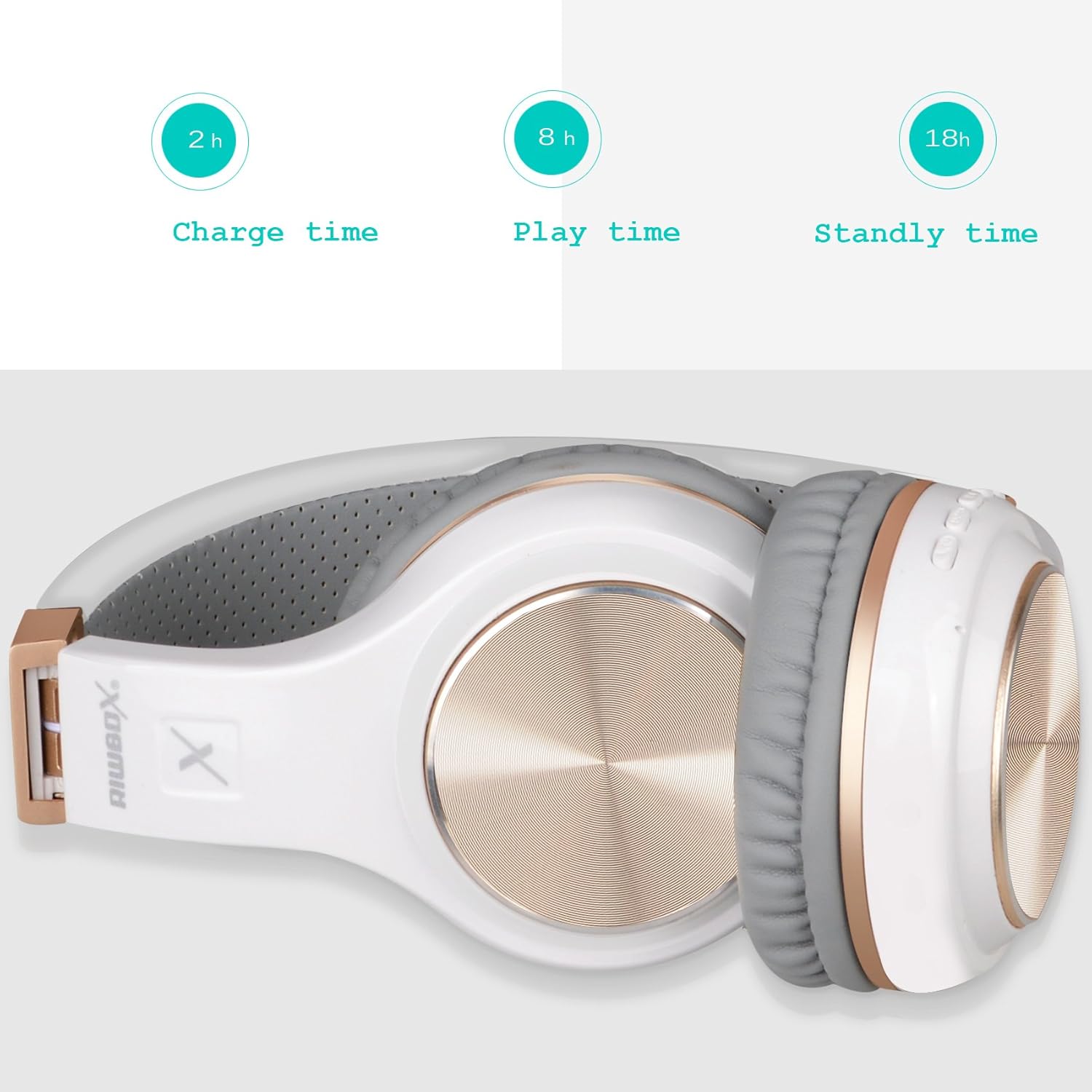
Figure 3: Headphones folded, illustrating battery performance metrics.
4.2. Emparellamento Bluetooth
- Asegúrate de que os auriculares estean cargados e apagados.
- Long press the Power button until the LED indicator flashes blue and red alternately, indicating pairing mode.
- No teu dispositivo (teléfono intelixente, tableta, PC), activa o Bluetooth e busca os dispositivos dispoñibles.
- Select "Riwbox XBT-80" from the list of found devices.
- Unha vez conectado, o indicador LED amosará unha luz azul fixa ou parpadeará en azul lentamente.
4.3. Conexión por cable
To use the headphones in wired mode, connect one end of the provided 3.5mm audio cable to the AUX jack on the headphones and the other end to your audio device's 3.5mm audio output. The headphones will function as a wired headset and do not require battery power in this mode.
5. Instrucións de funcionamento
- Encendido/apagado: Mantén premido o botón de acendido/apagado.
- Reproducir/pausar música: Preme o botón Reproducir/Pausa.
- Axustar o volume: Long press the '+' button to increase volume, long press the '-' button to decrease volume.
- Seguimento / Seguimento anterior: Short press the '+' button for the next track, short press the '-' button for the previous track.
- Responder/Finalizar chamada: Preme o botón Chamar.
- Rexeitar a chamada: Long press the Call button.
- Modo de cambio: Press the Mode button to cycle through available modes (e.g., Bluetooth, SD Card).
6. Mantemento
- Keep the headphones dry. Do not expose them to water or moisture. The headphones are not water resistant.
- Clean the ear cushions and headband with a soft, dry cloth. Avoid using harsh chemicals or abrasive materials.
- Store the headphones in a cool, dry place, away from direct sunlight and extreme temperatures. The foldable design allows for compact storage.
- Evite deixar caer os auriculares nin someterlos a impactos fortes.
7 Solución de problemas
| Problema | Posible Solución |
|---|---|
| Os auriculares non se acenden. | Asegúrate de que os auriculares estean completamente cargados. Conéctaos a unha fonte de alimentación mediante o cable de carga USB. |
| Non se pode emparellar co dispositivo. | Ensure headphones are in pairing mode (LED flashing blue/red). Turn off and on Bluetooth on your device. Move headphones closer to the device. Clear previous Bluetooth connections on your device if necessary. |
| Sen son ou volume baixo. | Check volume levels on both headphones and the connected device. Ensure the headphones are properly paired or the audio cable is securely connected. Test with another audio source. |
| O micrófono non funciona. | Ensure the headphones are connected via Bluetooth (microphone functionality is typically not available in wired mode unless the cable supports it). Check microphone settings on your device. |
| Conexión intermitente. | Ensure the headphones are within the 10-meter Bluetooth range. Avoid obstacles between the headphones and the device. Reduce interference from other wireless devices. |
8. Especificacións
| Característica | Detalle |
|---|---|
| Marca | ripbox |
| Número de modelo | XBT-80 |
| Colocación do oído | Sobre orella |
| Tecnoloxía de conectividade | Bluetooth, Wired (3.5mm Jack) |
| Versión Bluetooth | 5.3 |
| Alcance Bluetooth | 10 metros |
| Tamaño do controlador de audio | 50 milímetros |
| Impedancia | 32 ohmios |
| Resposta en frecuencia | 2 kHz |
| Tempo de carga da batería | 3 horas |
| Duración media da batería | 13 hours (music), 15 hours (talk) |
| Tipo de control | Control de volume, mando a distancia |
| Características adicionais | Plegable, lixeiro, micrófono incluído |
| Nivel de resistencia á auga | Non resistente á auga |
| Material do recinto | Plástico |
9. Garantía e soporte
The Riwbox XBT-80 Bluetooth Headphones come with a 1 ano de garantía do fabricante.
For any issues or support inquiries, please refer to the contact information provided with your purchase documentation or visit the official Riwbox website. The manufacturer is committed to assisting customers with product-related concerns.