
1. Produto rematadoview
The MICROSEVEN M7B4K-WSAA is an outdoor IP camera featuring 4K/8MP Ultra HD resolution, dual-band WiFi (2.4/5 GHz), two-way audio, and advanced motion detection capabilities. It is designed for robust outdoor surveillance with an IP66 waterproof rating and supports various recording and integration options.

Figura 1.1: Máisview of the MICROSEVEN 4K/8MP Ultra HD Duo 2 WiFi IP Camera.
2. Que hai na caixa
Verifica que todos os compoñentes estean presentes no paquete:
- MICROSEVEN 4K/8MP IP Camera
- Adaptador de alimentación
- Cable Ethernet
- Parafusos e ancoraxes de montaxe
- Manual de inicio rápido
- Kit de conectores impermeables
- Chave hexadecimal
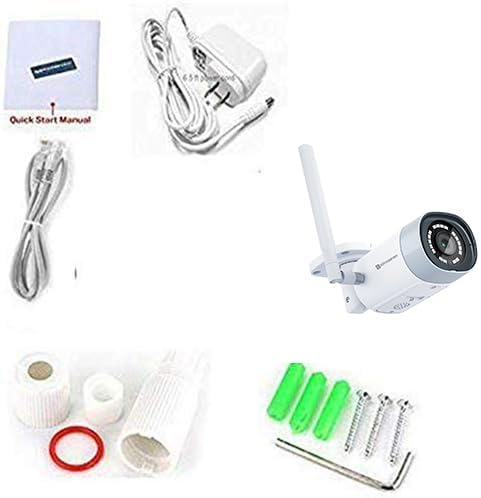
Figure 2.1: Included accessories and camera unit.
3. Configuración e instalación
3.1 Initial Camera Discovery and Login
Before physical installation, it is recommended to connect the camera to your network via an Ethernet cable and power it on. Use the Microseven Cam Locator software on your PC to find the camera on your local network and access its web interface.
The default username is 'admin' and the default password is 'password' (all lowercase). It is strongly recommended to change these credentials after initial setup for security purposes.
3.2 Descarga de software
To manage your camera, download the Microseven software for Windows or macOS, or the mobile app for iOS/Android.
3.3 Configuración do wifi
Configure the camera's WiFi settings for wireless operation. Ensure the camera is initially connected via Ethernet for this process.
3.4 Configuración da aplicación móbil
Download the Microseven app from your device's app store. Create an account if you are a new user, then add your camera by scanning the QR code or manually entering the camera ID and PIN.

Figure 3.4: The Microseven software platform supports MacOS, Windows, iOS, and Android devices, as well as Alexa and ONVIF.
3.5 Amazon Alexa Integration
Integrate your Microseven camera with Amazon Alexa for voice control and live streaming on compatible devices like Echo Show or Echo Spot.
4. Instrucións de funcionamento
4.1 En directo View e Reprodución
Accede a transmisións de vídeo en directo e comida gravadatage from your PC, smartphone, or tablet using the Microseven app or web interface. The camera supports 4K/8MP Ultra HD resolution for clear viewing.

Figure 4.1: The Camera Management System (CMS) allows viewing up to 16 cameras on one screen.
4.2 Audio bidireccional
The camera features a built-in amplified microphone and speaker, enabling two-way communication. You can listen and talk back through the M7 App on your phone or tablet, or via M7 Software on your PC.
4.3 Detección de movemento e alertas
The camera offers intelligent human/vehicle motion detection, reducing false alerts. You can configure specific detection zones and set up various alert actions.

Figure 4.3: Real-time motion detection alerts with video clips sent to your phone or computer.

Figure 4.4: The camera features Human Motion Detection, WiFi, and Power over Ethernet (POE) capabilities.
4.4 Opcións de gravación
Recordings can be saved 24/7, on a schedule, or triggered by motion. Storage options include a microSD card (up to 256GB, not included), Microseven Cloud, Microseven NVR, or an FTP server.
4.5 Visión nocturna
The camera is equipped with 18 IR LEDs, providing up to 100ft of clear night vision. The M7 Software allows manual disabling of IR lights and modification of camera properties remotely.

Figure 4.6: The camera provides clear vision both during the day and at night.
5. Mantemento
The camera features an all-metal casing with an IP66 waterproof rating, ensuring durability in various outdoor conditions. Regular cleaning of the lens may be required to maintain optimal image clarity. Firmware updates are provided by Microseven to enhance features and security.
6 Solución de problemas
6.1 Problemas de conectividade
- Asegúrate de que a cámara estea acendida e que o adaptador de corrente estea conectado correctamente.
- For initial setup, ensure the Ethernet cable is properly connected to both the camera and the router.
- Verify that your WiFi network is operational and the camera is within range.
- If using WiFi, double-check the entered WiFi password for accuracy.
- Use the Microseven Cam Locator to confirm the camera's presence on the network.
6.2 Problemas de calidade de imaxe
- Limpe a lente da cámara cun pano suave e seco.
- Asegúrate de que non haxa obstáculos no campo de acción da cámara view.
- Comprobe o ancho de banda da rede se a calidade da transmisión é deficiente.
6.3 Motion Detection Not Triggering
- Verifica que a detección de movemento estea activada na configuración da cámara.
- Adjust the sensitivity level of the motion detection.
- Ensure detection zones are correctly configured and cover the desired areas.
7. Especificacións
| Característica | Especificación |
|---|---|
| Número de modelo | M7B4K-WSAA |
| Resolución | 4K/8MP Ultra HD (3840x2160) |
| Sensor | Sensor CMOS Sony |
| Lente | 2.8mm, 150° Wide-Angle |
| Conectividade | Dual-Band WiFi (2.4/5 GHz), Ethernet |
| Range de visión nocturna | Ata 100 pés (18 LED IR) |
| Audio | Two-Way Talk (Amplified Mic & Speaker) |
| Almacenamento | MicroSD (up to 256GB, not included), Cloud, NVR, FTP |
| Clasificación de resistencia á intemperie | IP66 |
| Detección de movemento | Human Motion Detection, Zone-based |
| Compatibilidade | Alexa, Blue Iris, Milestone, ZoneMinder, NAS, ONVIF 2.0 |
| Fonte de enerxía | Eléctrico con cable (5 vatios) |
| Material | Metal |
| Dimensións do elemento | 6 x 5 x 4 polgadas |
| Peso do elemento | 1 libra |
8. Garantía e soporte
MICROSEVEN provides free software for Windows and MacOS, along with free apps for iOS and Android. These tools offer potent customizable configuration features within the camera firmware. For support, refer to the official Microseven website or contact their customer service. Information regarding specific warranty periods can typically be found on the product packaging or the official Microseven websitio.