
1. Introdución
The Vonyx VMM-F701 is a versatile 7-channel mixer designed for various audio applications, including live performances and studio recording. It features multiple input options, an integrated effect processor, USB playback, and +48V phantom power for condenser microphones. This manual provides essential information for the safe and effective use of your VMM-F701 mixer.
2. Instrucións de seguridade
- Always read these instructions carefully before using the device. Keep this manual for future reference.
- Asegúrese de que a fonte de alimentación coincida co voltagIndicado no dispositivo.
- Non expoña o dispositivo á choiva nin á humidade.
- Desconecte o cable de alimentación durante tormentas eléctricas ou cando non se use durante períodos prolongados.
- To reduce the risk of electric shock, do not remove the cover. There are no user-serviceable parts inside. Refer all servicing to qualified service personnel.
3. Produto rematadoview
The Vonyx VMM-F701 mixer offers a comprehensive set of features for audio mixing. It includes 5 mono microphone/line inputs (XLR/6.3mm Jack combo), 1 stereo line input (6.3mm Jack), and an integrated USB player. Each channel provides Hi, Mid, and Low equalization controls, along with FX, Pan, and AUX adjustments. The mixer also features a built-in effect processor with delay and repeat functions, +48V phantom power for condenser microphones, a balanced stereo main output, and a headphone output.
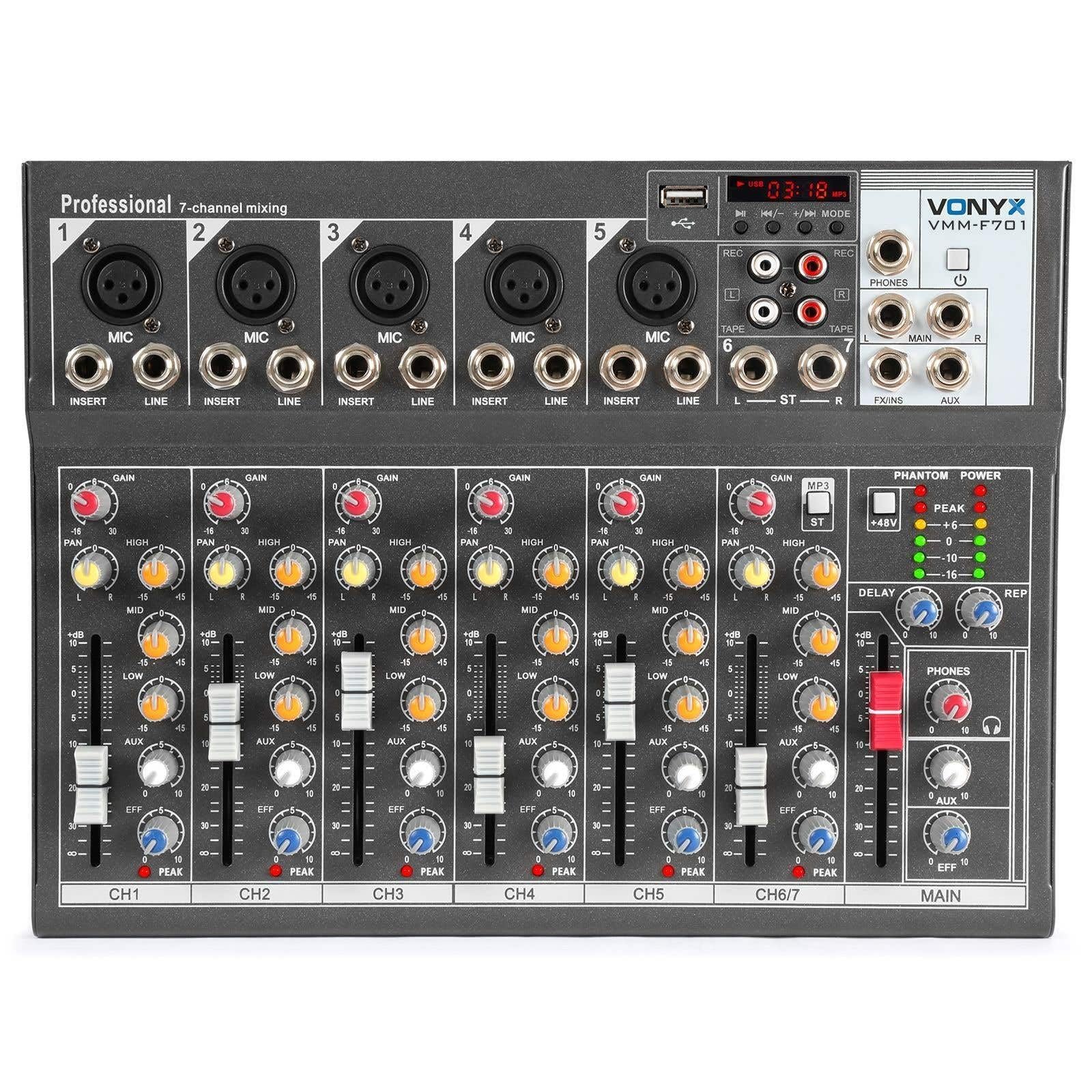
En xeral view of the Vonyx VMM-F701 7-channel mixer, showcasino seu deseño compacto e a disposición dos controis.

Arriba abaixo view of the Vonyx VMM-F701 mixer, highlighting the input channels, faders, and equalization knobs.

Close-up of the USB input and media player controls on the Vonyx VMM-F701 mixer, with a USB drive inserted.

Rear panel of the Vonyx VMM-F701 mixer, showing the power input and USB port for external power.
4. Configuración
- Conexión de alimentación: Connect the mixer to a 230Vac/50Hz power source using the provided power cable. The mixer can also be powered via USB (5V/1A) for certain functions.
- Conexións de entrada:
- For microphones, use XLR or 6.3mm jack cables to connect to channels 1-5. Activate +48V phantom power for condenser microphones.
- For line-level instruments or devices, use 6.3mm jack cables to connect to channels 1-5 (line inputs) or the stereo line input (channels 6/7).
- Conexións de saída: Conecta os altofalantes principais ou amplifier to the balanced stereo main output (6.3mm Jack).
- Auriculares: Connect headphones to the dedicated headphone output for monitoring.

Detallado view of the mains power input and a wiring diagram for microphone/line inputs on the Vonyx VMM-F701 mixer.
5. Instrucións de funcionamento
- Control de Ganancia: Adjust the input sensitivity for each channel using the GAIN knob.
- Ecualización (EQ): Use the HI, MID, and LOW knobs to adjust the treble, midrange, and bass frequencies for each channel.
- Control panorámico: Adjust the stereo positioning of each channel using the PAN knob.
- Envío de FX: Use the FX knob to send a portion of the channel's signal to the internal effect processor.
- AUX Send: Use the AUX knob to send a portion of the channel's signal to an external effect unit or monitor mix (via FX Send/Return).
- Faders de canles: Adjust the volume level for each individual channel.
- Main Fader: Control the overall output volume of the mixer.
- Effect Processor: Adjust the DELAY and REP (Repeat) knobs to control the characteristics of the built-in delay effect.
- Reproductor USB: Insira unha unidade USB no porto USB para reproducir audio files. Use the media player controls (play/pause, skip, mode) to navigate and control playback.
- Poder fantasma: Press the +48V PHANTOM POWER button to supply power to condenser microphones. Ensure microphones are connected before activating.
6. Mantemento
- Limpeza: Usa un pano suave e seco para limpar a superficie da batedora. Evita produtos de limpeza líquidos ou solventes.
- Almacenamento: Garda a batedora nun lugar fresco e seco, lonxe da luz solar directa e de temperaturas extremas.
- Ventilación: Asegúrese de ventilación adecuada ao redor do mesturador para evitar o sobreenriquecido.
7 Solución de problemas
| Problema | Causa posible | Solución |
|---|---|---|
| Sen saída de son | Power off; cables disconnected; faders down; incorrect input selection. | Check power connection; ensure all cables are securely connected; raise channel and main faders; verify correct input source. |
| Son distorsionado | Ganancia de entrada demasiado alta; nivel de saída demasiado alto; cable defectuoso. | Reduce GAIN knob; lower main fader; try a different cable. |
| O micrófono non funciona | Phantom power off (for condenser mics); mic not connected; faulty mic. | Activate +48V PHANTOM POWER; check mic connection; test with another microphone. |
| USB player not working | USB drive not recognized; unsupported file formato. | Ensure USB drive is properly inserted; try a different USB drive; check file formats (e.g., MP3). |
8. Especificacións
| Característica | Especificación |
|---|---|
| Número de modelo | VMM-F701 |
| Número de canles | 7 |
| Rango de frecuencias | 20 Hz - 20 kHz |
| THD (distorsión harmónica total) | <0.01 % |
| Relación sinal-ruído | > 110 dB |
| Nivel de saída | ± 1 V |
| Sensibilidade de entrada de liña | ± 150 mV |
| Sensibilidade de entrada de micrófono | ± 1.5 mV |
| Conexión Voltage | 230Vac / 50Hz (USB 5V/1A) |
| Dimensións (L x W x H) | 230 x 312 x 45 mm (9.06 x 12.28 x 1.77 polgadas) |
| Peso | 2.25 kg (4.96 lb) |
| Tecnoloxía de conectividade | USB |
| Entrada de audio | XLR, 1/4 inch (6.3 mm) jack |
| Tipo de conector de saída | TRS 1/4" (balanced) |
9. Garantía e soporte
Garantía: This product comes with a 2-year warranty on spare parts. For warranty claims, please retain your proof of purchase.
Soporte: For technical assistance, troubleshooting, or service inquiries, please contact your local Vonyx dealer or visit the official Vonyx websitio para recursos de apoio.