
1. Introdución
This manual provides detailed instructions for the installation, operation, and maintenance of your AVIPAS AV-1081W 10x Full HD HDMI PTZ Camera. This camera is designed for professional video applications, offering high-quality video output, flexible control options, and robust streaming capabilities. Please read this manual thoroughly before using the product to ensure proper setup and optimal performance.
2. Características do produto
- Saída de alta resolución: Delivers 1920 x 1080 Full HD video with frame rates up to 60fps.
- Zoom óptico: Features a 10x optical zoom lens for detailed image capture.
- Lente gran angular: Equipped with a 60.9° wide-angle lens.
- Imaxe avanzada: High Signal-to-Noise Ratio (SNR) CMOS sensor combined with 2D & 3D noise reduction algorithms for clear images.
- Compresión de vídeo: Supports H.264/H.265 video compression for efficient streaming.
- Saídas múltiples: Provides IP streaming and HDMI output.
- Interfaces de control: Supports RS-232 (VISCA/Pelco-D/Pelco-P), VISCA over IP, and IR remote control.
- Eficiencia enerxética: Low-power sleep function, consuming less than 0.4W.
- Deseño: Elegant, compact design with a super quiet and smooth pan/tilt mechanism.
3. Compoñentes e diagrama do produto
Familiarize yourself with the various parts of your AVIPAS AV-1081W camera.

Figura 3.1: Fronte View. This image shows the front of the AVIPAS AV-1081W PTZ camera, highlighting the main lens assembly and the AVIPAS branding on the base. The lens features 10x zoom capabilities.
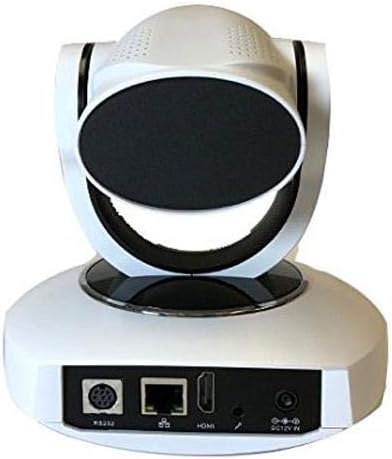
Figura 3.2: Traseira View with Connectivity Ports. This image displays the rear panel of the AVIPAS AV-1081W camera, detailing the various input and output ports. From left to right, these include the RS-232 control port, Ethernet (IP) port, HDMI output, audio input, and DC 12V power input.
4. Instrucións de configuración
4.1 Desembalaxe
Carefully remove the camera and all accessories from the packaging. Verify that all components are present.
4.2 Colocación
The AV-1081W is designed for indoor use. It can be placed on a flat surface or mounted to a wall. Ensure the camera is positioned to capture the desired area without obstruction. For wall mounting, use appropriate hardware (not included) to secure the camera firmly.
4.3 Conectando a cámara
- Conexión de alimentación: Connect the provided power adapter to the DC 12V IN port on the rear of the camera (refer to Figure 3.2) and then plug it into a power outlet.
- Saída de vídeo (HDMI): Connect an HDMI cable from the HDMI port on the camera to an HDMI input on your display or video switcher.
- Network Connection (IP Streaming): For IP streaming and network control, connect an Ethernet cable from the camera's Ethernet port to your network router or switch.
- Serial Control (RS-232): For serial control, connect an RS-232 cable from the camera's RS-232 port to your control device.
- Entrada de audio: If external audio is required, connect an audio source to the audio input port.
Once all connections are made, power on the camera. The camera will perform a self-test and initialize.
5. Instrucións de funcionamento
5.1 Métodos de control
The AV-1081W camera can be controlled via multiple methods:
- Control remoto IR: Use the included infrared remote control for basic pan, tilt, zoom, and preset functions. Ensure a clear line of sight to the camera's IR receiver.
- Serial Control (RS-232): Utilize a compatible control panel or software with VISCA, Pelco-D, or Pelco-P protocols connected via the RS-232 port.
- IP Control (VISCA over IP): Acceder á cámara web interface or use IP-based control software for comprehensive control over your network. Refer to the camera's network settings for its IP address.
5.2 Pan, Tilt, and Zoom (PTZ) Functions
Use your chosen control method to adjust the camera's view:
- Pan: Rotate the camera horizontally.
- Inclinación: Adjust the camera vertically.
- Zoom: Adjust the optical zoom to get closer or further from the subject. The camera features 10x optical zoom.
5.3 presets
Most control methods allow you to save and recall specific camera positions (pan, tilt, zoom, focus) as presets. Consult your control device's manual for detailed instructions on setting and recalling presets.
5.4 IP Streaming
Once connected to a network, the camera can stream video using H.264/H.265 compression. Access the camera's web interface via its IP address to configure streaming settings, including resolution, bitrate, and streaming protocols.
6. Mantemento
- Limpeza: Use a soft, dry cloth to clean the camera body. For the lens, use a lens cleaning cloth and specialized lens cleaning solution. Avoid harsh chemicals or abrasive materials.
- Actualizacións de firmware: Periodically check the AVIPAS websitio para actualizacións de firmware. Manter o firmware actualizado garante un rendemento óptimo e acceso a novas funcións.
- Ambiente: Ensure the camera is operated within its specified environmental conditions (indoor use only). Avoid extreme temperatures, humidity, or dusty environments.
7 Solución de problemas
| Problema | Causa posible | Solución |
|---|---|---|
| Sen luz indicadora de enerxía. | O adaptador de corrente non está conectado ou está avariado. | Asegúrate de que o adaptador de corrente estea conectado correctamente á cámara e a unha toma de corrente que funcione. Proba a toma de corrente con outro dispositivo. |
| No video output via HDMI. | HDMI cable faulty or incorrect input selected on display. | Check HDMI cable connection. Ensure the display is set to the correct HDMI input. Try a different HDMI cable. |
| Cannot access camera via IP. | Cable de rede desconectado, enderezo IP incorrecto ou problema de configuración de rede. | Verify Ethernet cable connection. Confirm the camera's IP address and ensure your computer is on the same network subnet. Clear browser cache and cookies if using the web interface. |
| O control remoto IR non funciona. | Batteries low/dead, IR receiver blocked, or remote out of range. | Replace remote batteries. Ensure no obstructions between the remote and the camera's IR receiver. Operate within the specified range. |
| Camera freezes or crashes during streaming. | Network bandwidth issues, outdated firmware, or camera fault. | Ensure sufficient network bandwidth. Update camera firmware. If issues persist, contact AVIPAS support. |
8. Especificacións
| Característica | Detalle |
|---|---|
| Nome do modelo | AV-1081W |
| Uso interior/exterior | Interior |
| Protocolo de conectividade | Wi-Fi, HDMI, IP Streaming |
| Resolución de captura de vídeo | 1080p (1920 x 1080) up to 60fps |
| Zoom óptico | 10x |
| Ángulo da lente | 60.9 ° de gran angular |
| Compresión de vídeo | H.264/H.265 |
| Métodos de control | RS-232 (VISCA/Pelco-D/Pelco-P), VISCA over IP, IR Remote |
| Tipo de montaxe | Soporte de parede |
| Consumo de enerxía | Less than 0.4W (sleep function) |
| Dimensións (L x W x H) | 5.95 x 4.99 x 6 polgadas |
| Peso do elemento | 3.08 libras (1.4 quilogramos) |
| Cor | Branco |
| Tecnoloxía do sensor fotográfico | CMOS |
| UPC | 858738005336 |
9. Garantía e soporte
For warranty information, technical support, or service inquiries, please contact AVIPAS customer support. Refer to the official AVIPAS websitio para obter os datos de contacto e os recursos de asistencia máis actuais.
AVIPAS Official Websitio: www.avipas.com