
MACAP M42D R Chrom Model 2018
MACAP M42D R Chrom Model 2018
Digital Espresso Grinder User Manual
Produto rematadoview
The MACAP M42D R Chrom Model 2018 is a high-performance digital espresso grinder designed for precision and consistency. It features a robust construction with 58 mm flat burrs, offering stepless grind size adjustment for optimal control over your coffee extraction. The integrated digital dosing system allows for precise grinding by time, ensuring repeatable results for your espresso.
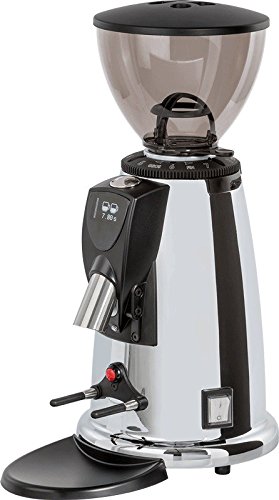
Imaxe: Fronte view of the Macap M42D R Chrom coffee grinder, showcasing its chrome finish, bean hopper, digital display, and portafilter holder.
Características principais:
- Electric Grinder with powerful motor.
- Digital Timer for precise dosing control.
- Durable 58 mm Flat Burrs for consistent grinding.
- Stepless grind size adjustment for fine-tuning.
- Plastic bean hopper with approximately 500 grams capacity.
Configuración e instalación
- Desembalaxe: Carefully remove the grinder from its packaging. Retain all packaging materials for future transport or storage.
- Colocación: Coloque o moedor sobre unha superficie estable, plana e seca. Asegúrese de que haxa unha ventilación axeitada arredor da unidade.
- Limpeza inicial: Antes do primeiro uso, limpe o exterior cun anuncioamp cloth. Remove the bean hopper and wash it with mild soap and water, then dry thoroughly. Do not immerse the main unit in water.
- Instalar o tolva de fabas: Securely place the bean hopper onto the top of the grinder. Ensure it is properly seated to prevent beans from spilling.
- Conexión de alimentación: Connect the power cord to a grounded electrical outlet. Verify that the voltage matches the specifications listed on the grinder's rating label.
Instrucións de funcionamento
- Encher o depósito de grans: Pour fresh, roasted coffee beans into the bean hopper. Do not overfill.
- Axustar o tamaño da moenda: The M42D R Chrom features stepless grind adjustment. Rotate the adjustment collar located below the bean hopper to achieve the desired fineness. Rotate clockwise for finer grind and counter-clockwise for coarser grind. A finer grind is typically required for espresso.
- Set Dosing Time: Use the digital display and control buttons to set the desired grinding time. This controls the amount of coffee dispensed. Refer to the grinder's specific interface for detailed instructions on setting single and double shot times.
- Moenda: Position your portafilter or coffee container under the dispensing chute. Activate the grinding process by pressing the appropriate button or engaging the portafilter switch. The grinder will dispense coffee for the set duration.
- Optimal Use Tips:
- Always use fresh, quality coffee beans for best results.
- Adjust grind size incrementally and test with your espresso machine to find the perfect setting.
- Clean the grinder regularly to maintain performance and flavor.
Mantemento e Limpeza
Regular cleaning is essential for maintaining the performance and longevity of your MACAP M42D R Chrom grinder and for ensuring the best coffee flavor.
Limpeza diaria:
- Wipe down the exterior of the grinder with a soft, damp pano.
- Brush away any loose coffee grounds from the dispensing chute and portafilter holder.
Limpeza semanal (ou segundo sexa necesario):
- Desconectar o moedor: Always disconnect the power cord before performing any cleaning or maintenance.
- Eliminar a tolva de feixóns: Empty any remaining beans and remove the bean hopper.
- Rebabas limpas: Use a stiff brush (a dedicated coffee grinder brush is recommended) to clean the grinding burrs. You may need to remove the upper burr assembly for thorough cleaning. Refer to the grinder's specific design for burr removal.
- Clean Grinding Chamber and Chute: Use a vacuum cleaner with a narrow attachment to remove fine coffee dust from the grinding chamber and dispensing chute.
- Remontar: Once clean, reassemble the burr assembly and bean hopper, ensuring all parts are securely in place.
Caution: Do not use water or abrasive cleaners inside the grinding mechanism. Do not immerse the main unit in water.
Resolución de problemas
| Problema | Causa posible | Solución |
|---|---|---|
| O moedor non arranca. | Non conectado; interruptor de alimentación apagado; disyuntor saltado. | Ensure power cord is securely plugged in. Turn power switch to ON. Check household circuit breaker. |
| Moenda inconsistente. | Burrs are dirty or worn; old/oily beans; grind setting too coarse/fine. | Clean burrs thoroughly. Use fresh, quality beans. Adjust grind setting incrementally. |
| Grinder motor runs but no coffee dispenses. | Beans not feeding; chute clogged; burrs jammed. | Ensure beans are in hopper. Clear any clogs in the dispensing chute. Clean burrs and grinding chamber. |
| O moedor fai excesivamente ruído. | Obxecto estraño en rebabas; compoñentes soltos. | Unplug and inspect burrs for foreign objects. If noise persists, contact customer support. |
If you encounter issues not listed here, or if the suggested solutions do not resolve the problem, please contact MACAP customer support.
Especificacións
- Marca: MACAP
- Modelo: M42D R Chrom Model 2018
- Velocidade de moenda: Approximately 2 grams per second
- Tipo de rebaba: Rebabas planas
- Burr Diameter: 58 mm
- Axuste de moenda: Continuo
- Dosing Control: Temporizador dixital
- Capacidade da tolva de feixón: Approximately 500 grams (plastic)
- Peso do artigo: 7.5 quilogramos
- Uso recomendado: Coffee Bean Grinding
- Uso específico: Moenda
Garantía e Soporte
MACAP products are manufactured to high quality standards and are covered by a manufacturer's warranty. Please refer to the warranty card included with your product for specific terms and conditions, including warranty period and coverage details.
For technical assistance, spare parts, or warranty claims, please contact your authorized MACAP dealer or visit the official MACAP websitio web para obter información de atención ao cliente.
Nota: As reparacións ou modificacións non autorizadas poden anular a garantía.
Ask a question about this manual
Ask about setup, troubleshooting, compatibility, parts, safety, or missing instructions. Manuals+ will review the question and use this page’s manual context to help answer it.