
REVO RTCB30-1
Manual do usuario da cámara tipo bala IR para interiores/exteriores REVO America RTCB30-1 Aero HD 1080p
Model: RTCB30-1
Introdución
The REVO America RTCB30-1 Aero HD 1080p Indoor/Outdoor IR Bullet Camera is designed to provide high-definition video surveillance for both indoor and outdoor environments. Featuring a 2.1 Megapixel sensor, 1080p resolution, and 30 IR LEDs for night vision up to 100 feet, this camera offers reliable monitoring capabilities. Its IP66 weather-resistant rating ensures durability in various conditions, and the 3D rotary bracket simplifies installation and positioning.
Contido do paquete
- 1x REVO America Aero HD 1080p Indoor/Outdoor IR Bullet Camera (White)
- 1x 60' Premium Quality BNC Cable
Características clave
- Resolución de vídeo Full HD 1080p
- Indoor/Outdoor Usage with IP66 Weather Resistance
- Lente fixa de 3.6 mm
- 30 IR LEDs for up to 100' Night Vision
- Automatic IR Cut Filter Removal (ICR) for enhanced day/night performance
- 3D Rotary Bracket for easy mounting and positioning
- Wired Connectivity via BNC Cable
Configuración e instalación
1. Montaxe da cámara
The REVO Aero Bullet Camera is designed for wall mounting. The integrated 3D rotary bracket allows for flexible positioning to achieve the desired viewing angle. Ensure the mounting surface is stable and can support the camera's weight. The camera is rated IP66 weather resistant, making it suitable for outdoor installation.
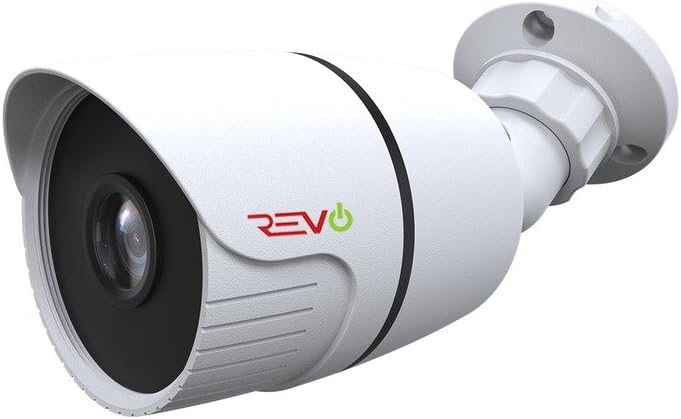
Figura 1: Fronte view of the REVO America RTCB30-1 Aero HD 1080p Bullet Camera, showing the lens and IR LEDs.
2. Conectando a cámara
This camera uses a wired BNC connection for video transmission and a separate power connection. Connect the included 60' BNC cable to the camera's BNC port and to your compatible DVR/NVR system. Ensure all connections are secure to prevent signal loss. Power the camera using a compatible 12V DC power adapter (not included unless part of a kit).

Figura 2: Lateral view of the REVO America RTCB30-1 Aero HD 1080p Bullet Camera, illustrating the mounting bracket and cable entry point.
For optimal video quality, it is recommended to use high-quality BNC cables. After installation, ensure no wires are exposed to maintain safety and reliability.
Instrucións de funcionamento
1. Acendido
Once the camera is securely mounted and connected to your DVR/NVR system and power source, it will automatically power on. The camera will begin transmitting video feed to your recording device.
2. Monitorización remota
To access live feed, review pasado footage, and manage settings remotely, utilize the REVO Aero Mobile App or Browser Login. These platforms allow you to receive instant notifications, adjust camera settings, set alarms, check motion events, and view varias cámaras simultaneamente.
3. Visión nocturna
The camera is equipped with 30 IR LEDs, providing night vision capabilities up to 100 feet in low-light conditions. The automatic IR Cut Filter Removal (ICR) function ensures optimal image clarity by switching between day and night modes as ambient light changes.
Mantemento
Regular maintenance helps ensure optimal performance and longevity of your camera.
- Limpeza: Limpe periodicamente a lente e a carcasa da cámara cun pano suave eamp pano. Evite produtos de limpeza abrasivos que poidan raiar a lente.
- Inspección de cables: Regularly check BNC and power cable connections for any signs of wear, damage, or corrosion, especially for outdoor installations.
- Actualizacións de firmware: Check the REVO America website for any available firmware updates for your DVR/NVR system, which may improve camera compatibility and performance.
Resolución de problemas
If you encounter issues with your REVO America RTCB30-1 camera, refer to the following common troubleshooting steps:
- Sen sinal de vídeo:
- Ensure the camera is properly powered.
- Verify that the BNC cable is securely connected at both the camera and DVR/NVR ends.
- Check the BNC cable for any damage or breaks.
- Confirm that your DVR/NVR system is compatible with 1080p HD analog cameras.
- Mala calidade da imaxe:
- Limpa a lente da cámara para eliminar calquera sucidade ou manchas.
- Ensure the camera's protective film (if any) has been removed.
- Check for strong light sources directly facing the camera, which can cause glare.
- Verify the BNC cable quality; a damaged or low-quality cable can degrade video.
- A visión nocturna non funciona:
- Ensure there is sufficient power to the camera for the IR LEDs to activate.
- Check for obstructions in front of the camera that might block the IR light.
- Confirm that the camera is in a dark environment, as the IR LEDs only activate in low light.
Especificacións técnicas
| Número de modelo | RTCB30-1 |
| Marca | REVO América |
| Resolución de captura de vídeo | 1080p (2.1 Megapixels) |
| Lente | Lente fixa de 3.6 mm |
| Visión Nocturna | Up to 100' (30 IR LEDs) |
| Uso interior/exterior | Si |
| Clasificación de protección internacional | IP66 (resistente ás inclemencias meteorolóxicas) |
| Tecnoloxía de conectividade | Con cable (BNC) |
| Fonte de enerxía | Eléctrico con cable (12 V CC) |
| Tipo de montaxe | Soporte de parede |
| Cor | Branco |
| Dimensións do artigo (L x W x H) | 9 x 9 x 9 polgadas |
| Peso do elemento | 16 onzas |
| UPC | 045924597953 |
Soporte e Garantía
For technical assistance, product support, or warranty information, please refer to the official REVO America website or contact their customer service department. Warranty terms and conditions may vary and are typically provided with your purchase documentation or available on the manufacturer's websitio.
REVO America provides necessary materials such as videos and manuals to assist with self-installation and setup. For further assistance, please consult these resources or contact their support team directly.
Ask a question about this manual
Ask about setup, troubleshooting, compatibility, parts, safety, or missing instructions. Manuals+ will review the question and use this page’s manual context to help answer it.