
Introdución
Thank you for choosing the Butterfly Eco Smart Plus 25-Litre Air Cooler. This manual provides essential information for the safe and efficient operation, maintenance, and troubleshooting of your new appliance. Please read these instructions carefully before use and retain them for future reference.
Instrucións de seguridade importantes
Para reducir o risco de incendio, descarga eléctrica ou lesións, siga sempre as precaucións de seguridade básicas ao usar electrodomésticos. Isto inclúe:
- Asegúrese de que a fonte de alimentación voltage matches the cooler's requirements (220-240 volts).
- Non mergulles o refrixerador, o cable nin o enchufe en auga ou outros líquidos.
- Unplug the cooler from the outlet when not in use, before filling with water, or before cleaning.
- Non faga funcionar ningún aparello cun cable ou enchufe danados, ou despois de que o aparello funcione mal ou teña dano dalgún xeito.
- Keep the cooler on a stable, level surface to prevent tipping.
- Do not block air inlets or outlets. Maintain adequate clearance around the cooler for proper airflow.
- Keep children and pets away from the cooler during operation.
- Do not use the cooler in areas where flammable liquids or gases are stored.
Produto rematadoview
Familiarize yourself with the components of your Butterfly Eco Smart Plus Air Cooler.

Figura 1: Fronte view of the Butterfly Eco Smart Plus 25-Litre Air Cooler. This image shows the main body, front louvers, digital display control panel at the top, and castor wheels at the base.
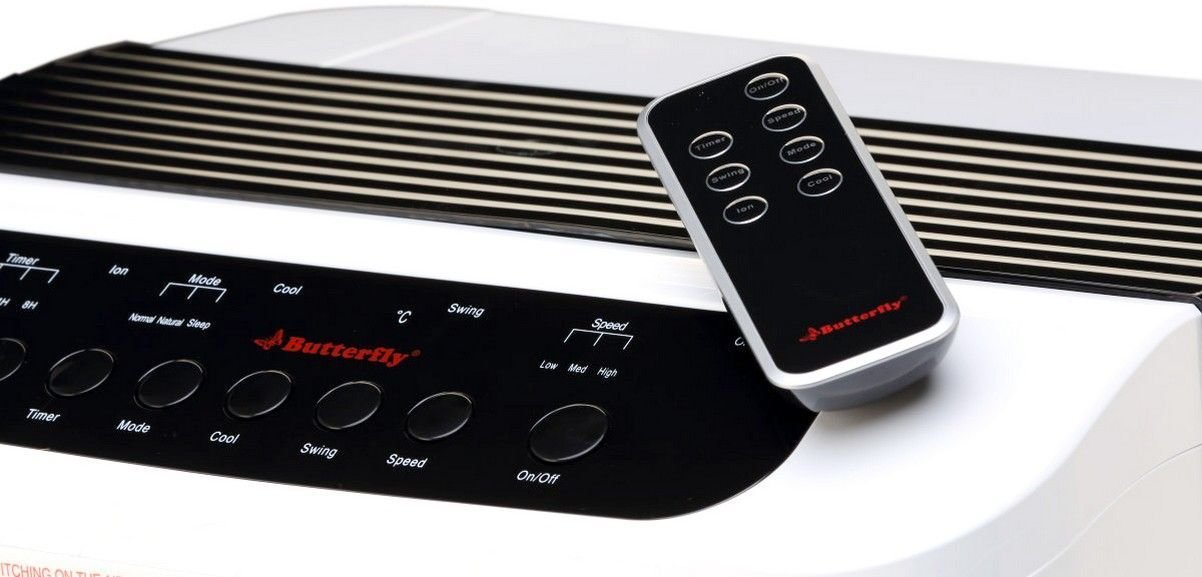
Figura 2: En ángulo view of the air cooler, highlighting the top control panel and the included remote control placed on top. The side profile with vertical vents is also visible.

Figura 3: Close-up of the remote control for the air cooler, showing buttons for On/Off, Speed, Mode, Timer, Swing, Ion, and Cool functions.

Figura 4: Traseira view of the air cooler with the back panel removed, revealing the honeycomb cooling media. This section is where air is drawn in and cooled by evaporating water.
Compoñentes clave:
- Digital Display Control Panel: Located on the top, for manual operation.
- Front Louvers: Adjustable for directing airflow. Features both horizontal and vertical louvers for wide air distribution.
- Depósito de auga: 25-litre capacity, located at the bottom for water storage.
- Medios de refrixeración Honeycomb: Located at the rear, responsible for evaporative cooling.
- Rodas de rodadura: Para facilitar a mobilidade da unidade.
- Control remoto: Para unha operación cómoda a distancia.
Configuración
- Desembalaxe: Carefully remove the air cooler from its packaging. Retain all packaging materials for future storage or transport.
- Colocación: Place the air cooler on a firm, level surface. For optimal cooling, position the cooler near an open window or door to allow fresh air intake and proper ventilation. Ensure there is at least 20 cm of space around the unit for unobstructed airflow.
- Recheo de auga: Open the water inlet cap, typically located at the top or side. Fill the water tank with clean, fresh water up to the 'MAX' level indicator. Do not overfill. The cooler has a 25-litre capacity.
- Conexión de alimentación: Ensure the cooler is switched off before plugging it into a standard 220-240V AC power outlet.
Instrucións de funcionamento
Your air cooler can be operated using the control panel on the unit or the remote control.
Panel de control/Funcións de control remoto:
- Botón On/Off: Prema para acender ou apagar o refrixerador.
- Botón de velocidade: Cambia entre 3 velocidades do ventilador: Baixa, Media, Alta.
- Botón xenial: Activates the water pump to circulate water over the honeycomb pads for evaporative cooling.
- Botón de balance: Activates or deactivates the automatic oscillation of the vertical louvers to distribute air across a wider area. Horizontal louvers can be adjusted manually.
- Botón de modo: Selects different operating modes (e.g., Normal, Natural, Sleep, if available).
- Botón do temporizador: Sets an operating duration after which the cooler will automatically turn off.
- Ion Button: Activates the ionizer function (if available) for air purification.
Operación inicial:
- Enchufe o cable de alimentación nunha toma eléctrica adecuada.
- Preme o On/Off button on the control panel or remote. The unit will start in a default fan speed.
- Preme o Velocidade button to select your desired fan speed (Low, Medium, High).
- For cooling, press the Genial button. You will hear the water pump activate.
- Preme o Swing button to activate the automatic swing function for wider air distribution.
Mantemento
Un mantemento regular garante un rendemento óptimo e unha maior duración do seu arrefriador de aire.
Daily/Weekly Maintenance:
- Depósito de auga: Regularly check the water level. For best performance and hygiene, drain and refill the water tank with fresh water every few days, especially if the cooler is used frequently.
- Limpeza exterior: Limpe as superficies exteriores cun suave, damp pano. Non use produtos de limpeza ou disolventes abrasivos.
Mantemento mensual/estacional:
- Honeycomb Cooling Pads: The honeycomb pads can accumulate dust and mineral deposits. To clean, first unplug the cooler. Remove the back panel (refer to Figure 4 for location). Carefully slide out the honeycomb pads. Rinse them under running water to remove dust and deposits. For stubborn deposits, soak them in a mild descaling solution (e.g., vinegar and water) for 30 minutes, then rinse thoroughly. Ensure pads are completely dry before reinserting.
- Bomba de auga: Inspect the water pump and its tubing for any blockages or damage. Clean any debris that may have accumulated.
- Drenaxe: Completely drain the water tank before long periods of non-use or storage.
Almacenamento:
Before storing the cooler for an extended period, ensure the water tank is empty and clean, and the honeycomb pads are dry. Store the unit in a dry, cool place, preferably in its original packaging.
Resolución de problemas
Se tes problemas co teu refrixerador de aire, consulta os seguintes problemas e solucións comúns:
| Problema | Causa posible | Solución |
|---|---|---|
| O refrixerador non se acende. | Sen fonte de alimentación; cable de alimentación non conectado; botón de acendido non premido. | Check power outlet; Ensure cord is securely plugged in; Press the On/Off button. |
| No cool air / Only hot air. | Water tank empty; Cool function not activated; Honeycomb pads clogged; Water pump malfunction. | Fill water tank; Press the Cool button; Clean honeycomb pads; Check water pump for blockages or contact customer service if damaged. |
| Water is not pumping. | Water tank empty; Water pump or tubing blocked/damaged; Cool function not activated. | Ensure water tank is filled; Inspect pump and tubing for blockages; Press the Cool button. If pump is damaged, contact customer service. |
| Cool button blinking. | Low water level indicator. | Refill the water tank to the 'MAX' level. The blinking should stop once sufficient water is detected. |
| Ruído inusual durante o funcionamento. | Low water level; Obstruction in fan or pump; Unit not on a level surface. | Check water level and refill if low; Inspect for foreign objects in fan or pump area (unplug first); Ensure cooler is on a stable, flat surface. |
| O control remoto non funciona. | Batteries depleted; Obstruction between remote and cooler; Remote not pointed correctly. | Replace batteries; Remove any obstructions; Point remote directly at the cooler's receiver. |
Se o problema persiste despois de intentar estas solucións, póñase en contacto co servizo de atención ao cliente.
Especificacións
- Marca: Bolboreta
- Nome do modelo: Eco Smart Plus
- Capacidade: 25 litros
- Consumo de enerxía: 200 vatios
- Vol. Operativotage: 220 - 240 voltios
- Número de velocidades: 3 (Baixo, Medio, Alto)
- Tipo de montaxe: Autónomo
- Características especiais: Compact design, Remote Control, Horizontal and Vertical Louvers, Honeycomb Cooling Media, Digital Display Control Panel
- Cor: Branco
Garantía
This Butterfly Eco Smart Plus Air Cooler comes with a 1 ano de garantía on the product from the date of purchase. Please retain your purchase receipt as proof of purchase for warranty claims. The warranty covers manufacturing defects under normal use. It does not cover damage caused by misuse, accidents, unauthorized repairs, or normal wear and tear.
Atención ao cliente
For any queries, service requests, or technical assistance regarding your Butterfly Eco Smart Plus Air Cooler, please contact Butterfly customer support. Refer to the warranty card or the official Butterfly websitio para obter a información de contacto máis actualizada.
Nota: Always provide your product model number (Eco Smart Plus) and purchase details when contacting support.