
1. Introduction to the AUTO-VOX X2 Mirror Dash Cam
The AUTO-VOX X2 is a sophisticated mirror dash cam designed to enhance driving safety and provide comprehensive recording capabilities. It features a 9.88-inch full touch streaming media display, offering a clear, real-time view of traffic conditions. The system includes both a front camera for forward recording and a 720P AHD waterproof backup camera for reverse assistance.
Key functionalities include G-Sensor for collision detection, loop recording to manage storage efficiently, parking monitoring for 24-hour surveillance, Lane Departure Warning System (LDWS), and GPS tracking for route and speed data.

Imaxe 1.1: Acabadoview of AUTO-VOX X2 features, including parking monitoring, dual views, night vision, emergency lock, touch screen, loop recording, GPS tracking, and LDWS.
Video 1.1: An official AUTO-VOX video demonstrating the features and functionality of the X2 9.88" Rear View Cámara de salpicadero con espello.
2. Configuración e instalación
Proper installation is crucial for the optimal performance of your AUTO-VOX X2 Mirror Dash Cam. Follow these steps carefully.
2.1 Contido do paquete
Antes de comezar, asegúrate de que estean presentes todos os compoñentes:
- AUTO-VOX X2 Mirror Dash Cam Unit
- Cámara traseira
- Cargador de coche (cable de alimentación)
- Cable de vídeo para cámara traseira
- Módulo GPS
- Two Sets of Mounting Straps
- Manual de usuario (este documento)
- Guía rápida
- Tarxeta de garantía
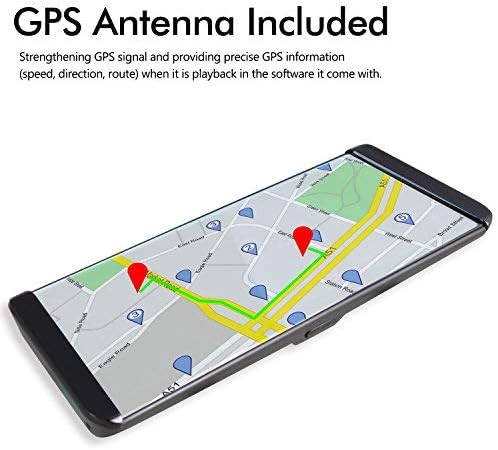
Image 2.1: The complete set of components included with the AUTO-VOX X2 Mirror Dash Cam.
2.2 Montaxe da cámara de salpicadero con espello
- Secure the AUTO-VOX X2 unit over your vehicle's existing rearview espello usando as correas de goma proporcionadas. Asegúrate de que estea firmemente suxeito e que non obstrua a túa vista view.
- Axusta o ángulo da lente da cámara frontal para asegurarte de que capture a estrada con claridade.
2.3 Connecting Power and GPS
- Connect the car charger cable to the USB port on the dash cam unit.
- Conecta o outro extremo do cargador do coche á toma do acendedor de cigarros do teu vehículo.
- Connect the GPS module to the designated GPS port on the dash cam unit. Position the GPS module on your dashboard or windshield where it has a clear view do ceo para unha recepción óptima do sinal.
2.4 Instalación da cámara traseira
- Mount the rear camera at the rear of your vehicle, typically above the license plate or on the rear window. Ensure it has a clear, unobstructed view.
- Route the video cable from the rear camera to the AV (backup camera) port on the main dash cam unit.
- Connect the red wire from the rear camera's video cable to your vehicle's reversing light power supply (+12V). This enables automatic display of the rear view when shifting into reverse gear.

Image 2.2: Detailed wiring diagram illustrating the connections for the rear camera, GPS, and power supply.
3. Instrucións de funcionamento
The AUTO-VOX X2 is designed for intuitive operation via its touch screen interface.
3.1 Funcionamento da pantalla táctil
The 9.88-inch full touch screen allows for easy navigation and control. Swipe your fingers across the screen to access different menus and settings, or to adjust display brightness and camera views.
3.2 Front Camera Recording
The front camera records in 1296P Full HD, capturing a wide 140-degree field of view. Recording starts automatically when the device powers on. The display can show the front view, traseira view, or a split view.

Imaxe 3.1: Ex.ample of the clear, wide-angle view provided by the front camera on the X2 display.
3.3 Rear Camera and Reverse Assistance
When the vehicle is shifted into reverse gear, the rearview camera automatically activates, displaying a wide 140-degree view with parking guidelines on the screen. This assists in safe parking by showing a closer backup image and reducing blind spots.

Image 3.2: The rear camera display with active parking guidelines for easy maneuvering.
Sensor G 3.4 e gravación en bucle
- Sensor G: In the event of a collision or sudden impact, the built-in G-Sensor automatically locks the current video footage, preventing it from being overwritten.
- Gravación en bucle: When the storage card is full, the system automatically overwrites the oldest unlocked video segments. This ensures continuous recording without manual deletion.

Image 3.3: Illustration of the loop recording function, ensuring continuous video capture.
3.5 Parking Monitor and LDWS
- Monitor de estacionamento: When enabled, the dash cam will automatically begin recording if an impact is detected while the vehicle is parked. This feature provides 24-hour surveillance. A hardwire kit (5V/2A) is required for continuous 24-hour parking monitoring and must be purchased separately.
- Sistema de aviso de cambio de carril (LDWS): This system provides an audible alert if the vehicle unintentionally drifts from its lane, promoting safer driving.

Image 3.4: The parking monitoring feature capturing an event while the vehicle is stationary.
3.6 Reprodución GPS
The integrated GPS tracking system records precise speed, direction, and route information. This data can be reviewed on a PC using the included player software, which requires an internet connection for map display. This feature is valuable for documenting journeys and providing evidence in case of an incident.

Image 3.5: Visual representation of GPS tracking and route playback.
4. Mantemento
To ensure the longevity and optimal performance of your AUTO-VOX X2 Mirror Dash Cam, regular maintenance is recommended.
- Limpeza: Gently wipe the screen and camera lenses with a soft, lint-free cloth. Avoid using abrasive cleaners or solvents.
- Xestión da tarxeta SD: Regularly format the microSD card (at least once a month) to prevent data corruption and ensure smooth recording. Use a high-quality Class 10 or higher microSD card.
- Coidado da batería: If using the parking monitor feature, ensure your vehicle's battery is in good condition and consider checking its charge frequently, especially in cold weather or if the vehicle is parked for extended periods. For continuous parking monitoring, a dedicated hardwire kit is recommended to prevent draining the car battery.
- Actualizacións de firmware: Check the official AUTO-VOX websitio periodicamente para ver se hai actualizacións de firmware dispoñibles para mellorar o rendemento e engadir novas funcións.
5 Solución de problemas
If you encounter issues with your AUTO-VOX X2, refer to the following common troubleshooting tips:
- O dispositivo non se acende: Ensure the car charger is securely connected to both the dash cam and the vehicle's power outlet. Check if the vehicle's power outlet is functioning.
- Problemas de gravación: Verify that a compatible microSD card is inserted and formatted correctly. If the card is full, loop recording should automatically manage space; however, frequent manual formatting can resolve issues.
- Cámara traseira non mostra: Check all cable connections between the rear camera and the main unit. Ensure the red wire for reverse assistance is correctly connected to the reversing light's +12V power.
- GPS Signal Problems: Ensure the GPS module is placed in an area with a clear view do ceo, libre de obstáculos.
- Brillo da pantalla: Adjust the screen brightness settings via the touch screen. Consider using a screen protector designed to reduce glare.
- LDWS Alerts Constantly: The Lane Departure Warning System may be sensitive. Adjust its sensitivity settings in the menu if available, or disable it for city driving if preferred.
If problems persist, please contact AUTO-VOX customer support for further assistance.
6. Especificacións
| Característica | Especificación |
|---|---|
| Nome do modelo | X2 |
| Tamaño da pantalla | 9.88 polgadas (pantalla táctil) |
| Resolución cámara frontal | 1296P FHD |
| Resolución da cámara traseira | 720P AHD |
| Campo de View | 140 graos |
| Características especiais | Built-In GPS, Parking Monitor, G-Sensor, LDWS, Loop Recording, WDR |
| Tecnoloxía de conectividade | USB |
| Tipo de montaxe | Windshield Mount (Mirror Clip-on) |
| Baterías | Requírese 1 batería de iones de litio |
| Peso do elemento | 2.64 libras |
| Dimensións do paquete | 12.5 x 4.7 x 2.6 polgadas |
7. Garantía e soporte
The AUTO-VOX X2 Mirror Dash Cam comes with a manufacturer's warranty. Please refer to the included Warranty Card for specific terms and conditions. For technical support, troubleshooting assistance, or warranty claims, please contact AUTO-VOX customer service through their official websitio web ou a información de contacto que se inclúe na embalaxe do produto.
For additional resources and frequently asked questions, visit the official AUTO-VOX support page: www.auto-vox.com/support