
1. Introdución
Grazas pola compraasing the Homtime D2qi Bluetooth Speaker with Wireless Charging and Alarm Clock. This device is designed to provide a versatile audio experience with convenient features for your daily life. Please read this manual carefully before use to ensure proper operation and to maximize the product's lifespan.
2. Información de seguridade
- Non expoña o dispositivo a temperaturas extremas, humidade ou luz solar directa.
- Manter lonxe da auga e outros líquidos.
- Non desmontes nin intentes reparar o dispositivo ti mesmo. Encarga todo o mantemento a persoal cualificado.
- Empregue só o adaptador de corrente fornecido ou recomendado.
- Evite deixar caer ou someter o dispositivo a fortes impactos.
3. Contido do paquete
Comprobe se o paquete contén os seguintes elementos:
- Homtime D2qi Bluetooth Speaker
- Adaptador de alimentación
- Manual de usuario
4. Produto rematadoview
The Homtime D2qi combines a high-quality Bluetooth speaker with a digital alarm clock and a convenient wireless charging pad. It features intuitive controls for easy operation.

Figura 4.1: Fronte view of the Homtime D2qi speaker with a smartphone placed on its top surface for wireless charging.

Figure 4.2: The Homtime D2qi speaker positioned on a book, showcasing its compact design and the digital clock display.

Figure 4.3: The Homtime D2qi speaker in a home setting, demonstrating wireless charging functionality.
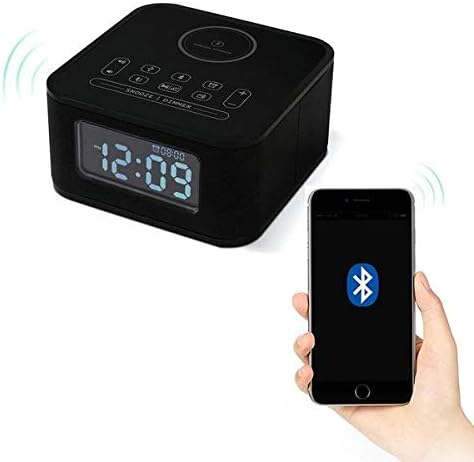
Figure 4.4: The Homtime D2qi speaker connected via Bluetooth to a smartphone.
5. Configuración
5.1 Conexión de alimentación
- Connect the provided power adapter to the DC input port on the back of the Homtime D2qi.
- Conecte o adaptador de alimentación a unha toma de corrente estándar.
- A pantalla acenderase, indicando que o dispositivo está acendido.
5.2 Axuste da hora inicial
Ao primeiro acendido ou despois dun apagadotage, you may need to set the time. Refer to the 'Operating Instructions' section for detailed steps on setting the clock.
6. Instrucións de funcionamento
6.1 Conexión Bluetooth
- Preme o Botón Bluetooth on the top panel to enter Bluetooth pairing mode. The Bluetooth indicator will flash.
- On your smartphone or audio device, enable Bluetooth and search for available devices.
- Select "Homtime D2qi" from the list.
- Once connected, the Bluetooth indicator will stop flashing and remain solid. You can now play audio through the speaker.
6.2 Carga sen fíos
- Place your Qi-compatible smartphone centrally on the wireless charging pad located on the top surface of the speaker.
- Ensure the phone is properly aligned with the charging coil.
- The charging indicator on your phone will show that charging has begun.
6.3 Función de alarma
- Preme o Botón de alarma para entrar no modo de configuración da alarma.
- Usa o botóns +/- para axustar a hora e os minutos.
- Preme o Botón de alarma de novo para confirmar cada axuste.
- Para activar/desactivar a alarma, prema o botón Botón de alarma briefly when not in setting mode.
- Para pospoñer, prema a tecla Botón de repetición/dimmer cando soa a alarma.
6.4 Función de radio
- Preme o Botón de modo para cambiar ao modo de radio FM.
- Manteña premido o Botón Reproducir/Pausa to auto-scan and save available stations.
- Usa o Botóns Anterior/Seguinte to navigate through saved stations.
6.5 Resposta de chamadas
Cando se conecta mediante Bluetooth, o altofalante pódese usar para chamadas de mans libres.
- Para responder a unha chamada entrante, prema o Botón Reproducir/Pausa.
- Para finalizar unha chamada, prema o botón Botón Reproducir/Pausa de novo.
7. Mantemento
- Limpa o dispositivo cun pano suave e seco. Non empregues produtos de limpeza abrasivos nin disolventes.
- Keep the charging pad free of dust and debris to ensure efficient wireless charging.
- Garde o dispositivo nun lugar fresco e seco cando non o use durante períodos prolongados.
8 Solución de problemas
| Problema | Causa posible | Solución |
|---|---|---|
| Sen poder | O adaptador de corrente non está conectado ou a toma de corrente está defectuosa. | Ensure power adapter is securely plugged into the device and a working wall outlet. |
| Non hai son do altofalante | Bluetooth not connected; volume too low; incorrect mode. | Ensure Bluetooth is paired. Increase volume on both the speaker and your device. Check if the speaker is in the correct mode (Bluetooth/Radio). |
| A carga sen fíos non funciona | Phone not Qi-compatible; phone not aligned; phone case too thick. | Verify phone supports Qi wireless charging. Realign phone on the charging pad. Remove thick phone cases. |
| Buttons difficult to locate in the dark | Buttons are flush with the surface. | Familiarize yourself with button layout during daylight. Use the dimmer function to adjust display brightness. |
| Bluetooth disconnects automatically | Power saving feature; device out of range. | Reconnect Bluetooth manually. Keep devices within Bluetooth range (approx. 10 meters). |
9. Especificacións
| Característica | Detalle |
|---|---|
| Marca | Hora local |
| Número de modelo | D2qi |
| Cor | Negro |
| Tipo de altofalante | Altofalantes Bluetooth |
| Conectividade | Sen fíos |
| Dispositivos compatibles | Smartphones |
| Potencia de saída | 5 - 10 vatios |
| Peso do produto | 0.5 kg |
| Dimensións do paquete | 19.6 x 18.8 x 14.8 cm |
| Interface de hardware | Audio/Video Port |
10. Garantía e soporte
Homtime products are manufactured to the highest quality standards. For warranty information and customer support, please refer to the warranty card included in your package or visit the official Homtime websitio. Garde o recibo da compra como xustificante da mesma.