
1. Introdución
This manual provides essential instructions for the installation, operation, and maintenance of the CAME ZBX7N Control Board. The ZBX7N is an electronic replacement part designed for CAME BX series sliding gate operators, operating on a 230V single-phase current. It is fully compatible with and replaces older models ZBX74 and ZBX78. Please read this manual thoroughly before proceeding with installation or operation to ensure safe and correct usage.
2. Información de seguridade
AVISO: Improper installation or use can lead to serious injury or damage.
- Installation and wiring must be performed by qualified personnel in accordance with all local electrical codes and regulations.
- Disconnect power to the gate operator before performing any installation, maintenance, or repair work.
- Asegúrate de que todas as conexións estean seguras e debidamente illadas para evitar riscos eléctricos.
- Non accione a porta se algunha parte do sistema está danada ou non funciona correctamente.
- Keep hands and loose clothing clear of moving gate parts.
- This control board is designed for 230V single-phase current. Verify your power supply matches this requirement.
- Always use original CAME replacement parts and accessories.
3. Contido do paquete
Ao abrir o paquete, comprobe que todos os compoñentes estean presentes e non estean danados. O paquete debe conter:
- 1 x CAME ZBX7N Control Board
- Manual de instrucións (este documento)
- Any specific mounting hardware or connectors (check your specific product packaging)
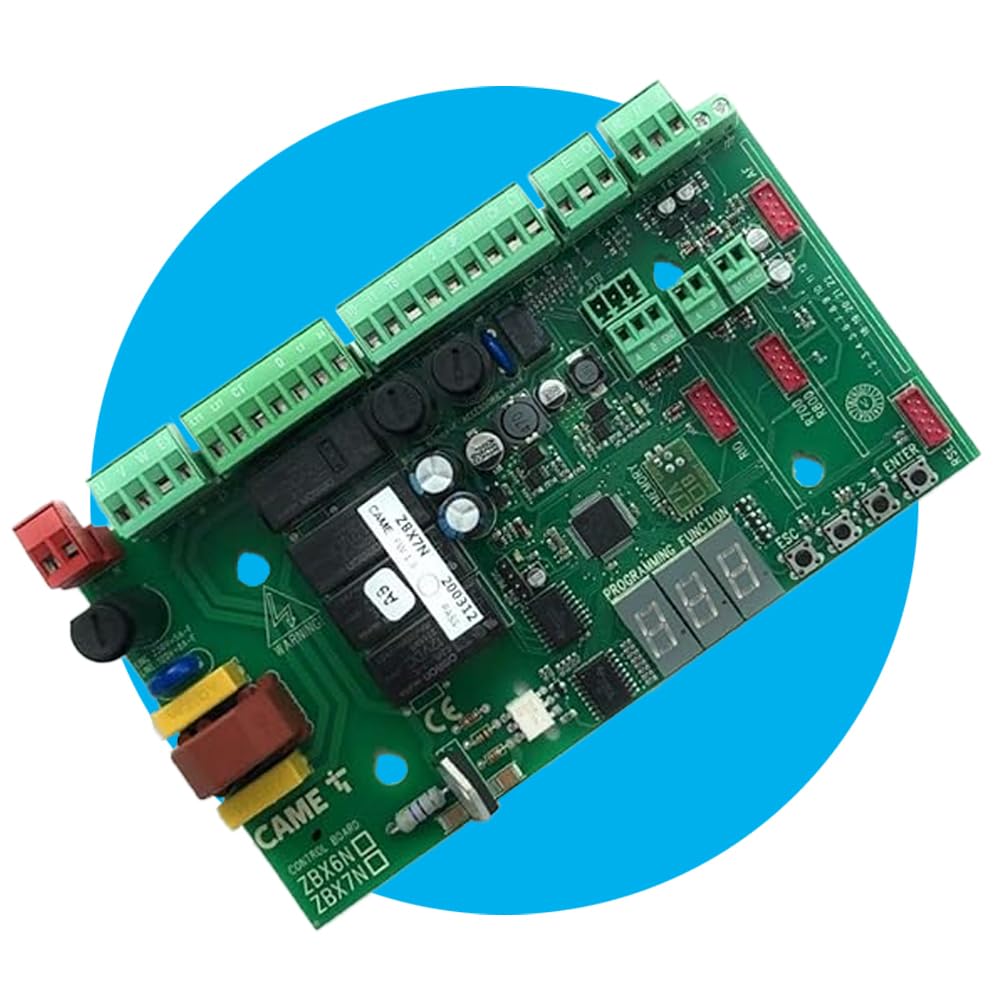
Image 1: The CAME ZBX7N Control Board. This image displays the main electronic board with various connectors and components.
4. Configuración e instalación
The CAME ZBX7N control board is designed for easy integration into CAME BX series sliding gate operators. It is a direct replacement for ZBX74 and ZBX78 models.
4.1 Compatibilidade
This control board is specifically compatible with CAME BX series sliding gate operators that utilize a 230V single-phase current supply. It directly replaces the ZBX74 and ZBX78 models, ensuring seamless integration.
4.2 Cableado e conexións
Refer to the wiring diagram provided with your specific gate operator model for detailed connection instructions. Ensure all electrical connections are made securely and correctly.
- Fonte de alimentación: Connect the 230V single-phase power supply to the designated terminals.
- Conexións do motor: Connect the gate operator motor wires to the appropriate terminals on the ZBX7N board.
- Safety Strips: The board features CX and CY-resistive inputs for 8k2 safety strips, ensuring compliance with safety regulations. Connect these as required.
- Accesorios: The ZBX7N supports various CAME accessories, including Rio wireless systems, CAME keyboards, and transponder selectors. Connect these to their respective ports as per their individual manuals.
4.3 CAME Connect Integration
The ZBX7N is ready for CAME Connect, allowing for remote control and monitoring via dedicated gateways. Consult the CAME Connect documentation for setup and configuration of remote access.
5. Instrucións de funcionamento
Once installed and powered, the CAME ZBX7N control board offers advanced functionalities for gate operation.
- Radio Decoding: Supports rolling code, twin, and key block radio decoding for up to 250 users. Refer to the programming guide for adding and managing remote controls.
- Memory Roll: Utilize the Memory Roll feature to store and recall configurations, simplifying setup for multiple installations or replacements.
- Master/Slave Pairing: The master/slave pairing function allows for synchronized operation of two gate operators.
- Quick Display Menu: Navigate settings and monitor status using the quick display menu on the control board.
- Modo de espera: The energy-saving standby mode reduces power consumption when the gate is inactive.
For detailed programming steps and advanced settings, consult the comprehensive programming manual available from CAME.
6. Mantemento
Regular maintenance ensures the longevity and reliable operation of your CAME ZBX7N control board and gate system.
- Inspección visual: Inspeccione periodicamente a placa de control e as súas conexións para detectar calquera signo de desgaste, corrosión ou danos.
- Limpeza: Keep the control board free from dust, dirt, and moisture. Use a soft, dry cloth for cleaning. Do not use liquid cleaners.
- Integridade da conexión: Ensure all wiring connections remain tight and secure. Loose connections can lead to intermittent operation or electrical issues.
- Protección ambiental: Ensure the control board is housed in a suitable enclosure that protects it from environmental elements such as rain, extreme temperatures, and direct sunlight.
For any complex maintenance or repairs, it is recommended to contact a qualified CAME service technician.
7 Solución de problemas
If you encounter issues with your CAME ZBX7N control board, consider the following basic troubleshooting steps:
- Sen enerxía: Check the main power supply to the gate operator and ensure all circuit breakers are on. Verify the control board's power connections.
- A porta non responde: Check remote control batteries. Ensure the safety strips (CX/CY inputs) are not triggered or faulty. Inspect motor connections.
- Operación errática: This could indicate interference or a faulty connection. Check for loose wires or external electrical noise.
- Erros de visualización: Consult the CAME programming manual for a list of error codes and their meanings displayed on the quick display menu.
If the problem persists after performing these checks, contact CAME technical support or a certified technician for further assistance. Do not attempt to repair the control board yourself.
8. Especificacións
| Característica | Detalle |
|---|---|
| Fabricante | Chegou |
| Número de peza | 88001-0065 |
| Número de modelo do artigo | ZBX7N |
| Compatibilidade | CAME BX series sliding gate operators (replaces ZBX74/78) |
| Fonte de alimentación | 230 V monofásico |
| Dimensións do produto | 10 x 5 x 10 cm |
| Peso do elemento | 280 g |
| Pilas necesarias | Non |
| ASIN | B07D18LY77 |
9. Garantía e soporte
For information regarding the warranty period and terms for your CAME ZBX7N Control Board, please refer to the warranty documentation provided with your purchase or visit the official CAME websitio.
For technical support, spare parts, or service inquiries, please contact your authorized CAME dealer or the CAME customer service department. Ensure you have your product model number (ZBX7N) and part number (88001-0065) available when contacting support.