
1. Introdución
Grazas pola compraasing the Edifier R501BT 5.1 Channel Wireless Bluetooth Multimedia Speaker System. This manual provides detailed instructions for the proper installation, operation, and maintenance of your speaker system. Please read this manual thoroughly before use to ensure optimal performance and longevity of your product.
2. Instrucións de seguridade importantes
- Lea atentamente estas instrucións.
- Conserve estas instrucións para referencia futura.
- Presta atención a todas as advertencias.
- Siga todas as instrucións.
- Non use este aparello preto da auga.
- Limpar só cun pano seco.
- Non bloquee ningunha abertura de ventilación. Instáleo segundo as instrucións do fabricante.
- Non instale preto de fontes de calor como radiadores, rexistros de calor, cociñas ou outros aparellos (incluíndo amplificadores) que producen calor.
- Protexa o cable de alimentación para evitar que se pise ou se pinche, especialmente nos enchufes, tomas de corrente e no punto de saída do aparello.
- Use só anexos/accesorios especificados polo fabricante.
- Desenchufe este aparello durante tormentas eléctricas ou cando non se use durante longos períodos de tempo.
- Encargue toda a reparación a persoal de servizo cualificado. O mantemento é necesario cando o aparello resultou danado dalgún xeito, como o cable de alimentación ou o enchufe está danado, se derrama líquido ou caen obxectos no aparello, o aparello estivo exposto á choiva ou á humidade, non funciona normalmente. , ou foi abandonado.
3. Contido do paquete
Asegúrate de que todos os elementos que se indican a continuación estean presentes no teu paquete:
- 1x Subwoofer Unit (main unit)
- 1x Center Satellite Speaker
- 4x Satellite Speakers (Front Left, Front Right, Surround Left, Surround Right)
- 1 x mando a distancia
- Audio Connection Cables (e.g., 3.5mm to RCA, RCA to RCA)
- Manual de usuario (este documento)

Image: Complete Edifier R501BT 5.1 speaker system, showcasing the subwoofer, five satellite speakers, and the included remote control.
4. Produto rematadoview
4.1 Subwoofer Unit
The subwoofer unit houses the main amplifier, power supply, and control interface for the entire system. It features an 8-inch (210mm) woofer for deep bass reproduction.

Imaxe: Fronte view of the Edifier R501BT subwoofer, highlighting its design and front-facing port.

Imaxe: De arriba abaixo view of the Edifier R501BT subwoofer, showing the internal structure and the downward-firing woofer.

Image: The base of the Edifier R501BT subwoofer, illustrating its elevated design for enhanced bass resonance.
4.2 altofalantes satélite
The system includes one center channel speaker and four satellite speakers (front left, front right, surround left, surround right), each featuring a 3-inch driver for clear mid-range and treble audio.

Image: The Edifier R501BT center channel speaker, designed for clear dialogue.
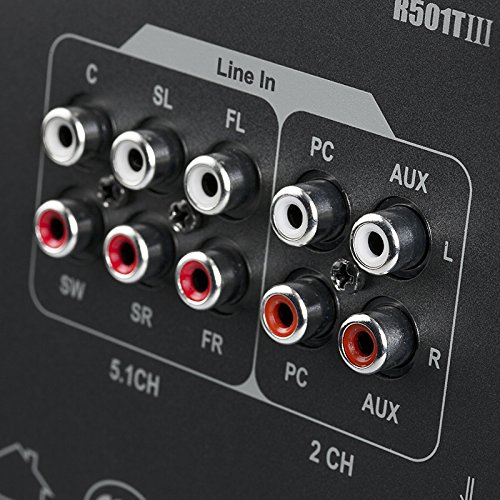
Image: A single Edifier R501BT satellite speaker, representative of the four surround speakers.
4.3 Panel de control e control remoto
The subwoofer features an integrated control panel for direct adjustments, complemented by a full-function remote control for convenient operation from a distance.

Image: Close-up of the subwoofer's control panel, displaying the digital screen and control buttons.
4.4 Conexións do panel traseiro
The rear panel of the subwoofer provides various input and output options for connecting to different audio sources and the satellite speakers.

Imaxe: Detallada view of the Edifier R501BT subwoofer's rear panel, showing 5.1 channel outputs, Line In, PC, and AUX inputs.
5. Configuración
5.1 Colocación de altofalantes
Optimal speaker placement is crucial for achieving the best 5.1 surround sound experience:
- Subwoofers: Coloca o subwoofer no chan, preferiblemente nun recuncho ou preto dunha parede, para mellorar a resposta dos graves.
- Relator do centro: Position the center speaker directly above or below your display (TV/monitor), facing the listening area.
- Front Speakers (FL/FR): Place the front left and front right speakers equidistant from your listening position, forming an equilateral triangle with the listener. They should be at ear level.
- Surround Speakers (SL/SR): Position the surround left and surround right speakers to the sides or slightly behind your listening position, also at ear level or slightly higher.
5.2 Conexión dos altofalantes
- Ensure the main power switch on the subwoofer is in the OFF position before making any connections.
- Connect the satellite speakers to the corresponding output ports on the rear panel of the subwoofer. Match the color-coded cables and ports:
- FL (dianteiro esquerdo)
- FR (dianteiro dereita)
- C (centro)
- SL (Surround Esquerdo)
- SR (Surround dereito)
- Connect your audio source (e.g., TV, PC, DVD player) to the appropriate input ports on the subwoofer's rear panel.
- 5.1 CH Input: For devices with dedicated 5.1 channel analog outputs. Connect the corresponding FL, FR, C, SL, SR, and SW (subwoofer) outputs from your source to the speaker system.
- Entrada de PC: For connecting to a computer's audio output.
- Entrada AUX: For general stereo audio devices (e.g., smartphones, tablets, MP3 players) using a 3.5mm to RCA cable.
- Liña en: Another stereo input option.
- Conecte o cable de alimentación a unha toma de parede.
6. Instrucións de funcionamento
6.1 Encendido/apagado
To power on the system, flip the main power switch on the rear of the subwoofer to the ON position. The display on the front panel will illuminate. To power off, flip the switch to OFF.
6.2 Selección de entrada
Press the "Input" button on the subwoofer's control panel or the remote control to cycle through available input modes: Bluetooth, AUX, PC, 5.1 CH, USB, SD Card.
6.3 Control de volume
Adjust the master volume using the volume knob on the subwoofer or the Volume +/- buttons on the remote control.
6.4 Emparejamento Bluetooth
- Select "Bluetooth" as the input mode on the speaker system. The display will show "BT" and blink, indicating it's in pairing mode.
- No teu dispositivo con Bluetooth (por exemplo, teléfono intelixente ou tableta), busca os dispositivos Bluetooth dispoñibles.
- Select "EDIFIER R501BT" from the list. Once paired, the "BT" indicator on the speaker system will stop blinking and remain solid.
- If pairing fails, try restarting the speaker system and your device, then repeat the steps.
Reprodución de tarxetas USB/SD de 6.5
Insert a USB drive or SD card containing MP3/WMA audio files into the corresponding slot on the subwoofer. The system will automatically switch to USB or SD mode and begin playback. Use the remote control to navigate tracks (Previous/Next), Play/Pause, and adjust volume.
6.6 Funcións de control remoto
O mando a distancia proporciona un acceso cómodo a varias funcións:
- Potencia: En espera/Activado
- Entrada: Cycle through input modes (Bluetooth, AUX, PC, 5.1 CH, USB, SD)
- Volume +/-: Adjust master volume
- Silenciar: Mute/unmute audio
- Baixo +/-: Adjust subwoofer bass level
- Agudos +/-: Axustar o nivel de agudos
- Anterior/Seguinte: Skip tracks (USB/SD/Bluetooth modes)
- Reproducir/Pausa: Play or pause audio (USB/SD/Bluetooth modes)
- 5.1/2.1: Switch between 5.1 and 2.1 channel output modes (virtual 5.1 for stereo sources).
7. Mantemento
- Limpeza: Use a soft, dry cloth to clean the surfaces of the speakers. Do not use liquid cleaners or aerosol sprays.
- Ventilación: Asegúrese de que as aberturas de ventilación do subwoofer non estean bloqueadas para evitar o sobrequecemento.
- Almacenamento: If storing the system for an extended period, unplug it from the power outlet and store it in a cool, dry place.
- Evitar a humidade: Keep the speakers away from water, rain, and excessive humidity.
8 Solución de problemas
| Problema | Causa posible | Solución |
|---|---|---|
| Sen son |
|
|
| O emparejamento por Bluetooth falla |
|
|
| Son distorsionado |
|
|
| O control remoto non funciona |
|
|
9. Especificacións
| Característica | Detalle |
|---|---|
| Modelo | R501BT |
| Potencia total | 93 vatios (RMS) |
| Controlador de subwoofer | 8 polgadas (210 mm) |
| Satellite Speaker Drivers | 3 polgadas (78 mm) |
| Resposta en frecuencia | 150 Hz (General, specific subwoofer range not provided) |
| Conectividade | Bluetooth, RCA (Line In, PC, AUX, 5.1 CH) |
| Características especiais | SD Card, USB Playback, Class D amplifier with Digital Signal Processing (DSP) |
| Subwoofer Dimensions (D x W x H) | 23P x 17.8L x 28.8H centímetros |
| Peso do elemento | 13.7 kg |
| distancia wireless | Ata 10 metros (Bluetooth) |

Image: Diagram illustrating the dimensions of the Edifier R501BT subwoofer unit.
10. Garantía e soporte
10.1 Información da garantía
This Edifier R501BT speaker system comes with a 1 ano de garantía from the date of purchase. Please retain your proof of purchase for warranty claims. The warranty covers manufacturing defects and workmanship under normal use. It does not cover damage caused by misuse, accidents, unauthorized modifications, or natural disasters.
10.2 Atención ao cliente
For technical assistance, troubleshooting, or warranty inquiries, please contact your local Edifier distributor or authorized service center. In India, support is provided by:
Distribuidores de Nikita
Green Terrace Building, Lane Number 5,
South Koregaon Park, Pune 411001, MH, India
For the most up-to-date support information, please visit the official Edifier websitio ou póñase en contacto co seu comerciante.