
1. Introdución
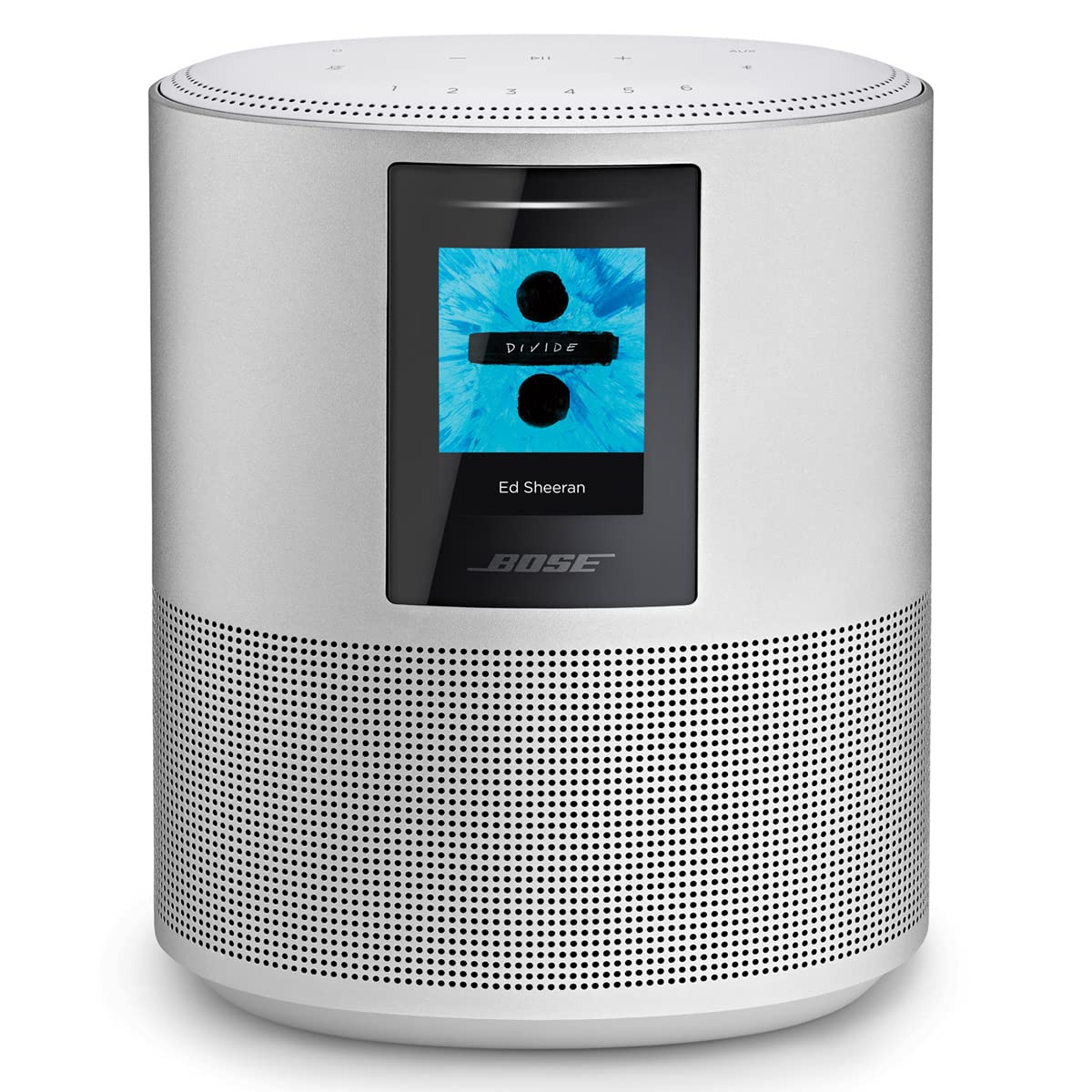
The Bose Home Speaker 500 is designed to deliver powerful, room-filling sound. It features two custom drivers positioned to project sound off walls, creating a wide soundstage. Integrated voice assistants, such as Amazon Alexa and Google Assistant, allow for hands-free control of music playback, internet radio, and playlists. The speaker includes a custom-designed eight-microphone array for superior voice pickup, even during loud music playback. Control options extend beyond voice, with top-panel controls and management through the Bose Music app. The speaker supports Wi-Fi, Bluetooth, and Apple AirPlay 2, enabling playback from various music services like Spotify and Apple Music, or directly from a phone or tablet. Users can set up to six presets for quick access to favorite content. A color LCD display provides visual information, including current song, station, playlist details, and album art.
2. Configuración
Follow these steps to set up your Bose Home Speaker 500:
- Conexión de alimentación: Connect the power cord to the speaker and then to a wall outlet. The speaker will automatically power on.
- Descarga a aplicación Bose Music: Download the Bose Music app on your mobile device from the App Store (iOS) or Google Play Store (Android). This app is essential for initial setup and managing your speaker.
- Configuración inicial a través da aplicación: Open the Bose Music app and follow the on-screen instructions to connect your speaker to your Wi-Fi network. The app will guide you through setting up your voice assistant (Alexa or Google Assistant) and linking your music services.
- Emparejamento Bluetooth (opcional): To pair a Bluetooth device, press and hold the Bluetooth button on the top of the speaker until the light ring pulses blue. Then, select the Bose Home Speaker 500 from your device's Bluetooth settings.
- Entrada auxiliar: For wired connections, locate the AUX input port on the back of the speaker. Connect your audio source using a 3.5mm audio cable (not included).


3. Funcionamento
Your Bose Home Speaker 500 offers multiple ways to control your audio experience:
3.1 Controis do panel superior
The top surface of the speaker features touch-sensitive controls:
- Subir/Baixar o volume (+/-): Adjust the speaker's volume.
- Play/Pause (►▮▮): Start or pause audio playback.
- Silenciar o micrófono: Disable the built-in microphones for privacy. The light ring will glow red when muted.
- Botón Bluetooth: Press to switch to Bluetooth mode or initiate pairing.
- Botón AUX: Select the auxiliary input source.
- Presets (1-6): Customize these buttons in the Bose Music app to quickly access favorite playlists, radio stations, or albums.

3.2 Control por voz
With Amazon Alexa or Google Assistant built-in, you can control your speaker using voice commands. Simply say the wake word ("Alexa" or "Hey Google") followed by your command, such as "Play jazz music" or "What's the weather?"
3.3 Bose Music App
The Bose Music app provides comprehensive control over your speaker, including:
- Managing connected music services.
- Adjusting equalizer settings (bass and treble).
- Creating and managing speaker groups for multi-room audio.
- Accessing software updates.
3.4 Pantalla LCD
The front LCD display shows useful information such as:
- Hora actual.
- Album art for playing music.
- Song title and artist information.
- Active source (Wi-Fi, Bluetooth, AUX).

4. Mantemento
To ensure the longevity and optimal performance of your Bose Home Speaker 500, follow these maintenance guidelines:
- Limpeza: Use a soft, dry cloth to clean the exterior surfaces of the speaker. Avoid using liquid cleaners, solvents, or sprays, as these can damage the finish or internal components.
- Actualizacións de software: Regularly check for and install software updates through the Bose Music app. Updates often include performance improvements, new features, and bug fixes.
- Colocación: Place the speaker on a stable, flat surface. Ensure adequate ventilation around the speaker to prevent overheating.
- Condicións ambientais: The speaker is not waterproof. Avoid exposing it to water, excessive moisture, or extreme temperatures.
5 Solución de problemas
If you encounter issues with your Bose Home Speaker 500, try the following solutions:
| Problema | Posible Solución |
|---|---|
| O altofalante non se acende. | Ensure the power cord is securely connected to both the speaker and a working wall outlet. Try a different outlet. |
| Sen son ou mala calidade de son. | Check the volume level on both the speaker and your connected device. Ensure the correct source (Wi-Fi, Bluetooth, AUX) is selected. Verify audio cables are properly connected for AUX input. |
| Problemas de conectividade wifi. | Ensure your Wi-Fi router is on and within range. Restart your speaker and router. Use the Bose Music app to reconfigure Wi-Fi settings if necessary. Ensure your Wi-Fi network is stable. |
| Bluetooth pairing failure. | Ensure the speaker is in Bluetooth pairing mode (pulsing blue light). Turn off and on Bluetooth on your device. Remove the speaker from your device's paired list and try pairing again. |
| O asistente de voz non responde. | Ensure the microphone is not muted (microphone mute button not illuminated red). Check your internet connection. Verify voice assistant settings in the Bose Music app. Speak clearly and be within range of the speaker. |
| Bose Music app is buggy or unresponsive. | Close and reopen the app. Ensure your app is updated to the latest version. Restart your mobile device. Check for speaker software updates. |
If problems persist, visit the official Bose support website or contact Bose customer service for further assistance.
6. Especificacións
| Característica | Detalle |
|---|---|
| Marca | Bose |
| Nome do modelo | Orador doméstico 500 |
| Número de modelo | 795345-1300 |
| Tecnoloxía de conectividade | Bluetooth, WiFi |
| Modo de saída de audio | Estéreo |
| Método de control | Voice, App, Touch Controls |
| Tipo de controlador | Amazon Alexa, Asistente de Google |
| Material | Aluminio |
| Dimensións do artigo (D x W x H) | 4.31" D x 6.68" W x 8.01" H |
| Peso do elemento | 4.7 libras |
| Alcance Bluetooth | 9 metros |
| Fonte de enerxía | Fonte de alimentación integrada |
| É Impermeable | Non |
| O que hai na caixa | Bose Home Speaker 500 |
7. Garantía e soporte
The Bose Home Speaker 500 comes with a Limited Warranty. For detailed information regarding the warranty period, coverage, and terms and conditions, please refer to the warranty card included with your product or visit the official Bose websitio.
For technical support, product registration, or to access additional resources such as FAQs and software downloads, please visit the Bose support websitio:
You may also contact Bose customer service directly for personalized assistance.