
Introdución
This manual provides detailed instructions for the setup, operation, and maintenance of your Zerone BN59-01179A Replacement Remote Control. Please read this manual carefully before using the product to ensure proper functionality and longevity.
Produto rematadoview
The Zerone BN59-01179A is a universal replacement remote control designed for compatible Smart TVs. It offers a compact design and a comprehensive set of buttons for various functions.
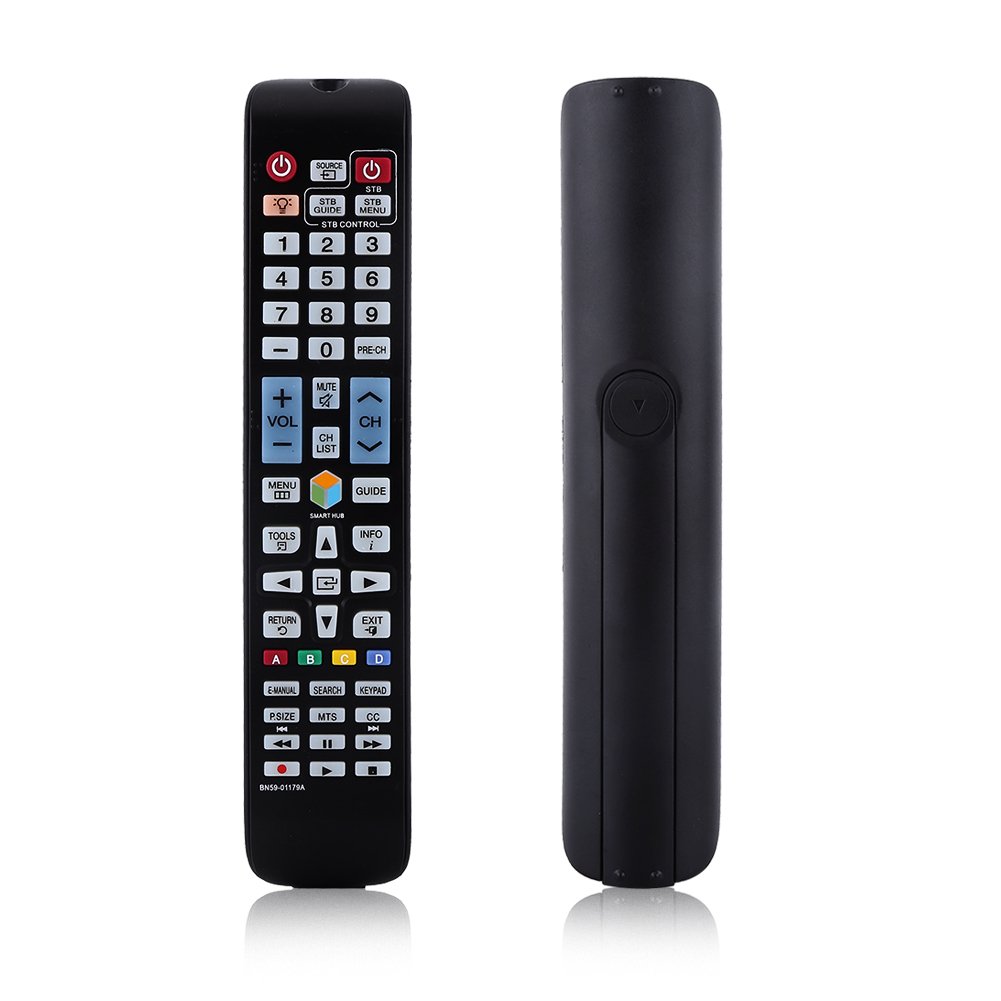
Imaxe: Fronte view of the Zerone BN59-01179A remote control, showing its full layout and approximate dimensions (23cm length, 4.7cm width, 2cm thickness).
Configuración
Instalación de baterías
- Localice o compartimento da batería na parte traseira do control remoto.
- Deslice a tapa da batería cara abaixo ou prema o pestillo e levante para abrila.
- Insira dúas (2) pilas AAA, asegurándose de que os terminais positivo (+) e negativo (-) estean aliñados correctamente coas marcas do interior do compartimento.
- Volva colocar a tapa da batería deslizándoa de volta á súa posición ata que faga clic de forma segura.
Nota: Batteries are not included with the remote control. Please use new AAA batteries for optimal performance.

Image: The back of the remote control with the battery cover removed, showing the empty battery compartment ready for two AAA batteries.
Instrucións de funcionamento
This remote control is designed for immediate use with compatible TVs without requiring programming. Simply insert batteries and point the remote towards your television.
Funcións clave

Image: A hand holding the Zerone remote control, with inset close-ups highlighting the power/source buttons and the navigation/Smart Hub buttons.
- Acendido (botón vermello): Acende ou apaga o televisor.
- Fonte: Selecciona fontes de entrada (HDMI, AV, etc.).
- STB/DTV: Switches between Set-Top Box and Digital TV modes.
- Botóns numéricos (0-9): Selección directa de canles.
- PRE-CH: Volve á canle anterior.
- Volume (+/-): Axusta o nivel de volume.
- Silenciar: Silencia ou activa o son do televisor.
- Canle (canle arriba/abaixo): Cambia as canles de televisión secuencialmente.
- LISTA CH: Mostra a lista de canles.
- MENÚ: Accede ao menú principal do televisor.
- Smart Hub: Opens the Smart Hub interface for apps and streaming services.
- GUÍA: Mostra a guía electrónica de programas.
- INFORMACIÓN: Mostra información sobre o programa actual.
- FERRAMENTAS: Accede á configuración rápida ou ás opcións contextuais.
- Botóns de navegación (Arriba/Abaixo/Esquerda/Dereita/Intro): Navega polos menús e selecciona opcións.
- DEVOLUCIÓN: Volta á pantalla ou ao menú anterior.
- SAÍDA: Sae do menú ou da aplicación actual.
- Botóns de cores (A, B, C, D): A funcionalidade varía segundo o modelo de televisor e a aplicación.
- MANUAL ELECTRÓNICO: Accesses the TV's electronic manual.
- BUSCAR: Abre a función de busca.
- TECLADO: Displays an on-screen keypad.
- TAMAÑO: Axusta o tamaño/relación de aspecto da imaxe.
- MTS: Multi-channel Television Sound (SAP).
- CC: Subtítulos pechados.
- Botóns de control multimedia (Reproducir, Pausar, Deter, Rebobinar, Avanzar rápido): Controla a reprodución multimedia.
Mantemento
- Limpeza: Use un pano suave e seco para limpar o mando a distancia. Non empregue produtos de limpeza líquidos nin materiais abrasivos.
- Substitución da batería: Replace batteries when the remote's response becomes sluggish or stops working. Always replace both batteries at the same time with new ones.
- Almacenamento: Se o mando a distancia non se vai usar durante un período prolongado, retire as pilas para evitar fugas e danos.
- Evitar a exposición: Keep the remote away from direct sunlight, heat sources, and moisture.
Resolución de problemas
- O mando a distancia non responde:
- Asegúrese de que as pilas estean inseridas correctamente coa polaridade correcta.
- Substitúa as pilas vellas por pilas AAA novas.
- Comprobe se hai algunha obstrución entre o mando a distancia e o sensor de infravermellos do televisor.
- Asegúrate de que o mando a distancia estea apuntado directamente ao televisor.
- Alcance limitado:
- Substitúe as pilas.
- Ensure there are no strong light sources or electronic devices interfering with the signal.
- Botóns específicos que non funcionan:
- Limpa o mando a distancia, especialmente arredor dos botóns que non responden, para eliminar calquera sucidade ou residuos.
- If the issue persists after battery replacement and cleaning, the remote may be faulty.
Especificacións
| Característica | Descrición |
|---|---|
| Marca | Cero |
| Nome do modelo | Zerone32687x9gqs (BN59-01179A compatible) |
| Tecnoloxía de conectividade | Infravermello |
| Dispositivos compatibles | Television (specifically for Samsung BN59-01179A compatible models) |
| Número máximo de dispositivos compatibles | 8 (Universal functionality) |
| Cantidade de botóns | 12 (referring to main function groups, actual count is higher) |
| Tipo de controlador | Control de botón |
| Rango máximo | 8 metros |
| Tipo de batería | AAA |
| Número de baterías | Requírense 2 pilas AAA (non incluídas) |
| Característica especial | Universal replacement, no programming required |
Garantía e Soporte
Zerone provides a service guarantee for this product. If you encounter any questions or issues regarding your remote control, please contact the seller or manufacturer for assistance. They will provide follow-up services to address your concerns.
For specific warranty details and support contact information, please refer to your purchase documentation or the retailer's websitio.