
Introdución
This manual provides detailed instructions for the MONODEAL MD-ANC5 Active Noise Cancelling Headphones. Please read this manual thoroughly before using the product to ensure proper operation and to maximize your listening experience. This document covers setup, operation, maintenance, troubleshooting, and product specifications.
Contido do paquete
- MONODEAL MD-ANC5 Active Noise Cancelling Headphones
- Cable de carga USB
- Bolsa de transporte
- Airplane Adapter (two-pin)
- Manual de usuario (este documento)
Produto rematadoview
The MONODEAL MD-ANC5 headphones are designed for comfort and effective noise reduction, making them suitable for travel and daily use. They feature active noise cancelling technology, a built-in microphone, and a foldable design for portability.
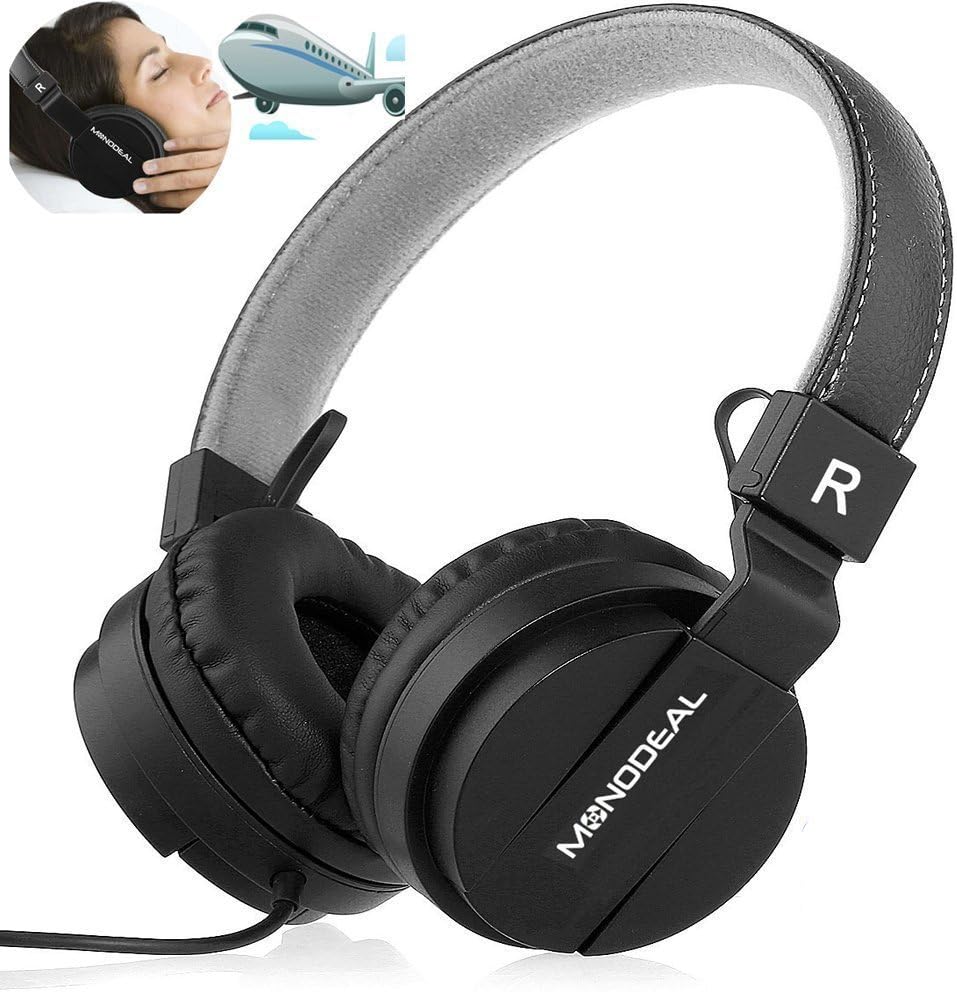
A pair of black MONODEAL MD-ANC5 on-ear headphones, showcasing their design and the brand logo on the earcups. An inset image shows a person wearing headphones on an airplane, illustrating their use for travel and noise reduction.
Características clave
- Cancelación activa de ruído (ANC): Reduces ambient noise by up to 85%, ideal for environments with low-frequency sounds like airplane engines or traffic.
- Micrófono incorporado: Permite chamadas telefónicas mans libres.
- Deseño plegable: Allows for compact storage and portability, accompanied by a carrying bag.
- Adjustable Headband & Comfortable Ear Cushions: Ensures a snug and comfortable fit for various head shapes.
- Batería de longa duración: Up to 20 hours of playtime per charge for ANC function.
- Conectividade por cable: Standard 3.5mm audio jack for wide compatibility.
- Airplane Adapter: Included for in-flight entertainment systems.

The MONODEAL MD-ANC5 headphones are shown in a folded configuration, highlighting their space-saving design for easy portability. An inset image shows a person resting with headphones on an airplane, demonstrating their suitability for travel.

An illustration detailing the battery life of the MONODEAL MD-ANC5 headphones, indicating up to 20 hours for music playback, 20 hours for phone calls, and 250 hours of standby time.
Configuración
Carga inicial
Antes do primeiro uso, cargue completamente os auriculares.
- Connect the small end of the provided USB charging cable to the USB Charging Port on the headphone's inline controller.
- Conecta o extremo máis grande do cable USB a un porto USB con alimentación (por exemplo, un ordenador ou un adaptador de parede USB).
- The Noise Cancelling Indicator Light will illuminate during charging.
- Charging typically takes approximately 2 hours for a full charge. The indicator light may change or turn off when fully charged.
Conectando a fonte de audio
- Insert the 3.5mm Audio Plug into the audio jack of your device (smartphone, tablet, computer, MP3 player, etc.).
- The headphones are wired and do not require Bluetooth pairing for audio playback.
Instrucións de funcionamento
Cancelación activa de ruído (ANC)
To activate the Active Noise Cancellation feature:
- Locate the "Noise Cancelling On/Off" switch on the inline controller.
- Deslice o interruptor á posición "ON".
- The Noise Cancelling Indicator Light will illuminate, indicating ANC is active.
- To deactivate ANC, slide the switch to the "OFF" position.
Nota: ANC primarily reduces low-frequency ambient noise. It may not completely eliminate human voices or sudden high-frequency sounds. The ANC function requires battery power. If the battery is depleted, the headphones can still be used for audio playback without ANC.
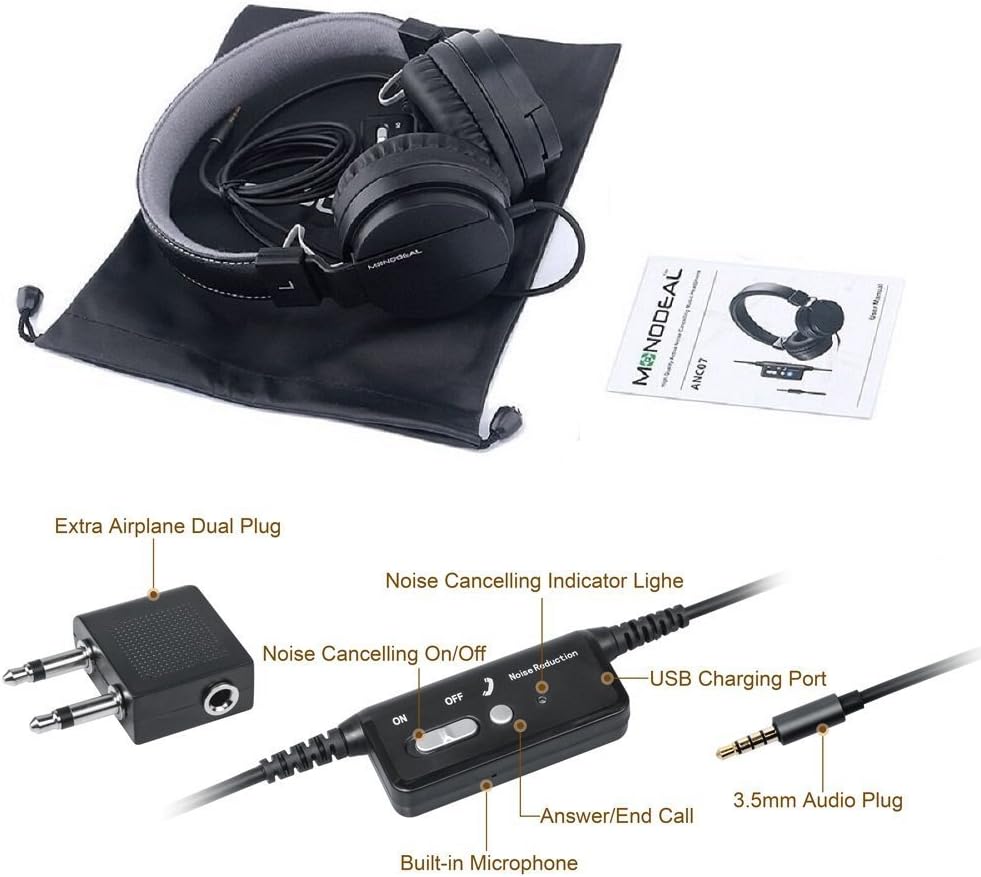
Un primeiro plano view of the inline controller for the MONODEAL MD-ANC5 headphones, showing the Noise Cancelling On/Off switch, the Noise Cancelling Indicator Light, the USB Charging Port, the Built-in Microphone, and the 3.5mm Audio Plug. An 'Extra Airplane Dual Plug' adapter is also visible.
Using the Microphone/Controller
The inline controller includes a built-in microphone and an "Answer/End Call" button.
- Atender / finalizar chamadas: Press the "Answer/End Call" button once to answer an incoming call. Press it again to end an active call.
- Control de reprodución de música: This model primarily focuses on ANC and basic call functions. For music control (play/pause, track skip), use your connected device.
Usando o adaptador de avión
For in-flight entertainment systems that use a dual-pin audio jack:
- Connect the 3.5mm Audio Plug of your headphones into the single input of the Airplane Adapter.
- Insert the dual pins of the Airplane Adapter into the corresponding jacks on the airplane's armrest.
Mantemento
- Limpeza: Usa un pano suave e seco para limpar os auriculares. Non empregues produtos de limpeza líquidos nin disolventes.
- Almacenamento: When not in use, fold the headphones and store them in the provided carrying bag to protect them from dust and damage.
- Coidado da batería: Para prolongar a duración da batería, evite descargala completamente con frecuencia. Cargue os auriculares regularmente, mesmo se non os usa durante períodos prolongados.
- Evita condicións extremas: Non expoñas os auriculares a temperaturas extremas, humidade nin luz solar directa.
- Resistencia á auga: These headphones are not water-resistant. Avoid contact with liquids.
Resolución de problemas
| Problema | Causa posible | Solución |
|---|---|---|
| Sen son | O conector dos auriculares non está completamente inserido. | Ensure the 3.5mm audio plug is securely inserted into both the headphones and the audio source. |
| Sen son | Volume da fonte de son demasiado baixo ou silenciado. | Increase the volume on your connected device. Check if the device is muted. |
| ANC non funciona | ANC switch is off. | Slide the "Noise Cancelling On/Off" switch to the "ON" position. |
| ANC non funciona | Headphone battery is low or depleted. | Cargue os auriculares durante aproximadamente 2 horas. |
| O micrófono non funciona | Microphone port blocked or damaged. | Ensure the microphone is not obstructed. Test with another device if possible. |
| Poor sound quality with ANC on | ANC can sometimes alter sound profile. | If preferred, turn off ANC for music listening, especially if sound quality is a priority over noise reduction. |
| Auriculares incómodos | Headband or earcups not adjusted. | Adjust the headband for a comfortable fit. Ensure ear cushions sit properly on the ears. |
Para obter máis axuda, consulte a sección Garantía e asistencia.
Especificacións
| Característica | Detalle |
|---|---|
| Número de modelo | MD-ANC5 |
| Marca | MONODEAL |
| Tecnoloxía de conectividade | Con cable (conector de 3.5 mm) |
| Control de ruído | Cancelación activa de ruído |
| Colocación do oído | Na Orella |
| Factor de forma | Na Orella |
| Battery Life (ANC) | Ata 20 horas |
| Tempo de carga | Aprox. 2 horas |
| Resposta en frecuencia | 20 Hz - 20000 Hz |
| Peso do elemento | 6.5 onzas (184 gramos) |
| Dimensións do produto | 7.87 x 6.3 x 2.36 polgadas |
| Material | Coiro sintético |
| Característica especial | Foldable, Rechargeable, Built-in Microphone |
| Dispositivos compatibles | Smartphones, Tablets, Laptops, MP3/MP4 Players |
| Compoñentes incluídos | Carrying Bag, USB Charging Cable, Airplane Adapter |
Garantía e Soporte
The MONODEAL MD-ANC5 headphones come with an 18-month warranty.
For any questions, issues, or warranty claims, please contact MONODEAL customer support.
Correo electrónico de contacto: amzus@monodeal.net
Important Warning: Prolonged listening at high volume levels may cause hearing damage. It is recommended to take breaks every 1-2 hours to relax your ears and ensure a better listening experience.