
1. Introdución
The SUNMI L2 SmartOrder is a rugged industrial terminal designed for various business applications requiring mobility and data capture. It features an Android 7.1 operating system, a 5-inch display, and an integrated 1D/2D Zebra scanner. This manual provides essential information for the proper setup, operation, and maintenance of your device.
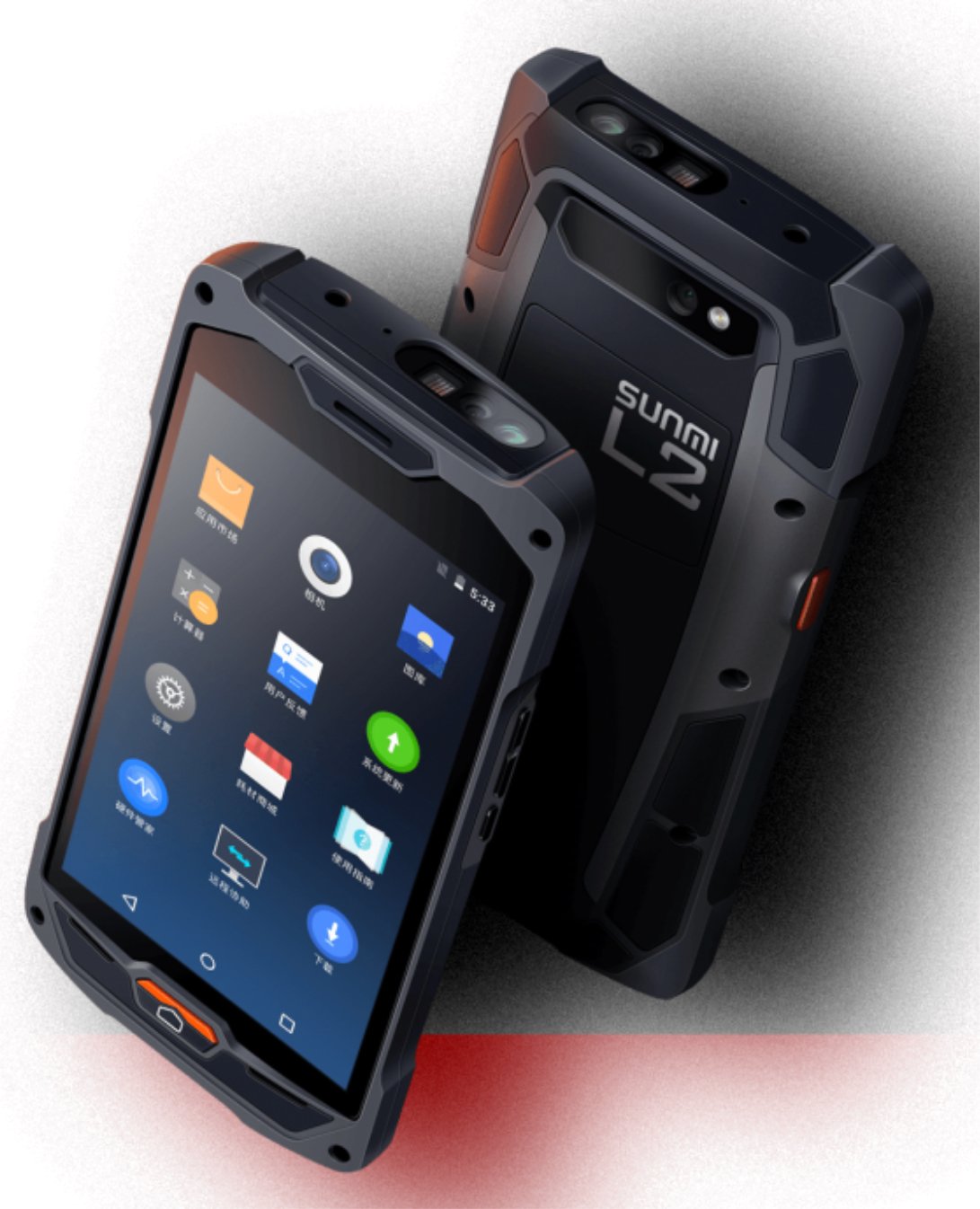
Figura 1: Parte dianteira e traseira view of the Sunmi L2 SmartOrder industrial terminal.
2. Información de seguridade
Lea todas as instrucións de seguridade antes de usar o dispositivo para evitar lesións ou danos. Garde este manual para futuras consultas.
- Non expoñas o dispositivo a temperaturas extremas, luz solar directa nin humidade elevada.
- Use only SUNMI-approved accessories and power adapters.
- Avoid dropping or subjecting the device to severe impact, despite its rugged design.
- Non intente desmontar nin reparar o dispositivo vostede mesmo. Consulte persoal de servizo cualificado.
- Manteña o dispositivo lonxe de dispositivos médicos, xa que pode interferir co seu funcionamento.
3. Dispositivo rematadoview
The SUNMI L2 SmartOrder is designed for durability and functionality. Key features include:
- Pantalla de 5 polgadas: High-resolution touchscreen for clear visibility.
- 1D/2D Zebra Scanner: Integrated for efficient barcode and QR code scanning.
- Porto USB-C: Para carga e transferencia de datos.
- Ranura para tarxeta SIM: For cellular network connectivity.
- Ranura para tarxetas TF: Para almacenamento ampliable.
- PSAM Card Slot (Optional): For enhanced security in professional applications.
- NFC Induction Area: For near-field communication.

Figura 2: Traseira view showing SIM card slot, TF card slot, PSAM card slot, and NFC induction area.

Figure 3: Three different scanner options for the Sunmi L2: Zebra Code Scanner, Standard Code Scanner, and without scanner.
4. Configuración
4.1. Instalación e carga da batería
The device is equipped with a 5000mAh high-volume battery. Ensure the battery is fully charged before initial use.
- Conecta o cable USB-C fornecido ao porto USB-C do dispositivo.
- Connect the other end of the USB-C cable to a compatible power adapter and plug it into a power outlet.
- The charging indicator will illuminate. Allow the device to charge completely before disconnecting.

Figure 4: Illustration of the 5000mAh high-volume battery with Quick Charge technology.
4.2. Instalación da tarxeta SIM e TF
To install SIM or TF cards:
- Locate the card slot cover on the rear of the device (refer to Figure 2).
- Abra a tapa con coidado.
- Insert the SIM card into the designated SIM card slot with the gold contacts facing down.
- Insert the TF card (microSD) into the TF card slot if additional storage is required.
- Close the card slot cover securely to maintain the device's IP67 rating.
4.3. Acendido inicial
After charging, press and hold the power button located on the side of the device until the screen illuminates and the SUNMI logo appears. The device will boot into the Android 7.1 operating system.
5. Instrucións de funcionamento
5.1. Navegación básica
The SUNMI L2 operates on Android 7.1. Navigate the interface using the touchscreen. Swipe to unlock, tap icons to open applications, and use the navigation buttons (Home, Back, Recent Apps) as standard for Android devices.
5.2. Using the 1D/2D Zebra Scanner
The integrated Zebra scanner is located at the top of the device.
- Open the scanning application on your device.
- Point the scanner window at the barcode or QR code you wish to scan.
- Press the dedicated scan button (if available on your model) or trigger the scan via the software interface.
- Ensure the barcode is well-lit and within the scanner's optimal range for accurate reading.

Figura 5: Abaixo view of the Sunmi L2, highlighting its rugged design and integrated scanner.
5.3. Conectividade
O dispositivo admite varias opcións de conectividade:
- Rede sen fíos (Wi-Fi): Supports 2.4 GHz and 5 GHz bands. Access Wi-Fi settings from the Android system menu to connect to available networks.
- Bluetooth (BT): Pair with other Bluetooth-enabled devices such as printers or headsets via the Bluetooth settings.
- GPRS/LTE: Utilize cellular data by inserting a SIM card and configuring network settings.
- NFC: For short-range wireless communication, typically used for contactless payments or data exchange.
6. Mantemento
6.1. Limpeza do dispositivo
Para manter o rendemento e a aparencia do dispositivo:
- Use un pano suave e sen pelusa lixeiramente dampened with water or a mild screen cleaner.
- Avoid using harsh chemicals, abrasive cleaners, or solvents, as these can damage the device's surface and seals.
- Ensure all port covers are securely closed before cleaning to maintain water and dust resistance.
6.2. Coidado da batería
Un coidado axeitado da batería prolonga a súa vida útil:
- Evite descargar completamente a batería con frecuencia.
- Do not expose the device to extreme heat or cold, as this can degrade battery performance.
- Se garda o dispositivo durante un período prolongado, cárgueo aproximadamente ao 50 % e gárdeo nun lugar fresco e seco.
6.3. Almacenamento
When not in use, store the SUNMI L2 in a cool, dry environment, away from direct sunlight and corrosive materials.
7 Solución de problemas
This section addresses common issues you might encounter with your SUNMI L2 device.
- O dispositivo non se acende: Ensure the battery is sufficiently charged. Connect the device to a power source and attempt to power it on again.
- Scanner not working: Verify that the scanning application is active and the scanner is enabled in the device settings. Ensure the barcode is clean, undamaged, and properly illuminated.
- Problemas de conectividade (Wi-Fi/móbil): Check your Wi-Fi network connection or cellular data settings. Ensure the SIM card is correctly inserted. Try restarting the device.
- A pantalla táctil non responde: Reinicia o dispositivo. Se o problema persiste, ponte en contacto co servizo de asistencia.
8. Especificacións
Key technical specifications for the SUNMI L2 SmartOrder:
| Número de modelo | Sunmi L2 Zebra T8900 |
| Sistema Operativo | Android 7.1 |
| Mostrar | 5 polgadas |
| CPU | Quad Core |
| RAM | 2 GB |
| ROM | 16 GB |
| Escáner | 1D/2D Zebra Scanner |
| Conectividade | USB-C, WLAN 2.4/5 GHz, Bluetooth, GPRS, LTE, NFC |
| Batería | 5000mAh (up to 2 days use, 30 days standby) |
| Durabilidade | IP67 rated (dust-proof, water-resistant, drop-resistant) |
| Temperatura de funcionamento | -20 °C a +55 °C |
| Peso | 349.27 g |
| Dispositivos compatibles | Desktop computer, Laptop, POS, Smartphone, Tablet |

Figure 6: Sunmi L2 device partially submerged in water, demonstrating its IP67 dust-proof and water-resistant capabilities.
9. Garantía e soporte
For detailed warranty information, technical support, or service inquiries, please refer to the official SUNMI website or contact your authorized SUNMI distributor. Please retain your purchase receipt as proof of purchase for any warranty claims.