
Introdución
This manual provides essential instructions for the safe and effective use of your Andoer Portable 1080P Digital Camera D11773S. Please read this manual thoroughly before operating the device and retain it for future reference. This digital camera is designed for capturing high-resolution photos and videos, featuring a 48MP image sensor, 1080P video recording, 8X digital zoom, and a 2.7-inch LCD screen.
Información de seguridade
- Non expoña a cámara á auga nin á humidade.
- Evite deixar caer a cámara ou sometela a impactos fortes.
- Manteña a cámara lonxe de campos magnéticos fortes.
- Do not attempt to disassemble or modify the camera. Repairs should only be performed by qualified personnel.
- Empregue só o tipo de batería e o cable de carga especificados.
- Garda a cámara nun lugar fresco e seco cando non estea en uso.
- Manter fóra do alcance dos nenos pequenos.
Contido do paquete
Verifica que todos os elementos estean presentes no paquete:
- Andoer Portable Digital Camera (Model D11773S)
- Lithium Battery (3.7V 550mAh)
- Cable de carga tipo C
- Correa de pulso
- Bolsa de transporte
- Manual de usuario

Image: Contents of the camera package, showing the camera, battery, USB-C cable, wrist strap, carry bag, and user manual.
Cámara rematadaview
Familiarize yourself with the main components of your camera.
Fronte View

Imaxe: Fronte view of the Andoer D11773S camera. Key features visible include the digital lens, built-in flash, and the 2.7" TFT display and 48 Mega pixels indicators.
- Lente: Captura imaxes e vídeos.
- Flash: Ofrece iluminación en condicións de pouca luz.
- Micrófono: Records audio during video capture.
Traseira View

Imaxe: Traseira view of the Andoer D11773S camera, displaying the 2.7-inch LCD screen and various control buttons for navigation and settings.
- LCD Screen (2.7 Inch): Mostra en directo view, menus, and playback.
- Botóns de control: For menu navigation, mode selection, zoom, and playback.
- Relator: Para a reprodución de son.
Lado View e Dimensións

Image: Diagram illustrating the dimensions of the Andoer D11773S camera: 9.2cm length, 6.1cm width, and 1.4cm thickness.
- Porto USB (tipo C): Para carga e transferencia de datos.
- Ranura para tarxetas de memoria: For inserting a Micro SD card.
- Compartimento de batería: Alberga a batería de litio recargable.
Configuración
1. Cargando a batería
- Insert the provided lithium battery into the camera's battery compartment.
- Connect the camera to a power source (e.g., computer USB port or USB wall adapter) using the supplied Type-C charge cable.
- A luz indicadora de carga acenderase. Unha vez cargada completamente, a luz pode cambiar de cor ou apagarse.
2. Inserción dunha tarxeta de memoria
The camera requires a Class-10 external Micro SD memory card (not included) with a maximum capacity of 128GB.
- Localice a ranura da tarxeta de memoria no lateral da cámara.
- Insert the Micro SD card with the metal contacts facing the front of the camera until it clicks into place.
- To remove, gently press the card inward until it springs out.
Instrucións de funcionamento
Encendido/apagado
- Para acender, manteña premido o botón de acendido.
- Para apagar, manteña premido de novo o botón de acendido/apagado.
Facendo Fotos
The camera supports picture resolutions up to 48MP.
- Acende a cámara.
- Encuadra a túa foto coa pantalla LCD de 2.7 polgadas.
- Press the Shutter button halfway to focus (if applicable), then fully press to capture the photo.

Image: Visual representation of the camera's capabilities, showing a 48MP photo example and a 1080P video example.
Gravación de vídeos
The camera supports video resolution up to 1920x1080 (1080P).
- Switch the camera to video recording mode (refer to on-screen icons or mode button).
- Preme o botón Gravar para comezar a gravar.
- Preme de novo o botón Gravar para deixar de gravar.
Función de zoom
A cámara ten un zoom dixital de 8 aumentos.
- Use the zoom buttons (often marked 'W' for Wide and 'T' for Telephoto) to adjust the zoom level.
Configuración de Flash
The built-in flash can be used in dark conditions.
- Access the flash settings through the camera's menu to select modes like Auto Flash, Fill-in Flash, Red-eye Reduction, or Flash Off.
Special Features: Anti-Shake, Face Detect, Smile Capture, Self-Timer
These features enhance your photography experience.
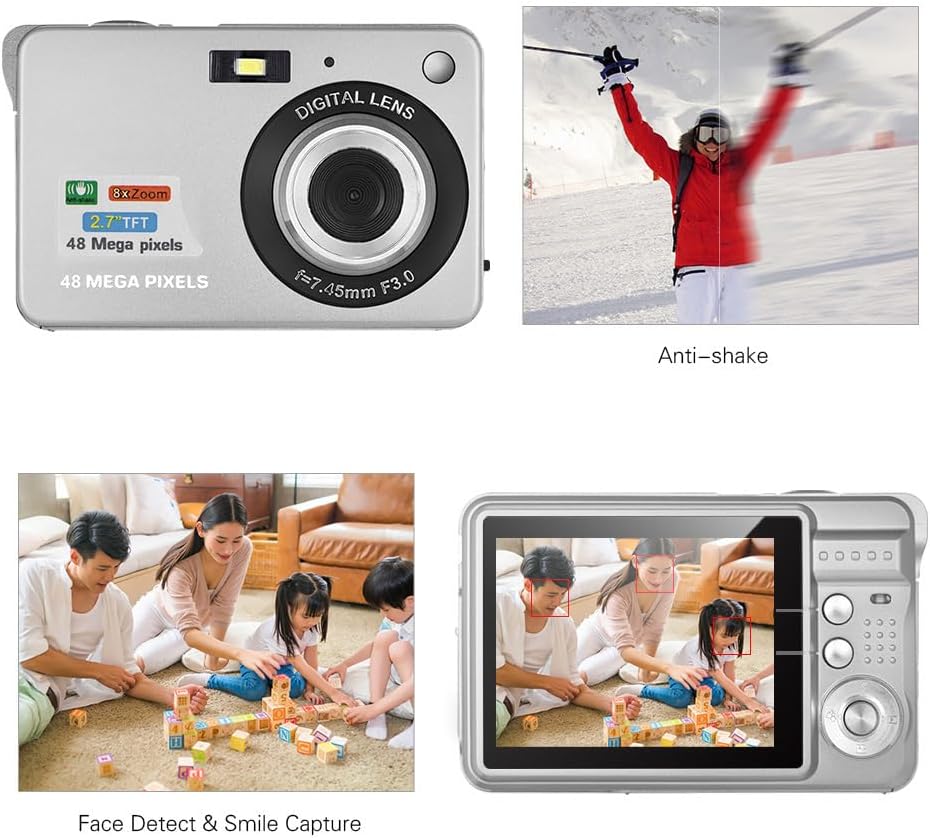
Image: Demonstrations of the camera's Anti-shake function (reducing blur from movement) and Face Detect & Smile Capture (identifying faces and automatically taking a photo when a smile is detected).
- Antivibración: Helps reduce blur caused by camera movement. This feature is typically enabled by default or can be toggled in settings.
- Face Detect & Smile Capture: The camera can detect faces and automatically capture a photo when a smile is detected. Enable these options in the camera's menu.
- Temporizador automático: Set a delay (2, 5, or 10 seconds) before the photo is taken, allowing you to be in the shot.
Modo macro
For close-up photography of small objects.

Image: A close-up photograph of an ant, demonstrating the camera's Macro Mode capability for detailed shots of small subjects.
- Activate Macro Mode through the camera's menu or a dedicated button for close-up shots.
Modo de reprodución
- Press the Playback button to review captured photos and videos on the LCD screen.
- Usa os botóns de navegación para percorrer os teus contidos multimedia.
Conectando a un ordenador
You can transfer photos and videos to a computer using the supplied Type-C USB cable.
- Asegúrate de que a cámara estea acendida.
- Connect one end of the Type-C USB cable to the camera's USB port and the other end to an available USB port on your computer.
- The camera should appear as a removable disk or media device on your computer.
- Open the camera's folder to access and transfer your files.
- Expulsa o dispositivo do ordenador de forma segura antes de desconectar o cable.
Mantemento
- Limpeza: Use a soft, dry cloth to clean the camera body. For the lens and LCD screen, use a specialized lens cleaning cloth and solution. Do not use abrasive cleaners.
- Almacenamento: When not in use for extended periods, remove the battery and store the camera in a cool, dry place, preferably in its carry bag.
- Coidado da batería: Recharge the battery periodically even if not in use to maintain its lifespan.
Resolución de problemas
| Problema | Posible Solución |
|---|---|
| A cámara non se acende. | Asegúrate de que a batería estea completamente cargada e inserida correctamente. |
| Cannot take photos/record videos. | Check if a memory card is inserted and has sufficient free space. Ensure the camera is in the correct mode. |
| As imaxes son borrosas. | Ensure the lens is clean. Hold the camera steady during capture. Check lighting conditions and use flash if necessary. |
| Cámara non recoñecida polo ordenador. | Ensure the USB cable is securely connected. Try a different USB port or restart the computer. |
| A batería esgotarase rapidamente. | Reduce LCD brightness. Limit flash usage. Ensure the camera is powered off when not in use. |
Especificacións
| Característica | Detalle |
|---|---|
| Sensor de imaxe | Sensor CMOS |
| Mostrar | LCD de 2.7 polgadas |
| File Formato | JPEG (Photo), AVI (Video) |
| Resolución de imaxe | Ata 48M (8000x6000) |
| Resolución de vídeo | 1920x1080 (1080P), 1280x720 |
| Zoom dixital | 8X |
| Compensación de exposición | EV-3 to EV+3 |
| Temporizador automático | Apagado / 2 seg / 5 seg / 10 seg |
| Características especiais | Anti-Shake, Face Detect, Smile Capture |
| Fonte de alimentación | 1 * Lithium battery (3.7V 550mAh) |
| Tarxeta de memoria compatible | Class-10 Micro SD, max. 128GB (not included) |
| Interface | Tipo C USB |
| Dimensións (L*W*H) | 9.2 * 6.1 * 1.4 cm / 3.6 * 2.4 * 0.5 inch |
| Peso | 99 g / 3.5 oz |
| Sistema soportado | Windows XP, VISTA, WIN7, MAC |
Garantía e Soporte
This product comes with a standard manufacturer's warranty. Please refer to the warranty card included in your package for specific terms and conditions. For technical support, troubleshooting assistance, or further inquiries, please visit the official Andoer websitio web ou póñase en contacto co seu departamento de atención ao cliente. Garde o recibo da compra como proba de compra para reclamacións de garantía.
Soporte en liña: Visit the Andoer Store on Amazon