
1. Introdución
This manual provides instructions for the proper setup, operation, and maintenance of your Acer B247Y 23.8-inch LED LCD Monitor. Please read this manual thoroughly before using your monitor to ensure optimal performance and to prevent damage.
The Acer B247Y is a 23.8-inch Full HD (1920 x 1080) monitor featuring an IPS panel for wide viewing angles, an anti-glare display, and a frameless design on three sides. It includes multiple connectivity options and an ergonomic stand for comfortable viewing.
2. Contido do paquete
Verifica que todos os artigos estean no teu paquete. Se falta algún artigo ou está danado, ponte en contacto co teu vendedor.
- Acer B247Y 23.8-inch LED LCD Monitor
- Soporte para monitor (base e pescozo)
- Power Adapter (Internal) and Power Cable
- Cable VGA
- Cable DisplayPort 1.2
- Cable HDMI
- Audio-in Cable (if included)
- Audio-out Cable (if included)
- Manual de usuario (este documento)
3. Configuración
3.1 Montaxe do soporte do monitor
The monitor comes with a detachable foot stand. Follow these steps to assemble:
- Retire con coidado os compoñentes do monitor e do soporte da embalaxe.
- Fixe o colo do soporte ao panel do monitor. Asegúrate de que encaixa firmemente no seu lugar.
- Attach the stand base to the stand neck. Tighten any screws if provided, usually located on the underside of the base.
- Coloque o monitor montado sobre unha superficie estable e plana.
Nota: The monitor also supports VESA mount (100 x 100 mm) for wall or arm mounting. Refer to your VESA mount kit instructions for installation.
3.2 Conectar o monitor
Conecte o monitor ao seu ordenador ou a outros dispositivos utilizando os cables axeitados.
- Conexión de vídeo:
- Connect one end of the DisplayPort cable to the DisplayPort output on your computer and the other end to the DisplayPort input on the monitor.
- Alternatively, connect an HDMI cable from your computer's HDMI output to the monitor's HDMI input.
- For older systems, connect a VGA cable from your computer's VGA output to the monitor's VGA input.
- Conexión de audio:
- If using VGA or DisplayPort without audio, connect an audio cable from your computer's audio output to the monitor's audio-in port for integrated speakers.
- To connect external speakers or headphones, use the monitor's audio-out port.
- Conexión de alimentación:
- Conecta o cable de alimentación á entrada de alimentación do monitor e, a seguir, conecta o outro extremo a unha toma de corrente con conexión a terra.

Figure 3.2.1: Acer B247Y Monitor with Stand. This image illustrates the overall appearance of the monitor when fully assembled on its stand.
4. Instrucións de funcionamento
4.1 Acendido/Apagado
Press the power button, usually located on the bottom right or rear of the monitor, to turn the monitor on or off. The power indicator light will illuminate when the monitor is on.
4.2 Adjusting Monitor Settings (OSD)
The monitor features an On-Screen Display (OSD) menu for adjusting various settings. Use the control buttons (typically located near the power button) to navigate and select options within the OSD menu.
A configuración OSD común inclúe:
- Imaxe: Brightness, Contrast, Color Temperature, Gamma, Acer eColor Management modes (e.g., Dark Room, Eco).
- Audio: Volume control for integrated speakers or audio-out.
- Entrada: Select the active video input source (VGA, DisplayPort, HDMI).
- OSD: Tempo de espera da OSD, idioma.
- Xestión: Restablecer os valores predeterminados de fábrica.
4.3 Axustes ergonómicos
The Acer B247Y monitor stand offers several ergonomic adjustments to optimize your viewexperiencia:
- Inclinación: Adjust the screen angle from -5 degrees to 25 degrees (forward/backward).
- Xiratorio: Rotate the monitor horizontally up to +/- 45 degrees.
- Axuste de altura: Axusta a altura da pantalla ata 120 mm.
- Pivote: Xira a pantalla 90 graos para o modo vertical viewing.
5. Mantemento
Un mantemento axeitado garante a lonxevidade e o rendemento óptimo do teu monitor.
- Limpeza da pantalla: Limpe a pantalla con suavidade cun pano suave e sen pelusa. Para marcas difíciles,ampen the cloth with a small amount of water or a non-abrasive screen cleaner. Do not spray liquid directly onto the screen.
- Limpeza do Casing: Use un pano suave e seco para limpar o monitor casing. Evite o uso de deterxentes fortes ou produtos de limpeza abrasivos.
- Ventilación: Asegúrate de que as aberturas de ventilación do monitor non estean bloqueadas para evitar o sobrequecemento.
- Apagado: Apague sempre o monitor e desconécteo da toma de corrente antes de limpalo ou cando non o use durante períodos prolongados.
6 Solución de problemas
Se tes problemas co monitor, consulta os seguintes pasos habituais para a resolución de problemas:
- No Power / Monitor Does Not Turn On:
- Ensure the power cable is securely connected to both the monitor and a working electrical outlet.
- Verifica que a toma de corrente funcione conectando outro dispositivo.
- Prema firmemente o botón de acendido.
- No Image / "No Signal" Message:
- Check that the video cable (DisplayPort, HDMI, or VGA) is securely connected to both the monitor and your computer.
- Asegúrate de que o teu ordenador estea acendido e non en modo de suspensión.
- Use o menú OSD para seleccionar manualmente a fonte de entrada correcta.
- Proba cun cable ou porto de vídeo diferente se está dispoñible.
- Image is Distorted or Unclear:
- Ensure the display resolution on your computer is set to the monitor's native resolution (1920 x 1080).
- Adjust brightness, contrast, and other picture settings via the OSD menu.
- Check for any physical damage to the screen or cables.
- Sen son dos altofalantes:
- Increase the volume using the OSD menu or your computer's sound settings.
- Ensure the audio cable (if used) is properly connected.
- Comprobe que o dispositivo de saída de son correcto estea seleccionado na configuración de son do seu ordenador.
7. Especificacións
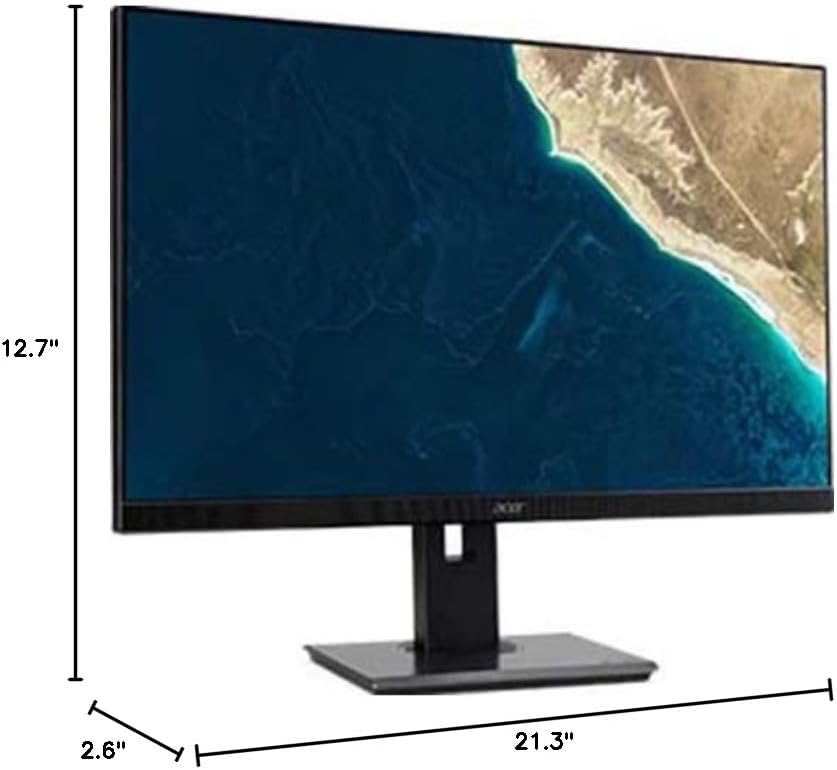
Figure 7.1.1: Acer B247Y Monitor Dimensions. This image shows the approximate height (12.7"), width (21.3"), and depth (2.6") of the monitor without the stand.
| Característica | Especificación |
|---|---|
| Número de modelo | B247Y |
| Tamaño da pantalla | 23.8 polgadas (60.5 cm) |
| Tipo de visualización | LED LCD, IPS Panel, Anti-glare (AG) |
| Resolución máxima | 1920 x 1080 (Full HD) |
| Relación de aspecto | 16:9 |
| Taxa de actualización | 75 Hz |
| Tempo de resposta | 4ms (gray-to-gray) |
| Brillo (típico) | 250 cd/m² |
| Ratio de contraste nativo | 1,000:1 |
| Relación de contraste dinámico | 100,000,000:1 |
| ViewÁngulos variables (H/V) | 178° / 178° |
| Conectividade | VGA, DisplayPort 1.2, HDMI, Audio-in, Audio-out |
| Altofalantes integrados | 2 x 2.0 W |
| Axustes ergonómicos | Tilt (-5° to 25°), Swivel (+/- 45°), Height Adjustment (120mm), Pivot (90°) |
| VESA Mount Support | 100 x 100 mm |
| Dimensións con soporte (ancho x alto x prof.) | 21.3" x 14.9"~19.6" x 7.6" (54.0cm x 37.9cm~49.9cm x 19.3cm) |
| Peso con soporte | 12.3 kg (5.6 lb) |
| Adaptador de alimentación | Interno |
| Cor | Negro |
8. Garantía e soporte
Your Acer B247Y monitor comes with a Limited Three-Year Warranty. Please retain your proof of purchase for warranty claims.
For technical support, service, or warranty inquiries, please refer to the official Acer support website or contact their customer service department. Contact information can typically be found on the Acer websitio web ou na tarxeta de garantía incluída co produto.
Bloqueo Kensington: The monitor supports a Kensington lock for security. Attach a compatible Kensington lock (sold separately) to the security slot on the monitor to deter theft.