
1. Introdución
This manual provides essential information for the safe and efficient operation of your Zerone 10.8V-12V Lithium Battery Charger. This charger is designed for use with 10.8V to 12V Lithium-Ion batteries, offering quick and reliable charging. Please read this manual thoroughly before first use and retain it for future reference.

Image 1: The Zerone 10.8V-12V Lithium Battery Charger, showing its compact design and universal compatibility label.
2. Instrucións de seguridade
Always observe the following safety precautions to reduce the risk of electric shock, fire, or serious injury:
- Le todas as instrucións: Antes de usar o cargador, lea todas as instrucións e as marcas de precaución do cargador, da batería e do produto que utiliza a batería.
- Só para uso en interiores: Non expoña o cargador a choivas nin a condicións de humidade.
- Vol. Axeitadotage: Asegúrese de que a fonte de alimentación voltage coincide co voltagespecificado na placa de características do cargador.
- Evitar danos: Non poñas en marcha o cargador se recibiu un golpe forte, se caeu ou sufriu algún outro dano. Lévao a un técnico de servizo cualificado.
- Ventilación: Do not block any ventilation openings. Ensure adequate airflow around the charger during operation.
- Desenchufe cando non estea en uso: Always unplug the charger from the power outlet before attempting any maintenance or cleaning, and when not in use.
- Use specified batteries: Only charge batteries specifically designed for this charger. Charging other battery types may cause them to burst, leading to personal injury and damage.
- Non curtocircuíte: Nunca cortocircuite os terminais da batería.
- Manter lonxe dos nenos: Este aparello non está pensado para o seu uso por persoas (incluídos nenos) con capacidades físicas, sensoriais ou mentais reducidas, ou con falta de experiencia e coñecementos, a menos que teñan supervisión ou instrucións sobre o uso do aparello por unha persoa responsable da súa seguridade.
3. Contido do paquete
Verificar que todos os elementos estean presentes e en bo estado:
- 1 x Zerone 10.8V-12V Lithium Battery Charger
- 1 x Manual de usuario
4. Características do produto
The Zerone 10.8V-12V Lithium Battery Charger offers the following key features:
- Compatibilidade universal: Specifically designed for 10.8V to 12V Lithium-Ion batteries.
- Indicador LED: Built-in LED display provides intuitive monitoring of battery status.
- Xestión de carga intelixente: Utilizes a 'first in, first charged' system and protects against overload.
- Carga rápida: Capable of charging a 12V Lithium-Ion 1.5Ah battery in approximately 50 minutes.
- Ampla compatibilidade de modelos: Compatible with models such as DC10WD, DC10SB, DC10WC, BL1015, BL1016, BL1021B, and BL1041B.

Image 2: The charger displaying its compatibility with various battery models, including DC10WD, DC10SB, DC10WC, BL1015, BL1016, BL1021B, and BL1041B.
5. Configuración
Follow these steps to set up your battery charger:
- Desempaquetar o cargador: Carefully remove the charger and all components from the packaging.
- Conectar á enerxía: Plug the charger's power cord into a standard 100V-260V AC electrical outlet. The charger's LED indicator will flash green once to confirm power connection.
- Prepare Battery: Ensure the battery to be charged is clean and free from debris.
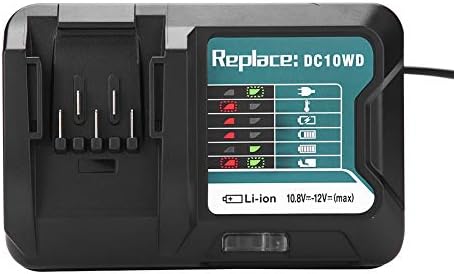
Image 3: The Zerone charger with its integrated power cord, ready for connection to an electrical outlet.
6. Instrucións de funcionamento
Para cargar unha batería:
- Inserir batería: Align the battery with the charger's slot and slide it in until it clicks securely into place.
- Carga do monitor: The LED indicator will show the charging status. Refer to the "LED Indicator Guide" section for detailed explanations of the light patterns.
- Carga completada: Once the battery is fully charged, the LED indicator will show a solid green light.
- Eliminar batería: Press the release button on the battery (if applicable) and slide it out of the charger.
- Desconectar o cargador: Desconecte o cargador da toma de corrente cando non estea en uso.

Image 4: The Zerone charger with a compatible lithium-ion battery inserted, ready for charging.
7. Guía do indicador LED
The charger features an LED display to communicate the battery's status:
| Luz indicadora | Estado |
|---|---|
| Verde intermitente | Charger is plugged in and ready. |
| Intermitente vermello | Battery is in cooling mode. Charging will begin once the battery temperature is within the optimal range. |
| Red Sustained Light | Battery is currently charging (0-100%). |
| Green Sustained Light | Charging is completed. The battery is fully charged. |
| Red and Green Flashing | Indicates a defective battery pack or charger. |

Imaxe 5: Primeiro plano view of the charger's LED indicator panel, detailing the meaning of each light pattern for battery status.
8. Mantemento
Proper maintenance ensures the longevity and performance of your charger:
- Limpeza: Desconecte o cargador da fonte de alimentación antes de limpalo. Use un pano seco e suave para limpar o exterior do cargador. Non empregue auga nin produtos de limpeza químicos.
- Almacenamento: Garde o cargador nun lugar seco e fresco, lonxe da luz solar directa e da humidade.
- Inspeccionar regularmente: Periodically inspect the charger and its cord for any signs of damage. If damage is found, discontinue use and seek professional repair.
9 Solución de problemas
Se tes problemas co cargador, consulta os seguintes problemas e solucións comúns:
- O cargador non se acende:
- Ensure the power cord is securely plugged into both the charger and a working electrical outlet.
- Comprobe a toma de corrente con outro dispositivo para confirmar que funciona.
- Battery not charging (Red Flashing LED):
- The battery may be too hot or too cold. Allow the battery to reach room temperature before attempting to charge again. Charging will automatically resume once the temperature is optimal.
- Battery not charging (Red and Green Flashing LED):
- This indicates a defective battery or charger. Try charging a different, known-good battery. If the issue persists, the charger may be faulty. If only the original battery causes this, the battery is likely defective.
- Carga lenta:
- Ensure the battery is fully seated in the charger.
- Verify that the battery is compatible with this charger.
Se estes pasos non resolven o problema, ponte en contacto co servizo de atención ao cliente.
10. Especificacións
| Especificación | Detalle |
|---|---|
| Número de modelo | Zeronegfvetp6dn8-01 |
| Vol. De entradatage | 100 V-260 V CA, 50-60 Hz |
| Vol. De saídatage | 10.8 V-12 V (CC) |
| Dimensións do produto | 4.72 x 1.97 x 5.91 polgadas |
| Peso do elemento | 11.6 onzas (0.33 quilogramos) |
| Fabricante | Cero |
| Tipos de batería compatibles | 10.8V-12V Lithium-Ion (e.g., BL1015, BL1016, BL1021B, BL1041B) |
| Modelos de cargadores compatibles | DC10WD, DC10SB, DC10WC |

Image 6: The bottom view of the Zerone charger, showing its input/output specifications and model number.
11. Garantía e soporte
For warranty information or technical support, please refer to the documentation provided with your purchase or contact Zerone customer service through the retailer where the product was purchased. Keep your purchase receipt as proof of purchase.