
Introdución
This manual provides essential instructions for the safe and efficient use of your Maxcom MM134 2G Senior Mobile Phone. Please read this manual thoroughly before operating the device and keep it for future reference.
1. Configuración
1.1 Contido do paquete
Asegúrate de que todos os elementos estean presentes na caixa:
- Maxcom MM134 Mobile Phone
- Batería (ion de litio)
- Cargador
- Cable USB
- Auriculares
- Manual de usuario
1.2 Inserción da tarxeta SIM e da batería
- Retire a tapa traseira do teléfono.
- Insert your SIM card into the designated slot. The MM134 supports a single SIM card.
- If using, insert a Micro SD card (up to 32GB) into its slot.
- Insert the Lithium-ion battery, ensuring the contacts align correctly.
- Volva colocar a tapa traseira ata que encaixe no seu lugar.
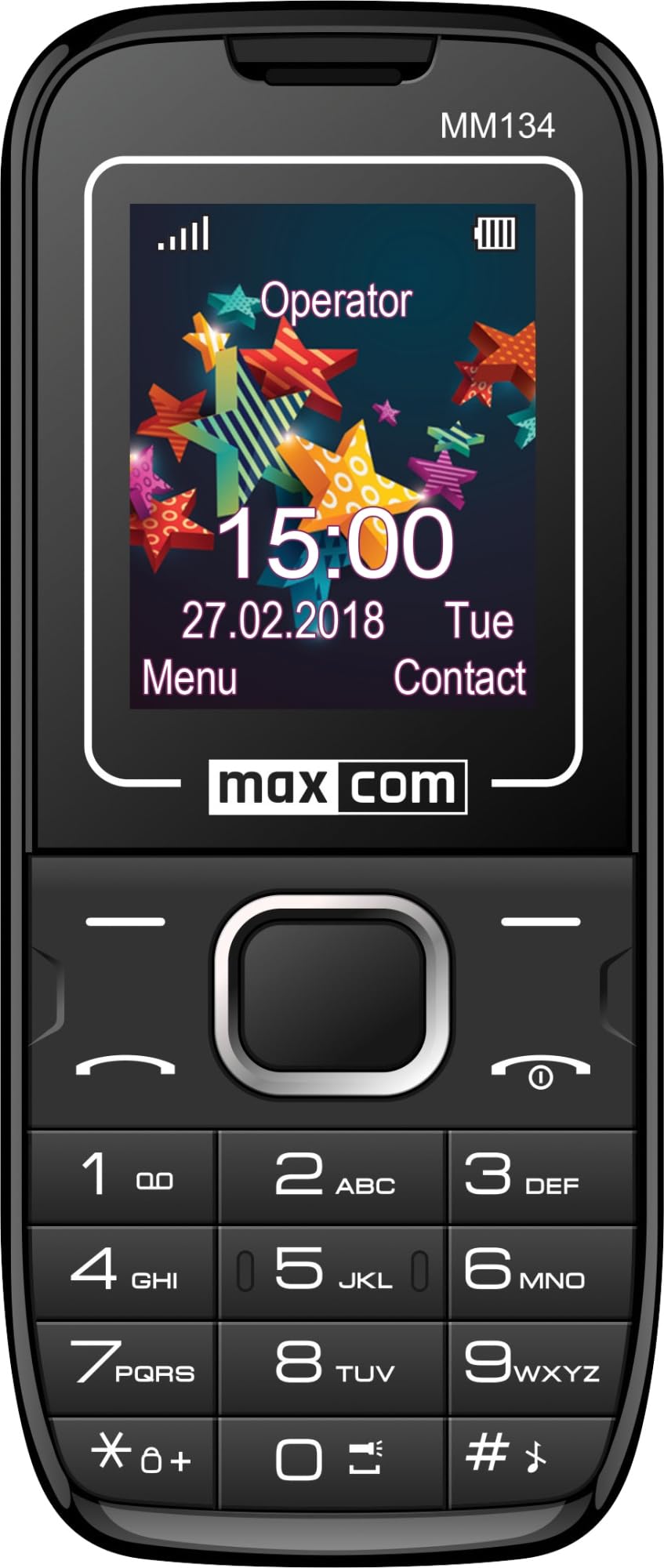
Image 1: Maxcom MM134 2G Senior Mobile Phone. This image shows the front of the phone, highlighting its compact design, screen, and large, easy-to-use buttons.
1.3 Cargar o teléfono
Connect the charger to the phone's charging port and plug it into a power outlet. The battery indicator on the screen will show charging status. Fully charge the phone before first use. The battery capacity is 800 mAh.
1.4 Acendido/Apagado
- Para acender: Manteña prema o botón Acender/Finalizar chamada botón ata que se ilumine a pantalla.
- Para apagar: Manteña premido o botón Acender/Finalizar chamada button, then confirm shutdown.
2. Instrucións de funcionamento
2.1 Facer e recibir chamadas
- To make a call: Enter the phone number using the keypad and press the Chamar botón.
- To answer a call: Press the Chamar botón cando soa o teléfono.
- Para finalizar unha chamada: Prema a tecla Acender/Finalizar chamada botón.
2.2 Contacts (Phonebook)
The phonebook can store up to 500 entries. Navigate to the "Contacts" menu to add, edit, or delete entries.
2.3 Envío e recepción de mensaxes SMS
The phone can store up to 200 SMS messages. Access the "Messages" menu to compose new messages or view received ones.
2.4 Conectividade Bluetooth
To enable Bluetooth, go to the "Settings" menu, then "Connectivity" or "Bluetooth". You can pair with other Bluetooth-enabled devices for hands-free communication or file Transferir.
2.5 Radio FM
Plug in the headset (which acts as an antenna) to use the FM Radio function. Navigate to the "FM Radio" application in the menu to scan for stations.
2.6 Lanterna
The phone features a built-in flashlight. Typically, this can be activated by a dedicated button or through a quick access menu option.
2.7 Cámara
The phone is equipped with a rear camera (0.08 MP). Access the "Camera" application from the main menu to take photos. Photos will be saved to the phone's memory or the inserted Micro SD card.
3. Mantemento
3.1 Coidado coa batería
- Evite expor a batería a temperaturas extremas.
- Non fures nin danes a batería.
- Use only the original charger provided with the phone.
- If the phone will not be used for an extended period, charge it partially before storage and recharge every few months.
3.2 Limpeza
Wipe the phone with a soft, dry cloth. Do not use liquid cleaners or aerosols. The phone is not water-resistant.
4 Solución de problemas
| Problema | Solución |
|---|---|
| O teléfono non se acende | Asegúrate de que a batería estea inserida e cargada correctamente. Conecta o cargador e inténtao de novo. |
| Sen sinal de rede | Check if the SIM card is properly inserted. Move to an area with better network coverage. Contact your service provider if the issue persists. |
| Non se poden facer nin recibir chamadas | Verifica que a túa tarxeta SIM estea activa e teña crédito/plan suficiente. Comproba a intensidade do sinal da rede. |
| A batería esgotarase rapidamente | Reduce screen brightness. Close unused applications. Limit background data usage. Ensure the battery is not old or damaged. The phone has a talk time of approximately 6 hours. |
5. Especificacións
| Nome do modelo | Classic MM134 |
| Marca | Maxcom |
| Sistema Operativo | Symbian |
| Tecnoloxía Celular | 2G (GSM 900/1800 MHz) |
| Tecnoloxía de conectividade | Bluetooth, USB |
| Tamaño da pantalla | 1.77 polgadas (LCD) |
| Modelo CPU | Cortex (1.8 GHz) |
| Descrición da cámara | Rear (0.08 MP) |
| Tipo de batería | Ion de litio |
| Capacidade da batería | 800 mAh |
| Tempo de conversa | Ata 6 horas |
| SMS Memory | Ata 200 mensaxes |
| Capacidade da axenda telefónica | Ata 500 entradas |
| Soporte para tarxetas Micro SD | Ata 32 GB |
| Ranuras para tarxetas SIM | SIM única |
| Dimensións | 13 x 52 x 111 mm |
| Conector para auriculares | Jack de 3.5 mm |
| Resistencia á auga | Non |
6. Garantía e soporte
For warranty information and technical support, please refer to the warranty card included in your product package or visit the official Maxcom websitio. Garda o comprobante de compra para reclamacións de garantía.