
Introdución
This manual provides essential information for the setup, operation, maintenance, and troubleshooting of your Moog One 8-Voice Analog Synthesizer. Please read this guide thoroughly to ensure proper use and to maximize your experience with this instrument.

Image: The Moog One 8-Voice Analog Synthesizer, showcasing its full keyboard and control panel from a front-angle perspective.
Configuración
Unboxing e Colocación
Carefully remove the synthesizer from its packaging. Ensure the unit is placed on a stable, flat surface. Avoid locations with extreme temperatures, humidity, or direct sunlight. Allow adequate ventilation around the instrument.
Conexión de alimentación
Connect the provided power cable to the synthesizer's power input and then to a grounded electrical outlet. Ensure the power switch is in the OFF position before connecting. The Moog One operates on standard AC power.
Audio and USB Connections
- Saída de audio: Connect the main audio outputs (Left/Mono, Right) to your mixer, audio interface, or amplificador usando cables TS estándar de 1/4 de polgada.
- USB: The Moog One features a USB connector for MIDI communication and data transfer with a computer. Connect a standard USB-B to USB-A cable between the synthesizer and your computer.
- MIDI: Traditional 5-pin DIN MIDI In, Out, and Thru ports are available for connecting to other MIDI hardware.
Instrucións de funcionamento
Powering On and Initial Boot
Once all connections are secure, flip the power switch to the ON position. The synthesizer will undergo a brief boot sequence. The display screen will show the Moog logo and then transition to the main preset browsing interface.

Imaxe: Primeiro plano view of the Moog One's central display screen, showing the preset selection menu with various sound categories.
Controis básicos e navegación
The Moog One features a comprehensive control panel with dedicated knobs and buttons for various parameters. The central display and navigation controls allow for browsing presets, adjusting global settings, and managing system functions.
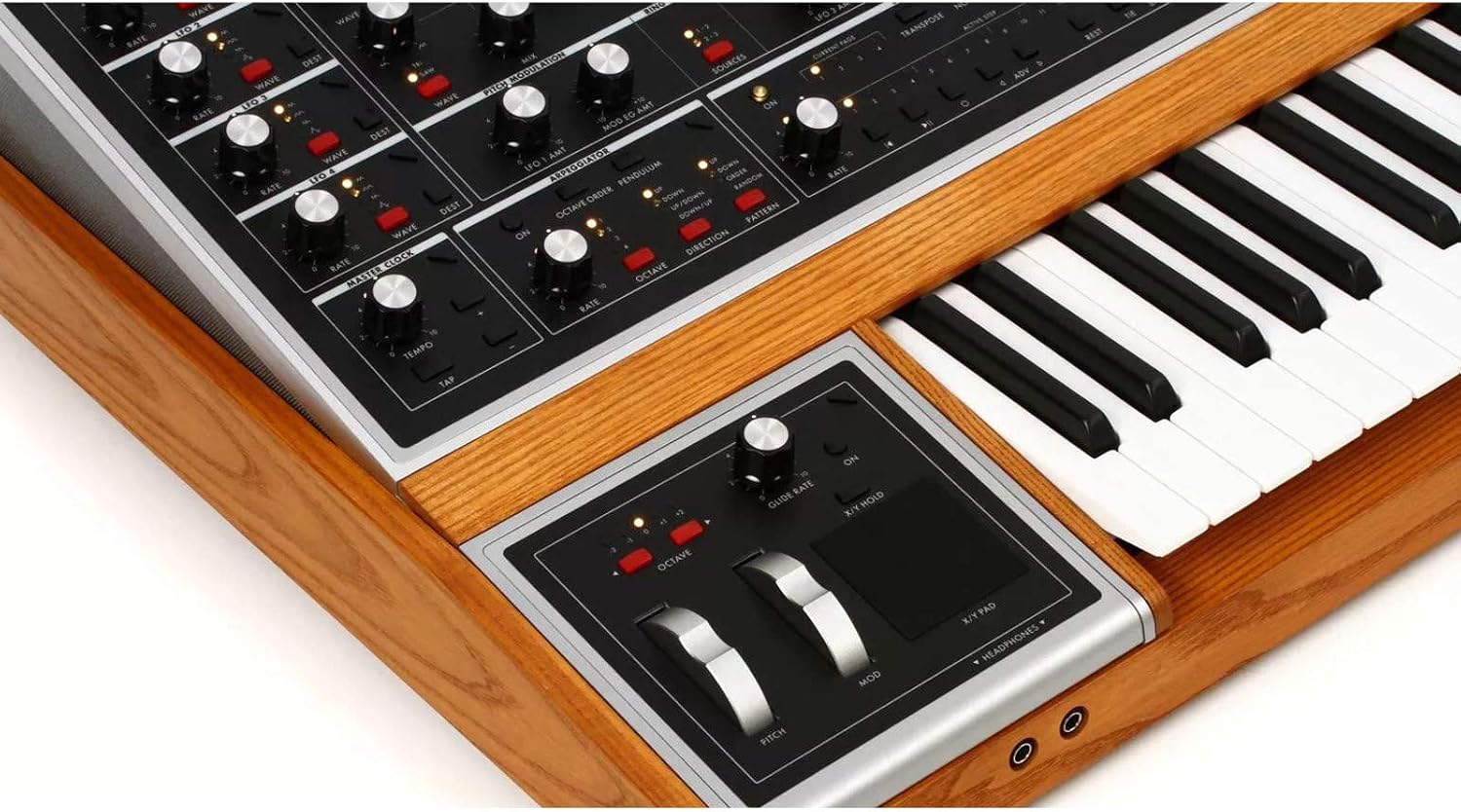
Image: Detail of the Moog One's left-hand controller section, featuring pitch bend and modulation wheels, along with headphone output jacks.
Sound Synthesis Overview
The Moog One is an 8-voice analog synthesizer with three voltage-controlled oscillators (VCOs) per voice, two independent analog filters, and a comprehensive modulation matrix. Each voice can be layered or split across the keyboard.
- Osciladores: Each oscillator offers multiple waveforms (triangle, sawtooth, square, pulse) and can be tuned, modulated, and synced.
- Filtros: Two types of filters are available: a State Variable Filter (SVF) and a classic Moog Ladder Filter. These can be used in series or parallel.
- Sobres: Multiple ADSR envelopes control the amplitude, filter cutoff, and other parameters.
- LFOs: Four Low-Frequency Oscillators provide extensive modulation capabilities for creating dynamic and evolving sounds.

Imaxe: Unha detallada view of the Moog One's oscillator, ring modulation, and pitch modulation sections, showing numerous control knobs and switches.
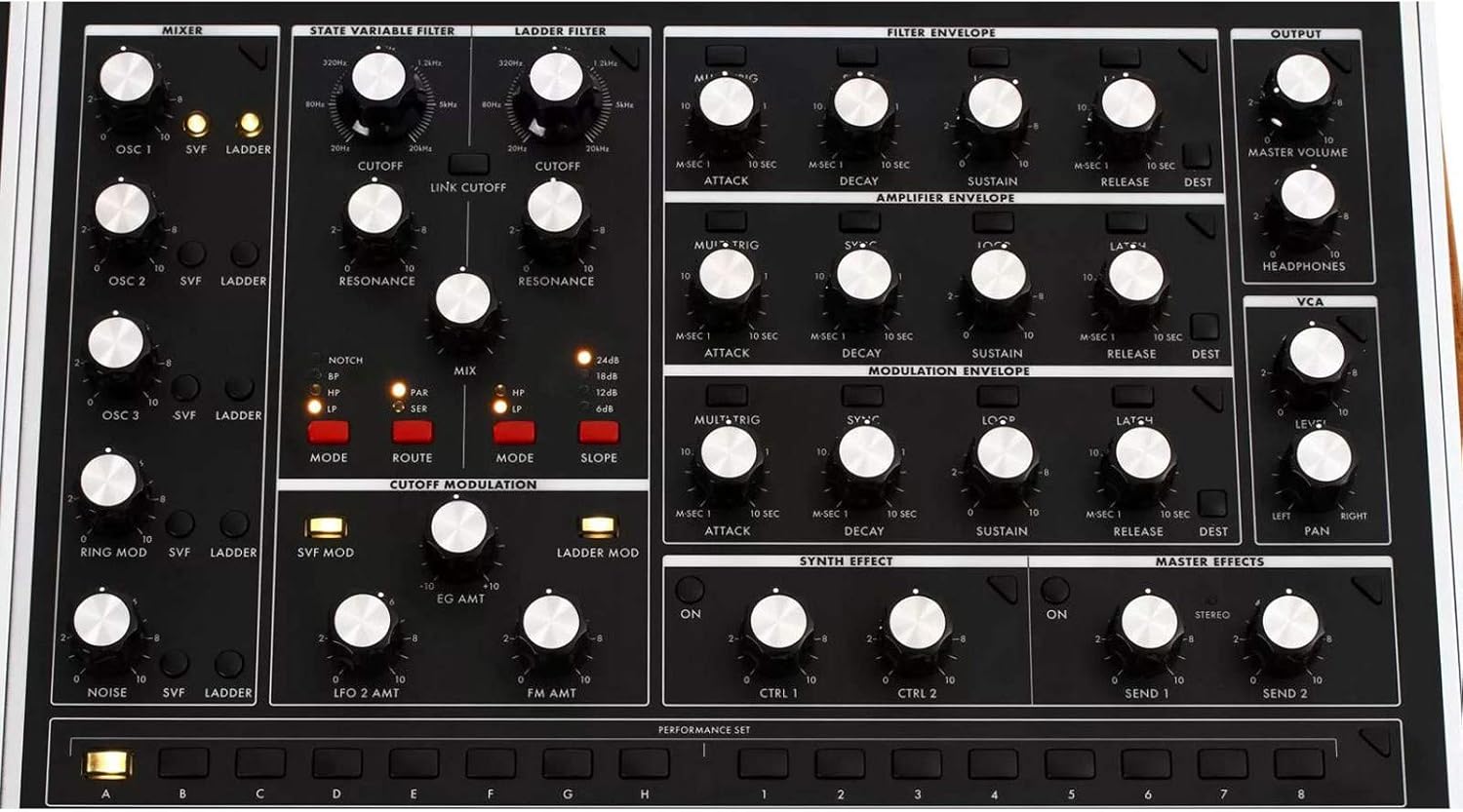
Image: Close-up of the Moog One's filter, envelope generators (Amplifier and Modulation), and master effects sections, highlighting the array of controls.

Imaxe: Unha detallada view of the Moog One's master clock, arpeggiator, and sequencer controls, including rate, octave, and pattern settings.
Gardando e cargando presets
The Moog One allows users to save custom sounds as presets. Use the navigation controls around the display to access the 'Save' function. Presets can be organized and recalled from the 'Presets' menu.
Mantemento
Limpeza
To clean the exterior of your Moog One, use a soft, dry, lint-free cloth. For stubborn marks, a slightly damp cloth with mild soap can be used, ensuring no liquid enters the controls or openings. Avoid abrasive cleaners or solvents.
Actualizacións de software
Periodically check the official Moog website for firmware updates. Updates can provide new features, performance enhancements, and bug fixes. Follow the instructions provided with the update package carefully.
Resolución de problemas
- Sen son:
- Comprobe todas as conexións dos cables de son.
- Asegúrate de que o volume principal estea ao máximo.
- Verify that the correct audio output is selected on your mixer/interface.
- Confirm that a preset is loaded and not muted.
- MIDI non responde:
- Check MIDI cable connections (In/Out).
- Verify MIDI settings on both the Moog One and the connected device/software.
- Ensure the correct USB port is selected if using USB MIDI.
- Problemas de visualización:
- If the display is frozen, try restarting the unit.
- Asegúrese de que a fonte de alimentación é estable.
Especificacións
| Característica | Detalle |
|---|---|
| Marca | MOOG |
| Nome do modelo | MOG-ONE |
| Número de modelo do artigo | MOG-ONE-001 |
| Peso do elemento | 22.05 libras (10 kg) |
| Dimensións do produto (L x W x H) | 39.37 x 19.69 x 9.84 polgadas (100 x 50 x 25 cm) |
| Material do corpo | Metal |
| Tipo de conector | USB |
| UPC | 040232238918 |
| Fabricante | Moog Music |
| Data de primeira dispoñibilidade | 24 de setembro de 2019 |
Información da garantía
The Moog One 8-Voice Analog Synthesizer is covered by a manufacturer's warranty against defects in materials and workmanship. Specific warranty terms and duration may vary by region. Please retain your proof of purchase. For detailed warranty information, refer to the documentation included with your product or visit the official Moog Music websitio.
Apoio
For technical assistance, product registration, or further inquiries, please visit the official Moog Music support page or contact their customer service department. You can find more information and resources on the MOOG Store on Amazon or the official Moog Music websitio.