
Defiant 9a843b7d-eaac-472e-b6d2-4b1006f6f6a5
Defiant Electronic Deadbolt Door Lock
Model: 9a843b7d-eaac-472e-b6d2-4b1006f6f6a5
Acabado bronce envellecido
Introdución
This manual provides detailed instructions for the installation, operation, and maintenance of your Defiant Electronic Deadbolt Door Lock. Please read this manual thoroughly before installation and use to ensure proper function and safety.
The Defiant Electronic Deadbolt offers convenient keyless access with a touch keypad, along with the security of a traditional mechanical key. It is designed for use on garage, entry, home office, computer room, or utility room doors.
Información de seguridade
Always follow basic safety precautions when installing and operating this product to reduce the risk of injury or damage.
- Non intente desmontar nin modificar o peche máis alá das instrucións proporcionadas neste manual.
- Use only the specified battery type (not included).
- Keep keys in a secure location away from the lock.
- Asegúrese de que todos os compoñentes estean fixados de forma segura durante a instalación.
Contido do paquete
Comprobe que estean presentes todas as pezas antes de comezar a instalación:
- Montaxe de teclado exterior
- Interior Assembly with Thumb Turn
- Pestillo de pestillo
- Placa de folga
- Parafusos de montaxe
- Chaves (2)
- Modelo de instalación (se corresponde)

Image: Included components such as keys, strike plate, and the cylinder housing.
Guía de instalación
Ferramentas necesarias: Philips screwdriver (included), measuring tape, pencil.
- Prepara a porta: Ensure your door has the standard bore holes for a deadbolt. If not, use the provided template (if applicable) to drill necessary holes.
- Instalar o pestillo: Insert the deadbolt latch into the edge of the door. Ensure the "UP" arrow on the latch is pointing upwards. Secure with screws.
- Instalar o teclado exterior: Feed the cable from the exterior keypad through the cross bore hole. Align the keypad with the latch and press it firmly against the door.
- Instalación do conxunto interior: Connect the cable from the exterior keypad to the interior assembly. Align the interior assembly with the mounting posts from the exterior keypad and secure with screws. Ensure the thumb turn operates smoothly.
- Instalar a placa de peche: Install the strike plate on the door frame, aligning it with the deadbolt latch. Secure with screws.
- Inserir pilas: Abra a tapa das pilas no interior e insira 4 pilas AA (non incluídas), respectando a polaridade.
- Proba de funcionamento: Test the lock with the mechanical key and by entering a default code (if any) or a newly programmed code.
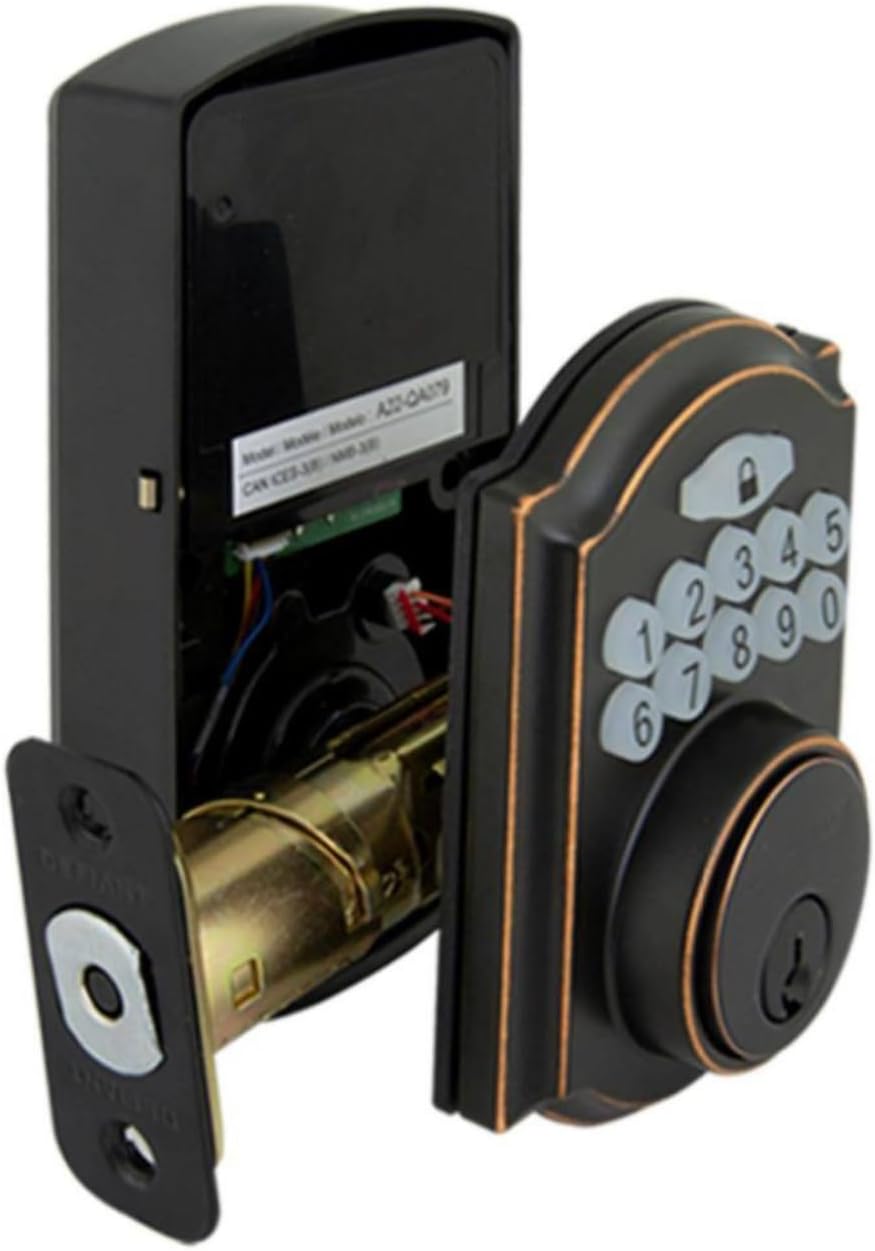
Image: The electronic deadbolt assembly, showing the interior mechanism and exterior keypad.

Imaxe: Exterior view of the electronic deadbolt installed on a door, showcasing the keypad.
Instrucións de funcionamento
Programación de códigos de usuario
The lock can hold up to 10 user codes and 5 single-entry codes.
- Entrar no modo de programación: Locate the program button on the interior assembly (usually on the battery cover or near the battery compartment). Press it once. The keypad will illuminate.
- Engadir novo código de usuario: Enter your desired 4-digit user code. Press the Lock button (padlock icon) to confirm. The lock will beep to confirm successful programming.
- Eliminar código de usuario: Enter programming mode. Enter the 4-digit user code you wish to delete. Press the Lock button. The lock will beep to confirm deletion.
Bloqueo e desbloqueo
- Para desbloquear: Enter your 4-digit user code on the keypad. The keypad will illuminate, and the deadbolt will retract after a few seconds.
- To Lock (from outside): Press the Lock button (padlock icon) on the keypad. The deadbolt will extend after a few seconds.
- To Lock (from inside): Xire a polgada do conxunto interior á posición de bloqueo.
Función de bloqueo automático
The lock features an auto-lock function with an adjustable delay from 10 to 99 seconds. Refer to the full programming guide (usually a separate sheet or detailed section in the manual) for instructions on enabling and adjusting this feature.

Image: Close-up of the electronic keypad for code entry.
Mantemento
- Limpeza: Limpar a fechadura cun pano suaveamp pano. Evite produtos de limpeza abrasivos ou solventes que poidan danar o acabado ou os compoñentes electrónicos.
- Substitución da batería: When the battery indicator light flashes or the lock makes a low battery warning sound, replace all four AA batteries. Use only new, high-quality alkaline batteries.
- Lubricación: Periodically lubricate the deadbolt mechanism with a silicone-based lubricant to ensure smooth operation. Do not lubricate the keypad.
Resolución de problemas
| Problema | Causa posible | Solución |
|---|---|---|
| O teclado non se acende. | Pilas gastadas ou instalación incorrecta das pilas. | Substitúa as pilas, asegurándose de que a polaridade sexa correcta. |
| Lock does not respond to code. | Incorrect code entered, code not programmed, or lock is jammed. | Verify code, reprogram code, check for obstructions in door frame or latch. |
| O cerrojo non se estende/retrae completamente. | Misalignment of strike plate or latch, low battery. | Adjust strike plate, replace batteries. |
| O bloqueo emite un pitido continuo. | Aviso de batería baixa. | Substitúa as pilas inmediatamente. |
Especificacións
- Marca: Desafiante
- Número de modelo: 9a843b7d-eaac-472e-b6d2-4b1006f6f6a5
- Tipo de bloqueo: Pistola electrónica
- Material: Bronce
- Estilo: Moderno
- Característica especial: Keyless Entry, Back-up Mechanical Key
- Códigos de usuario: Ata 10
- Single Entry Codes: Ata 5
- Retardo de bloqueo automático: 10-99 segundos (axustable)
- Fonte de enerxía: 4 pilas AA (non incluídas)
- Peso do artigo: 2.26 libras
- Dimensións do paquete: 7.48 x 5.51 x 4.61 polgadas
- UPC: 050134991163
Garantía e Soporte
For warranty information or technical support, please refer to the official Defiant websitio web ou póñase en contacto co servizo de atención ao cliente. Garde o recibo de compra para reclamacións de garantía.
Recursos en liña: Visit the Defiant websitio para preguntas frecuentes, guías adicionais e rexistro de produtos.
Atención ao cliente: Contact Defiant customer support for assistance with installation, programming, or troubleshooting issues.
Ask a question about this manual
Ask about setup, troubleshooting, compatibility, parts, safety, or missing instructions. Manuals+ will review the question and use this page’s manual context to help answer it.