
1. Introdución
The Zerone Sport Action DV Camera is a compact and portable device designed for capturing high-definition video during various outdoor activities. Featuring 1080P and 720P recording options, a 120-degree wide-angle lens, and an IPX-4 waterproof aluminum alloy shell, this camera is built for durability and ease of use. It includes a built-in microphone for audio recording and provides vibration feedback for operational status.
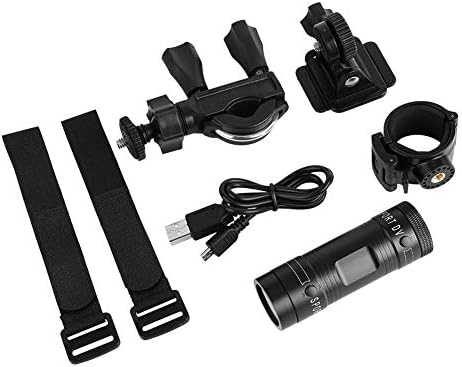
Image 1.1: The Zerone Sport Action DV Camera unit.
2. Información de seguridade
- Non expoña a cámara a temperaturas extremas nin á luz solar directa durante períodos prolongados.
- While the camera features an IPX-4 waterproof rating, it is designed to withstand splashes and light rain. Do not submerge or soak the camera in water.
- Manteña o dispositivo lonxe de campos magnéticos fortes.
- Use only the specified charging cable and power adapter to prevent damage.
- Non intente desmontar nin modificar a cámara, xa que isto anulará a garantía e podería causar danos.
- Store the camera in a dry, cool place when not in use.
3. Contido do paquete
Comprobe o paquete para asegurarse de que conteñan todos os elementos:
- Zerone Sport Action DV Camera Unit
- Cable de carga USB
- Mounting Accessories (e.g., bike mount, helmet mount, strap mounts)
- Rechargeable Battery (may be pre-installed)
- Manual de usuario (este documento)
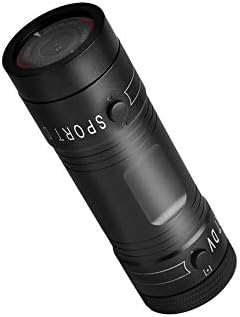
Image 3.1: Contents of the Zerone Sport Action DV Camera package, showing the camera, USB cable, and various mounting options.
4. Cámara rematadaview
Familiarízate cos compoñentes e controis da cámara.
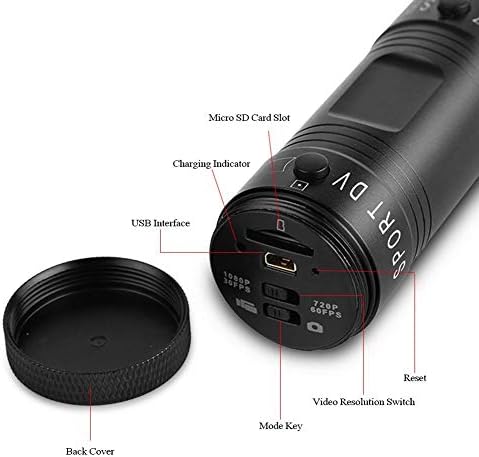
Imaxe 4.1: Detallada view of the camera's rear end, highlighting the Micro SD card slot, USB interface, charging indicator, mode key, video resolution switch (1080P 30fps / 720P 60fps), and reset button.
- Ranura para tarxeta Micro SD: Insert your Micro SD card here. A card is required for operation.
- Indicador de carga: Displays charging status. A red light indicates charging; it turns off when fully charged.
- Interface USB: Para cargar e conectar a un ordenador.
- Tecla de modo: Used to switch between recording modes (e.g., video, photo).
- Video Resolution Switch: Selects between 1080P 30fps and 720P 60fps recording resolutions.
- Botón de reinicio: Used to reset the device if it becomes unresponsive.
- Power Button (Front): Located on the front side of the camera.
- Record/Stop Button (Back): Located on the back side of the camera.
5. Configuración
5.1 Carga da batería
- Conecta a cámara a unha fonte de alimentación USB (por exemplo, un ordenador ou un adaptador de parede) usando o cable USB fornecido.
- O luz vermella on the back of the camera will illuminate, indicating that it is charging.
- Unha vez cargado por completo, a luz vermella apagarase.
- Note: If the camera blinks red and blue when plugged in, it indicates that an SD card is not inserted. This is not a charging indicator.
5.2 Inserir unha tarxeta Micro SD
A Micro SD card (not included) is required for recording video and photos. The camera supports Micro SD cards up to a certain capacity (check product packaging for maximum supported size, typically 32GB or 64GB for similar devices).
- Desenrosque a tapa traseira da cámara.
- Locate the Micro SD card slot (refer to Image 4.1).
- Insira con coidado a tarxeta Micro SD na ranura ata que encaixe no seu lugar. Asegúrese de que a tarxeta estea orientada correctamente.
- Replace the back cover, ensuring it is securely tightened to maintain water resistance.
5.3 Montaxe da cámara
A cámara inclúe varios accesorios de montaxe para diferentes aplicacións.
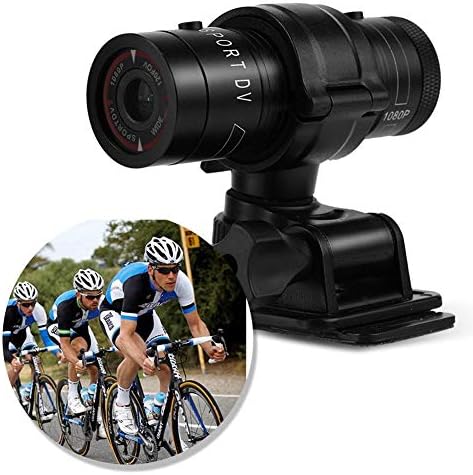
Image 5.1: The camera attached to a bicycle handlebar, demonstrating one of its mounting options.
- Soporte para bicicleta: Use o clamp mount to attach the camera securely to bicycle handlebars or other tubular structures.
- Soporte para casco: Utilize the adhesive or strap mounts to fix the camera to a helmet.
- Strap Mounts: For attaching to various gear or body parts.
Ensure all mounts are securely fastened before engaging in activities to prevent the camera from falling.
6. Funcionamento da cámara
6.1 Encendido/apagado
- Para acender, manteña premido o botón Botón de encendido (front switch) until the camera vibrates.
- Para apagalo, manteña premido o botón Botón de encendido again until the camera vibrates once.
6.2 Selecting Video Resolution
Before recording, select your desired video resolution using the switch on the back of the camera (refer to Image 4.1).
- Deslice o interruptor a "1080P 30fps" for Full HD video at 30 frames per second.
- Deslice o interruptor a "720P 60fps" for HD video at 60 frames per second.
6.3 Gravación de vídeo
- Asegúrate de que a cámara estea acendida.
- Preme o Botón Gravar/Parar (back switch) to start recording. The camera will vibrate three times to indicate recording has started.
- Para deixar de gravar, prema o botón Botón Gravar/Parar again. The camera will vibrate once to indicate recording has stopped.
6.4 Conectando a un ordenador
Para transferir files or access recorded content:
- Asegúrese de que a cámara estea apagada.
- Conecte a cámara ao seu ordenador mediante o cable USB proporcionado.
- The camera will be recognized as a removable storage device.
- You can then access and transfer your video files.
7. Mantemento
- Limpeza: Usa un pano suave e seco para limpar o corpo da cámara. Para a lente, usa un pano e unha solución de limpeza de lentes especializados. Evita materiais abrasivos.
- Almacenamento: When not in use for extended periods, store the camera in a cool, dry place. Ensure the battery is partially charged (around 50%) to prolong its lifespan.
- Resistencia á auga: Regularly check that the back cover is securely tightened to maintain the IPX-4 water resistance. Avoid exposing the USB port or SD card slot to moisture when the cover is open.
- Coidado da batería: Avoid fully discharging the battery frequently. Recharge it when the low battery indicator appears.
8 Solución de problemas
| Problema | Causa posible | Solución |
|---|---|---|
| A cámara non se acende. | A batería está esgotada. | Carga a cámara completamente. |
| Camera blinks red and blue, then turns off. | No Micro SD card inserted or card is faulty. | Insert a functional Micro SD card. Ensure it is properly seated. |
| Non se pode gravar vídeo. | Sen tarxeta Micro SD, tarxeta chea ou erro na tarxeta. | Insert a Micro SD card, delete old files ou formate a tarxeta (isto borrará todos os datos). |
| Poca calidade de vídeo. | Lens is dirty; low light conditions; incorrect resolution setting. | Clean the lens. Ensure adequate lighting. Select 1080P resolution for higher detail. |
| A cámara non responde. | Fallo de software. | Usa un obxecto fino (como un clip) para premer o Botón de reinicio (refer to Image 4.1). |
9. Especificacións
| Característica | Detalle |
|---|---|
| Marca | Cero |
| Número de modelo | Zeronefg3h149y2s |
| Resolución de captura de vídeo | 1080p (30 fps), 720p (60 fps) |
| Ángulo da lente | 120-degree A+ grade wide-angle |
| Clasificación impermeable | IPX-4 (splash-proof) |
| Material de carcasa | Aliaxe de aluminio |
| Tecnoloxía do sensor fotográfico | CMOS |
| Apertura máxima | 1.8 milímetros |
| Tipo de memoria flash | Micro SD (card not included) |
| Formato de captura de vídeo | AVI |
| Formato de audio compatible | AAC, MP3, PCM, FLAC, or Dolby Digital/AC-3 |
| Tecnoloxía de conectividade | USB |
| Peso do elemento | 10.8 onzas (aprox. 306 gramos) |
| Dimensións do produto | 11.81 x 6.3 x 5.91 polgadas (aprox. 30 x 16 x 15 cm) |
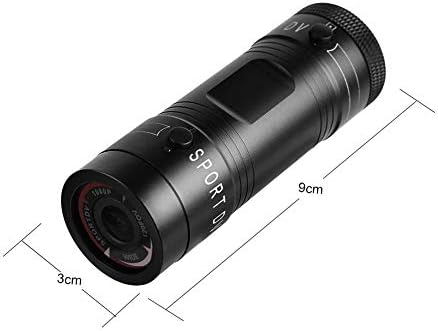
Image 9.1: Physical dimensions of the camera, showing a length of 9cm and a diameter of 3cm.
10. Garantía e soporte
Para obter información sobre a garantía e asistencia técnica, consulte a documentación incluída coa súa compra ou póñase en contacto directamente co vendedor/fabricante. Garde o comprobante de compra para reclamacións de garantía.
Manufacturer: Zerone
For further assistance, you may visit the Zerone Store on Amazon: Zerone Store