
1. Produto rematadoview
The Schlage Connect Smart Deadbolt offers advanced security and convenient keyless access for your home. This Z-Wave Plus compatible deadbolt integrates seamlessly with various smart home systems, allowing for remote control and monitoring. It features a durable touchscreen keypad, a built-in alarm, and the ability to manage multiple access codes.
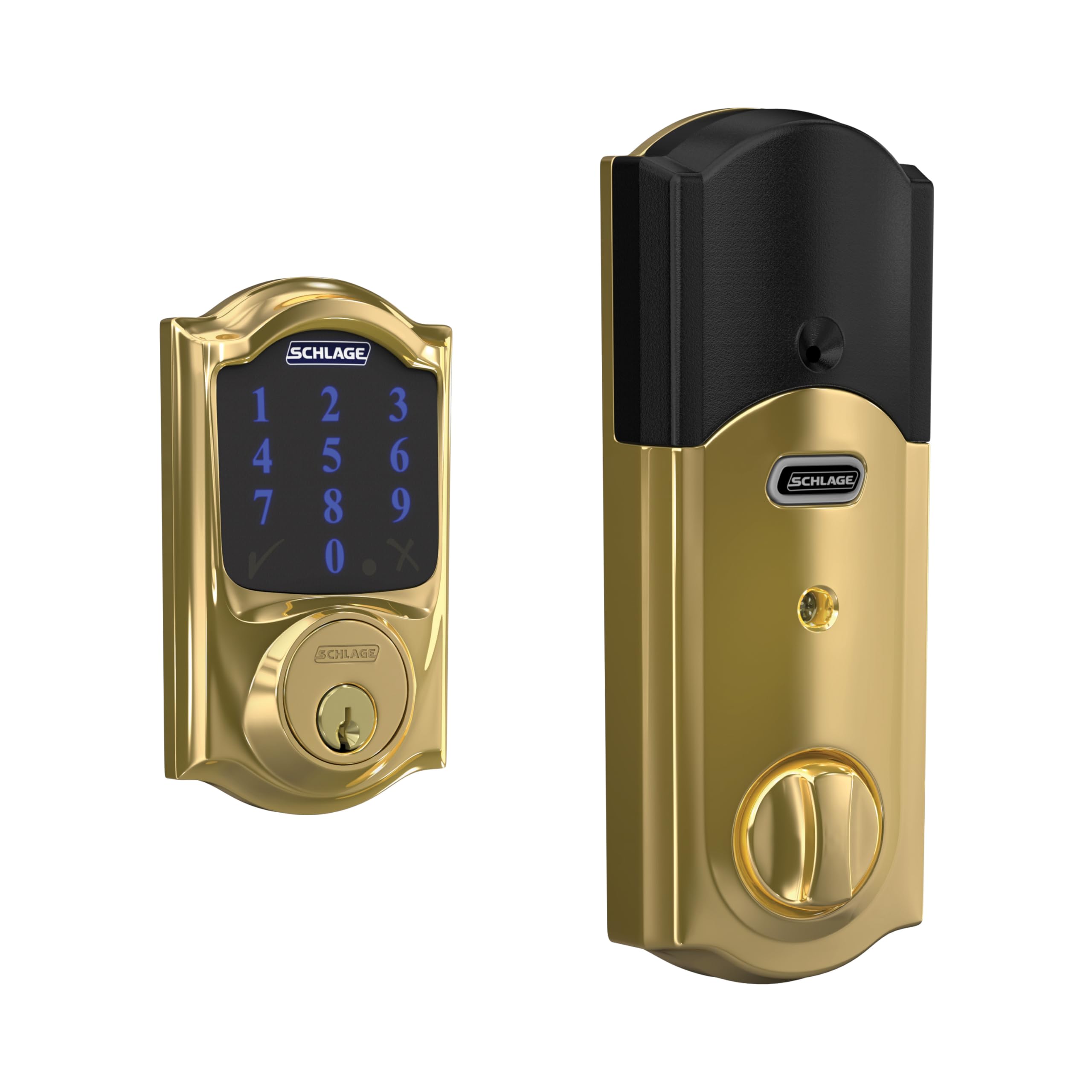
Figure 1: Schlage Connect Smart Deadbolt with Touchscreen Keypad in Bright Brass finish.
Características principais:
- Z-Wave Plus Compatibility: Integrate with smart home or security systems like Samsung SmartThings or Ring Alarm for remote lock/unlock functionality.
- Teclado táctil: Fingerprint-resistant touchscreen for keyless entry.
- Códigos de acceso: Manage up to 30 unique access codes for family, friends, or service providers.
- Alarma integrada: Alerts to potential door attacks.
- Fácil instalación: Designed for simple installation with a screwdriver, featuring Snap ‘n Stay technology.
- Funciona con pilas: Uses 4 AA batteries with a low battery indicator and backup key.
- Seguridade mellorada: Secure encryption with S2 Security protocol.
2. Configuración e instalación
The Schlage Connect Smart Deadbolt is designed for straightforward installation on standard doors. No hardwiring is required, making it suitable for DIY installation.
Pasos de instalación:
- Prepara a porta: Ensure your door meets the standard specifications for deadbolt installation.
- Instalar o cerrojo: Utilize the unique Snap ‘n Stay technology to hold the deadbolt in place, freeing both hands for the next steps.
- Attach Keypad and Interior Assembly: Secure the exterior keypad and interior assembly to the door using a screwdriver.
- Inserir pilas: Instale as 4 pilas AA proporcionadas.
- Proba de funcionamento: Verify that the deadbolt operates smoothly both manually and via the keypad.

Figure 2: The Schlage Connect Smart Deadbolt is designed for easy installation with basic tools.
Integración do fogar intelixente:
To enable smart features like remote access and voice control, pair your Schlage Connect deadbolt with a compatible Z-Wave enabled smart home or security system (sold separately). This typically involves a one-button enrollment process on your smart home hub.

Figure 3: One-button enrollment simplifies connecting your deadbolt to a smart home system.
Video 1: This video demonstrates the features and installation process of the Schlage BE469ZP CAM Connect Smart Deadbolt with Alarm with Camelot Trim.
3. Instrucións de funcionamento
Entrada sen chave:
To unlock the deadbolt using the touchscreen keypad, simply enter your programmed access code. The keypad illuminates for easy visibility in low light conditions. To lock, press the Schlage button or turn the interior thumbturn.

Figure 4: The touchscreen keypad allows for easy and secure keyless entry.
Managing Access Codes:
You can program and manage up to 30 unique access codes directly on the lock or through your connected smart home system's application. Refer to your smart home hub's instructions for app-based code management.

Figure 5: Manage up to 30 access codes and control your lock remotely via smartphone when connected to a smart home system.
Control de voz:
If integrated with a compatible Z-Wave smart home system and voice assistant (e.g., Amazon Alexa, Google Assistant), you can lock and unlock your door using voice commands. Ensure your voice assistant device is properly configured with your smart home hub.
4. Mantemento
Substitución da batería:
The deadbolt features a low battery indicator that provides weeks of warning before the batteries fully deplete. To replace, remove the interior cover and insert 4 new AA batteries. A backup key is provided to prevent lockouts if batteries die unexpectedly.
Limpeza:
Clean the touchscreen and exterior components with a soft, damp cloth. Avoid abrasive cleaners or solvents that could damage the finish or electronic components. The fingerprint-resistant finish helps maintain a clean appearance.
5 Solución de problemas
- O teclado non responde: Check battery levels. If the batteries are low or dead, replace them.
- Bloqueo sen activar/desactivar: Ensure the door is properly aligned and the deadbolt can extend fully into the strike plate. Check for any obstructions.
- Smart Home Connectivity Issues: Verify your Z-Wave hub is powered on and within range. Consult your smart home system's manual for pairing and troubleshooting Z-Wave devices.
- Introdución de código incorrecta: If the lock repeatedly rejects your code, ensure you are entering the correct sequence and that the code is still active.
6. Especificacións
| Característica | Detalle |
|---|---|
| Marca | ESCALA |
| Número de modelo | BE469ZPCAM605 |
| Tipo de bloqueo | Peche de teclado |
| Protocolo de conectividade | Z Wave Plus |
| Códigos de acceso | Ata 30 |
| Característica especial | Alarma incorporada |
| Material | Zinc |
| Cor | Latón brillante |
| Dimensións do artigo (L x W x H) | 5 x 3 x 1 polgadas |
| Peso do elemento | 3.5 libras |
| Operating Temperatures (Outside) | -35°C a 66°C |
| Operating Temperatures (Inside) | -10°C a 49°C |
| Compoñentes incluídos | Installation Hardware, Installation Instructions, 4 AA batteries |

Figure 6: Product dimensions for the Schlage Connect Smart Deadbolt.
7. Garantía e soporte
The Schlage Connect Smart Deadbolt is backed by a limited lifetime mechanical and finish warranty, and a limited three-year electronics warranty. For full details, please refer to the official Schlage warranty documentation. Warranty is valid on purchases from authorized retailers.
For technical support, product registration, or further assistance, please visit the official Schlage websitio web ou póñase en contacto co seu servizo de atención ao cliente. Pode atopar máis información e recursos de asistencia en www.schlage.com.
Vídeo 2: Un overview of Schlage's commitment to home security and product reliability.