
1. Produto rematadoview
The Sato One-Touch Timer TM-22 is a versatile digital timer designed for various timing needs, from kitchen use to laboratory applications. It combines ease of use with practical features to enhance your daily tasks.
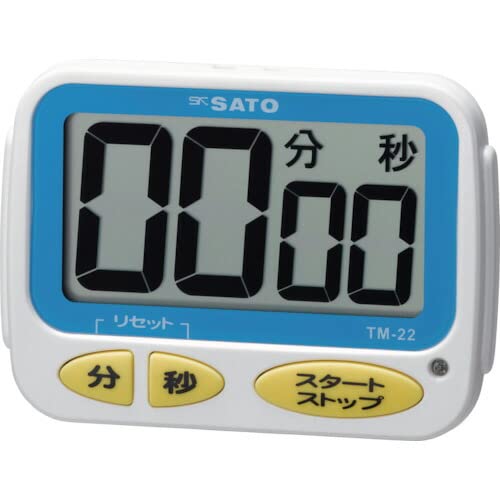
Imaxe 1: Fronte view of the Sato One-Touch Timer TM-22. The timer features a clear digital display and control buttons.
Características principais:
- Automatic Reset Alarm: The alarm sounds for 5 seconds at the set time and automatically resets to the initial set time.
- Operación sinxela: The primary key is for starting; no complex operations are required to stop the timer's alarm cycle.
- Dual Notification: Alerts users with both sound (70dB) and light.
- Drip-Proof Construction: Designed to resist splashes, making it suitable for kitchen environments.
- Varias opcións de montaxe: Equipped with a magnet on the back for attachment to metal surfaces and a strap for hanging.
- Funcións de conta atrás e conta atrás: Supports both decreasing e incrementoasing time measurements.
2. Configuración
Instalación da batería:
The TM-22 timer requires one AAA battery for operation. A battery is included with the unit.
- Localice a tapa do compartimento das pilas na parte traseira do temporizador.
- Deslice ou solte a tapa para abrir o compartimento.
- Insira unha pila AAA, asegurándose de que os terminais positivo (+) e negativo (-) estean aliñados correctamente coas marcas do interior do compartimento.
- Coloque a tapa do compartimento da batería de forma segura.
The timer should power on, and the display will show '00:00' or the last set time.
3. Instrucións de funcionamento
The TM-22 timer features both countdown and count-up functionalities.
3.1. Temporizador de conta atrás
This function allows you to set a specific duration, and the timer will count down to zero.
- Establecer hora: Use the 'M' (Minute) button and 'S' (Second) button to adjust the desired countdown duration. The timer can be set from 1 second up to 99 minutes and 59 seconds.
- Comezar a conta atrás: Press the 'START' button to begin the countdown.
- Notificación de alarma: When the time reaches zero, an alarm will sound for 5 seconds, accompanied by a flashing light.
- Restablecemento automático: After the 5-second alarm, the timer automatically resets to the initial set time, ready for the next countdown without manual intervention.
- Pausa/Parar: To pause the countdown, press the 'START' button again. To resume, press 'START' once more. To clear the set time, press the 'RESET' button (if available) or hold the 'START' button for a few seconds.
3.2. Count-up Timer
This function measures elapsed time from zero.
- Start Count-up: Ensure the timer display shows '00:00'. If not, press the 'RESET' button to clear any previous settings. Press the 'START' button to begin counting upwards from zero.
- Pausa / Reanudar: To pause the count-up, press the 'START' button. To resume, press 'START' again.
- Restablecer: To reset the count-up timer to '00:00', press the 'RESET' button (if available) or hold the 'START' button for a few seconds while paused.
4. Mantemento
Limpeza:
To maintain the timer's appearance and functionality:
- Wipe the exterior of the timer with a soft, dry cloth.
- Do not use abrasive cleaners, solvents, or chemical agents, as these may damage the casing ou pantalla.
- The timer is drip-proof, but do not immerse it in water or expose it to heavy splashing.
Substitución da batería:
Replace the battery when the display becomes dim or the timer's functions become erratic.
- Follow the battery installation steps outlined in the "2. Setup" section.
- Always use a fresh AAA battery.
- Elimina as baterías usadas segundo a normativa local.
5 Solución de problemas
If you encounter issues with your TM-22 timer, refer to the following common problems and solutions:
| Problema | Causa posible | Solución |
|---|---|---|
| Timer does not turn on. | A batería está descargada ou instalada incorrectamente. | Check battery polarity. Replace with a new AAA battery. |
| Display is faint or flickering. | Batería baixa. | Substitúe a batería AAA. |
| A alarma non soa. | Volume obstruction or internal issue. | Ensure the speaker is not covered. Check battery level. If problem persists, contact support. |
| Timer does not reset automatically after alarm. | This feature is specific to the countdown function. | Ensure you are using the countdown function. For count-up, manual reset is required. |
6. Especificacións
| Característica | Detalle |
|---|---|
| Número de modelo | TM-22 |
| Temporalización máxima | 99 minutos 59 segundos |
| Minimum Timing | 1 segundo |
| Dimensións (H x W x D) | 67 mm x 93 mm x 20 mm |
| Peso | 96 g |
| Fonte de enerxía | 1 pilas AAA (incluídas) |
| Volume de alarma | 70 dB |
| Funcións | Countdown, Count-up |
| Características especiais | Drip-proof construction, Magnet on back, Hanging strap, Sound and light notification |
7. Garantía e soporte
For warranty information, technical assistance, or customer support regarding your Sato One-Touch Timer TM-22, please contact your authorized retailer or the manufacturer, Sato Corporation. Keep your purchase receipt as proof of purchase.
Please visit the official Sato websitio para obter a información de soporte e os datos de contacto máis actualizados.