
Itek ITMC30V201FHD
iTek GGC 30-inch Curved Monitor User Manual
Model: ITMC30V201FHD
Benvido
Thank you for choosing the iTek GGC 30-inch Curved Monitor. This manual provides essential information for setting up, operating, and maintaining your new monitor. Please read it thoroughly before use to ensure optimal performance and safety.
Instrucións de seguridade importantes
Para evitar danos e garantir un funcionamento seguro, observe as seguintes precaucións:
- Non expoña o monitor á choiva, á humidade nin a temperaturas extremas.
- Asegúrate de que haxa unha ventilación axeitada arredor do monitor. Non bloquees as aberturas de ventilación.
- Use só o adaptador de corrente que se inclúe co monitor.
- Evite colocar obxectos pesados no cable de alimentación.
- Disconnect the power plug from the outlet if the monitor will not be used for a long period.
- Non intente realizar o mantemento do monitor vostede mesmo. Encargue calquera mantemento a persoal cualificado.
- Clean the monitor screen and casinLimpe cun pano suave e seco. Evite o uso de produtos de limpeza abrasivos ou solventes.
Contido do paquete
Comprobe se o paquete contén os seguintes elementos:
- iTek GGC 30-inch Curved Monitor
- Soporte para monitor (base e pescozo)
- Adaptador de alimentación e cable
- Cable DisplayPort
- Cable HDMI
- Manual de usuario
- Parafusos para o montaxe do soporte
Produto rematadoview
The iTek GGC 30-inch Curved Monitor is designed for an immersive viewing experience, ideal for gaming and professional use. It features a WFHD (2560x1080) resolution, a high 200Hz refresh rate, and a rapid 1ms MPRT response time.

Key Performance Highlights
- 200Hz Refresh Rate & AMD FreeSync Technology: Experience ultra-smooth visuals and tear-free gaming with a high refresh rate and adaptive sync technology.

Figure 2: 200Hz Refresh Rate and AMD FreeSync Technology in action. - Flicker-Free & Low Blue Light: Designed to reduce eye strain during prolonged use, providing a more comfortable viewexperiencia ing.

Figure 3: Flicker-Free and Low Blue Light features for eye comfort. - Tempo de resposta MPRT 1 ms: Minimizes motion blur and ghosting, crucial for fast-paced games and action sequences.

Figure 4: Rapid Refresh Rate and Response Time for smooth visuals. - Pantalla curva 1800R: The immersive curvature brings the edges of the screen closer to your field of view, enhancing depth perception and reducing distortion.

Figure 5: 1800R Curved Display for an immersive experience.
Configuración
Montaxe do soporte
- Retire con coidado os compoñentes do monitor e do soporte da embalaxe.
- Attach the stand neck to the monitor panel using the provided screws. Ensure it clicks securely into place or is fastened tightly.
- Attach the stand base to the stand neck, securing it with the thumb screw or screws from underneath.
- Coloque o monitor montado sobre unha superficie estable e plana.
Conectando o seu monitor
The iTek GGC monitor offers multiple connectivity options for various devices:
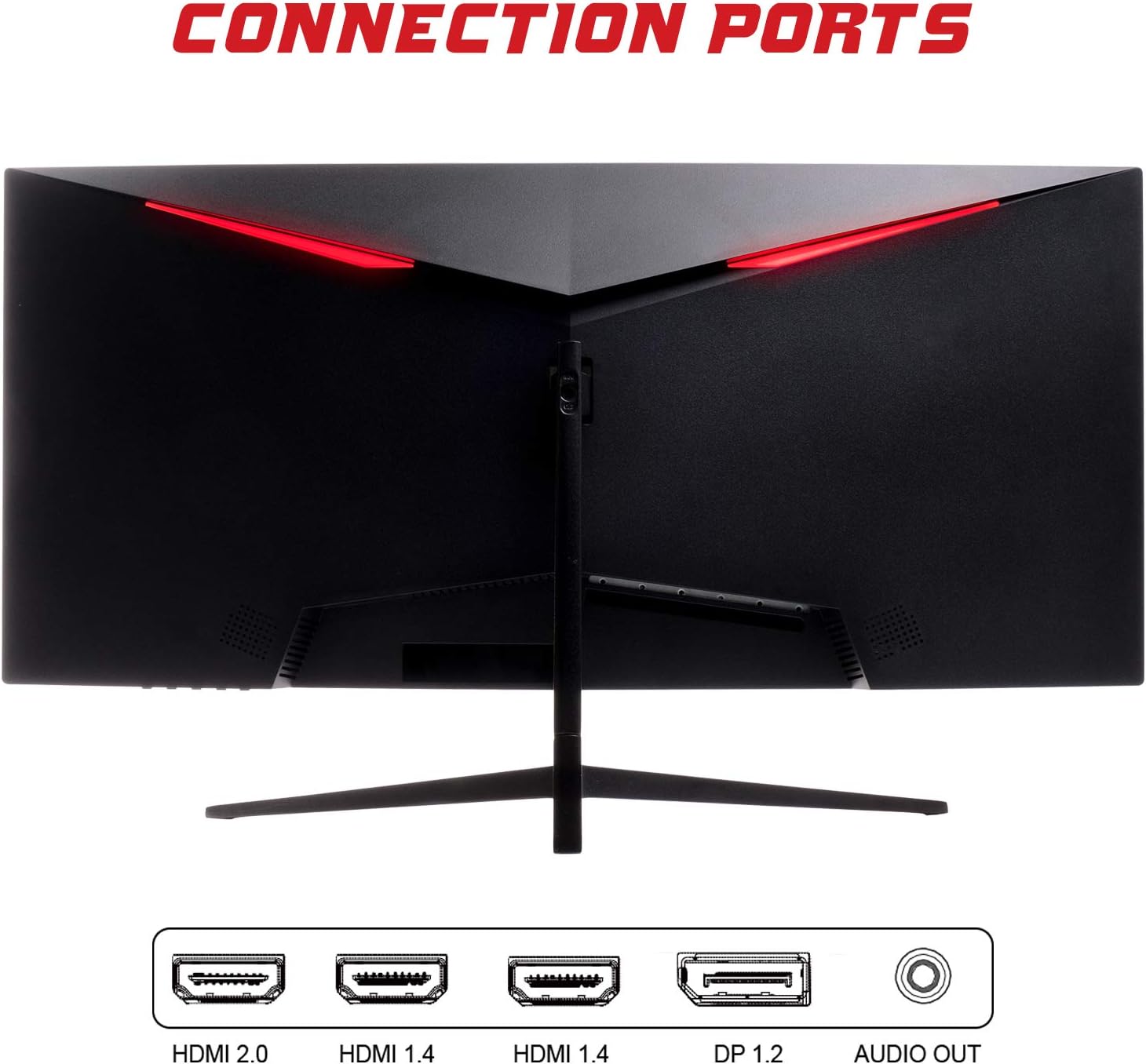
- DisplayPort (DP 1.2): For high-resolution and high-refresh-rate connections to your PC.
- HDMI (HDMI 2.0, HDMI 1.4 x2): Connect to PCs, gaming consoles, and other multimedia devices. HDMI 2.0 supports higher refresh rates at certain resolutions.
- Saída de audio: Conecta altofalantes ou auriculares externos.
After connecting the video cable, connect the power adapter to the monitor and then to a power outlet.
Funcionamento do monitor
Encendido/apagado
Preme o botón de acendido/apagado, que normalmente se atopa na parte inferior ou traseira do monitor, para acender ou apagar o monitor. A luz indicadora de acendido/apagado acenderase cando o monitor estea acendido.
Menú de visualización en pantalla (OSD).
The OSD menu allows you to adjust various monitor settings. Use the buttons on the monitor (typically on the back or bottom right) to navigate the menu.
- Configuración da imaxe: Axusta o brillo, o contraste, a nitidez e a gama.
- Configuración de cor: Modificar a temperatura da cor, o ton e a saturación.
- Selección de entrada: Cambia manualmente entre as entradas DisplayPort e HDMI.
- Audio: Adjust volume for the audio output.
- Configuración do sistema: Access language, OSD timeout, and reset options.
- Características do xogo: Enable/disable FreeSync, adjust response time overdrive, and activate crosshair overlays if available.
Mantemento
Un coidado axeitado garante a lonxevidade do seu monitor:
- Apague sempre o monitor e desconecte o cable de alimentación antes de limpalo.
- Usa un pano suave e sen pelusa para limpar a pantalla con suavidade. Para marcas difíciles, limpa lixeiramenteampEnxágüe o pano con auga ou cun limpador de pantallas suave e non abrasivo.
- Limpar o monitor casinlimpe cun pano suave e seco.
- Avoid spraying liquids directly onto the screen or casing.
- Do not use benzene, thinner, ammonia-based cleaners, or abrasive materials.
Resolución de problemas
If you encounter issues with your monitor, please refer to the following table for common problems and solutions:
| Problema | Posible Solución |
|---|---|
| Sen poder | Ensure the power cable is securely connected to the monitor and the power outlet. Check if the power outlet is working. |
| Sen sinal / Pantalla en branco | Verify the video cable (DisplayPort or HDMI) is firmly connected to both the monitor and your computer. Select the correct input source via the OSD menu. Ensure your computer is powered on and not in sleep mode. |
| Imaxe parpadeante ou inestable | Check the video cable connection. Try a different cable or port. Ensure your graphics card drivers are up to date. Adjust the refresh rate in your computer's display settings. |
| Poor image quality (blurry, distorted colors) | Adjust brightness, contrast, and color settings in the OSD menu. Ensure the display resolution on your computer matches the monitor's native resolution (2560x1080). |
| Non hai son da saída de son | Check the audio cable connection to your speakers/headphones. Verify the volume setting in the OSD menu and on your computer. Ensure the correct audio output device is selected in your computer's sound settings. |
Especificacións técnicas
| Característica | Especificación |
|---|---|
| Marca | Itek |
| Modelo | ITMC30V201FHD |
| Tamaño da pantalla | 30 polgadas |
| Tipo de panel | VA |
| Curvatura | R1800 |
| Resolución | 2560 x 1080 (WFHD) |
| Relación de aspecto | 21:9 |
| Taxa de actualización | 200 Hz |
| Tempo de resposta | MPRT de 1 ms |
| Brillo | 350 cd/m² |
| Relación de contraste | 3000:1 |
| Viewángulo ing | 178° (horizontal/vertical) |
| Conectividade | 1x DisplayPort 1.2, 1x HDMI 2.0, 2x HDMI 1.4, Audio Out |
| Características especiais | HDR Ready, FreeSync, Low Blue Light, Flicker Free, VESA Mountable |
| Dimensións do produto (con soporte) | 70.68 x 40.89 x 18.48 cm |
| Peso | 6.9 kg |
Eficiencia Enerxética

For detailed energy consumption information and product registration, please refer to the official EPREL database:
Garantía e Soporte
Your iTek GGC monitor is backed by a manufacturer's warranty. Please retain your proof of purchase for warranty claims.
- Guaranteed Product Support: This product is guaranteed to have support available until at least January 1, 2031.
- For technical support, warranty inquiries, or service requests, please contact iTek customer service through their official websitio ou a información de contacto proporcionada coa súa compra.
Ask a question about this manual
Ask about setup, troubleshooting, compatibility, parts, safety, or missing instructions. Manuals+ will review the question and use this page’s manual context to help answer it.