
1. Introdución
The Hexgears Impulse is a hot-swap mechanical keyboard designed for durability and customization. It features PBT keycaps for resistance against shine and grease, and an on-board RGB lighting system with translucent pudding keycaps for enhanced visual effects. The keyboard is built with an IP56 water-resistant design and a rigid curved metal frame, making it resilient to spills. Equipped with Kailh Box switches, rated for 80 million presses, it offers a smooth and stable typing experience. The Impulse is a plug-and-play device with features like 2-stage angle adjustment feet and Windows key locking.
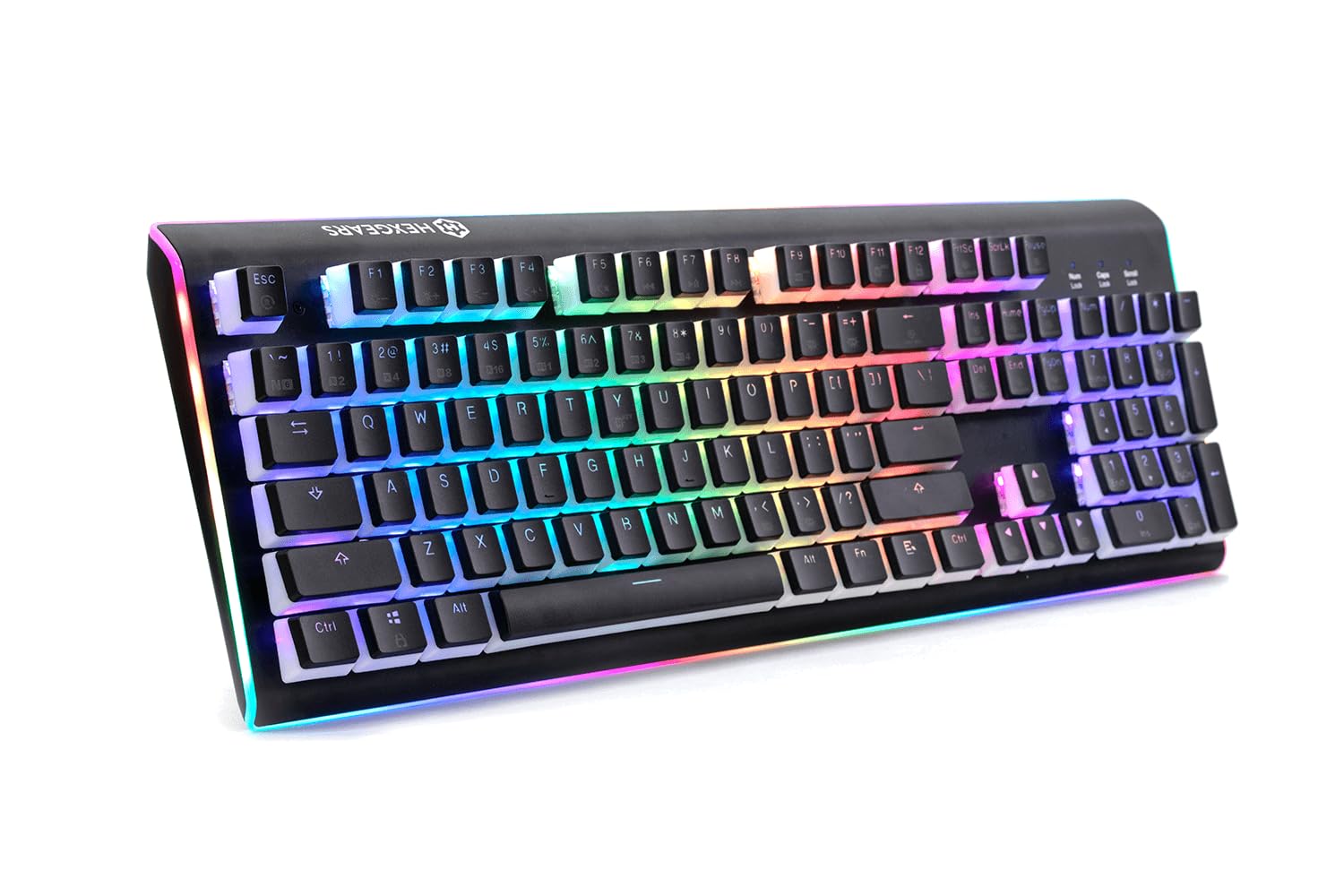
Figure 1: Hexgears Impulse Hot-swap Mechanical Keyboard. This image displays the keyboard with its RGB backlighting active, showcasing the translucent pudding keycaps and the overall design.
2. Contido do paquete
Asegúrate de que todos os elementos estean presentes no paquete:
- Hexgears Impulse Mechanical Keyboard
- Integrated USB-A Cable
- Hot-swap switch sockets (pre-installed)
- Manual de usuario (este documento)
3. Configuración
The Hexgears Impulse keyboard is designed for simple plug-and-play operation.
- Conecta o teclado: Locate the integrated USB-A cable attached to the keyboard. Plug the USB-A connector into an available USB port on your computer or compatible device.
- Instalación de controladores: The keyboard is typically recognized automatically by Windows, Linux, and other compatible operating systems. No additional drivers are usually required.
- Axustar o ángulo do teclado: O teclado ten 2tage adjustable feet on the underside. Flip these feet out to achieve your preferred typing angle.
4. Funcionamento
4.1 RGB Backlighting and Light Ring
The Hexgears Impulse features per-key customizable RGB lighting and an RGB light ring around the keyboard's perimeter. Lighting modes and effects are controlled directly on-board, ensuring compatibility across various operating systems. Refer to the keyboard's function key combinations (often indicated by secondary legends on keycaps) for adjusting brightness, changing lighting patterns, and selecting colors.
4.2 Hot-swap Switches
The Impulse V2 design includes hot-swap switch sockets, allowing you to change mechanical switches without soldering. This feature supports MX-compatible, LED-compatible, plate-mount switches. To replace a switch:
- Retire con coidado a tapa das teclas usando un extractor de tapas de teclas.
- Use a switch puller to carefully extract the switch from its socket.
- Aliña os pines do novo interruptor cos orificios da toma e preme firmemente ata que encaixe no seu lugar.
- Volva colocar a tapa das teclas.
Atención: Ensure the switch pins are straight before insertion to avoid bending or damaging the sockets.
4.3 Windows Key Locking
To prevent accidental presses of the Windows key during gaming or other activities, the keyboard includes a Windows key locking function. This is typically activated via a function key combination (e.g., Fn + Win key). Refer to your keyboard's specific keycap legends for the exact combination.
5. Mantemento
5.1 Limpeza
Para manter a aparencia e a funcionalidade do teclado:
- Eliminación de po: Usa unha lata de aire comprimido para eliminar o po e os residuos que hai entre as tapas das teclas.
- Limpeza das tapas das teclas: For general cleaning, gently wipe the keycaps with a soft, damp cloth. For deeper cleaning, keycaps can be removed (using a keycap puller) and washed with mild soap and water, then thoroughly dried before re-installation.
- Limpeza de superficies: Wipe the keyboard's metal frame and other surfaces with a soft, slightly damp pano. Evite produtos químicos agresivos ou materiais abrasivos.
5.2 Resistencia á auga
The Hexgears Impulse features an IP56 water-resistant design, meaning it can withstand water jets. While it offers protection against accidental spills, it is not designed for submersion. In case of a spill, disconnect the keyboard immediately, wipe off excess liquid, and allow it to air dry completely before reconnecting.
6 Solución de problemas
| Problema | Causa posible | Solución |
|---|---|---|
| O teclado non responde. | Conexión USB solta, porto USB defectuoso, problema co controlador. |
|
| As chaves non se rexistran nin se escriben dúas veces. | Debris under keycap/switch, faulty switch, software conflict. |
|
| RGB lighting is not working or inconsistent. | Lighting mode settings, power issue. |
|
7. Especificacións
| Característica | Detalle |
|---|---|
| Marca | Hexgears |
| Número de modelo | HX-01-02762 |
| Tecnoloxía de conectividade | USB, USB-A |
| Descrición do teclado | Mecánica |
| Tipo de cambio | MX-compatible plate-mount hot-swap switches (e.g., Kailh BOX Brown, BOX White, Hako Clear) |
| Chaves | Two-shot PBT (Pudding & 2-tone) |
| Retroiluminación | RGB, Per-key customizable lighting modes, RGB Light Ring |
| Nivel de resistencia á auga | Resistente á auga IP56 |
| N-Key Rollover (NKRO) | Si |
| Número de chaves | 108 |
| Sistemas operativos compatibles | Windows, Linux |
| Material | Metal, Polybutylene Terephthalate (PBT) |
| Características especiais | Hot-swap switch sockets, 2-stage adjustable height feet, Windows key locking |
8. Información da garantía
The Hexgears Impulse keyboard comes with a one (1) year limited warranty from the date of delivery to the customer.
This warranty covers defects in material or workmanship under normal use during the warranty period. During this period, Hexgears will repair or replace products or parts of the product that are found to be defective due to improper workmanship or materials, provided they were used under normal conditions and maintenance.
This limited warranty does not cover conditions, malfunctions, or damage that do not result from defects in material or workmanship. This includes, but is not limited to, damage caused by misuse, accident, unauthorized modification, or external causes such as power surges.
9. Apoio
For further assistance, technical support, or warranty claims, please visit the official Hexgears websitio ou póñase en contacto co seu servizo de atención ao cliente.
- Soporte en liña: Refer to the Hexgears official website for FAQs, drivers, and additional resources.
- Contacte co servizo de atención ao cliente: For direct assistance, contact Hexgears customer support through the channels provided on their websitio.