
Introdución
This manual provides comprehensive instructions for the Zerone Type C Qi Wireless Charging Receiver Module (Model: Zerone78ye2tc135). This ultra-slim receiver enables Qi wireless charging for smartphones equipped with a USB Type-C interface. Please read this manual carefully before use to ensure proper installation and operation.
Características clave
- Qi Standard Compatibility: Designed for devices with a USB 3.1 Type-C interface, providing charging that works with any Qi-enabled charger.
- Carga eficiente: Features an output voltage of 5V, output current of 1.5A, and a charging current of 1000mA, operating at a frequency of 100-200KHz.
- Comodidade sen cables: Eliminates the need for charging cables, prolonging the life of your phone's charging port and allowing for uninterrupted use during charging.
- Deseño compacto e lixeiro: Ultra-slim (0.04 inch) and lightweight, adding minimal bulk to your phone. The connector is designed for easy plug-in and removal, compatible with most phone cases.
Instrucións de configuración
Follow these steps to properly install and set up your Zerone Type C Qi Wireless Charging Receiver Module:
- Preparar o receptor:
Carefully remove the wireless charging receiver from its packaging. Ensure the Type-C connector is intact.

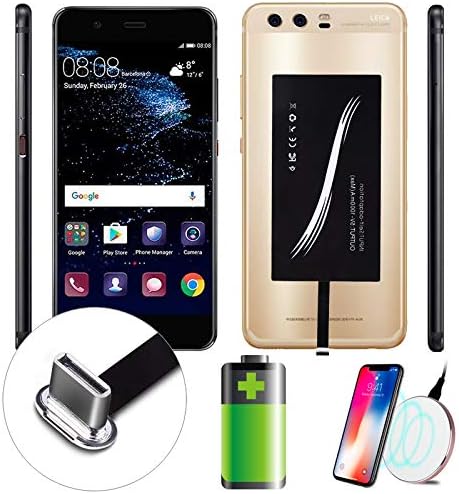
Image: The Zerone Type C Qi Wireless Charging Receiver Module, highlighting its compact design and Type-C connector.
- Connect to Your Smartphone:
Locate the USB Type-C charging port on your smartphone. Gently insert the receiver's Type-C connector into your phone's charging port. Ensure it is fully seated.
Imaxe: Primeiro plano view of the Type-C connector being inserted into a smartphone's charging port.
- Colocar o receptor:
Once connected, carefully fold the receiver pad onto the back of your smartphone. The adhesive on the receiver helps secure it in place. Ensure the charging coil on the receiver aligns with the general area where your wireless charger will make contact.

Image: The wireless charging receiver module attached to the back of a smartphone, ready for wireless charging.
- Install Phone Case (Optional):
For added protection and to keep the receiver securely in place, you can install a phone case over your smartphone with the receiver attached. The ultra-slim design of the receiver allows it to fit under most standard phone cases.
Vídeo de demostración da configuración
Video: This video demonstrates the installation process of the USB C Qi Wireless Charging Receiver Module for a smartphone, showing how to connect it and place it under a phone case.
Instrucións de funcionamento
Once the Zerone Type C Qi Wireless Charging Receiver Module is installed, using it is straightforward:
- Place on Wireless Charger:
Place your smartphone, with the receiver attached, onto a Qi-compatible wireless charging pad. Ensure the phone is centered on the charging pad for optimal connection.

Image: A smartphone with the wireless charging receiver attached, placed on a Qi-compatible wireless charging pad, indicating active charging.
- Verificar a carga:
Your smartphone should indicate that it is charging wirelessly. Most wireless charging pads also have an indicator light to confirm a successful connection.
- Remove for Wired Charging (Optional):
If you need to use wired charging, simply unplug the receiver's Type-C connector from your phone's port. The receiver can be reconnected when you wish to use wireless charging again.
Mantemento
To ensure the longevity and optimal performance of your Zerone Type C Qi Wireless Charging Receiver Module, follow these maintenance guidelines:
- Manter limpo: Regularly wipe the receiver pad and connector with a soft, dry cloth to remove dust and debris. Avoid using harsh chemicals or abrasive materials.
- Manipular con coidado: Avoid bending or twisting the flexible cable connecting the pad to the Type-C connector, as this can damage internal wiring.
- Evita condicións extremas: Do not expose the receiver to extreme temperatures, direct sunlight for prolonged periods, or moisture.
- Almacenamento adecuado: When not in use, store the receiver in a cool, dry place, away from direct heat or humidity.
Resolución de problemas
If you encounter issues with your Zerone Type C Qi Wireless Charging Receiver Module, refer to the following common problems and solutions:
| Problema | Causa posible | Solución |
|---|---|---|
| O teléfono non se carga sen fíos. |
|
|
| Velocidade de carga lenta. |
|
|
| Phone or receiver getting hot. |
|
|
Especificacións
| Característica | Detalle |
|---|---|
| Número de modelo | Zerone78ye2tc135 |
| Marca | Cero |
| Tipo de conector | USB tipo C |
| Dispositivos compatibles | Cellular Phones with Type C interface |
| Modelos de teléfonos compatibles | Activado para Qi |
| Vol. De saídatage | 5V |
| Corrente de saída | 1.5A |
| Corrente de carga | 1000 mA |
| Frecuencia de traballo | 100-200KHz |
| Dimensións do produto | 5.91 x 2.76 x 0.39 polgadas |
| Peso do elemento | 0.352 onzas |

Image: Diagram showing the dimensions of the wireless charging receiver module.
Garantía e Soporte
For any questions regarding this charging adapter or for technical support, please contact Zerone customer service. Refer to your purchase documentation for specific warranty details and contact information.


