
Introdución
Thank you for choosing the Hoco Bluetooth Headset E11. This manual provides essential information for setting up, operating, maintaining, and troubleshooting your new headset. Please read it carefully before use to ensure optimal performance and longevity of your device.
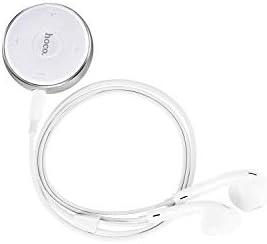
Image: The Hoco Bluetooth Headset E11, featuring a compact circular control unit and white wired earbuds.
Contido do paquete
- Hoco Bluetooth Headset E11
- Cable de carga USB
- Manual de usuario
Configuración
Cargando os auriculares
Before first use, fully charge the headset. Connect the provided USB charging cable to the charging port on the headset and the other end to a USB power source (e.g., computer USB port, wall adapter). The indicator light will show charging status and turn off or change color when fully charged.
Emparejamento cun dispositivo
- Asegúrese de que os auriculares están apagados.
- Press and hold the multi-function button on the headset until the indicator light flashes red and blue alternately, indicating pairing mode.
- No teu dispositivo (teléfono intelixente, tableta, etc.), activa o Bluetooth e busca os dispositivos dispoñibles.
- Select "Hoco E11" from the list of found devices.
- If prompted, enter "0000" as the passcode.
- Once successfully paired, the indicator light will flash blue slowly or turn off, and you will hear a confirmation tone.
En funcionamento
Encendido/apagado
- Encendido: Prema e manteña premido o botón multifunción durante aproximadamente 3 segundos ata que a luz indicadora azul parpadee.
- Apagado: Prema e manteña premido o botón multifunción durante aproximadamente 5 segundos ata que a luz indicadora vermella parpadee e logo se apague.
Xestión de chamadas
- Responder/Finalizar chamada: Preme o botón multifunción unha vez.
- Rexeitar a chamada: Manteña premido o botón multifunción durante 2 segundos.
- Volver a marcar o último número: Prema dúas veces o botón multifunción.
Reprodución de música
- Reproducir/Pausa: Preme o botón multifunción unha vez.
- Próxima pista: Manteña premido o botón Volume +.
- Pista anterior: Manteña premido o botón de Volume -.
- Subir volume: Preme o botón Volume +.
- Baixar volume: Prema o botón de Volume -.
Mantemento
To ensure the longevity and optimal performance of your Hoco E11 headset, follow these maintenance guidelines:
- Limpeza: Use a soft, dry, lint-free cloth to clean the headset. Do not use abrasive cleaners, solvents, or strong chemicals.
- Almacenamento: Store the headset in a cool, dry place away from direct sunlight and extreme temperatures. Avoid storing in dusty or humid environments.
- Coidado da batería: Evita descargar completamente a batería con frecuencia. Carga os auriculares regularmente, mesmo se non os usas durante períodos prolongados, para manter a batería en bo estado.
Resolución de problemas
| Problema | Solución |
|---|---|
| Os auriculares non se acenderán. | Ensure the headset is fully charged. Connect to a power source and try again. |
| Non se pode emparellar co dispositivo. | Ensure the headset is in pairing mode (flashing red and blue). Turn off and on Bluetooth on your device. Move closer to the headset. |
| Sen son ou volume baixo. | Check the volume levels on both the headset and your connected device. Ensure the headset is properly connected. |
| A conexión córrese con frecuencia. | Ensure there are no obstacles between the headset and your device. Move closer to your device. Avoid strong electromagnetic interference. |
Especificacións
- Modelo: E11
- Marca: Hoco
- Dimensións do paquete: 17 x 12 x 5.6 cm
- Peso: 240 g
- ASIN: B07M82BT9Q
- Note: Specific Bluetooth version, battery capacity, and playtime may vary. Refer to product packaging for precise details.
Garantía e Soporte
Hoco products are designed and manufactured to the highest quality standards. This product is covered by a limited warranty against manufacturing defects from the date of purchase. Please retain your proof of purchase for warranty claims.
For technical support, warranty inquiries, or further assistance, please contact your local Hoco distributor or the retailer from whom you purchased the product. You may also visit the official Hoco websitio para máis información.