
1. Introdución
The D-Link DWR-930M 4G/LTE Mobile Router is a portable wireless device designed to provide high-speed internet access on the go. It functions as a 4G LTE Cat4 mobile hotspot, enabling you to share a broadband wireless WAN (WWAN) connection via Wi-Fi. This device supports internet speeds up to 150Mbps for downloads and 50Mbps for uploads, allowing up to 8 Wi-Fi devices to connect simultaneously.
Its compact size and rechargeable 3000 mAh Li-ion battery make it suitable for travel and situations requiring an impromptu network. The DWR-930M incorporates a built-in firewall and supports WPA/WPA2 security protocols to protect your data. Charging is facilitated via a Micro-USB port, and device management can be performed using a mobile application.
2. Contido do paquete
Verifique que o seu paquete contén os seguintes elementos:
- D-Link DWR-930M 4G/LTE Mobile Router
- Batería recargable de iones de litio
- Cable de carga micro-USB
- Guía de instalación rápida (se está incluída)
Se falta algún artigo ou está danado, póñase en contacto co seu vendedor.
3. Produto rematadoview
Familiarize yourself with the physical components and indicator lights of your DWR-930M Mobile Router.
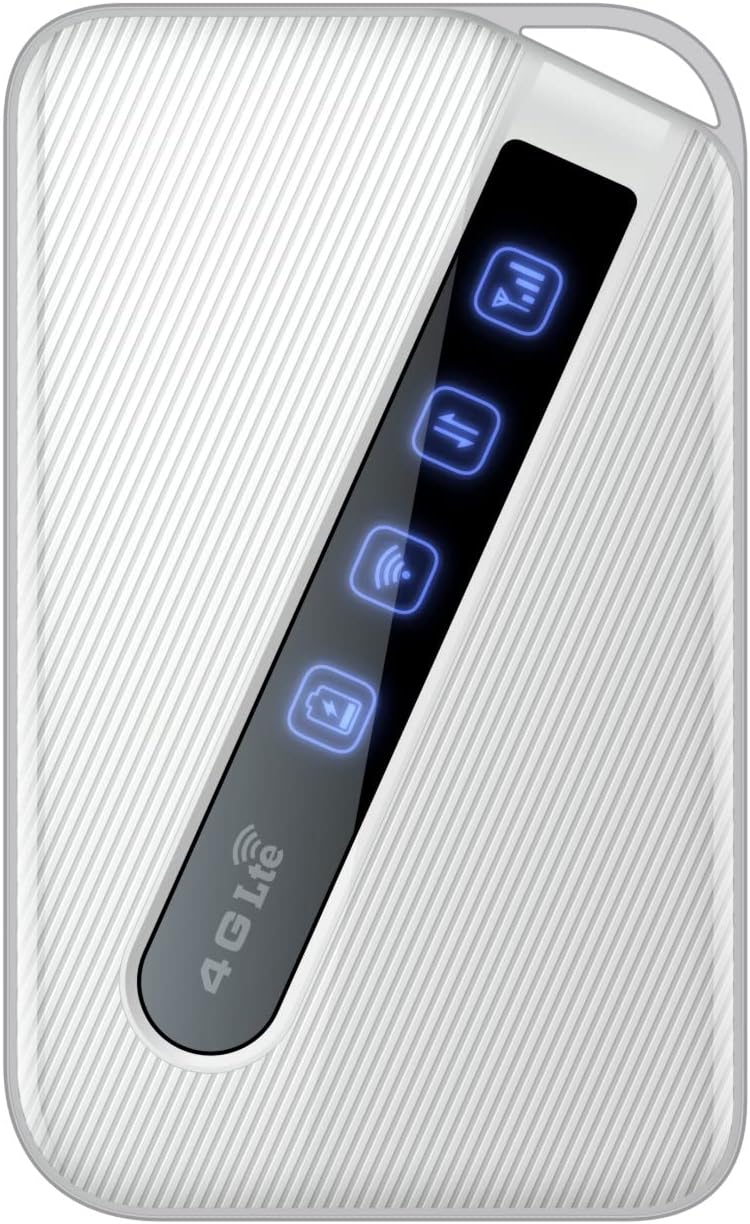
An image of the D-Link DWR-930M 4G/LTE Mobile Router, showing its compact white design and the illuminated indicator panel for signal, network, Wi-Fi, and battery status.
Luces indicadoras:
- Indicador de intensidade do sinal: Displays the strength of the 4G/LTE network signal.
- Network Type Indicator: Shows the current network connection status (e.g., 4G LTE).
- Indicador de estado da wifi: Indicates if the Wi-Fi hotspot is active.
- Indicador de estado da batería: Mostra o nivel de carga actual da batería.
Ports and Slots:
- Ranura para tarxeta SIM: For inserting your data-enabled SIM card.
- Porto micro-USB: Úsase para cargar o dispositivo.
- Botón de encendido: Para acender ou apagar o dispositivo.
4. Configuración
4.1. Inserir a tarxeta SIM
- Asegúrese de que o DWR-930M estea apagado.
- Locate the SIM card slot, typically found under the battery cover or on the side of the device.
- Carefully insert your data-enabled SIM card into the slot with the gold contacts facing down and the notched corner aligned correctly.
- Close the SIM card slot cover or replace the battery cover.
4.2. Cargando o dispositivo
- Conecta o cable de carga micro-USB ao porto micro-USB do DWR-930M.
- Connect the other end of the cable to a USB power adapter (not always included) or a computer's USB port.
- The battery indicator light will show charging status. Allow the device to fully charge before first use.
4.3. Acendido/apagado
- Para acender: Manteña premido o botón de acendido ata que se iluminen as luces indicadoras.
- Para apagar: Manteña premido o botón de acendido/apagado ata que as luces indicadoras se apaguen.
5. Funcionamento
5.1. Conexión de dispositivos a Wi-Fi
- Ensure the DWR-930M is powered on and the Wi-Fi indicator is active.
- No teu dispositivo con Wi-Fi (teléfono intelixente, tableta, portátil), abre a configuración de Wi-Fi.
- Busca redes wifi dispoñibles.
- Select the network name (SSID) of your DWR-930M (usually printed on a label inside the battery compartment or on the device itself).
- Enter the Wi-Fi password (WPA/WPA2 key), also found on the device label.
- Your device should now be connected to the internet via the DWR-930M.
5.2. Accedendo ao Web Interface de xestión
Para a configuración e os axustes avanzados, podes acceder á páxina do enrutador webinterface de xestión baseada en
- Conecta o teu dispositivo á rede Wi-Fi do DWR-930M.
- Abrir a web navegador (por exemplo, Chrome, Firefox, Edge).
- Na barra de enderezos, escriba o enderezo IP predeterminado do enrutador (normalmente
192.168.0.1or192.168.1.1) and press Enter. Refer to your device's label or quick start guide for the exact IP address. - Enter the default username and password (often
adminfor both, or specified on the device label). - You can now configure settings such as Wi-Fi name, password, security, and network preferences.
6. Mantemento
6.1. Coidado da batería
- Evite expoñer o dispositivo a temperaturas extremas.
- Non deixe a batería completamente descargada durante períodos prolongados.
- For optimal battery life, charge the device regularly.
6.2. Actualizacións de firmware
Comprobe periodicamente a compatibilidade con D-Link website for firmware updates for your DWR-930M. Firmware updates can improve performance, add new features, and enhance security. Follow the instructions provided with the firmware update carefully.
6.3. Limpeza
Usa un pano suave e seco para limpar o exterior do dispositivo. Non empregues produtos de limpeza líquidos nin aerosois, xa que poden danar o dispositivo.
7 Solución de problemas
This section addresses common issues you might encounter with your DWR-930M Mobile Router.
| Problema | Posible Solución |
|---|---|
| Sen conexión a Internet |
|
| Non se pode conectar á wifi |
|
| Velocidade de internet lenta |
|
| A batería non se está cargando |
|
8. Especificacións
Key technical specifications for the D-Link DWR-930M 4G/LTE Mobile Router:
| Característica | Detalle |
|---|---|
| Nome do modelo | DWR-930M |
| Tecnoloxía de conectividade | USB, Wi-Fi |
| Estándar de comunicación sen fíos | 802.11b, 802.11g, 802.11n |
| Clase de banda de frecuencia | Dobre banda |
| Data Speeds | Up to 150Mbps Downlink, 50Mbps Uplink (4G LTE Cat4) |
| Batería | 1 Lithium Ion battery required (included), 3000 mAh |
| Dimensións do produto | 10.3 x 1.3 x 6.3 cm |
| Peso | 360 g |
| Dispositivos compatibles | Ordenador portátil, ordenador persoal, teléfono intelixente, tableta |
| Usos recomendados | Viaxes, ao aire libre |
9. Garantía e soporte
Os produtos D-Link están respaldados por unha garantía limitada. Para coñecer os termos e condicións específicos da garantía aplicables á súa rexión, consulte a tarxeta de garantía incluída co produto ou visite o sitio web oficial de D-Link. websitio.
For technical support, product registration, or to download the latest drivers and firmware, please visit the D-Link support portal:
When contacting support, please have your product model number (DWR-930M) and serial number ready.