
1. Introdución
This manual provides instructions for the Superior Electronics Universal Replacement Remote Control, model SUPTRB015. This remote is designed to be a direct replacement for original remote controls of LG, Samsung, and Sony televisions, including Smart TV models. It is ready to use without any programming.
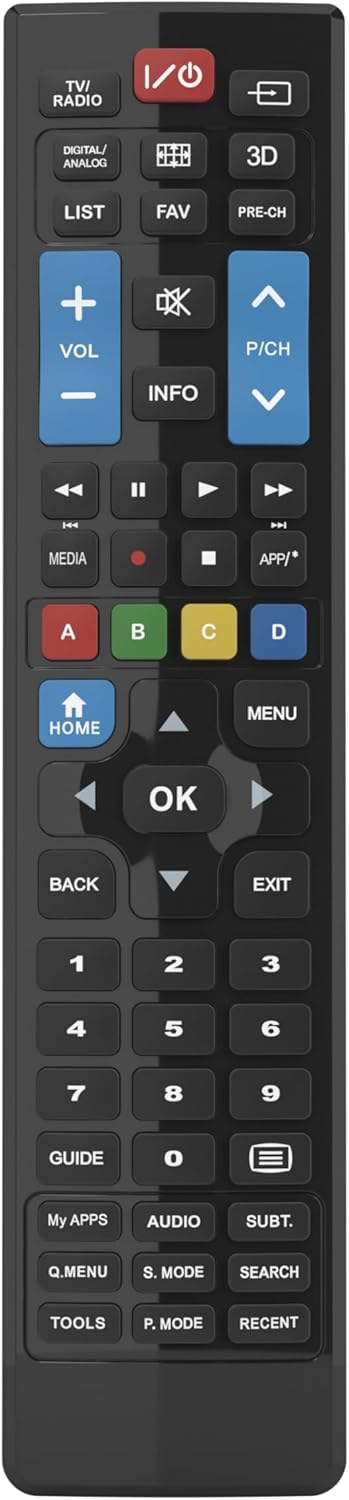
Figure 1: Superior Electronics Universal Remote Control (SUPTRB015)
2. Configuración
2.1. Instalación da batería
O mando a distancia require dúas pilas AAA (non incluídas). Siga estes pasos para instalalas:
- Localice o compartimento da batería na parte traseira do control remoto.
- Prema o pestillo e deslice a tapa da batería para retirala.
- Insira dúas pilas AAA, asegurándose de que os terminais positivo (+) e negativo (-) coincidan cos diagramas do interior do compartimento.
- Deslice a tapa da batería de novo no seu lugar ata que faga clic de forma segura.

Figure 2: Battery Compartment on the back of the remote.
2.2. Uso inicial (non se require programación)
This universal remote control is designed for immediate use with LG, Samsung, and Sony televisions. Once batteries are installed, it is ready to operate your TV without any additional programming or code setup.
3. Instrucións de funcionamento
The remote control features an intuitive layout with dedicated buttons for common functions and Smart TV access. Refer to Figure 3 for a visual guide to the buttons.

Figure 3: Remote Control Button Layout.
3.1. Funcións básicas da televisión
- Botón de encendido (ⓘ): Acende ou apaga o televisor.
- Subir/Baixar volume (VOL +/-): Axusta o volume do son.
- Channel Up/Down (P/CH +/-): Cambia as canles de televisión.
- Botón de silencio (🔇): Silencia ou activa o son do televisor.
- Botóns numéricos (0-9): Seleccionar directamente as canles de televisión.
- Input/Source Button (⎌): Selecciona a fonte de entrada (HDMI, AV, etc.).
3.2. Navigation and Menu Functions
- Directional Pad (Up, Down, Left, Right Arrows): Navega polos menús e as opcións.
- Botón OK: Confirma as seleccións.
- Botón HOME: Accesses the TV's main home screen or Smart Hub.
- Botón MENU: Abre o menú principal do televisor.
- Botón VOLVER: Volve á pantalla ou ao menú anterior.
- Botón EXIT: Sae do menú ou da aplicación actual.
- Botón INFO: Mostra información sobre o programa ou a entrada actual.
3.3. Smart TV and Media Functions
- Dedicated Smart TV Buttons: Access popular streaming apps directly (e.g., Netflix, YouTube, Prime Video). These buttons are typically labeled or have recognizable logos.
- Botóns de control multimedia (Reproducir, Pausar, Deter, Rebobinar, Avanzar rápido): Controla a reprodución multimedia.
- Botóns de cores (vermello, verde, amarelo, azul): These buttons often have specific functions within Smart TV apps or teletext, as indicated on your TV screen.
4. Mantemento
4.1. Limpeza do mando a distancia
Para manter o aspecto e a funcionalidade do mando a distancia:
- Limpe a superficie cun pano suave e seco.
- Para a sucidade persistente, d lixeiramenteampgl o pano con auga ou un limpador suave e non abrasivo.
- Non empregues produtos químicos agresivos, solventes nin estropajos de limpeza abrasivos, xa que poden danar o acabado ou os compoñentes internos do mando a distancia.
4.2. Substitución da batería
Replace batteries when the remote's response becomes sluggish or it stops functioning. Always replace both batteries at the same time with new AAA batteries. Do not mix old and new batteries, or different types of batteries.
5 Solución de problemas
Se tes problemas co teu mando a distancia, proba as seguintes solucións:
- O mando a distancia non responde:
- Comprobe se as pilas están inseridas correctamente coa polaridade correcta (+/-).
- Substitúe as pilas por outras novas.
- Asegúrese de que non haxa obstrucións entre o mando a distancia e o receptor de infravermellos do televisor.
- Asegúrate de estar dentro do rango de funcionamento efectivo (ata 10 metros).
- Algúns botóns non funcionan:
- This remote is designed for LG, Samsung, and Sony TVs. Ensure your TV is one of these brands.
- Some advanced functions or very specific buttons might not be universally supported across all TV models, especially older ones.
- Clean the remote control, especially around the unresponsive buttons, to ensure no debris is preventing contact.
- Smart TV buttons not working:
- Ensure your TV is a Smart TV and is connected to the internet.
- The dedicated Smart TV buttons (e.g., Netflix, YouTube) are compatible with most LG, Samsung, and Sony Smart TV models. If they don't work, you may need to access these apps through your TV's main Smart Hub/Home menu using the navigation buttons.
6. Especificacións
| Marca | Superior Electronics |
| Nome do modelo | Superior Electronics Replacement LG/Samsung/Sony SUPTRB015 |
| Característica especial | Universal |
| Cor | Negro |
| Máximo de dispositivos compatibles | 3 (LG, Samsung, Sony) |
| Dispositivos compatibles | Televisión |
| Tecnoloxía de conectividade | Infravermello |
| Tipo de controlador | Control de botón |
| Rango máximo | 10 metros |
| Número de baterías | 2 AAA (Required) |

Figure 4: Remote Control Dimensions (approx. 20 cm length, 4.5 cm width).
7. Garantía e soporte
Superior Electronics products are manufactured to high-quality standards. For information regarding warranty coverage, please refer to the documentation provided with your purchase or visit the official Superior Electronics website. For technical support or further assistance, please contact Superior Electronics customer service through their official channels.
Conserve este manual para futuras consultas.