
1. Introdución
Grazas pola compraasing the DACOM GF7 TWS V4.2 Bluetooth Earbuds. This manual provides detailed instructions on how to set up, operate, and maintain your earbuds to ensure optimal performance and longevity. Please read this manual thoroughly before using the product and retain it for future reference.
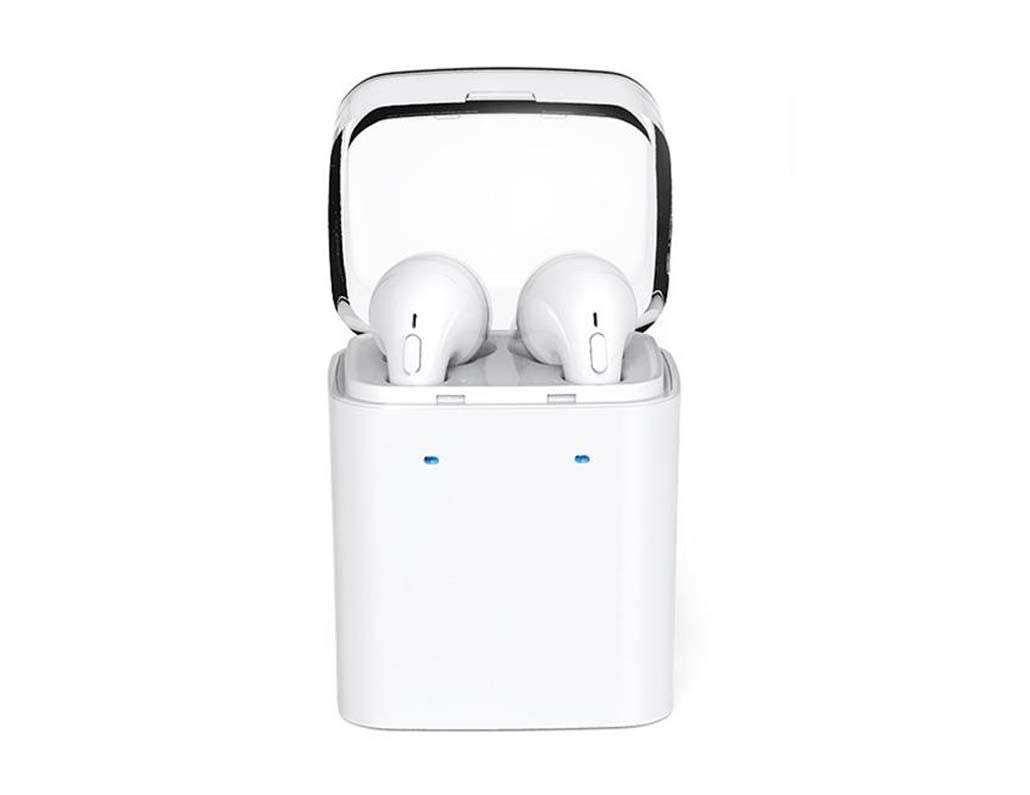
Image 1.1: DACOM GF7 TWS V4.2 Bluetooth Earbuds in their charging case.
2. Contido do paquete
Comprobe o contido do paquete ao desembalar. Se falta algún artigo ou está danado, póñase en contacto co seu vendedor.
- DACOM GF7 TWS V4.2 Bluetooth Earbuds (Left and Right)
- Estuche de carga portátil
- Cable de carga USB
- Almofadas para os oídos (varios tamaños)
- Manual de usuario (este documento)
3. Produto rematadoview
Familiarize yourself with the components of your DACOM GF7 TWS V4.2 Earbuds and charging case.

Image 3.1: Detailed diagram showing the Multifunction Button (MFB), Indicator Light, Microphone (Mic), Air Gate, DC5V Charge Jack Cover, Headphone Charging Indicator Light, USB Charging Input Port, and the Charging Indicator Light of the bottom on the DACOM GF7 TWS V4.2 Earbuds and Charging Case.
- Botón multifunción (MFB): Used for power, playback, call management, and voice assistant activation.
- Luz indicadora: Displays pairing status, charging status, and power status.
- Micrófono: Built-in microphone for calls and voice commands.
- Porta de aire: Acoustic vent for sound performance.
- DC5V Charge Jack Cover: Protects the charging port on the earbuds.
- Headphone Charging Indicator Light: Shows charging status of individual earbuds within the case.
- USB Charging Input Port: For charging the portable charging case.
- Charging Indicator Light of the bottom: Mostra o estado de carga da caixa.
4. Configuración
4.1. Carga dos auriculares e da caixa de carga
- Carga do estuche: Connect the USB charging cable to the USB Charging Input Port on the charging case and the other end to a 5V USB power adapter (not included). The Charging Indicator Light at the bottom of the case will illuminate to indicate charging. Once fully charged, the indicator light may change color or turn off.
- Cargando os auriculares: Place the earbuds into their respective slots in the charging case. Ensure the earbuds are properly seated. The Headphone Charging Indicator Light on the case will show the charging status of the earbuds. The earbuds' indicator lights will also show charging status (e.g., red while charging, off when fully charged).
- Para o primeiro uso, carga completamente tanto os auriculares como a caixa de carga.
4.2. Emparellamento Bluetooth
- Encendido: Take both earbuds out of the charging case. They will automatically power on and attempt to pair with each other. You will hear an audible prompt indicating they are connected to each other.
- Modo de emparejamento: Once the earbuds are paired with each other, one earbud's indicator light will flash red and blue alternately, indicating it is in pairing mode and ready to connect to your device.
- Conectar ao dispositivo: On your smartphone or Bluetooth-enabled device, go to the Bluetooth settings and search for available devices. Select "DACOM GF7 TWS" (or similar name) from the list.
- Conexión exitosa: Once connected, the earbud's indicator light will stop flashing, and you will hear a confirmation sound.
- Reconexión automática: Despois do emparellamento inicial, os auriculares conectaranse automaticamente co último dispositivo emparellado ao retiralos da caixa de carga, sempre que o Bluetooth estea activado no dispositivo.
5. Instrucións de funcionamento
The DACOM GF7 TWS V4.2 Earbuds feature a Multifunction Button (MFB) for various controls.
5.1. Acendido/apagado
- Encendido: Take the earbuds out of the charging case. They will power on automatically. Alternatively, press and hold the MFB on both earbuds for approximately 3 seconds until you hear a power-on prompt.
- Apagado: Place the earbuds back into the charging case. They will power off automatically. Alternatively, press and hold the MFB on both earbuds for approximately 5 seconds until you hear a power-off prompt.
5.2. Reprodución de música
- Reproducir/Pausa: Single press the MFB on either earbud.
- Próxima pista: Double press the MFB on the right earbud.
- Pista anterior: Double press the MFB on the left earbud.
5.3. Xestión de chamadas
- Responder/Finalizar chamada: Single press the MFB on either earbud.
- Rexeitar a chamada: Press and hold the MFB on either earbud for approximately 2 seconds.
5.4. Asistente de voz
- Activar o asistente de voz: Triple press the MFB on either earbud to activate your device's voice assistant (e.g., Siri, Google Assistant).
5.5. Cancelación de ruído
- The DACOM GF7 TWS V4.2 features active noise cancellation. Specific activation methods may vary. Refer to the product's quick start guide or manufacturer's website for precise instructions if not detailed here. Typically, a long press or specific tap sequence on an MFB or dedicated button activates/deactivates ANC.
6. Mantemento
Un mantemento axeitado garante a lonxevidade e o rendemento dos teus auriculares.
- Limpeza: Limpa regularmente os auriculares e a funda de carga cun pano suave, seco e sen pelusa. Non empregues produtos químicos agresivos nin materiais abrasivos.
- Consellos para oídos: Remove and clean the ear tips periodically with a damp un pano e xabón suave, despois enxágüe e seque ben antes de volver colocar.
- Almacenamento: Cando non os uses, garda os auriculares na súa funda de carga para protexelos do po e dos danos.
- Evitar a humidade: Keep the earbuds and charging case away from water, excessive humidity, and extreme temperatures.
7 Solución de problemas
If you encounter issues with your earbuds, refer to the following common problems and solutions.
| Problema | Solución |
|---|---|
| Os auriculares non se emparellan entre si. |
|
| Os auriculares non se conectan ao dispositivo. |
|
| Non se escoita son polos auriculares. |
|
| Charging case or earbuds not charging. |
|
8. Especificacións
| Nome da marca | DACOM |
| Nome do modelo | GF7 TWS |
| Número de modelo | 7 TWS |
| Cor | Branco |
| Factor de forma dos auriculares | In-Ear |
| Control de ruído | Cancelación activa de ruído |
| Tecnoloxía de conectividade | Sen fíos (Bluetooth) |
| Tecnoloxía de comunicación sen fíos | Bluetooth V4.2 (inferred from title) |
| Compoñentes incluídos | Almofadas para orellas |
| Características especiais | Noise Cancellation, Microphone Included |
| Método de control | Toca |
| Dispositivos compatibles | Todos os dispositivos |
| Material | PU Metal Eraser (likely referring to ear tip material or casing finish) |
9. Información de seguridade
Please read and follow these safety guidelines to prevent injury or damage to your device.
- Non desmonte, repare nin modifique o produto. Isto podería provocar incendios, descargas eléctricas ou danos completos no produto.
- Keep the product away from extreme temperatures (hot or cold), direct sunlight, and sources of heat.
- Evite expoñer o produto á auga ou a outros líquidos.
- Non empregue o produto a un volume alto durante períodos prolongados para evitar danos auditivos.
- Use só os cables e adaptadores de carga proporcionados ou recomendados.
- Manter fóra do alcance dos nenos e das mascotas. As pezas pequenas poden supoñer un perigo de asfixia.
- Ten coidado co que te rodea ao usar os auriculares, especialmente no tráfico ou noutras situacións potencialmente perigosas.
10. Garantía e soporte
DACOM products are designed and manufactured to the highest quality standards. For detailed warranty information, please refer to the warranty card included with your purchase or visit the official DACOM websitio.
For technical support, troubleshooting assistance, or to inquire about replacement parts, please contact DACOM customer service through their official websitio web ou a información de contacto que se inclúe na embalaxe do produto.
- Soporte en liña: Visit the official DACOM websitio con preguntas frecuentes, artigos de soporte e formularios de contacto.
- Soporte por correo electrónico: Refer to your product packaging for customer service email addresses.