
1. Información de seguridade
Lea atentamente todas as instrucións antes da montaxe e o uso. Garde este manual para futuras consultas.
- Montaxe necesaria: This desk requires self-assembly. Follow the provided assembly instructions meticulously to prevent injuries.
- Límite de peso: This desk is not designed to carry heavy objects. The maximum weight capacity is approximately 17 kg (37.5 lbs) to ensure stability.
- Supervisión: Children should be supervised while using the desk, especially during adjustments.
- Colocación: Coloca o escritorio sobre unha superficie plana e estable.
2. Produto rematadoview
The TecTake Children's Desk is designed to provide a comfortable and adaptable workspace for various activities such as drawing, homework, and crafts. Its thoughtful design allows for height and tilt adjustments to suit the user's needs.
Características principais:
- Tilting Desktop: The work surface can be tilted to provide an ergonomic position for different tasks.
- Altura axustable: The desk legs are adjustable in 7 steps, allowing the desk to grow with your child.
- Integrated Drawer: A convenient drawer provides storage for school supplies, drawing materials, and other items.
- Removable Stopper Strips: Two removable stopper strips on the lower edge of the desktop prevent materials from sliding off when the surface is tilted.
- Construción estable: Built with robust materials for durability and stability during daily use.
- Esquinas redondeadas: The desktop features rounded corners for enhanced safety.
- Fácil de limpar: The surface is washable with a damp pano.

Figure 1: TecTake Children's Desk, showcasing o seu deseño e as súas características.

Figura 2: Máisview of key features including adjustable height, tilting desktop, and storage.
3. Configuración
The desk comes with detailed assembly instructions in the package. Please refer to the included manual for step-by-step guidance on assembling your TecTake Children's Desk.
Pasos da Asemblea Xeral:
- Desembale todos os compoñentes e compruébeos coa lista de pezas do manual incluído.
- Monta a estrutura principal do marco usando os accesorios proporcionados.
- Attach the desktop to the frame, ensuring the tilting mechanism is correctly installed.
- Install the storage drawer and stopper strips.
- Asegúrese de que todos os parafusos e elementos de fixación estean ben axustados antes do uso.

Figure 3: The desk's flexible design allows for various adjustments to suit user needs.
4. Instrucións de funcionamento
4.1 Axustar a altura do escritorio
- Locate the height adjustment mechanisms on the desk legs.
- Carefully loosen the fasteners or pins that secure the legs at their current height.
- Adjust the desk to one of the 7 available height positions (from approximately 63 cm to 94 cm).
- Ensure both sides are adjusted to the same height and securely fasten the mechanisms before use.
4.2 Tilting the Desktop
- The desktop features a tilting mechanism for ergonomic positioning.
- To tilt, lift the desktop slightly and adjust it to the desired angle.
- Ensure the desktop is securely locked into place at the chosen angle.
- Utilize the two removable stopper strips to prevent items from sliding off the tilted surface.
4.3 Using the Storage Drawer
- The integrated drawer provides convenient storage.
- Pull the drawer out to access its contents.
- Push the drawer back in until it is fully closed to keep items secure and maintain a tidy workspace.
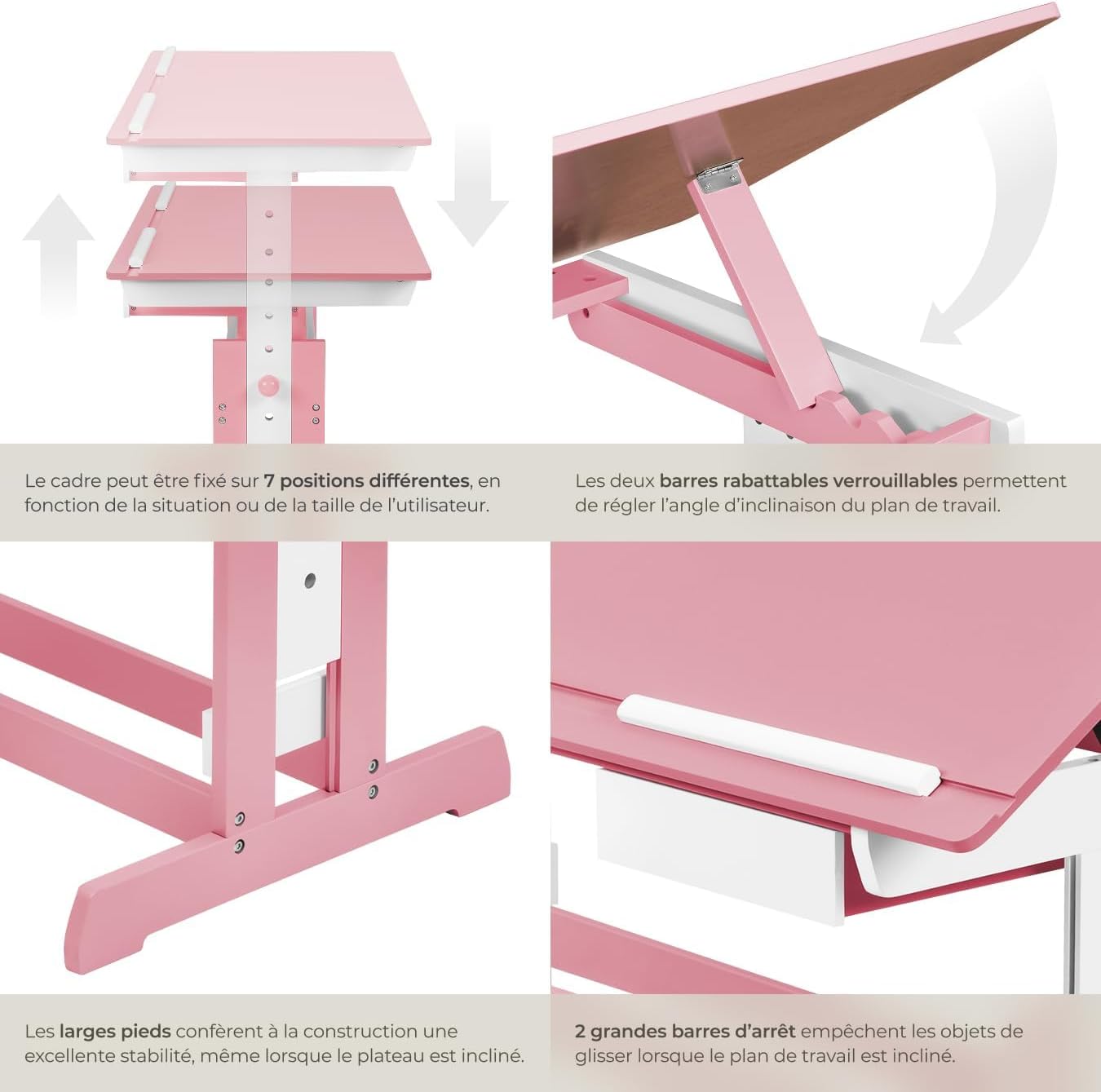
Figure 4: Close-up of the height adjustment and tilting mechanism.
5. Mantemento
- Limpeza: Limpar as superficies do escritorio con publicidadeamp pano. Evite produtos de limpeza abrasivos ou produtos químicos agresivos que poidan danar o acabado.
- Inspección: Comprobe periodicamente todos os parafusos e elementos de fixación para asegurarse de que permanecen axustados. Aperte de novo segundo sexa necesario.
- Evitar a humidade excesiva: Do not expose the desk to excessive moisture or direct sunlight for prolonged periods to prevent warping or discoloration.
6 Solución de problemas
If you encounter any issues with your TecTake Children's Desk, please refer to the following common solutions:
- Desk Wobbles: Ensure the desk is placed on a level surface. Check that all assembly screws and bolts are securely tightened.
- Difficulty Adjusting Height/Tilt: Verify that no obstructions are present in the adjustment mechanisms. Ensure fasteners are sufficiently loosened before attempting to adjust.
- Pezas faltantes ou danadas: If any parts are missing or damaged upon arrival, please contact TecTake customer support for assistance.
7. Especificacións
| Característica | Especificación |
|---|---|
| Marca | TecTake |
| Número de modelo | 800117 |
| Dimensións da superficie de traballo | Aprox. 109 x 55 cm (43 x 21.7 polgadas) |
| Rango de axuste de altura | Approx. 63 cm to 94 cm (24.8 to 37 inches) in 7 steps |
| Drawer Interior Dimensions (HxWxD) | Aprox. 6 x 27 x 22 cm (2.4 x 10.6 x 8.7 polgadas) |
| Peso | Aprox. 17 kg (37.5 libras) |
| Material | Plywood (lacquered) / Metal |
| Característica especial | Adjustable, Tilting Desktop |
| Instrucións de coidado | Limpar con anuncioamp pano |

Figure 5: Detailed dimensions and technical specifications of the desk.
8. Garantía e soporte
For warranty information, product support, or to order replacement parts, please refer to the documentation included with your purchase or visit the official TecTake websitio. Teña á man o número de modelo (800117) e a data de compra cando contacte co servizo de asistencia.