
ARREGUI Forma Evolution 150020
ARREGUI Forma Evolution 150020 Furniture Safe User Manual
Model: Forma Evolution 150020 | Brand: ARREGUI
Introdución
This manual provides detailed instructions for the installation, operation, and maintenance of your ARREGUI Forma Evolution 150020 furniture safe. Designed for both home and commercial use, this safe offers enhanced security with its electronic lock and key system. Please read this manual thoroughly before using the safe to ensure proper function and security.
Produto rematadoview
The ARREGUI Forma Evolution 150020 is a compact and secure furniture safe, ideal for protecting valuables. It features a robust construction with a double-walled drill-resistant front and a two-factor security lock (electronic code + key) for enhanced protection.
Características principais:
- Dimensións: 25 x 35 x 25 cm (H x W x D), 16 L capacity.
- Double-Walled Drill-Resistant Front: 6 mm strong front + 3 mm steel drill protection plate.
- Grosor do corpo: 3 mm.
- Mecanismo de bloqueo: Two 22 mm diameter saw and pry-resistant rotating bolts.
- Two-Factor Security Lock: Electronic code and key for opening.
- Pantalla dixital: For displaying messages and codes.
- Iluminación interna: Automatically activates upon opening.
- Easy Anchoring: Pre-drilled holes in the base and back for wall or floor mounting.
Contido do paquete:
- ARREGUI Forma Evolution 150020 Safe
- Manual de usuario
- 2 chaves estándar
- 1 Emergency Key
- External Micro-USB Power Supply
- Anchoring Screws
- 4 pilas AA (preinstaladas)
Configuración
1. Desembalaxe e Inspección Inicial
Carefully remove the safe from its packaging. Inspect the safe for any signs of damage. Ensure all package contents listed above are present.
2. Instalación da batería (se non está preinstalada)
The safe requires 4 AA alkaline batteries. The battery compartment is located on the inside of the door. If batteries are not pre-installed, open the battery cover and insert the batteries, observing the correct polarity (+/-). Close the cover securely.

Imaxe: Dentro view of the safe door, highlighting the battery compartment for 4 AA batteries.
3. Initial Opening and Code Setting
Upon first use, the safe can be opened using the emergency key. Insert the emergency key into the keyhole on the electronic panel and turn it while simultaneously turning the handle to open the door.

Image: The safe door is open, showing the emergency key inserted into the keyhole on the electronic panel, ready for initial access.
Once open, you can set your personal user code. Refer to the "Operating" section for detailed instructions on setting and changing codes.
4. Anchoring the Safe
For maximum security, it is highly recommended to anchor the safe to a wall, floor, or sturdy furniture. The safe has pre-drilled holes (2 in the base, 2 in the back) for this purpose. Use the provided anchoring screws.
- Choose a suitable location for the safe.
- Mark the drilling points through the pre-drilled holes on the desired surface.
- Drill holes of appropriate size and depth.
- Position the safe and secure it using the anchoring screws.

Imaxe: Fronte view of the ARREGUI Forma Evolution safe, showing the electronic keypad and keyhole. This image represents the safe ready for installation.

Image: The ARREGUI Forma Evolution safe securely installed within a wooden cabinet, demonstrating a typical anchoring scenario.
Instrucións de funcionamento
1. Setting the User Code
With the safe door open:
- Press the red reset button located on the inside of the door, near the hinge. The display will show "PROG".
- Enter your desired user code (3 to 8 digits) on the keypad.
- Press the "E" (Enter) button to confirm. The display will show "GOOD" indicating successful programming.
- Proba o novo código coa porta aberta antes de pechala.
Nota: There are two possible codes: one Master code and one User code. The initial code is usually a default Master code. It is highly recommended to change both codes upon first use.
2. Configuración do código mestre
With the safe door open:
- Press "00" then the red reset button. The display will show "PROG".
- Enter your desired Master code (3 to 8 digits) on the keypad.
- Press the "E" (Enter) button to confirm. The display will show "GOOD".
3. Opening the Safe with Electronic Code
- Enter your user code (or Master code) on the keypad. The display will show the entered digits.
- Press the "E" (Enter) button. If the code is correct, the display will show "OPEN" and the lock will disengage for a few seconds.
- Within this time, insert the standard key into the keyhole on the electronic panel and turn it clockwise while simultaneously turning the handle to open the door.

Imaxe: Primeiro plano view of the electronic keypad and digital display, illustrating the interface for code entry.
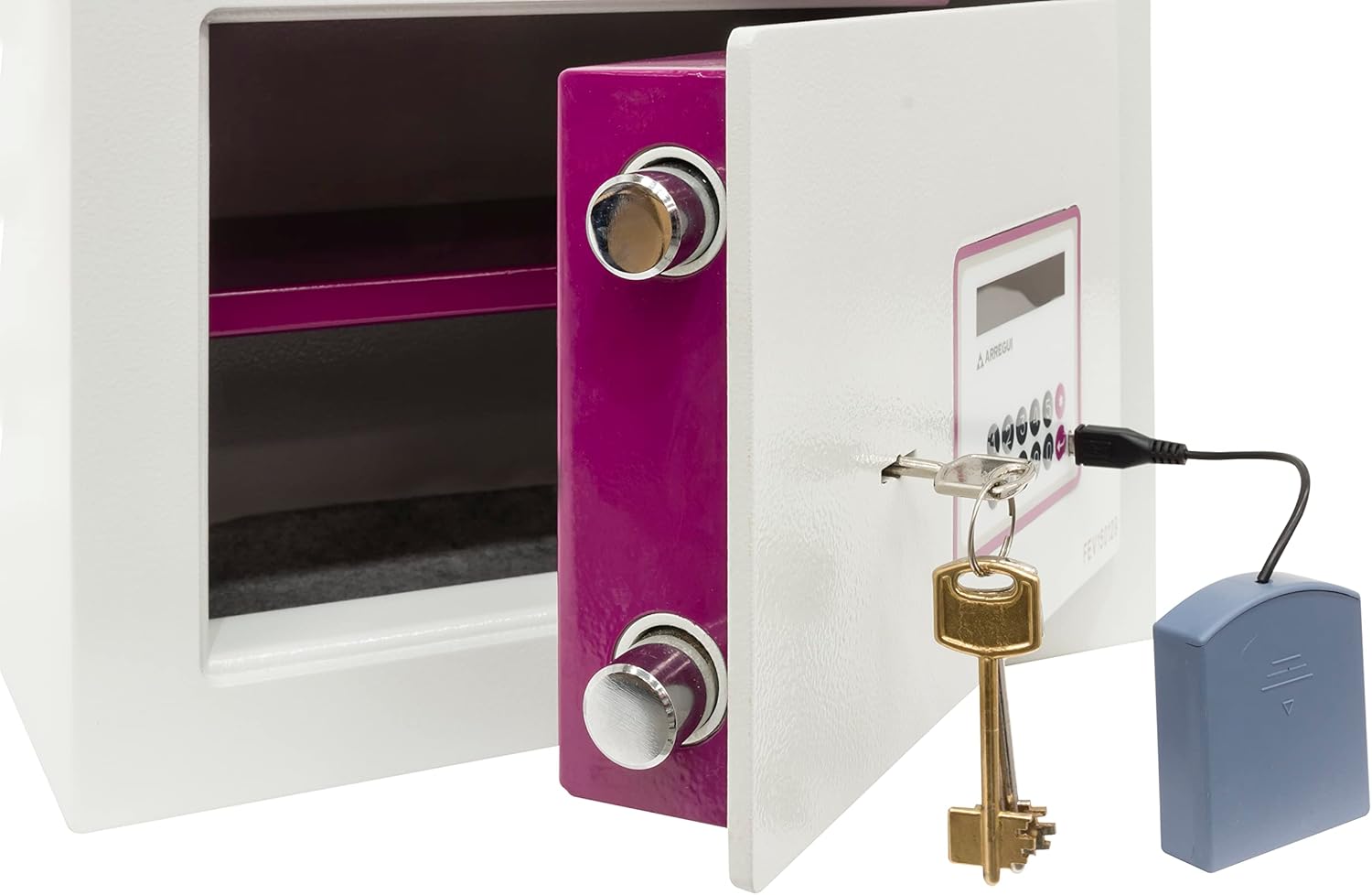
Image: The safe door is partially open, with a key inserted into the electronic panel, illustrating the two-factor security system in action.
4. Peche e bloqueo da caixa forte
Close the safe door and turn the handle counter-clockwise until it is fully engaged. The safe will automatically lock. No code entry is required to lock the safe.
Image: The safe door is open, showing the interior and the locking bolts, ready to be closed and secured.
Mantemento
1. Substitución da batería
When the batteries are low, the red light above the keypad will illuminate, or the display may show "LOW BATT". Replace all 4 AA alkaline batteries promptly to ensure continued operation. Use only new, high-quality alkaline batteries.
Imaxe: Dentro view of the safe door, indicating the location of the battery compartment for replacement.
2. Using External Power Supply
If the batteries are completely depleted and you cannot open the safe, you can use the external micro-USB power supply. Connect the power supply to the micro-USB port on the electronic panel. This will temporarily power the keypad, allowing you to enter your code and open the safe. Replace the internal batteries immediately after opening.
Image: A hand connecting the external micro-USB power supply to the safe's electronic panel, demonstrating how to provide temporary power.
3. Limpeza
Limpar o exterior da caixa forte cun pano suave eamp cloth. Do not use abrasive cleaners or solvents, as these can damage the finish or electronic components. Ensure no moisture enters the electronic keypad or keyhole.
Resolución de problemas
| Problema | Causa posible | Solución |
|---|---|---|
| A caixa forte non abre con código. | Incorrect code entered; Low batteries; Electronic malfunction. | Re-enter code carefully. Replace batteries or use external power supply. If problem persists, use emergency key and contact support. |
| Red light flashes or "LOW BATT" on display. | As baterías están baixas. | Replace all 4 AA alkaline batteries immediately. |
| Safe cannot be locked. | Door not fully closed; Obstruction in door frame. | Ensure door is completely closed and clear of obstructions. Turn handle firmly. |
| Keys are lost. | Keys misplaced. | Use the emergency key. Contact ARREGUI support for key replacement options, providing proof of ownership. |
Especificacións
| Característica | Detalle |
|---|---|
| Número de modelo | Forma Evolution 150020 |
| Dimensións externas (H x W x D) | 25 x 35 x 25 cm |
| Capacidade | 16 litros |
| Peso | 18.5 quilogramos |
| Material | Aceiro de aliaxe |
| Grosor frontal | 6 mm (front) + 3 mm (drill protection) |
| Espesor corporal | 3 mm |
| Pernos de bloqueo | 2 x 22 mm diameter rotating bolts |
| Tipo de bloqueo | Electronic Keypad + Key (2-Factor Security) |
| Fonte de enerxía | 4 pilas alcalinas AA (incluídas) |
| Potencia de emerxencia | External Micro-USB connection |
| Tipo de montaxe | Montaxe no chan, montaxe na parede |
Garantía e Soporte
ARREGUI products are manufactured to high-quality standards. For warranty information and customer support, please refer to the warranty card included with your product or visit the official ARREGUI websitio. Garde o recibo da compra como proba de compra para calquera reclamación de garantía.
For technical assistance or inquiries, please contact ARREGUI customer service directly. Contact details can typically be found on the manufacturer's websitio web ou na embalaxe do produto.
ARREGUI Official Websitio: www.arregui.es (Please note: This link is provided as a general reference and may not be specific to your region or product support page. Always check your product documentation for the most accurate contact information.)
Ask a question about this manual
Ask about setup, troubleshooting, compatibility, parts, safety, or missing instructions. Manuals+ will review the question and use this page’s manual context to help answer it.