
Introdución
Thank you for choosing the NEC NP-MC372X Portable Projector. This manual provides essential information for the safe and efficient use of your projector. Please read these instructions thoroughly before operating the device and retain them for future reference. The NEC NP-MC372X is an XGA LCD projector designed for clear and bright presentations, offering 3700 lumens of brightness and a native resolution of 1024x768.
Información de seguridade
Observe sempre as seguintes precaucións de seguridade para evitar incendios, descargas eléctricas ou lesións:
- Non bloquee as aberturas de ventilación. Asegúrese de que haxa espazo suficiente arredor do proxector para un fluxo de aire axeitado.
- Non mire directamente á lente do proxector cando estea aceso.amp está acendido, xa que a luz brillante pode causar danos nos ollos.
- Non coloque o proxector nun carro, soporte ou mesa inestable.
- Unplug the projector from the power outlet before cleaning. Use a dry cloth for cleaning.
- Encargue toda a reparación a persoal de servizo cualificado.
Contido do paquete
Verifique que todos os elementos que se indican a continuación estean incluídos no seu paquete:
- NEC NP-MC372X Portable Projector
- Cable de alimentación
- Cable HDMI
- Control remoto
Produto rematadoview
The NEC NP-MC372X is a versatile projector featuring an LCD display, 1024x768 native resolution, and 3700 lumens brightness. It includes a 1.2x zoom lens and offers a lamp life of up to 10,000 hours. Connectivity options include Dual HDMI, VGA, and USB.
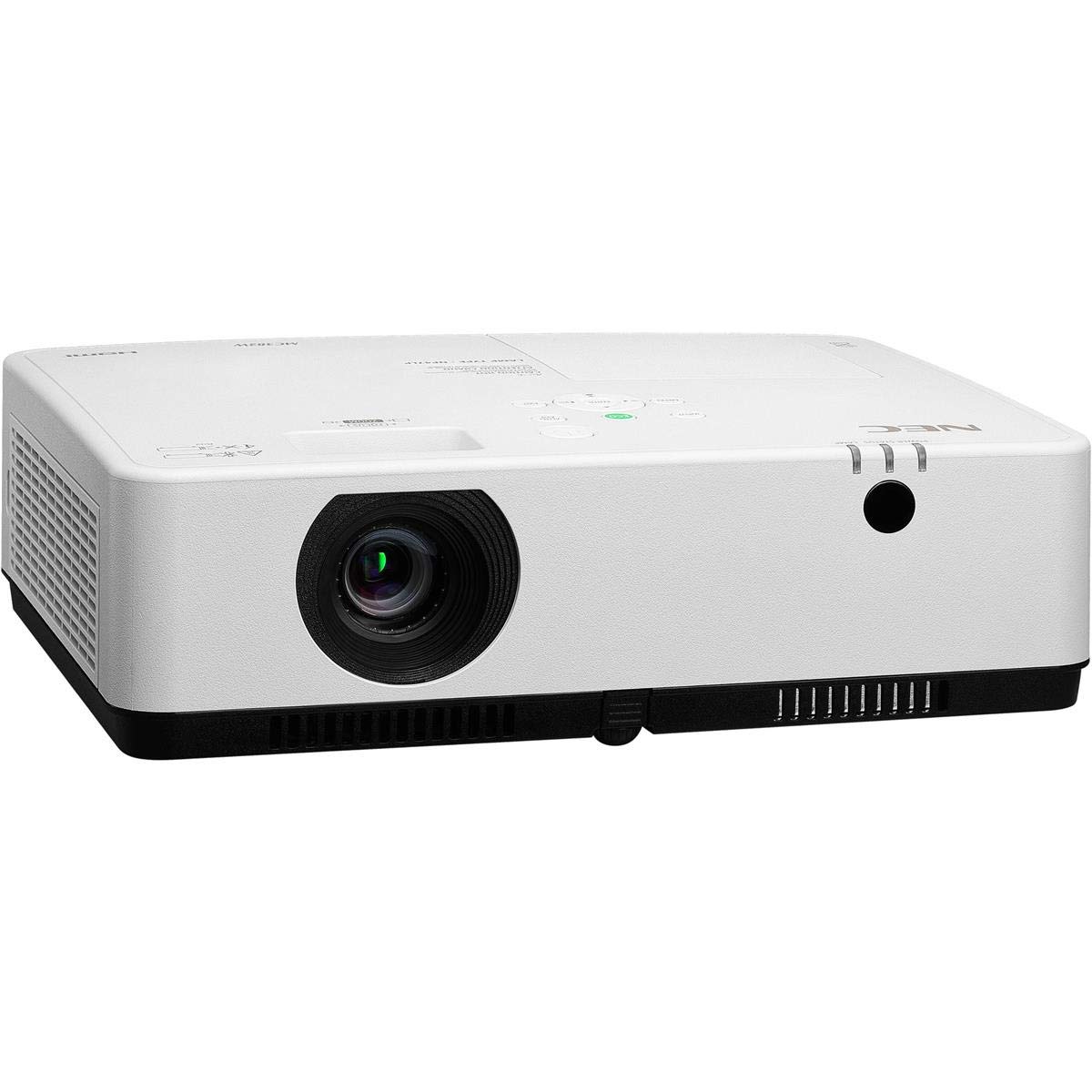
Figura 1: Parte dianteira e superior view of the NEC NP-MC372X Portable Projector, showing the lens and control panel.

Figura 2: Fronte view of the projector, highlighting the projection lens.

Figura 3: Traseira view of the projector, displaying the various input and output ports including HDMI, VGA, USB, LAN, and audio connections.
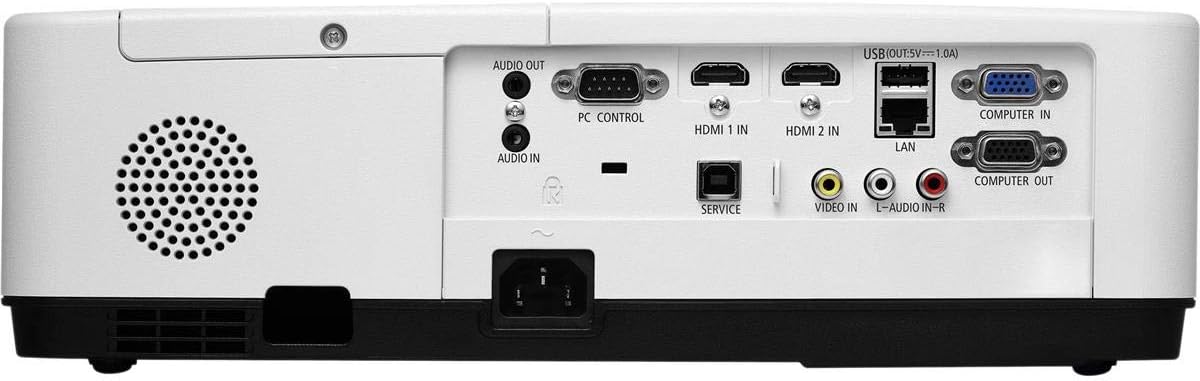
Figura 4: Lateral view of the projector, showing the ventilation grille for heat dissipation.
Configuración
Colocación física
Place the projector on a stable, flat surface or mount it securely. Ensure the projector is positioned at an appropriate distance from the screen to achieve the desired image size. Maintain clear space around the projector for ventilation.
Conectando Dispositivos
Refer to Figure 3 for port locations. Connect your source device (e.g., laptop, gaming console) to the projector using one of the following methods:
- HDMI: Use an HDMI cable to connect to either HDMI 1 IN or HDMI 2 IN.
- VGA: Use a VGA cable to connect to COMPUTER IN. For audio, connect a 3.5mm audio cable to AUDIO IN.
- USB: Connect a USB device to the USB port for direct media playback.
- LAN: Conecte un cable Ethernet ao porto LAN para a conectividade de rede.
Encendido/apagado
1. Connect the power cable to the projector and a power outlet.
2. Press the power button on the projector or the remote control to turn on the projector.
3. To turn off, press the power button again. Confirm shutdown when prompted.
Instrucións de funcionamento
Basic Operation with Remote Control
Use the included remote control to navigate menus, select input sources, and adjust settings. Point the remote control towards the projector's remote sensor.
Selección da fonte de entrada
Press the 'Input' button on the remote control or projector control panel to cycle through available input sources (HDMI 1, HDMI 2, Computer In, USB).
Axuste da imaxe
- Foco: Xira o anel de enfoque da lente ata que a imaxe estea nítida.
- Zoom: Use the zoom ring on the lens to adjust the image size without moving the projector. The projector features a 1.2x optical zoom.
- Corrección Keystone: If the image appears trapezoidal, use the keystone correction function in the projector menu to square the image.
Características especiais
- Multi Presenter: This feature allows multiple users to connect and display content wirelessly from their devices. Refer to the on-screen menu for setup instructions.
- USB Viewer Capability: Insert a USB drive into the USB port to directly view photos, videos, and documents without a connected computer.
- Subtítulos pechados: Enable closed captioning for compatible video sources through the projector's menu settings.
Mantemento
Lamp Substitución
O proxector lamp has an operating life of up to 10,000 hours. When the lamp reaches the end of its life, a warning message will appear. Consult a qualified service technician for lamp replacement to ensure proper installation and safety.
Limpeza
- Exterior: Limpar o proxector casincun pano suave, seco e sen fiapos. Para marcas difíciles, limpar lixeiramenteampen o pano con auga.
- Lente: Use a professional lens cleaning kit or a soft, dry cloth specifically designed for optical lenses. Avoid harsh chemicals.
- Filtro de ar: Regularly check and clean the air filter to prevent dust buildup, which can affect performance and lamp life. Refer to the projector's on-screen menu for filter usage time.
Resolución de problemas
Se tes problemas, proba as seguintes solucións antes de contactar co servizo de asistencia:
- Sen imaxe: Ensure all cables are securely connected. Verify the correct input source is selected. Check if the lens cap is removed.
- Sen son: Confirm audio cables are connected (if applicable). Adjust volume on both the projector and the source device.
- O control remoto non funciona: Check the batteries in the remote. Ensure there are no obstructions between the remote and the projector's sensor.
- A imaxe está borrosa: Axuste o anel de enfoque da lente. Asegúrese de que a superficie de proxección estea plana.
- Aviso de sobrequecemento: Ensure ventilation openings are not blocked. Clean the air filter if necessary.
Especificacións
| Característica | Especificación |
|---|---|
| Marca | NEC |
| Nome do modelo | MC372X |
| Número de modelo | NP-MC372X |
| Tipo de visualización | LCD |
| Resolución nativa | 1024 x 768 (XGA) |
| Brillo | 3700 lúmenes |
| Tecnoloxía de conectividade | HDMI, USB, VGA, LAN |
| Zoom | 1.2x óptica |
| Vida de funcionamento da fonte de luz | 10,000 horas |
| Wattage | 267 watts (typical 120V) |
| Tipo de controlador | Control remoto |
| Peso do elemento | 7.1 libras |
| Voltage | 120 voltios |
| UPC | 805736070248 |
Garantía e Soporte
The NEC NP-MC372X Portable Projector comes with a 3 ano de garantía limitada. For warranty claims or technical support, please contact NEC customer service. You can find contact information on the official NEC websitio web ou a través do vendedor do produto.