
SUDOTACK ST-800
SUDOTACK USB Condenser Podcast Microphone User Manual
Model: ST-800 | Brand: SUDOTACK
1. Introdución
The SUDOTACK ST-800 USB Condenser Podcast Microphone is designed for high-quality audio capture across various applications, including recording, streaming, gaming, voice-overs, and online meetings. Featuring a 192KHz/24bit professional sound chipset and a cardioid pickup pattern, it delivers clear, crisp sound while minimizing background noise. It offers plug-and-play simplicity with most operating systems, making it a versatile choice for content creators.
2. Que hai na caixa
Your SUDOTACK ST-800 microphone kit includes the following components:
- ST-800 Condenser Microphone
- Adjustable Boom Arm Stand
- Filtro Pop
- Montaxe de mesa Clamp
- Montaxe de choque
- 8.2ft USB-B to USB Cable

Image: All components included in the SUDOTACK ST-800 microphone kit, laid out clearly.
3. Instrucións de configuración
Follow these steps for quick and easy setup of your SUDOTACK ST-800 microphone:
- Fixar o soporte de amortiguador: Securely attach the microphone to the shock mount. The shock mount helps to isolate the microphone from physical vibrations, floor, and stand noise.
- Mount the Boom Arm: Use the table mounting clamp to attach the adjustable boom arm stand to your desk or table. Ensure it is firmly secured to prevent movement.
- Attach Microphone to Boom Arm: Carefully screw the shock mount (with the microphone attached) onto the threaded end of the boom arm stand.
- Instala o filtro antipop: Attach the pop filter to the boom arm. Position it approximately 2-3 inches in front of the microphone to reduce plosive sounds (P's and B's).
- Conecte o cable USB: Plug the USB-B end of the provided 8.2ft cable into the microphone's port and the USB-A end into an available USB port on your computer (PC, Laptop, PS4/5). The microphone is plug-and-play and typically requires no additional drivers.
- Colocación do micrófono: For optimal sound capture, ensure the side of the microphone with the SUDOTACK logo is facing you directly. This aligns with the cardioid pickup pattern, which is most sensitive to sound from the front.
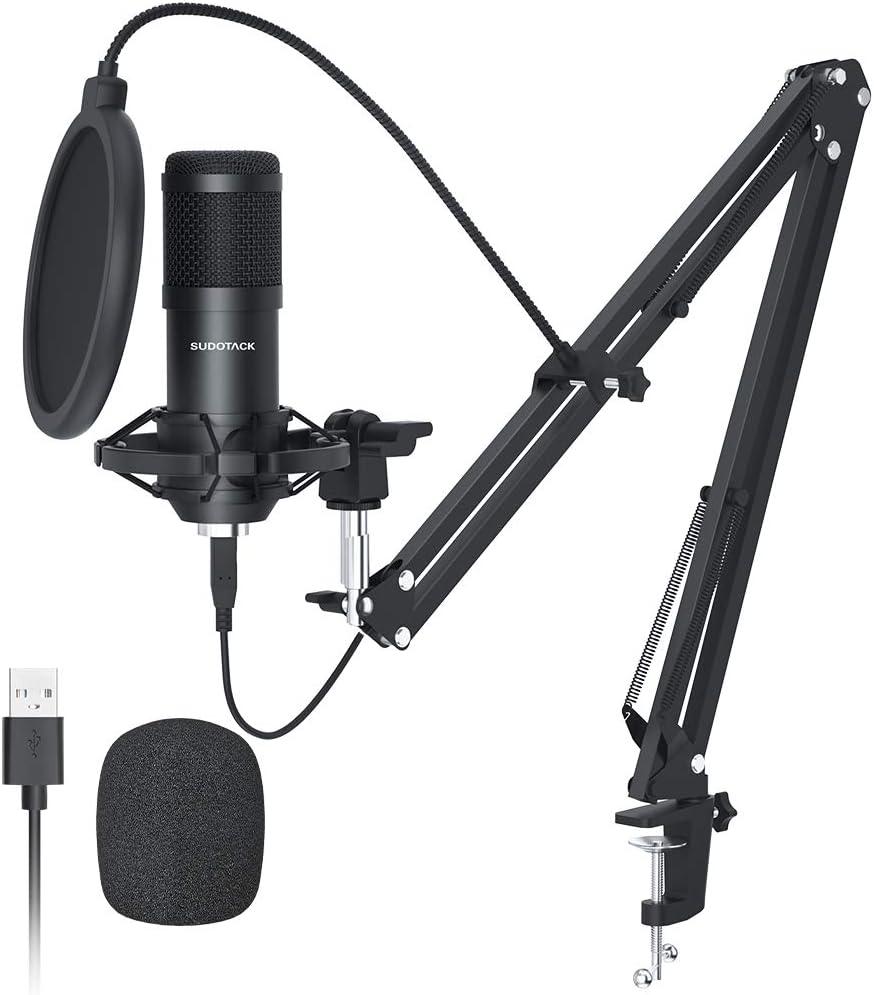
Image: The complete SUDOTACK ST-800 microphone kit, including the microphone, boom arm, pop filter, and USB cable, ready for setup.

Image: Illustration showing the correct (logo side facing user) and incorrect microphone positioning for optimal audio capture.

Image: The microphone connected via USB cable to a laptop, illustrating its plug-and-play functionality with various devices.
4. Instrucións de funcionamento
The SUDOTACK ST-800 microphone is designed for ease of use across a wide range of audio applications.
4.1. Sound Quality and Cardioid Pickup Pattern
The microphone features a 192KHz/24bit professional sound chipset and a 16mm diaphragm, ensuring high-resolution audio with clear and crisp sound reproduction. Its cardioid pickup pattern primarily captures sound from the front of the microphone, effectively minimizing unwanted background noise from the sides and rear. This makes it ideal for vocal recordings, streaming, and voice-overs where clear primary audio is crucial.

Imaxe: Primeiro plano view of the microphone's 16mm diaphragm, highlighting its role in capturing pure and natural sound.

Image: Visual representation of the built-in professional sound chipset, emphasizing high sampling rate and low noise.
4.2. Compatibilidade
The ST-800 is compatible with most mainstream operating systems, including Windows and Mac OS. It works seamlessly with PC, desktop computers, laptops, and PlayStation 4/5 consoles. Please note that this microphone is not compatible with XBOX.
4.3. Aplicacións recomendadas
This microphone is suitable for a variety of audio pursuits, including:
- Podcasting
- Streaming (Twitch, YouTube)
- Vídeos de YouTube
- Produción Musical
- Gravación
- Voice Acting
- Xogos
- Online Meetings (Zoom, Skype, Discord)

Image: Icons representing various platforms and applications like Twitch, Zoom, Audacity, YouTube, and Skype, indicating the microphone's broad utility.
5. Mantemento
Proper care and maintenance will extend the lifespan and performance of your microphone.
- Limpeza: Use a soft, dry cloth to wipe down the microphone body and stand. Avoid using liquid cleaners or abrasive materials, which can damage the finish or internal components.
- Almacenamento: When not in use, store the microphone in a clean, dry place away from extreme temperatures and humidity. Consider disassembling the boom arm for compact storage if needed.
- Manexo: Handle the microphone and its components with care. Avoid dropping or subjecting them to strong impacts, as this can affect performance and durability.
6 Solución de problemas
If you encounter issues with your SUDOTACK ST-800 microphone, refer to the following common problems and solutions:
6.1. Sen saída de son
- Comproba as conexións: Ensure the USB cable is securely plugged into both the microphone and your computer's USB port. Try a different USB port if necessary.
- Verify Computer Settings: On your computer, go to your sound settings (e.g., Windows: Sound Control Panel > Recording tab; Mac: System Preferences > Sound > Input). Make sure the SUDOTACK microphone is selected as the default input device and that its volume is not muted or set too low.
- Configuración da aplicación: If using specific software (e.g., OBS, Zoom, Audacity), check the audio input settings within that application to ensure the SUDOTACK microphone is selected.
6.2. Distorted or Unclear Sound
- Posicionamento do micrófono: Ensure the microphone's logo side is facing you directly. The cardioid pattern is directional, and improper positioning can lead to muffled sound.
- Distance from Mouth: Maintain an optimal distance (typically 6-12 inches) from the microphone. Being too close can cause distortion, while being too far can result in low volume and background noise.
- Uso do filtro pop: Ensure the pop filter is correctly positioned to reduce plosives (harsh 'P' and 'B' sounds).
- Ruído ambiental: Minimize background noise in your recording environment. The cardioid pattern helps, but it cannot eliminate all external sounds.
- Nivel de entrada: Adjust the microphone's input level in your computer's sound settings or recording software. Too high a level can cause clipping and distortion.
6.3. Incompatibility Issues
- XBOX: As stated, the SUDOTACK ST-800 is not compatible with XBOX consoles.
- Outros dispositivos: Ensure your device supports USB audio input. While compatible with most PCs, laptops, and PS4/5, some older or specialized devices may not support it.
7. Especificacións
| Característica | Especificación |
|---|---|
| Marca | SUDOTACK |
| Número de modelo | ST-800 |
| Tecnoloxía de conectividade | USB |
| Factor de forma do micrófono | Diafragma |
| Patrón polar | Unidireccional (cardioide) |
| Sensibilidade Audio | 32 dB |
| Relación sinal-ruído | 78 dB |
| Rango de frecuencias | 0.03 kHz - 16 kHz |
| Plataforma de hardware | PC, Computer, Laptop, PS4/5 |
| Material | Metal |
| Lonxitude do cable | 8.2 pés |
| Dimensións do produto | 17 x 8 x 3 polgadas |
| Peso do elemento | 2.79 libras |
8. Garantía e soporte
SUDOTACK products are manufactured with a commitment to quality. For specific warranty details and support inquiries, please refer to the warranty card included with your product or visit the official SUDOTACK store page on Amazon.
This product is also part of the 'Verified by Transparency' program, ensuring authenticity.
Para obter máis axuda, pode visitar o SUDOTACK Store on Amazon.
Ask a question about this manual
Ask about setup, troubleshooting, compatibility, parts, safety, or missing instructions. Manuals+ will review the question and use this page’s manual context to help answer it.