
Darkglass Electronics AO900
Darkglass Alpha Omega 900 Bass Head User Manual
Model: AO900 | Brand: Darkglass Electronics
1. Introdución
This manual provides comprehensive instructions for the Darkglass Alpha Omega 900 Bass Head. It covers setup, operation, maintenance, troubleshooting, and technical specifications. Please read this manual thoroughly before operating the device to ensure proper use and to maximize its performance and longevity.
The Alpha Omega 900 is a 900-watt bass amplifier head featuring a built-in compressor, IR cabinet simulation, a 6-band graphic EQ, and MIDI capabilities, offering unparalleled tonal flexibility and power for the modern bass player.
2. Produto rematadoview
Controis do panel frontal

Figure 2.1: Front panel of the Alpha Omega 900 Bass Head, showing input, compression, drive, level, EQ, and master controls.
- Entrada: Connect your instrument here. Features Passive/Active switch for different pickup outputs.
- Comp: Controla a cantidade de compresión.
- Condución: Axusta a cantidade de distorsión.
- Nivel: Sets the overall output volume of the distortion circuit.
- Mod: Selects between Alpha (punchy, tight) and Omega (brutal, raw) distortion circuits.
- Mestura: Mixes the clean signal with the distorted signal.
- Ganancia: Controls the input gain of the ampmáis vivo.
- Ecualizador gráfico: 6-band graphic equalizer for precise tone shaping (250 Hz, 500 Hz, 1.5 kHz, 3 kHz, 5 kHz).
- Silenciar: Silencia o sinal de saída.
- Mestre: Controla o volume de saída global do ampmáis vivo.
Conexións do panel traseiro

Figure 2.2: Rear panel of the Alpha Omega 900 Bass Head, detailing speaker outputs, effects loop, auxiliary input, headphone output, USB, DI outputs, MIDI, and footswitch connections.
- Saída do altofalante: Connect to your bass cabinet.
- Send/Return: Effects loop for external effects pedals.
- Entrada auxiliar: Connect external audio devices for practice.
- Saída de auriculares: Para a práctica silenciosa.
- USB: Connect to a computer for Darkglass Suite software access and firmware updates.
- Pre DI/Post DI: Balanced XLR outputs for direct connection to mixing consoles or audio interfaces.
- MIDI: For external MIDI control.
- Pedal: Connect the Darkglass Intelligent Footswitch for remote control of functions.
3. Configuración
- Conexión de alimentación: Connect the power cable to the AC inlet on the rear panel and then to a grounded power outlet. Ensure the power switch is in the OFF position before connecting.
- Conexión do altofalante: Connect your bass cabinet(s) to the Speaker Output jacks using appropriate speaker cables. Ensure the impedance of your cabinet(s) matches the amplifier's output capabilities (minimum 2 Ohm load).
- Conexión do instrumento: Plug your bass guitar into the Input jack on the front panel. Select the Passive or Active input mode based on your instrument's pickups.
- Footswitch Connection (Optional): Connect the Darkglass Intelligent Footswitch to the Footswitch jack on the rear panel for remote control of distortion and mute functions.
- Auxiliary Devices (Optional): For practice, connect an external audio source (e.g., smartphone, MP3 player) to the Aux In jack. Adjust the Headphone Volume for monitoring.
- Saída DI (opcional): For recording or live sound, connect the Pre DI or Post DI XLR outputs to a mixing console or audio interface. Use the Ground Lift switch if hum is present.
4. Instrucións de funcionamento
Operación básica
- Encendido: After all connections are made, set the Master volume to minimum and then turn on the power switch.
- Axuste de volume: Slowly increase the Master volume to your desired listening level.
- Formación do ton: Use the 6-band Graphic EQ sliders to adjust your tone. Experiment with the frequency bands to find your desired sound.
- Compresión: Adjust the Comp knob to control the dynamic range of your signal.
- Distorsión: Engage the distortion circuit using the dedicated switch. Use the Drive, Level, Mod, and Blend knobs to sculpt your distorted tone.
Funcións avanzadas
- IR Cabinet Simulation: The Alpha Omega 900 features built-in Impulse Response (IR) cabinet simulation. These can be accessed and managed via the Darkglass Suite software.
- Darkglass Suite Software: Conecta o amplifier to your computer via the USB port. Download and install the Darkglass Suite software from the official Darkglass website. This software allows for firmware updates, loading custom IRs, and fine-tuning various ampparámetros de lifier.
- Control MIDI: O amplifier supports MIDI control for various functions. Refer to the Darkglass website or Darkglass Suite for detailed MIDI implementation charts.

Figure 4.1: Darkglass Suite software interface for managing IRs and settings.
5. Mantemento
- Limpeza: Use un pano suave e seco para limpar ampexterior do lificador. Evite produtos de limpeza ou solventes abrasivos.
- Ventilación: Garantir unha ventilación adecuada ao redor amplifier. Do not block the cooling fan or vents on the rear panel.
- Almacenamento: Almacenar o amplifier in a dry, cool environment away from direct sunlight and extreme temperatures.
- Transporte: When transporting, use a padded case to protect the ampsalvador de danos físicos.
6 Solución de problemas
| Problema | Causa posible | Solución |
|---|---|---|
| Sen son | Power not connected, Master volume low, Mute engaged, faulty cables, incorrect input selection. | Check power connection, increase Master volume, disengage Mute, check all cables, ensure Passive/Active switch is correct. |
| Ruído de zumbido/zumbido | Ground loop, faulty instrument cable, interference from other electronics. | Engage Ground Lift switch on DI output, try different cables, move ampo refrigerador lonxe doutros dispositivos electrónicos. |
| Distortion not engaging | Distortion switch not activated, Drive knob set too low. | Press the Distortion switch, increase the Drive knob. |
| Sobrequecemento | Blocked vents, prolonged high-volume use in poor ventilation. | Ensure vents are clear, allow amplifier to cool down, operate in a well-ventilated area. |
7. Especificacións
- Potencia de saídatage: 900 vatios RMS
- Impedancia de entrada: 1 M ohmios
- Impedancia de carga mínima: 2 ohmios
- Dimensións (ancho x profundo x alto): 11 x 12 x 3.75 polgadas (27.94 x 30.48 x 9.53 cm)
- Peso: Approximately 1 pound (0.45 kg) - Note: This weight seems unusually low for a 900W bass head. Please refer to official Darkglass specifications for precise weight.
- Controis: Input, Comp, Drive, Level, Mod, Blend, Gain, 6-band Graphic EQ, Mute, Master.
- Conectividade: Instrument Input, Speaker Outputs, Send/Return, Aux In, Headphone Output, USB, Pre DI, Post DI, MIDI, Footswitch.
- Características: Built-in Compressor, Alpha/Omega Distortion Engine, IR Cabinet Simulation, MIDI Control.
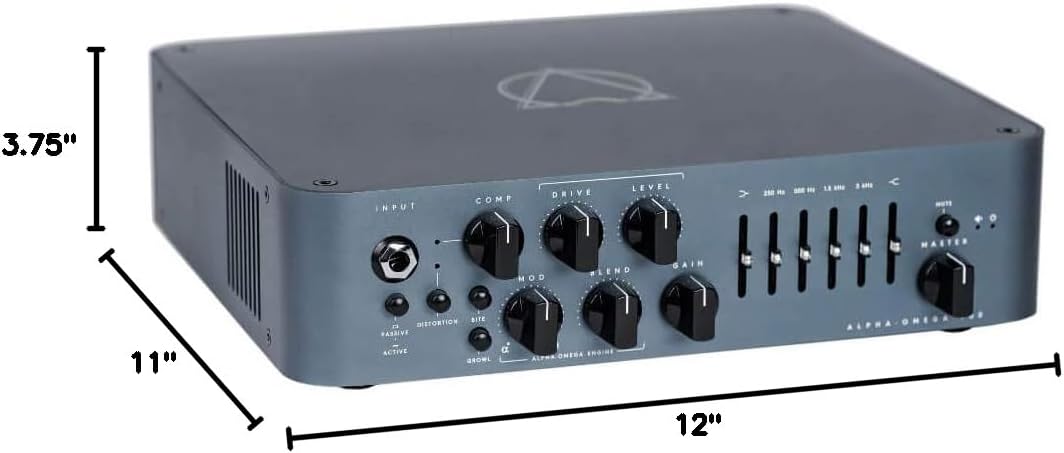
Figure 7.1: Physical dimensions of the Alpha Omega 900 Bass Head.
8. Garantía e soporte
Darkglass Electronics products are covered by a limited warranty. For detailed warranty information, please visit the official Darkglass Electronics websitio ou póñase en contacto co seu servizo de atención ao cliente.
For technical support, troubleshooting assistance, or service inquiries, please contact Darkglass Electronics customer support through their official websitio: www.darkglass.com/support
Ask a question about this manual
Ask about setup, troubleshooting, compatibility, parts, safety, or missing instructions. Manuals+ will review the question and use this page’s manual context to help answer it.