
1. Introdución
The Edifier S3000Pro Audiophile Active Speakers are designed to deliver high-fidelity audio with versatile connectivity options. Featuring Bluetooth 5.0 with aptX HD, USB audio, planar diaphragm tweeters, and 6.5-inch woofers, these speakers offer a premium listening experience. The innovative KleerNet wireless technology allows for a wire-free connection between the left and right speakers, providing flexible placement without compromising sound quality.
2. Contido do paquete
Asegúrate de que todos os elementos estean presentes no paquete:
- Edifier S3000Pro Speakers (1 pair)
- Control remoto
- Cable de alimentación
- Cable USB
- Cable óptico
- Cable de audio RCA a RCA
- Cable de audio de 3.5 mm a RCA
- Manual de usuario
3. Configuración e conexións
The Edifier S3000Pro speakers are designed for easy setup. The left and right speakers connect wirelessly to each other, eliminating the need for a speaker cable between them. Each speaker requires its own power connection.
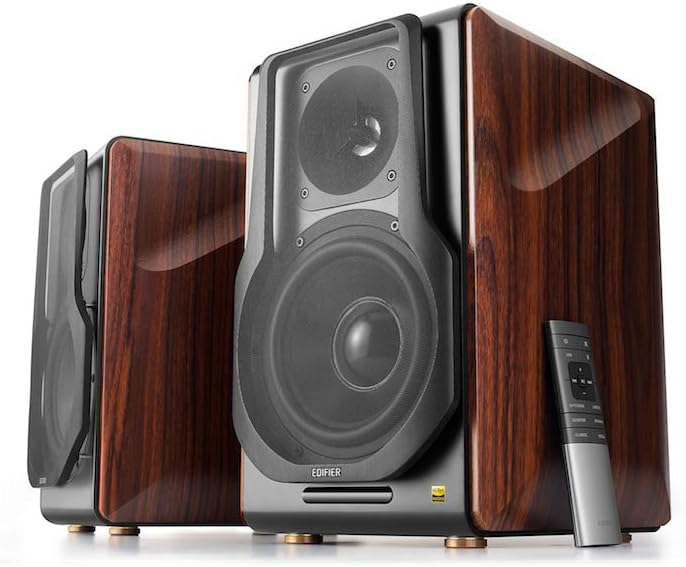
Figure 3.1: Edifier S3000Pro Speakers and Remote Control.
3.1 Colocación de altofalantes
Place the speakers in your desired listening area. Due to their wireless inter-speaker connection, you have flexibility in positioning them. Ensure each speaker is near a power outlet.

Figura 3.2: Example placement of Edifier S3000Pro speakers in a room.
3.2 Conexión de alimentación
Connect the included power cables to each speaker and then to a wall outlet. The speakers will automatically attempt to pair with each other upon power-on.
3.3 Conexións de entrada de audio
The active (right) speaker features a variety of input ports:
- Bluetooth 5.0 with aptX HD: Para a transmisión de audio sen fíos desde dispositivos compatibles.
- Audio USB: Connect directly to a computer for high-resolution audio playback.
- Óptica: For digital audio connection from TVs, game consoles, etc.
- Coaxial: Another digital audio input option.
- Entrada de liña (RCA): Standard analog input for various audio sources.
- Balanceado (XLR): Professional-grade input for balanced audio signals.

Figure 3.3: Rear panel of the active speaker with various input options.
3.4 Wireless Inter-Speaker Connection
The S3000Pro utilizes KleerNet wireless technology for lossless audio transmission between the left and right speakers. This connection is established automatically. If re-pairing is ever needed, refer to the troubleshooting section.
Video 3.1: Official Edifier S3000Pro Audiophile Active Speakers overview, demonstrating key features and connectivity.
4. Instrucións de funcionamento
Control your S3000Pro speakers using the included wireless remote or the controls located on the active (right) speaker.
4.1 Funcións de control remoto

Figure 4.1: The wireless remote control for Edifier S3000Pro speakers.
- Botón de encendido: Activa ou desactiva os altofalantes.
- Control de volume: Axusta o nivel de volume xeral.
- Silenciar: Silencia ou activa a saída de audio.
- Selección de entrada: Dedicated buttons for USB, Bluetooth, Optical/Coaxial, and Line/Balanced inputs.
- Controis de reprodución: Play/Pause, Skip Forward, Skip Backward (for Bluetooth and USB modes).
- Modos de son: Buttons for Monitor, Dynamic, Classic, and Vocal sound profiles.
4.2 On-Speaker Controls
The active speaker features rotary knobs for direct control:
- Volume/Input Selection: Rotate to adjust volume; press to cycle through inputs.
- Control de agudos: Axusta a saída de alta frecuencia.
- Control de graves: Axusta a saída de baixa frecuencia.
5. Características e deseño
The S3000Pro speakers are crafted with both acoustic performance and aesthetic appeal in mind.
5.1 Acoustic Design
- Planar Diaphragm Tweeters: Deliver clear, detailed high frequencies.
- 6.5-inch Aluminum Alloy Woofers: Provide powerful and accurate bass response.
- Integrado Ampmáis vivo: Each speaker features a 78 watts amplifier, eliminating the need for external amplificación.
- Audio de alta resolución: Supports higher bit depth and sample rates (96 kHz or higher) for superior sound quality.
5.2 Construction and Aesthetics
The speaker cabinets are constructed from high-quality MDF (Medium-Density Fiberboard) with a brown wood finish, offering both durability and a classic aesthetic. The front features a matt black finish with removable cloth grilles.

Figura 5.1: Fronte view highlighting the drivers and finish.

Figura 5.2: Lateral view mostrarasing the wood finish.
6. Mantemento
To ensure the longevity and optimal performance of your Edifier S3000Pro speakers, follow these maintenance guidelines:
- Limpeza: Use a soft, dry cloth to wipe down the speaker cabinets. Avoid using abrasive cleaners, waxes, or solvents.
- Desempolvado: Regularly dust the speaker grilles and drivers with a soft brush or vacuum cleaner with a brush attachment.
- Colocación: Avoid placing speakers in direct sunlight, near heat sources, or in areas with high humidity. Ensure adequate ventilation around the speakers.
- Manexo: Handle the speakers with care. Avoid pressing on the speaker cones or tweeters.
7 Solución de problemas
If you encounter issues with your S3000Pro speakers, refer to the following common solutions:
- Sen son:
- Ensure both speakers are powered on and connected to an electrical outlet.
- Verify the correct input source is selected on the active speaker or remote.
- Comprobe que todos os cables de son estean conectados de forma segura.
- Aumenta o volume tanto nos altofalantes como na fonte de son.
- Speakers Not Pairing Wirelessly:
- Ensure both speakers are powered on. The wireless connection between them is factory-paired and should resume automatically.
- If the wireless connection fails, locate the small "Pair" button on the back panel of both the active (R) and passive (L) speakers. Press and hold the "Pair" button on the active speaker first, then on the passive speaker. The LED indicator on the passive speaker will blink rapidly during pairing.
- Problemas de conectividade Bluetooth:
- Ensure the speakers are in Bluetooth input mode.
- Delete the "Edifier S3000Pro" from your device's Bluetooth list and attempt to re-pair.
- Move your Bluetooth device closer to the speakers to reduce interference.
- Son distorsionado:
- Baixa o volume tanto nos altofalantes como na fonte de son.
- Comprobe se os cables de son están dañados ou conexións soltas.
- Asegúrate de que a fonte de son non estea a sobrecargar a entrada.
8. Especificacións
| Característica | Especificación |
|---|---|
| Marca | Edificador |
| Nome do modelo | S3000PRO |
| Tipo de altofalante | Estante para libros |
| Material | MDF |
| Tecnoloxía de conectividade | Bluetooth, USB |
| Tecnoloxía de comunicación sen fíos | Bluetooth |
| Versión Bluetooth | 5.0 con aptX HD |
| Diámetro do woofer | 6.5 polgadas |
| Tipo de tweeter | Planar Diaphragm |
| Potencia de saída máxima do altofalante | 256 vatios |
| Relación sinal-ruído | 85 dB |
| Dimensións do produto | 21.6" D x 13.4" W x 17.3" H |
| Peso do elemento | 3.3 libras (1.5 quilogramos) |
| Compoñentes incluídos | produto, manual |
9. Garantía e soporte
The Edifier S3000Pro speakers come with a full warranty. For detailed warranty information, product registration, or technical support, please visit the official Edifier websitio web ou póñase en contacto co servizo de atención ao cliente. Garde o recibo de compra para reclamacións de garantía.
Para obter máis axuda, pode visitar o Tenda Edifier en Amazon.