
Keba KeTop T50-xxx/67641/06
Manual de usuario de Keba KeTop T50-xxx/67641/06
Model: KeTop T50-xxx/67641/06
1. Introdución
This manual provides essential information for the safe and efficient operation, setup, maintenance, and troubleshooting of the Keba KeTop T50-xxx/67641/06 industrial control panel. The KeTop T50-xxx/67641/06 is designed for robust performance in industrial environments, serving as a human-machine interface (HMI) for various control applications.
Please read this manual thoroughly before operating the device to ensure proper usage and to prevent damage or injury.
2. Información de seguridade
Observe sempre as seguintes precaucións de seguridade para evitar lesións persoais ou danos ao equipo:
- Persoal cualificado: Installation, operation, and maintenance should only be performed by qualified and authorized personnel.
- Desconexión de alimentación: Desconecte sempre a alimentación antes de realizar calquera traballo de instalación, mantemento ou reparación.
- Condicións ambientais: Operate the device within specified environmental limits (temperature, humidity, etc.).
- Parada de emerxencia: Familiarize yourself with the location and operation of the emergency stop button on the device and the connected system.
- Xestión de cables Asegúrate de que todos os cables estean correctamente colocados e fixados para evitar tropezos ou danos.
3. Produto rematadoview
The Keba KeTop T50-xxx/67641/06 is a robust handheld control panel designed for industrial applications. It features a display screen, various control buttons, and an emergency stop button, all integrated into an ergonomic housing.

Figura 1: Fronte view of the KeTop T50-xxx/67641/06 control panel, showing the display, control buttons, and the attached red connection cable.
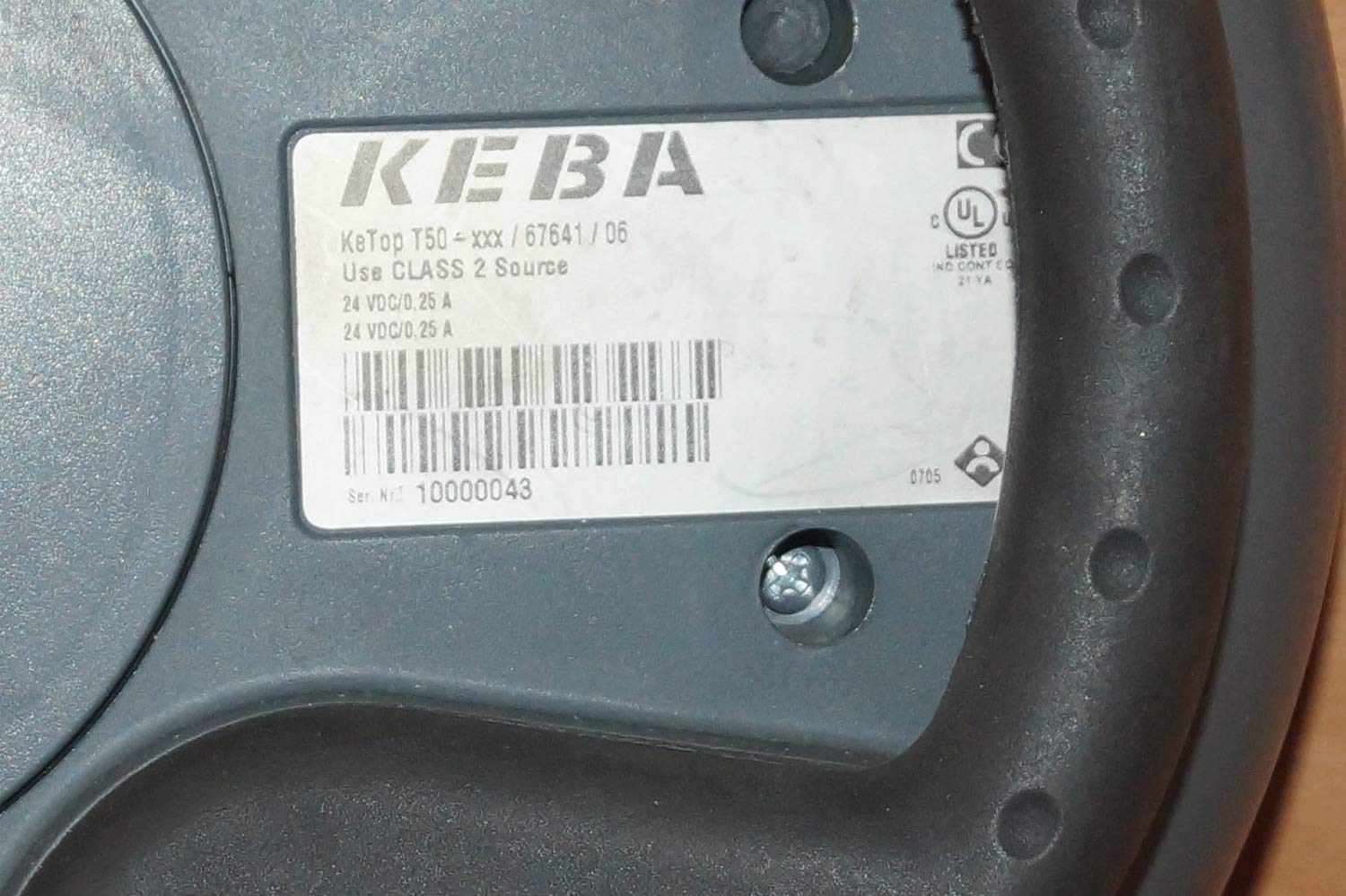
Figure 2: Rear label of the KeTop T50-xxx/67641/06, indicating model details and power requirements.
4. Configuración e instalación
Before connecting the KeTop T50-xxx/67641/06, ensure the host system is powered off and secured.
- Inspeccionar o dispositivo: Unpack the control panel and inspect it for any visible damage during transit.
- Conecte o cable: Connect the red multi-pin cable from the KeTop T50-xxx/67641/06 to the corresponding port on your industrial control system. Ensure the connection is secure and properly seated.
- Fonte de alimentación: Verify that the power supply for the control system meets the specifications required by the KeTop T50-xxx/67641/06 (24 VDC/0.25 A).
- Montaxe (opcional): If applicable, use the integrated mounting points to secure the panel in a convenient location, or ensure it is placed on a stable surface when not handheld.
- Encendido inicial: Once all connections are secure, power on the host system. The KeTop T50-xxx/67641/06 display should illuminate, indicating successful power-up.
5. Instrucións de funcionamento
The KeTop T50-xxx/67641/06 serves as an interface for controlling industrial machinery. Specific operations will depend on the programming of the connected system.
- Mostrar navegación: Use the directional buttons (if present) or touch screen (if applicable) to navigate through menus and display information.
- Botóns de función: The various buttons around the display are typically assigned specific functions by the system integrator. Refer to your system's documentation for button assignments.
- Parada de emerxencia: In case of an emergency, press the large red emergency stop button immediately. This will typically halt all connected machine operations. Ensure the button is reset before resuming operations.
- Entrada de datos: Use the integrated keypad or on-screen keyboard for data entry as required by the application.
- Comentarios: Pay attention to visual cues on the display and any audible signals from the device or connected system.
6. Mantemento
Regular maintenance ensures the longevity and reliable operation of your KeTop T50-xxx/67641/06.
- Limpeza:
- Desconecte a alimentación antes de limpar.
- Limpe as superficies exteriores cun suave, damp pano.
- Do not use abrasive cleaners, solvents, or excessive moisture.
- Ensure no liquid enters the device.
- Inspección de cables: Periodically inspect the connection cable for signs of wear, cuts, or damage. Replace damaged cables immediately.
- Función do botón: Regularly test all buttons, including the emergency stop, to ensure they respond correctly.
- Almacenamento: When not in use, store the device in a clean, dry environment, away from extreme temperatures and direct sunlight.
7 Solución de problemas
This section provides solutions to common issues. For more complex problems, contact qualified service personnel.
| Problema | Causa posible | Solución |
|---|---|---|
| O dispositivo non se acende. | No power from host system; loose cable connection; faulty power supply. | Check host system power; ensure cable is securely connected; verify power supply output. |
| A pantalla está en branco ou parpadea. | Insufficient power; cable issue; internal fault. | Verify power supply; check cable integrity; if problem persists, contact support. |
| Os botóns non responden. | Software issue on host system; physical button damage. | Restart the host system; inspect buttons for physical damage. |
| Emergency Stop button is stuck. | Button mechanism issue. | Do not force. Contact qualified service personnel immediately. |
8. Especificacións
| Característica | Detalle |
|---|---|
| Modelo | KeTop T50-xxx/67641/06 |
| Marca | Keba |
| Entrada de enerxía | 24 VDC / 0.25 A (as per device label) |
| ASIN | B07NSF65HM |
| Referencia do fabricante | 2186 |
| Primeira data dispoñible | 10 de maio de 2019 |
| Dispoñibilidade de Recambios | Información non dispoñible |
9. Garantía e soporte
Information regarding specific warranty terms and conditions for the Keba KeTop T50-xxx/67641/06 is not provided in the product details. Please refer to the original purchase documentation or contact your supplier for warranty details.
For technical support or service inquiries, please contact the manufacturer, Keba, or your authorized distributor. Ensure you have the model number (KeTop T50-xxx/67641/06) and serial number (if applicable) ready when contacting support.
Ask a question about this manual
Ask about setup, troubleshooting, compatibility, parts, safety, or missing instructions. Manuals+ will review the question and use this page’s manual context to help answer it.