
1. Introdución
This manual provides essential information for the safe and efficient operation of your Strong SRT 32HB3003 32-inch HD LED TV. Please read these instructions carefully before using the television and retain them for future reference.
2. Información de seguridade
Observe sempre as seguintes precaucións de seguridade para evitar descargas eléctricas, incendios ou danos no televisor:
- Non expoña o televisor á choiva nin á humidade.
- Non abras a televisión casing; encomende todo o mantemento a persoal cualificado.
- Asegúrese de ventilar adecuadamente o televisor.
- Desconecte o televisor durante as tormentas eléctricas ou cando non o use durante períodos prolongados.
- Manteña o televisor lonxe de fontes de calor e da luz solar directa.
3. Contido do paquete
Comprobe que todos os elementos estean presentes na embalaxe:
- Strong SRT 32HB3003 LED TV
- Control remoto
- 2 pilas AAA
- Soporte de TV
- Manual de usuario

Image: The Strong SRT 32HB3003 TV packaging, highlighting key features such as DVB-T2/C/S2 tuner, HDMI, USB, and Dolby Audio.
4. Configuración
4.1 Instalación do stand
Para instalar o soporte da TV:
- Coloque con coidado o televisor boca abaixo sobre unha superficie suave e limpa para evitar danar a pantalla.
- Aliñe as bases do soporte coas ranuras correspondentes na parte inferior do televisor.
- Fixe os soportes cos parafusos proporcionados.
4.2 Conexións
Conecta os teus dispositivos externos ao televisor usando os portos axeitados.
- Antena/Cable: Connect your DVB-T2 or DVB-C antenna/cable to the 'ANT IN' port.
- Satélite: Connect your satellite dish to the 'SATELLITE IN' port for DVB-S2 reception.
- Dispositivos HDMI: Use HDMI ports for high-definition devices like Blu-ray players, game consoles, or set-top boxes. HDMI 1 supports ARC (Audio Return Channel).
- Dispositivos USB: Insert USB drives into the USB 2.0 ports for media playback.
- Módulo CI+: Insert a CI+ module (Common Interface) into the CI+ slot for encrypted channels.
- Saída de audio: Use the Headphone jack for private listening or the Digital Optical Output (TOS-Link) for external audio systems.
- AV IN: Para dispositivos máis antigos, use o porto AV IN.

Imaxe: Traseira view of the Strong SRT 32HB3003 TV, illustrating the placement of connection ports including HDMI, USB, and antenna inputs.

Image: A diagram detailing the Common Interface (CI) slot and other connectivity options such as USB, headphone jack, AV IN, HDMI 1, HDMI 2, Satellite IN, and S/PDIF (digital optical audio out).
4.3 First Time Installation
After connecting the power cable and turning on the TV, the First Time Installation wizard will guide you through initial setup steps, including language selection, country, and channel scanning for DVB-T2, DVB-C, or DVB-S2.
5. En funcionamento
5.1 Control remotoview
The remote control allows you to access all TV functions. Insert the two AAA batteries into the remote control, ensuring correct polarity.

Image: The remote control for the Strong SRT 32HB3003 TV, featuring buttons for power, numerical input, volume control, channel selection, menu access, source input, and media playback functions.
5.2 Funcións básicas
- Potencia: Preme o botón de acendido vermello to turn the TV on or off.
- Volume: Usa o VOL +/- botóns para axustar o volume.
- Canle: Usa o CH +/- botóns para cambiar de canle.
- Silenciar: Preme o MUTO botón para silenciar o audio temporalmente.
5.3 Selección da fonte
Preme o FONTE button on the remote control to select the desired input source (e.g., HDMI 1, HDMI 2, DVB-T2, DVB-C, DVB-S2, AV).
5.4 Navegación por menús
Preme o MENÚ button to access the main menu. Use the arrow buttons to navigate and OK to confirm selections. The VOLVER button returns to the previous menu or exits the current menu.
5.5 Reprodución multimedia (USB)
Insert a USB storage device into one of the USB ports. The TV supports playback of photos, videos, and music files. Access the media player through the main menu or by selecting the USB source.
5.6 Guía electrónica de programas (EPG)
Preme o EPG botón para view the Electronic Program Guide, which displays program schedules for digital channels.
5.7 Modo Hotel
The TV features a Hotel Mode, which allows for restricted access to certain settings and functions, ideal for hospitality environments. Consult the advanced settings menu for Hotel Mode configuration.
6. Mantemento
6.1 Limpeza
- Desconecte sempre o televisor antes de limpalo.
- Usa un pano suave e seco para limpar a pantalla e a carcasa.
- Para marcas difíciles, espolvoree lixeiramenteampEnxágüe o pano con auga ou cun limpador suave e non abrasivo deseñado especificamente para dispositivos electrónicos.
- Never spray cleaning liquids directly onto the TV.
6.2 Almacenamento
If storing the TV for an extended period, ensure it is kept in a cool, dry place, protected from dust and extreme temperatures. It is recommended to use the original packaging for storage.
7 Solución de problemas
Se tes problemas co teu televisor, consulta as seguintes solucións habituais:
| Problema | Posible causa/solución |
|---|---|
| Sen poder | Check if the power cable is securely connected. Ensure the power outlet is functional. |
| Sen imaxe, pero hai son | Check the input source selection. Ensure external devices are powered on and connected correctly. |
| Sen son, pero si imaxe | Check volume level and mute status. Verify audio settings in the menu. |
| O control remoto non funciona | Check and replace batteries. Ensure no obstructions between remote and TV sensor. |
| Mala calidade de imaxe | Comprobe a conexión da antena/cable. Axuste a configuración da imaxe no menú. |
8. Especificacións
Detailed technical specifications for the Strong SRT 32HB3003 HD LED TV:
| Característica | Especificación |
|---|---|
| Número de modelo | SRT 32HB3003 |
| Tamaño da pantalla | 32 polgadas (80 cm) |
| Resolución | 1366 x 768 pixels (HD-Ready) |
| Tecnoloxía de visualización | LED |
| Taxa de actualización | 60 Hz |
| Tecnoloxía de sintonizador | DVB-C, DVB-S2, DVB-T2 |
| Portos HDMI | 2 (1x HDMI ARC) |
| Portos USB 2.0 | 2 |
| Outras interfaces | Headphone, Digital Optical Out (TOS-Link), CI+ interface, AV IN |
| Características especiais | Electronic Program Guide (EPG), USB Media Playback, Parental Control, Hotel Mode |
| Consumo de enerxía | 50 Watts |
| Clase de eficiencia enerxética | A+ |
| Consumo Enerxético Anual | 45 kWh/ano |
| Dimensións do produto (W x H x D) | 73.2 x 43.5 x 7.78 cm |
| Peso | 4.15 kg |

Image: The energy efficiency label for the Strong SRT 32HB3003, indicating an A+ rating and an annual energy consumption of 45 kWh.
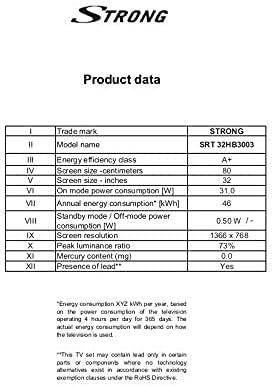
Image: A product data table providing detailed specifications for the Strong SRT 32HB3003, including screen size, resolution, and power consumption.
9. Garantía e soporte
Your Strong SRT 32HB3003 TV comes with a limited warranty. For specific warranty terms and conditions, please refer to the warranty card included in your product packaging or visit the official Strong website. For technical support, troubleshooting assistance, or service inquiries, please contact Strong customer service through their official channels.
Para obter máis axuda, visite o Strong official websitio.