
Fanimation MAD7912BBN
Fanimation Levon Custom DC Motor Ceiling Fan
Manual de usuario
Model: MAD7912BBN
Introdución
This manual provides detailed instructions for the safe installation, operation, and maintenance of your Fanimation Levon Custom DC Motor Ceiling Fan, model MAD7912BBN. The Levon Custom series offers a versatile design with various optional blade and finish combinations, allowing for a personalized aesthetic. This fan is designed for indoor use and features a DC motor for efficient performance, along with Wi-Fi compatibility and fanSync Bluetooth for modern control options.
Información de seguridade
Lea e comprenda todas as instrucións antes de comezar a instalación. O incumprimento destas instrucións podería provocar descargas eléctricas, incendios ou lesións persoais.
- Ensure the installation site is structurally sound and can support the fan's weight (approximately 19 pounds).
- Todas as conexións eléctricas deben facerse de acordo cos códigos e as ordenanzas locais e co Código Eléctrico Nacional (NEC). Se non está familiarizado coa instalación eléctrica, consulte cun electricista cualificado.
- Disconnect power at the main circuit breaker before attempting any installation or maintenance.
- Non fagas funcionar o ventilador cun cable de alimentación ou enchufe danados.
- Manteña as mans, o cabelo e a roupa lonxe das aspas do ventilador en movemento.
- Este ventilador está deseñado só para uso en interiores.
Contido do paquete
Carefully unpack all components and ensure you have received all items listed below. If any parts are missing or damaged, contact Fanimation customer support immediately.
- DC Motor Assembly (Fanimation Levon Custom)
- Soporte de montaxe
- Downrod
- Canopy
- Paquete de ferraxes (parafusos, arandelas, porcas para cables)
- fanSync Bluetooth Receiver
- Manual de instrucións
- Note: Fan blades and optional LED Light Kit are sold separately.
Configuración e instalación
Installation of the Fanimation Levon Custom ceiling fan requires basic electrical knowledge. If you are unsure about any steps, please consult a qualified electrician.
1. Prepare o sitio de instalación
Ensure the electrical box is securely mounted to the building structure and is rated for fan support. The fan requires a 120V AC power supply.
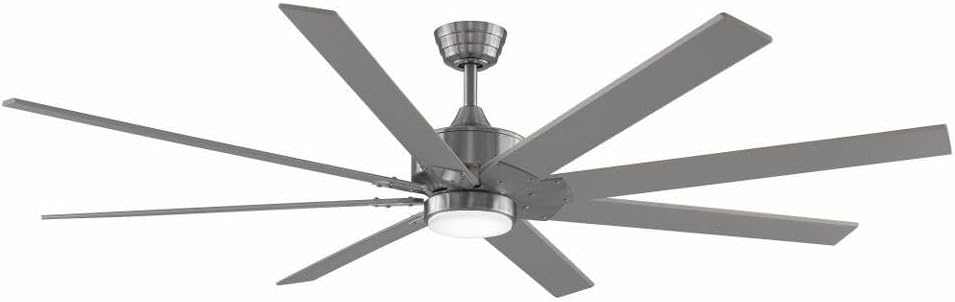
Figure 1: Assembled Fanimation Levon Custom DC Motor Ceiling Fan. This image shows the complete fan unit, including the motor housing, downrod, and a set of eight fan blades (sold separately), all in a brushed nickel finish.
2. Mount the Bracket and Downrod
Attach the mounting bracket to the electrical box. Secure the downrod to the fan motor assembly, ensuring all pins and screws are tightened.
3. Conexións Eléctricas
Connect the fan's electrical wires to the household wiring according to the wiring diagram provided in the separate detailed installation guide. Ensure proper grounding. The fanSync Bluetooth receiver should be wired in line as per instructions for remote and smart control functionality.

Figura 2: Lateral view of the Fanimation Levon Custom DC Motor Ceiling Fan. This perspective highlights the sleek profile of the motor housing and the angle of the fan blades, demonstrating its modern design.
4. Attach Fan Blades and Light Kit (Optional)
Securely attach the fan blades (sold separately) to the motor housing. If installing the optional LED light kit (sold separately), follow its specific installation instructions.

Imaxe 3: Primeiro plano view of the Fanimation Levon Custom DC Motor Ceiling Fan's central housing. This image focuses on the brushed nickel finish of the motor unit and the integrated light fixture, which is part of the optional LED light kit.
Instrucións de funcionamento
Your Fanimation Levon Custom fan can be controlled via the included fanSync Bluetooth remote or through a compatible Wi-Fi enabled smart device (with required controls sold separately).
- Encendido/apagado: Use the designated button on your remote or smart device interface to turn the fan on or off.
- Control de velocidade: The fan offers 3 distinct power levels. Adjust the fan speed using the speed control buttons on your remote or the slider/buttons in your smart application.
- Control de luz (se corresponde): If an optional LED light kit is installed, use the light control buttons on your remote or smart device to turn the light on/off and adjust brightness (if dimmable).
- Conectividade Wi-Fi: For Wi-Fi control, ensure you have the necessary Wi-Fi compatible controls and follow their specific pairing instructions to connect your fan to your home network.
Mantemento
Un mantemento regular garantirá a lonxevidade e o rendemento óptimo do teu ventilador de teito.
- Limpeza: Para limpar o ventilador, limpe cun pano suave eamp pano. Non empregue produtos de limpeza abrasivos nin disolventes, xa que poden danar o acabado ou as láminas.
- Inspección da lámina: Periodically check the blade attachments for tightness. Loose blades can cause wobbling and noise.
- Lubricación do motor: O motor de corrente continua está lubricado permanentemente e non require lubricación adicional.
- Conexións eléctricas: Annually inspect all electrical connections for any signs of wear or loosening. Ensure power is disconnected before inspection.
Resolución de problemas
If you experience issues with your Fanimation Levon Custom ceiling fan, refer to the following common problems and solutions:
| Problema | Causa posible | Solución |
|---|---|---|
| O ventilador non comeza | Sen alimentación ao ventilador; Conexións dos cables soltas; Batería do mando a distancia baixa. | Check circuit breaker and wall switch. Ensure all wire connections are secure. Replace remote control batteries. |
| O ventilador tambalea | Parafusos da lámina soltos; láminas desequilibradas; soporte de montaxe solto. | Tighten all blade screws. Use a balancing kit (not included) to balance blades. Ensure mounting bracket is securely fastened. |
| Funcionamento ruidoso | Parafusos soltos; zunido do motor; láminas que chocan contra un obstáculo. | Check and tighten all screws. A slight motor hum is normal for DC motors. Ensure nothing is obstructing the blade path. |
| O control remoto non funciona | Low battery; Not paired correctly; Obstruction between remote and receiver. | Replace batteries. Refer to fanSync pairing instructions. Ensure clear line of sight. |
Especificacións
Detailed technical specifications for the Fanimation Levon Custom DC Motor Ceiling Fan (Model MAD7912BBN).
| Marca | Fanimación |
| Nome do modelo | Levon Custom DC Motor - BN |
| Número de modelo | MAD7912BBN |
| Cor | Níquel cepillado |
| Deseño de ventiladores eléctricos | Ventilador de teito |
| Fonte de enerxía | Eléctrico con cable |
| Característica especial | Wi-Fi Enabled (with separate controls) |
| Tipo de acabado | Rematou |
| Capacidade de caudal de aire | 8244 CFPH |
| Voltage | 120.0 V |
| Peso do elemento | 18.96 libras (aprox. 8.6 kg) |
| Dimensións do produto | 52 x 52 x 15.58 polgadas (aprox. 132 x 132 x 39.6 cm) |
| Uso interior/exterior | Interior |
| Material da lámina | Plastic (if purchased separately) |
| Número de niveis de potencia | 3 |
| UPC | 840506087224 |
Información da garantía
The Fanimation Levon Custom DC Motor Ceiling Fan is backed by a Garantía limitada de por vida. This warranty covers defects in materials and workmanship under normal use. For specific terms, conditions, and limitations, please refer to the warranty documentation included with your purchase or visit the official Fanimation websitio.
Atención ao cliente
If you have any questions, require technical assistance, or need to report a missing or damaged part, please contact Fanimation customer support. Have your model number (MAD7912BBN) and purchase information ready when contacting support.
For the most up-to-date contact information and additional resources, please visit the official Fanimation websitio: www.fanimation.com
Ask a question about this manual
Ask about setup, troubleshooting, compatibility, parts, safety, or missing instructions. Manuals+ will review the question and use this page’s manual context to help answer it.