
Introdución
This manual provides comprehensive instructions for the installation, operation, and maintenance of your NB POWER TFT Display Electric Bike Controller and Display Set. This system includes a 48V-72V, 80A, 3000W Sabvoton V2 Controller, a TFT color display, an alarm lock, a twist throttle, brake levers, and a PAS sensor. Please read this manual thoroughly before installation and use to ensure proper function and safety.
Contido do paquete
Verifique que todos os elementos que se indican a continuación estean presentes no seu paquete:
- 1x NB POWER TFT Color Display (48V-72V compatible)
- 1x Sabvoton V2 Controller (48V-72V, 3000W, 80A)
- 1x Alarm Lock
- 1x Twist Throttle
- 1x Pair of Brake Levers
- 1x PAS (Pedal Assist System) Sensor
- Necessary wiring and connectors

Imaxe: The complete package contents, including the controller, TFT display, and various accessories, neatly packed in a box.
Configuración e instalación
Proper installation is crucial for the safe and efficient operation of your electric bike system. If you are unsure about any step, consult a qualified technician.
1. Controller Installation
Mount the Sabvoton V2 Controller securely to your electric bike frame. Ensure it is protected from direct water exposure and excessive vibration. Refer to the dimensions for proper fitment.
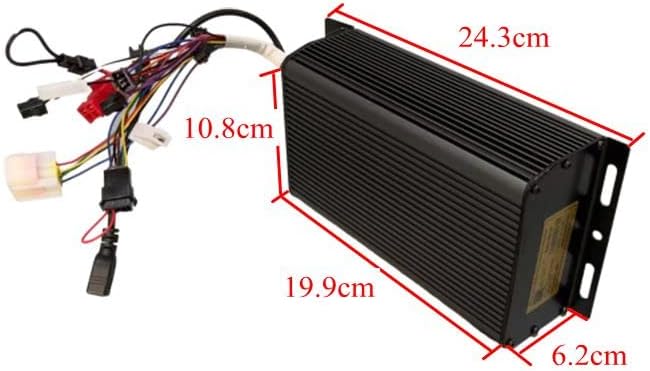
Imaxe: The Sabvoton V2 Controller with its wiring harness, showing approximate dimensions for installation planning. The controller measures approximately 24.3cm in length, 10.8cm in width, and 6.2cm in height.
2. TFT Display Mounting
Attach the TFT color display to your handlebars in a position that is easily visible and accessible while riding. Secure it firmly to prevent movement.

Imaxe: The TFT color display, illustrating its clear interface with speed, trip distance, wattage, and battery level indicators.
3. Conexións de cableado
Connect the components to the controller according to the wiring diagram (not provided in this manual, refer to product packaging or manufacturer's website for detailed diagrams). Ensure all connections are secure and waterproof where necessary.
- Conexión do motor: Connect the motor phase wires and Hall sensor wires to the corresponding ports on the controller.
- Conexión da batería: Connect the battery positive and negative terminals to the controller's power input. Ensure correct polarity.
- Pantalla TFT: Connect the display cable to the designated port on the controller.
- Acelerador de torsión: Connect the throttle to its dedicated port.
- Palancas de freo: Connect the brake levers to the controller. These typically provide a signal to cut motor power when brakes are applied.
- Sensor PAS: Install the PAS sensor on your pedal crank and connect its wire to the controller.
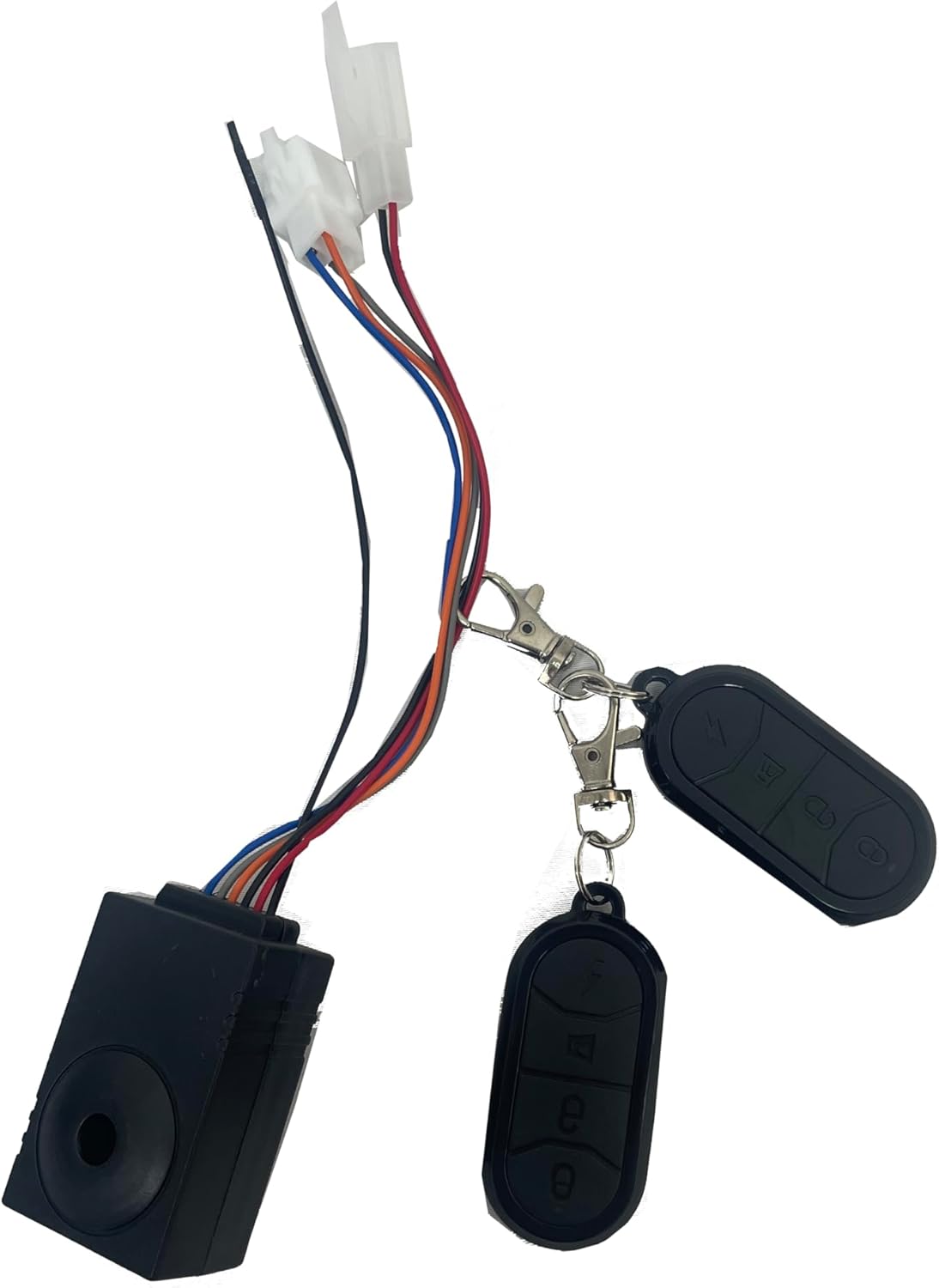
- Alarm Lock: Connect the alarm lock system.
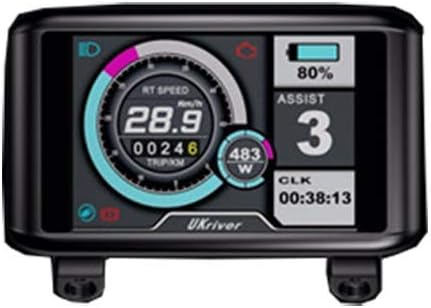
Imaxe: Unha alternativa view of a TFT display, showing various metrics and a different branding, indicating display compatibility.
Imaxe: The twist throttle assembly, featuring an integrated key switch for power control and a separate matching grip.

Imaxe: The alarm lock system, including the main unit and two remote controls for arming and disarming.
Instrucións de funcionamento
1. Acendido/apagado
Turn the key on the twist throttle to power on the system. The TFT display will illuminate. To power off, turn the key to the off position.
2. TFT Display Functions
The TFT display provides real-time information and allows for system adjustments:
- Velocidade: Mostra a velocidade de condución actual.
- Distancia: Shows trip distance and total odometer.
- Wattage: Indicates real-time power consumption.
- Indicador de batería: Shows remaining battery charge level.
- Tempo: Hora actual.
- Speed Levers (PAS Levels): Adjust pedal assist levels (typically 5 levels).
- Axuste do tamaño da roda: Allows calibration for accurate speed and distance readings.
- Batería Voltage Axuste: Configures the display for your specific battery voltage (48V-72V).
Navigate through display settings using the buttons on the display unit. Refer to the specific display model's mini-manual for detailed button functions.
3. Funcionamento do acelerador
Gently twist the throttle grip to engage motor power. The amount of twist corresponds to the power output. Release the throttle to disengage power.
4. Sistema de asistencia ao pedaleo (PAS)
The PAS sensor detects pedaling motion and provides motor assistance based on the selected assist level on the TFT display. Higher assist levels provide more motor power with less pedaling effort.
5. Pancas de freo
Activating the brake levers will cut power to the motor, ensuring safe stopping. Always use your brakes as needed.
6. Alarm Lock
Use the remote control to arm and disarm the alarm system. When armed, any movement or tampering with the bike will trigger an audible alarm.
Mantemento
Regular maintenance ensures the longevity and optimal performance of your electric bike system.
- Manter limpo: Regularly wipe down the controller and display with a soft, damp pano. Evite o uso de produtos químicos agresivos ou materiais abrasivos.
- Comproba as conexións: Inspeccione periodicamente todas as conexións do cableado para comprobar se están ben axustadas e se presentan signos de desgaste ou corrosión. Asegure calquera conexión solta.
- Protección da auga: While components are designed to be water-resistant, avoid submerging them or exposing them to heavy rain for extended periods.
- Coidado da batería: Follow the manufacturer's instructions for your specific battery pack regarding charging, storage, and discharge cycles.
Resolución de problemas
Se tes algún problema, consulta os seguintes problemas e solucións comúns:
| Problema | Causa posible | Solución |
|---|---|---|
| O sistema non se acende. | Loose battery connection, dead battery, faulty key switch. | Check battery connections. Charge battery. Inspect key switch wiring. |
| Motor not responding to throttle. | Loose throttle connection, faulty throttle, brake levers engaged, motor/controller fault. | Check throttle wiring. Ensure brake levers are not engaged. Consult a technician if problem persists. |
| Display shows incorrect speed/distance. | Incorrect wheel size setting. | Adjust wheel size setting in the TFT display menu. |
| PAS not working. | Loose PAS sensor connection, faulty PAS sensor, incorrect PAS level setting. | Check PAS sensor wiring. Ensure PAS level is set above 0 on the display. |
Especificacións
| Característica | Detalle |
|---|---|
| Marca | NB POWER |
| Nome do modelo | TFT Display Sabvoton V2 Controller Set |
| Tipo de controlador | Sabvoton V2 Sine Wave System |
| Voltage Compatibilidade | 48 V-72 V |
| Límite actual | 80A |
| Max Wattage | 3000 W |
| Tipo de visualización | Pantalla TFT a cor |
| Funcións de visualización | Speed, Distance, Wattage, Battery Indicator, Time, Wheel Size Adjust, Battery Voltage Adjust, 5 PAS Levels |
| Compoñentes incluídos | Controller, TFT Display, Alarm Lock, Twist Throttle, Brake Levers, PAS Sensor |
| ASIN | B07PF2S481 |
| UPC | 715444174148 |
Vídeo Demostración
Watch the official product video for a visual guide on the controller and display functionality.
Vídeo: This video demonstrates the MQCON APP, testing the controller and display. It shows the display responding to throttle input and the motor wheel spinning, illustrating the system's operational response.
Garantía e Soporte
For warranty information or technical support, please contact NB POWER customer service through your purchase platform or the manufacturer's official websitio. Garda o comprobante de compra para reclamacións de garantía.
Poden estar dispoñibles para a súa compra plans de protección adicionais:
- 2-Year Protection Plan (one-time payment)
- Protección completa (subscrición mensual)
Refer to the specific terms and conditions of these plans at the time of purchase.