
ASUS XG49VQ
ASUS ROG Strix XG49VQ 49-inch Curved Gaming Monitor User Manual
1. Introdución
The ASUS ROG Strix XG49VQ is a super ultra-wide 49-inch Dual Full HD (3840 x 1080) 1800R curved gaming monitor designed to provide an immersive and smooth gaming experience. It features a 144Hz refresh rate, Radeon FreeSync 2 HDR technology, DCI-P3 90% professional color gamut coverage, and DisplayHDR 400 certification. This manual provides essential information for setting up, operating, maintaining, and troubleshooting your monitor.
2. Que hai na caixa
Verifique que todos os seguintes elementos estean incluídos no seu paquete:
- ASUS ROG Strix XG49VQ Monitor
- Cable DisplayPort
- cable HDMI
- Adaptador de alimentación
- Guía de inicio rápido
- Kit de montaxe VESA
3. Configuración
3.1 Montaxe do monitor
Carefully remove the monitor and its components from the packaging. Attach the stand base to the monitor arm, then secure the assembled stand to the monitor. Ensure all connections are firm.
3.2 Cables de conexión
Connect the power adapter to the monitor and a power outlet. Use the provided DisplayPort or HDMI cable to connect your computer or gaming console to the monitor. The monitor features multiple input ports for versatile connectivity.
Imaxe: Traseira view of the monitor highlighting accessible I/O ports and smart cable management for a tidy setup.
3.3 Axustes físicos
The monitor offers ergonomic adjustments for optimal viewconfort:
- Inclinación: Adjust the screen angle from +20° to -5°.
- Xiratorio: Rotate the screen horizontally from +16° to -16°.
- Axuste de altura: Adjust the screen height up to 120mm.

Imaxe: A mostra do monitorasing its ergonomic design with arrows indicating available tilt, swivel, and height adjustment ranges.
4. Funcionamento do monitor
4.1 Encendido/apagado
Press the power button located on the monitor to turn it on or off.
4.2 Características de visualización
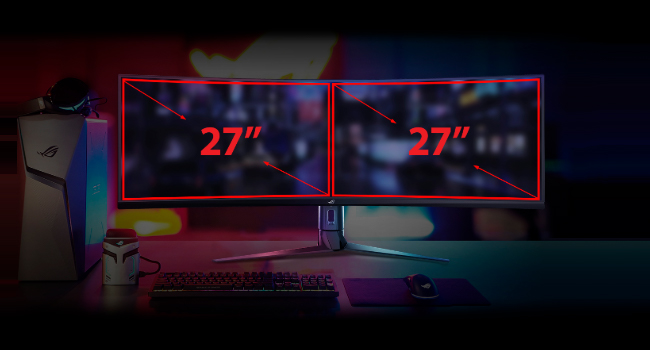
- Super Ultra-wide Display: The 49-inch curved screen provides an expansive view, equivalent to two 27-inch monitors side-by-side.
- Frecuencia de actualización de 144 Hz: Experimenta imaxes fluídas e sen latencia, cruciais para xogos de ritmo rápido.
- Radeon FreeSync 2 HDR: Synchronizes the monitor's refresh rate with your GPU's frame rate to eliminate screen tearing and stuttering, especially with HDR content.
- DisplayHDR 400 & DCI-P3 90%: Ensures high color contrast and cinematic color performance for vibrant and realistic visuals.

Image: Visual representation of the 49-inch super ultra-wide display, showing its equivalence to two 27-inch monitors for an expansive workspace.

Image: A split-screen comparison demonstrating the enhanced visual quality with High Dynamic Range (HDR) enabled, highlighting DCI-P3 90% and DisplayHDR 400 certification.

Image: A split-screen comparison illustrating the difference in gameplay smoothness with Radeon FreeSync 2 HDR turned 'On' versus 'Off'.
4.3 ASUS Eye Care Technology
ASUS Eye Care technology is integrated to minimize eye fatigue during extended use. This includes flicker-free backlighting and blue light filters, certified by TÜV Rheinland, to protect your eyes.
4.4 GamePlus and GameVisual
Utilize exclusive GamePlus and GameVisual overlays and color modes to optimize your gaming experience. These features provide in-game enhancements and display adjustments tailored for various game genres.
4.5 Picture-by-Picture (PBP) Functionality
The ultra-wide display supports Picture-by-Picture (PBP) mode, allowing you to view content from multiple input sources simultaneously, effectively acting as multiple monitors on a single screen.
Video: Official ASUS ROG Strix XG49VQ product overview, demonstrating key features like the ultra-wide display, high refresh rate, HDR, and various gaming enhancements.
Video: A merchant's overview of the ASUS ROG Strix XG49VQ, highlighting its curved design, FreeSync technology, and eye care features.
5. Mantemento
5.1 Limpeza do monitor
Para limpar a pantalla do monitor, limpe con coidado cun pano suave e sen pelusa. Para manchas difíciles, limpe lixeiramenteampEnxágüe o pano con auga ou cun limpador de pantallas suave e non abrasivo. Evite o uso de produtos químicos agresivos ou materiais abrasivos que poidan danar a superficie da pantalla.
5.2 Coidados xerais
Keep the monitor in a well-ventilated area. Avoid exposing it to direct sunlight, high humidity, or extreme temperatures. Do not block the ventilation openings on the monitor casing.
6 Solución de problemas
6.1 Sen pantalla / Pantalla negra
- Asegúrate de que o cable de alimentación estea conectado correctamente tanto ao monitor como á toma de corrente.
- Verify that the video cable (DisplayPort/HDMI) is firmly connected to both the monitor and your computer/console.
- Comprobe se está seleccionada a fonte de entrada correcta no menú OSD (visualización en pantalla) do monitor.
6.2 Image Quality Issues (e.g., Washed Out, Red Dot)
- If the display appears washed out or has unusual artifacts (like a red dot), try performing a "Reset All" from the monitor's OSD menu.
- Consider disabling HDR in your operating system or monitor settings if you experience poor image quality, as some content or system configurations may not fully support HDR effectively.
- Adjust brightness, contrast, and color settings via the OSD menu to suit your preferences.
6.3 Flickering or Stuttering
- Asegúrate de que os controladores da túa tarxeta gráfica estean actualizados.
- Verify that Radeon FreeSync 2 HDR is enabled in both your monitor settings and graphics card control panel.
- Comprobe se o cable de vídeo está danado ou conexións soltas.
7. Especificacións
| Característica | Especificación |
|---|---|
| Tamaño de visualización da pantalla de pé | 49 polgadas |
| Resolución de pantalla | 3840x1080 |
| Resolución máxima de pantalla | 3840 x 1080 píxeles |
| Marca | ASUS |
| Serie | XG49VQ |
| Número de modelo do artigo | XG49VQ |
| Peso do elemento | 21.4 libras |
| Dimensións do produto | 46.98 x 20.83 x 13.57 polgadas |
| Cor | Negro |
| Voltage | 100-240 voltios |
| Número de portos USB 2.0 | 1 |
| Número de portos USB 3.0 | 2 |
| Relación de aspecto | 32:9 |
| Descrición da superficie da pantalla | Mate |
8. Garantía e soporte
Para obter información detallada sobre a garantía e asistencia técnica, consulte a páxina oficial de ASUS websitio web ou a tarxeta de garantía incluída co produto. Garde o recibo de compra para reclamacións de garantía.
Ask a question about this manual
Ask about setup, troubleshooting, compatibility, parts, safety, or missing instructions. Manuals+ will review the question and use this page’s manual context to help answer it.