
1. Instrucións de seguridade importantes
Lea e comprenda todos os avisos e instrucións de seguridade antes de usar este aparello. O incumprimento dos avisos e as instrucións pode provocar descargas eléctricas, incendios e/ou lesións graves.
- Non pick up liquids or wet materials.
- Non pick up flammable or combustible materials.
- Non use without the dust bowl and filter in place.
- Non utilizar o aparello para calquera propósito que non sexa o previsto.
- Manteña o cabelo, a roupa solta, os dedos e todas as partes do corpo lonxe das aberturas e das partes móbiles.
- Garde o aparello en lugares cerrados.
- Use only with the charging cable provided by Black+Decker.
2. Produto rematadoview
The Black+Decker BHHV520JF is an 18V cordless handheld vacuum cleaner designed for quick and efficient cleaning tasks around the home and car. It features cyclonic action, a transparent dustbin, and an integrated crevice tool for enhanced versatility.

Figure 1: Product Diagram with Key Features (LED indicator, 700ml dustbin, integrated nozzle, 21 min runtime)
Características principais:
- Batería de ións de litio de 18 V: Provides powerful and consistent suction.
- Acción ciclónica: Helps keep the filter clean and maintains suction power.
- Transparent Dustbin (500 ml capacity): Allows you to see when it needs emptying.
- Integrated Extendable Crevice Tool: Para chegar a espazos e recunchos estreitos.
- Indicador LED de carga: Mostra o estado da batería.
- Two Power Levels: For varying cleaning needs.
- Washable Filter and Dust Container: For easy maintenance.
3. Configuración
3.1 Carga inicial
Before first use, fully charge the appliance. The charging time is approximately 5 hours.
- Conecte o cable de carga ao porto de carga da aspiradora.
- Plug the charging cable into a standard wall outlet.
- The LED charge indicator will illuminate to show charging status.
- Once fully charged, the indicator will change (refer to the LED indicator section in the manual for specific light patterns).

Figure 2: Charging the Handheld Vacuum
3.2 Montaxe na parede (opcional)
The vacuum comes with a practical wall-mountable charging station to keep it readily accessible and charged.
- Escolla un lugar axeitado preto dunha toma de corrente.
- Securely mount the charging station to the wall using appropriate fasteners (not included).
- Place the vacuum onto the charging station.
4. Instrucións de funcionamento
The BHHV520JF is designed for versatile cleaning of dry debris. Ensure the appliance is fully charged before use.
4.1 Acendido/apagado e selección de velocidade

Figure 3: Power Button and Battery Indicator
- To turn on the vacuum, press the power button once for the lower speed setting.
- Press the power button a second time for the higher speed setting.
- Preme o botón de acendido unha terceira vez para apagar o baleiro.
4.2 Using the Integrated Crevice Tool
The integrated crevice tool can be extended to reach narrow and difficult areas.
- To extend the crevice tool, pull it forward until it locks into place.
- Use the extended tool for cleaning corners, edges, and between cushions.
- To retract, press the release button (if present) and push the tool back into its housing.

Figure 4: Cleaning Floor Debris

Figure 5: Reaching High Areas

Figure 6: Cleaning Under Furniture

Figure 7: Car Interior Cleaning
5. Mantemento
Un mantemento regular garante un rendemento óptimo e prolonga a vida útil do teu aspirador.
5.1 Baleirar o colector de lixo
The transparent dustbin allows you to monitor the dirt level. Empty it regularly to maintain suction power.
- Asegúrate de que o aspirador estea apagado.
- Press the dustbin release button (usually located near the handle).
- Retire o colector de po da unidade principal.
- Hold the dustbin over a waste bin and open the lid to empty the contents.
- Reattach the dustbin to the vacuum until it clicks securely into place.

Figure 8: Emptying the Dustbin
5.2 Limpeza do filtro
Os 3-stage filtering system includes a filter sensor that illuminates when the filter is clogged. A clean filter is crucial for effective suction.
- With the dustbin removed, carefully pull out the filter assembly.
- Separate the outer and inner filters.
- Tap the filters gently over a waste bin to remove loose dirt.
- Rinse both filters under running water until clean. Ensure they are completely dry before reassembling.
- Reassemble the filters and place them back into the dustbin, then reattach the dustbin to the vacuum.

Figure 9: Removing the Filter
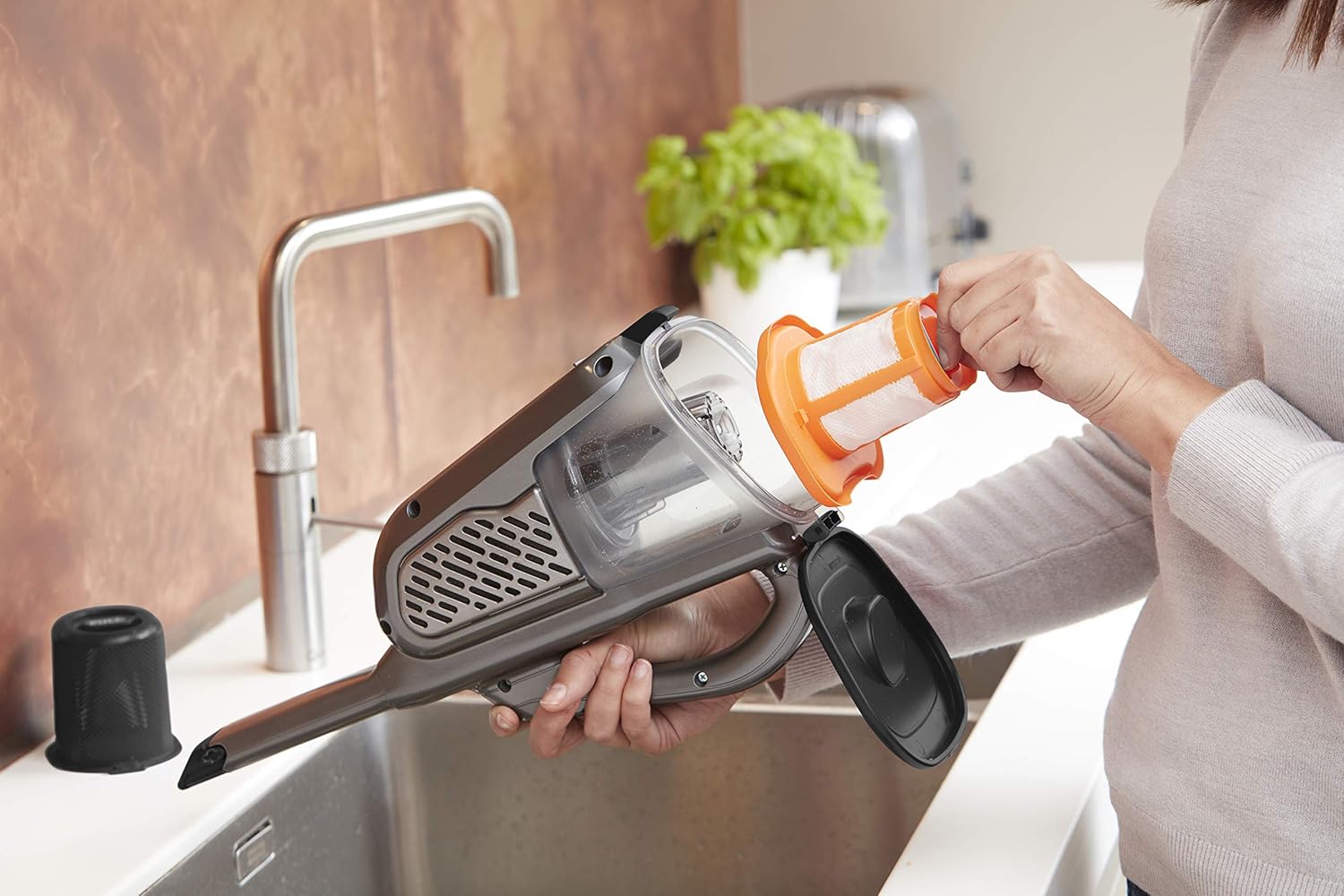
Figure 10: Washing the Filter
6 Solución de problemas
| Problema | Causa posible | Solución |
|---|---|---|
| O aspirador non se acende. | A batería non está cargada. | Cargue a batería durante 5 horas. |
| Potencia de succión reducida. | O colector de lixo está cheo ou o filtro está obstruído. | Baleirar o colector de lixo e limpar o filtro. |
| Filter sensor light is on. | O filtro está obstruído. | Clean the filter as described in Section 5.2. |
| Tempo de funcionamento curto. | Batería non completamente cargada ou batería vella. | Asegúrate de que a batería estea completamente cargada. Se o problema persiste, pode ser necesario substituíla. |
7. Especificacións
| Característica | Especificación |
|---|---|
| Marca | Black+Decker |
| Número de modelo | BHHV520JF |
| Fonte de enerxía | Alimentado por batería (sen fíos) |
| Voltage | 18 voltios |
| Enerxía Eléctrica | 36 vatios horas |
| Tipo de batería | Ion de litio |
| Tempo de carga | 5 horas |
| Duración da batería (tempo de execución) | Ata 21 minutos |
| Capacidade do lixo | 500 ml |
| Tipo de filtro | Cloth (3-stagfiltración electrónica) |
| Nivel de ruído | 72 decibeis |
| Número de niveis de potencia | 2 |
| Peso do produto | 1200 gramos (1.2 kg) |
| Dimensións do produto (L x W x H) | 40 x 20.3 x 16.5 cm |
| Uso recomendado | Indoor, Home, Car |
8. Garantía e soporte
Warranty information and customer support details are typically provided in a separate document included with your purchase or available on the manufacturer's official website. Please refer to the Black+Decker official website or contact their customer service for specific warranty terms and support options for your BHHV520JF model.
Para obter máis axuda, visite: www.blackanddecker.com