
Darkglass Electronics ANAGRAM
Darkglass Anagram Bass Multi-Effects Unit
Manual de usuario
Model: ANAGRAM | Brand: Darkglass Electronics
1. Introdución
Thank you for choosing the Darkglass Anagram Bass Multi-Effects Unit. This device is a powerful and versatile tool designed to provide bass players with an extensive range of tonal possibilities, combining advanced digital signal processing with intuitive controls. This manual will guide you through the setup, operation, and maintenance of your Anagram unit, ensuring you get the most out of its features.
2. Características clave
- NAM Integration: Paired with the groundbreaking Neural Amp Modeler (NAM) integration, ANAGRAM allows you to deploy thousands of high-quality, user-generated amp and effect models already in existence.
- Customizable Effect Blocks: With 50+ customizable effect blocks ranging from iconic Darkglass overdrives to lush reverbs and ambient delays, your tonal palette is as vast as your imagination.
- Portátil e duradeiro: Rugged anodized aluminum chassis ensures durability on the road, while a compact form factor and power via 9V input or USB-C (PD) offer unmatched portability.
- Studio-grade Sound: Pristine 32-bit/48kHz audio processing ensures pro-level clarity and low noise, while the built-in Darkglass amp and pedal models offer instant world-class tone.
- Pantalla táctil: The high-resolution touch display provides fluid, responsive navigation as you construct your sound.
3. Guía de configuración
3.1 Desembalaxe e inspección
Carefully remove the Anagram unit from its packaging. Inspect the unit for any signs of damage that may have occurred during shipping. If you find any damage, contact your dealer immediately.
3.2 Conexión de alimentación
The Anagram unit can be powered via a 9-12V DC, 2A power supply (center negative) or via USB-C Power Delivery (PD). Connect the appropriate power source to the designated port on the rear of the unit.

Figure 3.2.1: Rear panel of the Anagram unit, illustrating the power input, audio inputs (Input, Send, Return), audio outputs (Out 1/L, Out 2/R, Out 3/L, Out 4/R), headphone output, and MIDI In/Out ports.
3.3 Conexións de audio
- Entrada de instrumento: Conecta o teu baixo á ENTRADA toma de instrumentos usando un cable de instrumento estándar de 1/4 de polgada.
- Saídas: Conecta o OUT 1/L e OUT 2/R (XLR or 1/4-inch) to your amplifier, audio interface, or mixing console. Additional outputs (OUT 3/L, OUT 4/R) are available for more complex routing.
- Bucle de efectos: Usa o ENVIAR e RETORNO (1/4-inch) jacks to integrate external effects pedals into your signal chain.
- Auriculares: Connect headphones to the 1/8-inch headphone jack for silent practice or monitoring.
- MIDI: Usa o IN-MIDI-OUT ports for MIDI control and synchronization with other devices.
4. Instrucións de funcionamento
The Anagram unit features a high-resolution touch display and a combination of rotary encoders and footswitches for intuitive control.

Figure 4.1.1: Front panel of the Anagram unit, displaying a preset chain with various effect blocks and the main control knobs and footswitches.
4.1 Navigating the Touch Display
The touch display is your primary interface for configuring effects, managing presets, and accessing various functions. Tap icons and menus to navigate. Use the rotary encoders above the display for fine-tuning parameters.
4.2 Funcións do pedal
The three footswitches (A, B, C) provide hands-free control over various functions, including preset switching, tuner activation, looper control, and mode selection. Their functions can often be customized within the unit's settings.

Figure 4.2.1: The Anagram unit displaying the integrated tuner, showing pitch detection and tempo settings.
4.3 Creating and Editing Presets
The Anagram allows you to build complex signal chains using its extensive library of effect blocks. Drag and drop effects on the display to arrange them. Tap an effect block to adjust its parameters using the touch screen and rotary encoders.
4.4 Funcionalidade do bucle
The built-in looper allows for recording and overdubbing audio phrases. Access the looper via the touch display or a dedicated footswitch function. Refer to the on-screen prompts for recording, playback, and clearing loops.
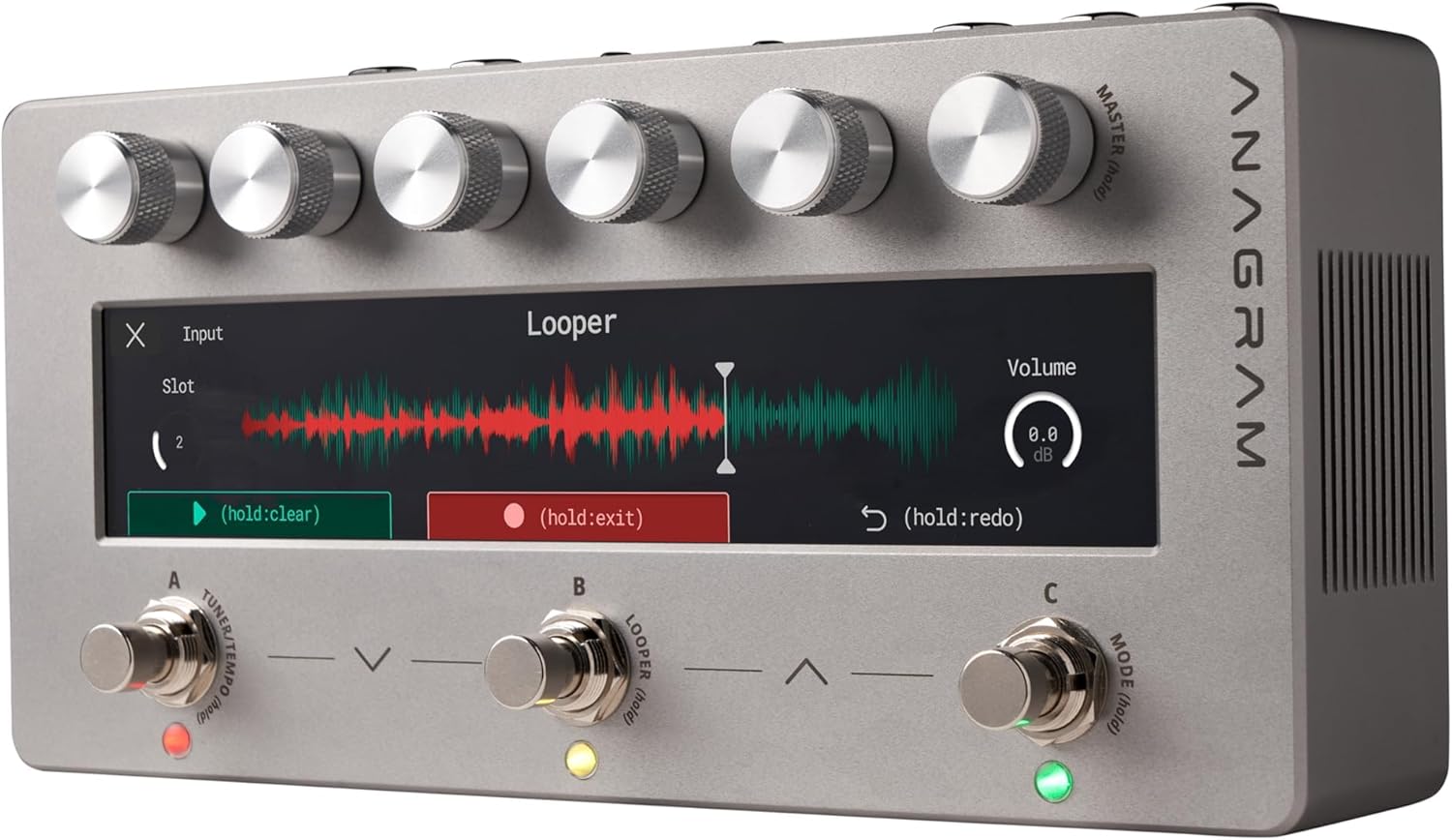
Figure 4.4.1: The Anagram unit displaying the looper interface, showing recorded waveform and volume controls.
4.5 NAM Integration
Leverage the Neural Amp Modeler (NAM) integration to load and use a vast library of user-generated amp and effect models. Consult the Darkglass software application for managing and transferring NAM models to your Anagram unit.
5. Mantemento
To ensure the longevity and optimal performance of your Darkglass Anagram unit, follow these maintenance guidelines:
- Limpeza: Use a soft, dry cloth to clean the exterior of the unit. For the touch display, use a microfiber cloth specifically designed for screens. Avoid abrasive cleaners or solvents.
- Almacenamento: Garde a unidade nun lugar fresco e seco, lonxe da luz solar directa, de temperaturas extremas e de alta humidade.
- Transporte: When transporting the unit, use a padded case to protect it from physical shock and damage.
- Actualizacións de firmware: Periodically check the Darkglass Electronics website for firmware updates. Keeping your unit's firmware up-to-date ensures access to the latest features and bug fixes.
6 Solución de problemas
If you encounter issues with your Anagram unit, refer to the following common troubleshooting steps:
- Sen enerxía: Asegúrese de que a fonte de alimentación estea conectada correctamente e que proporcione o volume especificadotage (9-12V DC, 2A). Try a different power outlet or USB-C PD source.
- Sen son: Check all audio cable connections. Ensure the input instrument is working and the output device (amp, interface) is properly connected and powered. Verify that the unit's master volume is not muted or set too low.
- Son distorsionado: Check input levels to ensure they are not clipping. Adjust gain stages within your presets. Ensure cables are not damaged.
- A pantalla non responde: Try restarting the unit by disconnecting and reconnecting power. If the issue persists, contact support.
- Unit Freezes: Disconnect power, wait a few seconds, and reconnect. If frequent, check for available firmware updates.
For more complex issues or if troubleshooting steps do not resolve the problem, please contact Darkglass Electronics customer support.
7. Especificacións
| Especificación | Valor |
|---|---|
| Peso do elemento | 1 libras |
| Dimensións do produto | 13.39 x 6.3 x 3.35 polgadas |
| ASIN | B07RHZFWS2 |
| Número de modelo do artigo | ANAGRAMA |
| Data de primeira dispoñibilidade | 3 de marzo de 2025 |
| Nome da cor | green, purple, and blue |
| Interface de hardware | Audio de 1/4 de polgada |
| Formato de sinal | Analóxico |
| Voltage | 9 voltios |
| Marca | Electrónica de vidro escuro |
| Estilo | ANAGRAMA |
| Cor | green, purple, and blue |
8. Garantía e soporte
Darkglass Electronics products are designed for reliability and performance. For information regarding warranty coverage, please refer to the warranty card included with your product or visit the official Darkglass Electronics websitio. Garda o comprobante de compra para reclamacións de garantía.
8.1 Atención ao cliente
If you require technical assistance, have questions about your Anagram unit, or need to arrange for service, please contact Darkglass Electronics customer support through their official websitio web ou a información de contacto que se inclúe na embalaxe do produto.
Websitio: www.darkglass.com
Ask a question about this manual
Ask about setup, troubleshooting, compatibility, parts, safety, or missing instructions. Manuals+ will review the question and use this page’s manual context to help answer it.