
1. Introdución
This manual provides essential information for setting up, operating, and maintaining your HP Prodesk 600 G3 Micro Computer. Please read these instructions carefully to ensure proper use and longevity of your device.

Image 1.1: HP Prodesk 600 G3 Micro Computer with peripherals.
The HP Prodesk 600 G3 is a compact and powerful mini PC designed for various computing tasks. Its small form factor allows for flexible placement in diverse environments.
2. Que hai na caixa
Upon unpacking your HP Prodesk 600 G3 Micro Computer, verify that all listed items are present:
- HP Prodesk 600 G3 Micro Computer
- Adaptador de alimentación
Nota: As a renewed product, additional accessories such as a keyboard, mouse, or USB Wi-Fi adapter may be included by the refurbisher. Please check your specific package contents.
3. Instrucións de configuración
3.1 Conexión de periféricos
- Conexión de alimentación: Connect the power adaptor to the power connector on the rear of the micro PC, then plug the power cable into a wall outlet.
- Conexión de pantalla: Connect your monitor(s) to the DisplayPort(s) on the rear of the micro PC using DisplayPort cables. The system supports up to two DisplayPort connections.
- Dispositivos USB: Connect your keyboard, mouse, and any other USB devices to the available USB 3.1 ports on the front or rear of the micro PC.
- Conexión de rede: For a wired network connection, connect an Ethernet cable from your router or modem to the RJ-45 connector on the rear of the micro PC.
- Dispositivos de audio: Connect headphones or speakers to the Universal Audio Jack on the front of the micro PC.

Image 3.1: Front panel ports including USB Type-C, USB 3.1, Headphone connector, Universal Audio Jack, and Power button.

Image 3.2: Rear panel ports including DisplayPort, USB 3.1, RJ-45, and Power connector.
3.2 Primeiro acendido
After connecting all necessary peripherals, press the power button located on the front of the micro PC. The system will boot up, and you may be guided through the initial Windows setup process if it's a fresh installation or a factory reset.
4. Instrucións de funcionamento
4.1 Encendido/apagado
- Para acender: Preme o botón de acendido no panel frontal.
- Para apagar: Fai clic no botón Inicio en Windows e, a seguir, selecciona Enerxía > Apagar.
- Para reiniciar: Fai clic no botón Inicio en Windows e, a seguir, selecciona Enerxía > Reiniciar.
- Para durmir: Fai clic no botón Inicio en Windows e, a seguir, selecciona Enerxía > Suspensión.
4.2 Sistema Operativo
Your HP Prodesk 600 G3 Micro Computer comes with Windows 10 Pro pre-installed. You can upgrade to Windows 11 if desired and compatible. Ensure all drivers are up-to-date for optimal performance. Windows updates are crucial for security and stability.

Image 4.1: Windows Operating System logo.
4.3 Conectarse a unha rede
- Conexión por cable: Connect an Ethernet cable to the RJ-45 port on the rear of the PC. The system will automatically detect the network.
- Conexión sen fíos (se é o caso): If your unit includes a Wi-Fi adapter, navigate to Windows Settings > Network & Internet > Wi-Fi, select your network, and enter the password.
5. Especificacións
| Compoñente | Especificación |
|---|---|
| Procesador | Intel Core i5-7500T (2.7 GHz, Quad Core) |
| RAM | 16 GB DDR4 |
| Almacenamento | SSD de 512 GB |
| Gráficos | Gráficos Intel HD 630 |
| Saída de vídeo | 2 x DisplayPort (Supports 4K resolution) |
| Portos USB | USB-C, USB 3.0/3.1 (multiple) |
| Rede | Gigabit Ethernet (RJ-45) |
| Sistema Operativo | Windows 10 Pro (Upgradeable to Windows 11) |
| Dimensións (LxWxH) | Aproximadamente 6.97 x 6.88 x 1.35 polgadas |
| Peso | Aproximadamente 4 libras |

Image 5.1: HP Prodesk 600 G3 illustrating its compact size.

Image 5.2: Representation of the Intel Core i5-7500T processor.
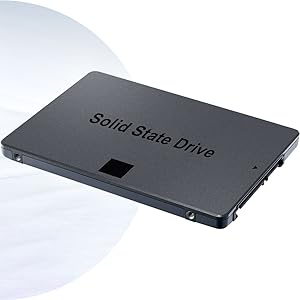
Imaxe 5.3: Ex.ample of a Solid State Drive (SSD).
6. Mantemento
Regular maintenance helps ensure the optimal performance and longevity of your micro computer.
- Mantéñase limpo: Regularly clean the exterior of the PC with a soft, dry cloth. Use compressed air to clear dust from vents and ports to prevent overheating.
- Actualizacións de software: Keep your operating system and drivers updated. This improves security, performance, and compatibility.
- Copia de seguridade de datos: Fai copias de seguridade dos datos importantes con regularidade nun disco duro externo ou nun almacenamento na nube para evitar a perda de datos.
- Ventilación adecuada: Ensure the PC is placed in a location with adequate airflow and that vents are not obstructed.
7 Solución de problemas
This section addresses common issues you might encounter with your HP Prodesk 600 G3 Micro Computer.
7.1 Sen enerxía
- Comproba o cable de alimentación: Ensure the power adaptor is securely connected to both the PC and a working electrical outlet.
- Salida de proba: Tenta conectar outro dispositivo á mesma toma de corrente para confirmar que teña corrente.
- Adaptador de alimentación: Verify the power adaptor is the correct one for the device and is functioning.
7.2 Sen visualización
- Conexión de monitor: Asegúrate de que o cable DisplayPort estea conectado correctamente tanto ao PC como ao monitor.
- Potencia do monitor: Confirm the monitor is powered on and set to the correct input source (e.g., DisplayPort).
- Test with Another Monitor/Cable: If possible, test with a different monitor or DisplayPort cable to rule out faulty equipment.
7.3 Desaceleración do sistema
- Pechar programas non utilizados: Close any applications running in the background that are not in use.
- Buscar actualizacións: Ensure Windows and all drivers are up-to-date.
- Busca de software malicioso: Executa unha análise completa do sistema cun software antivirus de confianza.
- Espazo en disco: Asegúrate de que haxa espazo libre suficiente no SSD.
7.4 Problemas de conectividade de rede
- Conexión por cable: Check the Ethernet cable connection to both the PC and the router/modem. Verify router/modem status.
- Conexión sen fíos: Ensure Wi-Fi is enabled in Windows settings and you are connected to the correct network with the correct password. Restart your router/modem.
8. Garantía e soporte
This HP Prodesk 600 G3 Micro Computer is a renewed product. Warranty coverage is typically provided by the refurbisher or seller, not directly by HP. Please refer to the specific warranty information provided at the time of purchase or contact your seller for details regarding their return and support policies.

Image 8.1: Microsoft Authorized Refurbisher information.
For technical assistance or questions not covered in this manual, please contact the seller or refurbisher directly. Keep your purchase receipt and product serial number readily available when seeking support.