
1. Produto rematadoview
The Intermatic ET2725C is a versatile electronic timer designed for precise control of electrical loads. It features an easy-to-use interface for scheduling, offering to-the-minute programming capabilities for a wide range of applications. This model supports 50 holiday blocks with independent scheduling and up to 96 ON/OFF events, accommodating complex scheduling requirements. A key feature is its 100-hour backup power, provided by a supercapacitor, eliminating the need for batteries.
Características principais:
- 100-hour supercapacitor backup, eliminating battery requirements.
- Up to 96 programmable set points or events.
- Ata 50 bloques de festivos con capacidades de programación independentes.
- Entrada automática voltage selection from 120 to 277 Vac, 60 Hz.
- Additional mode of operation that converts ON/OFF buttons into 2-hour overrides.
2. Que hai na caixa
Ao abrir o envase, comprobe que todos os compoñentes estean presentes e sen danos.
- Intermatic Electronic Timer (Model ET2725C)
- Manual de instrucións (este documento)
3. Información de seguridade
AVISO: Risco de incendio ou descarga eléctrica
- Always disconnect power at the circuit breaker(s) or disconnect switch(es) before installing or servicing this equipment.
- More than one circuit breaker or disconnect switch may be required to de-energize the equipment completely before servicing.
- Installation and/or wiring must be performed in accordance with all national and local electrical code requirements.
- Use COPPER conductors ONLY for wiring connections.
- NON retire o illante interno.
For wiring, lift the terminal cover, remove the screw, and swing it aside. Replace the screw and plastic insulator covering the terminal before powering on the device.
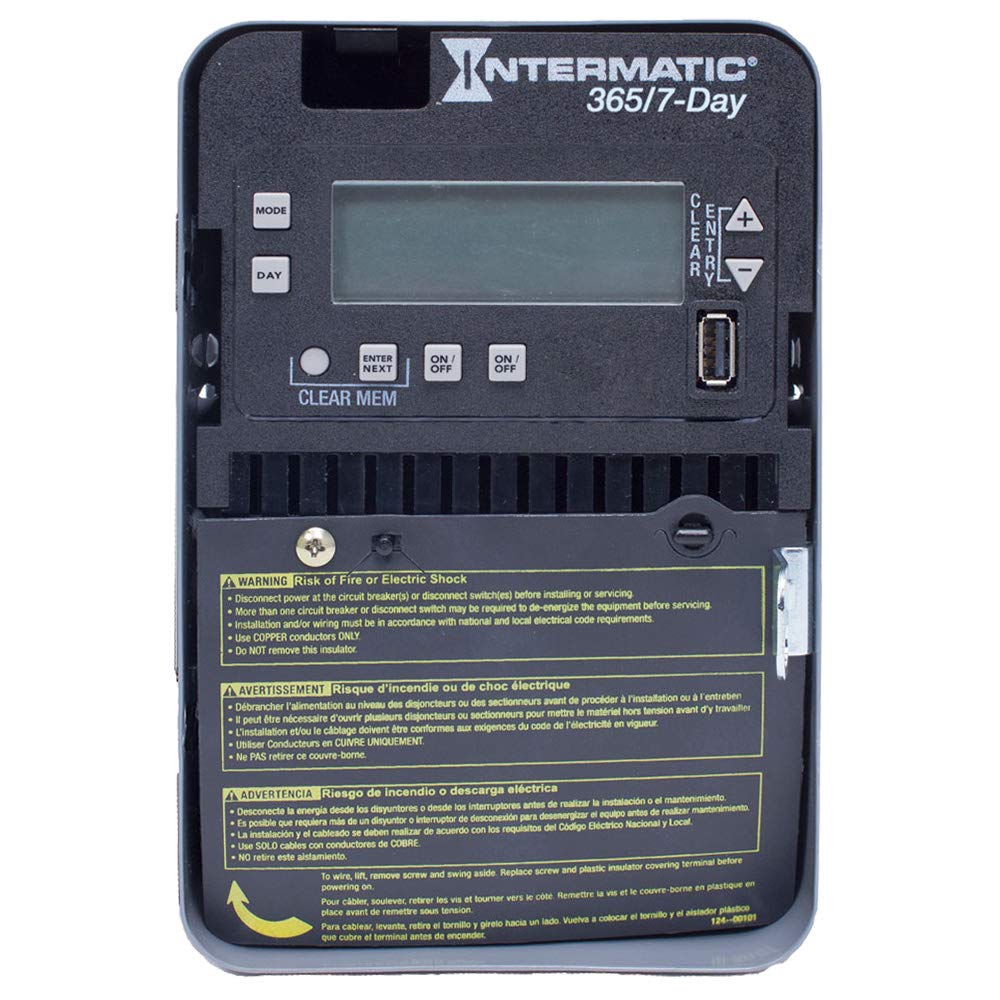
Figure 1: Front panel of the Intermatic ET2725C Electronic Timer, showing the display, control buttons (MODE, DAY, ENTER/NEXT, ON/OFF, CLEAR/ENTRY, +, -), and multi-language safety warnings at the bottom.
4. Instalación e cableado
Proper installation is crucial for the safe and reliable operation of the ET2725C timer. Ensure all safety precautions are followed.
4.1 Montaxe
Mount the timer securely in a suitable enclosure or location, ensuring it is protected from environmental elements and accessible for programming and maintenance. Refer to local electrical codes for specific mounting requirements.
4.2 Instrucións de cableado
- Desconectar a enerxía: Before beginning any wiring, ensure that power to the circuit is completely disconnected at the main circuit breaker or disconnect switch. Verify with a voltagprobador.
- Terminais de acceso: To access the wiring terminals, lift the terminal cover, remove the retaining screw, and swing the cover aside.
- Conectar cableado: Connect the appropriate copper conductors to the timer terminals as per the wiring diagram provided with the unit and local electrical codes. The timer supports 120 to 277 Vac, 60 Hz.
- Conexións seguras: Asegúrese de que todas as conexións dos cables estean firmes e seguras.
- Replace Insulator: Before restoring power, replace the plastic insulator covering the terminals and secure the terminal cover with its screw. This is critical for safety.
- Restaurar enerxía: Once all wiring is complete and verified, restore power to the circuit.
5. Funcionamento e programación
The ET2725C timer features a user-friendly interface for setting time, date, and programming events. The display and buttons (MODE, DAY, ENTER/NEXT, ON/OFF, CLEAR/ENTRY, +, -) are used for navigation and input.
5.1 Initial Setup (Setting Time and Date)
- Upon initial power-up or after a prolonged power outage (beyond 100 hours), the display may show default settings or require time/date input.
- Preme o MODO botón para entrar no menú de configuración.
- Usa o + or - botóns para axustar a hora actual (hora e minuto).
- Preme DÍA para configurar o día actual da semana.
- Preme ENTRAR/SEGUINTE to confirm settings and move to the next parameter.
- Continue adjusting year, month, and day as prompted until the current date and time are correctly set.
5.2 Programación de eventos de activación/desactivación
The timer allows for up to 96 ON/OFF events. Each event can be programmed for specific times and days.
- Preme MODO repeatedly until "PROG" or "EVENT" mode is displayed.
- Use ENTRAR/SEGUINTE to select an event number (e.g., P1 ON).
- Use + or - to set the desired ON time for the event.
- Preme DÍA to select the days of the week for this event (e.g., Mon-Fri, Daily, Weekends, or individual days).
- Preme ENTRAR/SEGUINTE to move to the OFF time for the same event (e.g., P1 OFF).
- Repeat steps 3-4 for the OFF time.
- Continuar con ENTRAR/SEGUINTE to program additional events or exit programming mode.
5.3 Holiday Programming
The ET2725C supports up to 50 holiday blocks, allowing for temporary schedule overrides for specific dates.
- Access the holiday programming mode (refer to the on-screen prompts or specific button combinations).
- Select a holiday block.
- Establece as datas de inicio e finalización do período vacacional.
- Define the desired ON/OFF state or program a specific schedule for the holiday period.
- Confirm and save the holiday block.
5.4 Anulación manual
The ON/OFF buttons can be used for manual overrides. In a specific mode, these buttons can provide a 2-hour override function, temporarily changing the load state without affecting the programmed schedule.
- Preme o ON/OFF button to manually switch the load ON or OFF.
- In override mode, a single press may activate a 2-hour override. Consult the display for confirmation.
5.5 Clearing Memory
To clear all programmed events and reset the timer to factory defaults (excluding current time/date), use the LIMPAR MEM function. This typically involves pressing and holding the LIMPAR MEM button for a few seconds until the display confirms the reset.
6. Mantemento
The Intermatic ET2725C timer is designed for long-term, reliable operation with minimal maintenance.
- Limpeza: Limpe periodicamente o exterior do temporizador cun pano suave e seco. Non empregue produtos de limpeza abrasivos nin disolventes.
- Conexións: Annually, or as required by local codes, inspect wiring connections to ensure they remain tight and free from corrosion. Always disconnect power before inspecting connections.
- Supercondensador: The internal supercapacitor provides backup power for up to 100 hours. No user maintenance or replacement is required for this component.
7 Solución de problemas
Se tes problemas co temporizador ET2725C, consulta os seguintes pasos comúns para a resolución de problemas:
| Problema | Causa posible | Solución |
|---|---|---|
| A pantalla do temporizador está en branco. | Sen alimentación á unidade; saltou o disyuntor. | Check circuit breaker and ensure power is supplied to the timer. Verify wiring connections. |
| Os programas non están executándose. | Incorrect time/date setting; program not enabled; manual override active. | Verify current time and date. Ensure programs are correctly set and enabled. Check for active manual overrides. |
| Load does not switch ON/OFF. | Incorrect wiring; faulty load; timer malfunction. | Verify wiring connections (power off first). Test the load independently. If issues persist, contact Intermatic support. |
| Time/date resets after power outage. | Poder outage exceeded 100-hour supercapacitor backup. | Reset the current time and date manually. This is normal behavior if the outage is prolonged. |
If troubleshooting steps do not resolve the issue, please contact Intermatic customer support.
8. Especificacións
| Característica | Detalle |
|---|---|
| Número de modelo | ET2725C |
| Voltage | 120 to 277 Vac, 60 Hz (Automatic Selection) |
| Ampera | 30 Amps |
| Modo de operación | 7/365 días |
| Número de canles | 2 |
| Programa Eventos | Ata 96 eventos de activación/desactivación |
| Bloques de vacacións | Up to 50 with independent scheduling |
| Poder de reserva | 100-hour supercapacitor (no batteries required) |
| Material | Plástico |
| Dimensións do produto | 7 cm de profundidade x 7 cm de ancho x 7 cm de alto (aproximadamente) |
| Peso do elemento | 0.01 Ounces (approximate) |
9. Garantía e soporte
For warranty information, technical support, or service inquiries regarding your Intermatic ET2725C Electronic Timer, please contact Intermatic customer service directly. Refer to the official Intermatic websitio web ou na embalaxe do produto para obter os datos de contacto e as condicións de garantía máis actuais.
Fabricante: Intermatic
Data de primeira dispoñibilidade: 13 de maio de 2019