SENTRY Bluetooth® Wireless Stereo Earbuds with Mic - Model BT879
Manual de usuario oficial
Introdución
Grazas pola compraasing the SENTRY Bluetooth® Wireless Stereo Earbuds with Mic, Model BT879. These earbuds are designed to provide a high-quality audio experience with the convenience of wireless connectivity. This manual will guide you through the setup, operation, and maintenance of your new earbuds.
For optimal performance and longevity, please read this manual thoroughly before use and retain it for future reference.
Información importante de seguridade
AVISO:
Este produto contén substancias químicas que o Estado de California sabe que causan cancro e defectos conxénitos ou outros danos reprodutivos. Manéxeo con coidado e desfágase de forma responsable.
Do not expose the earbuds to extreme temperatures, moisture, or corrosive materials.
Do not disassemble or attempt to repair the earbuds yourself. This may void the warranty and cause damage.
Manter fóra do alcance dos nenos e animais.
Evite escoitar a volumes altos durante períodos prolongados para evitar danos auditivos.
O que hai na caixa
Your SENTRY Bluetooth® Wireless Stereo Earbuds package should contain the following items:
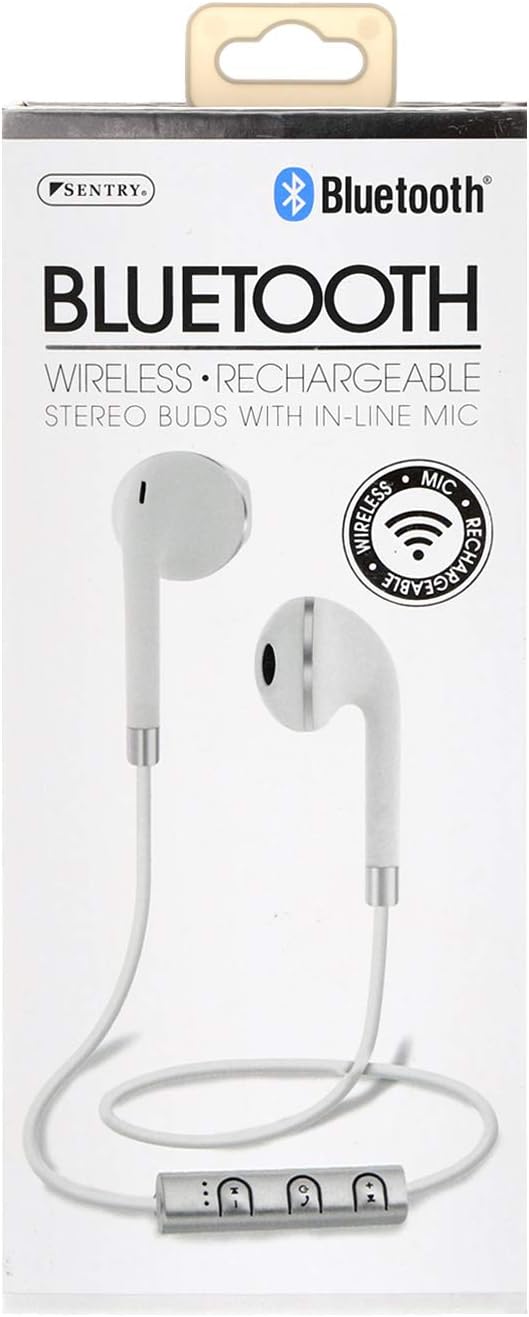
Image: The SENTRY BT879 earbuds displayed in their retail packaging, showcasing the earbuds, in-line controls, and the included deluxe carry pouch.
Guía de configuración
1. Cargando os auriculares
Before first use, ensure your earbuds are fully charged. The earbuds are equipped with a Lithium-ion battery.
Locate the charging port on the in-line control unit.
Connect the provided USB charging cable to the earbuds and plug the other end into a USB power source (e.g., computer USB port, wall adapter).
An indicator light will typically show the charging status. Refer to the light behavior for full charge indication (e.g., light turns off or changes color).
Image: Close-up of the SENTRY BT879 earbuds, highlighting the in-line control unit which houses the charging port and control buttons.
2. Emparejamento cun dispositivo Bluetooth
The SENTRY BT879 earbuds are compatible with devices that have Bluetooth capabilities and microphone support.
Asegúrate de que os auriculares estean cargados e apagados.
Press and hold the power button on the in-line control unit until the indicator light begins to flash, indicating pairing mode. (Typically blue/red flashing).
No teu dispositivo (teléfono intelixente, tableta, ordenador), vai á configuración de Bluetooth.
Busca available devices. The earbuds should appear as "SENTRY BT879" or similar.
Selecciona os auriculares da lista para iniciar o emparellamento.
Once successfully paired, the indicator light on the earbuds will typically stop flashing and remain solid blue, or turn off. A voice prompt may also confirm the connection.
O alcance do Bluetooth é de aproximadamente 10 metros (33 pés).
Instrucións de funcionamento
The in-line control unit allows for easy management of your audio and calls.
Botóns de control superadosview
Imaxe: Unha detallada view of the SENTRY BT879 in-line control unit, showing the various buttons for power, volume, and track control.
In-Line Control Functions
Botón/Acción
Función
Power Button (Center)
Press and Hold: Power On/Off, Enter Pairing Mode
Single Press (Music): Play/Pause
Single Press (Call): Answer/End Call
Double Press (Call): Redial Last Number
Press and Hold (Call): Reject Incoming Call
Subir volume (+)
Single Press: Increase Volume
Press and Hold: Next Track
Baixar volume (-)
Single Press: Decrease Volume
Press and Hold: Previous Track
Reprodución de música
Para xogar ou facer unha pausa music, press the Botón de encendido unha vez.
Para saltar ao seguinte pista, manteña premido o Subir volume (+) botón.
Para ir ao pista anterior, manteña premido o Baixar volume (-) botón.
Para axustar o volume, prema o Subir volume (+) or Baixar volume (-) botóns brevemente.
Realización e recepción de chamadas
Para responder a unha chamada entrante, prema o Botón de encendido unha vez.
Para end an active call, prema o Botón de encendido unha vez.
Para rexeitar unha chamada entrante, manteña premido o Botón de encendido durante aproximadamente 2 segundos.
Para volver a marcar o último número, prema dúas veces o botón Botón de encendido.
O incorporado micrófono en liña allows for clear hands-free communication.
Coidados e Mantemento
Proper care will ensure the longevity and optimal performance of your SENTRY earbuds.
Limpeza: Use a soft, dry, lint-free cloth to clean the earbuds. Do not use abrasive cleaners, alcohol, or chemical solvents. Gently wipe the ear tips and the body of the earbuds.
Almacenamento: When not in use, store the earbuds in the provided deluxe travel friendly carry pouch to protect them from dust, dirt, and physical damage.
Temperatura: Avoid exposing the earbuds to extreme temperatures (hot or cold) as this can affect battery life and internal components.
Humidade: Keep the earbuds dry. Do not immerse them in water or expose them to excessive moisture.
Resolución de problemas
Se tes problemas cos teus auriculares, consulta os seguintes problemas e solucións comúns:
Problema
Posible causa/solución
Os auriculares non se acenderon.
Battery is depleted. Charge the earbuds fully.
Power button not held long enough. Press and hold the power button until the indicator light appears.
Non se pode emparellar co dispositivo.
Earbuds are not in pairing mode. Ensure the indicator light is flashing (e.g., blue/red).
Bluetooth is off on your device. Enable Bluetooth in your device's settings.
Earbuds are already connected to another device. Disconnect from the previous device or turn off Bluetooth on that device.
Distance too far. Ensure earbuds are within 10 meters of your device.
Interference. Move away from other wireless devices or strong electromagnetic fields.
Tenta esquecer o dispositivo no teléfono e volver emparellalo.
Sen son ou volume baixo.
Volume on earbuds or device is too low. Increase volume using the '+' button on the earbuds and on your device.
Earbuds are not properly connected. Re-pair the earbuds with your device.
Audio output setting on your device is incorrect. Ensure audio is routed to the Bluetooth earbuds.
A calidade do son é deficiente ou intermitente.
Distance from device is too far or there are obstacles. Reduce distance and remove obstructions.
Low battery. Charge the earbuds.
Interference from other wireless devices. Move to an area with less interference.
O micrófono non funciona.
Ensure the earbuds are properly connected and selected as the audio input device on your phone/computer.
Check for any mute functions on your device or in the application you are using.
Especificacións técnicas
Característica
Especificación
Modelo
BT879
Conectividade
Bluetooth sen fíos
Alcance Bluetooth
10 metros
Unidade de condutor
15 mm
Resposta en frecuencia
20 Hz - 20 kHz
Impedancia
32 ohmios
Sensibilidade
100 dB +/- 3 dB
Tipo de batería
Ion de litio
Tipo de control
In-line Control Buttons
Micrófono
Si (en liña)
Material
Metal, plástico, silicona
Cor
Branco
Colocación do oído
En Orella
Factor de forma
En Orella
Jack para auriculares
Sen Jack
Dimensións do produto
3.5 x 6.75 x 3.8 polgadas
Peso do elemento
5.4 onzas
Fabricante
Centinela
UPC
080068548799, 800685487994
Garantía e Soporte
SENTRY Industries is committed to customer satisfaction. While specific warranty details are not provided in this manual, most SENTRY products come with a limited warranty against defects in materials and workmanship.
For warranty claims, technical support, or further assistance, please visit the official SENTRY websitio web ou póñase en contacto co seu departamento de atención ao cliente. Garde o comprobante de compra para calquera consulta relacionada coa garantía.
Ask about setup, troubleshooting, compatibility, parts, safety, or missing instructions. Manuals+ will review the question and use this page’s manual context to help answer it.