
Introdución
Welcome to the user manual for your Kingbox X55 MP3 Player. This guide provides detailed instructions on how to set up, operate, and maintain your device. Please read this manual thoroughly to ensure optimal performance and longevity of your MP3 player.
Contido do paquete
Ao desembalar, comproba que inclúa todos os seguintes elementos:
- Kingbox X55 MP3 Player
- Cable de datos/carga USB
- Cable de audio de 3.5 mm
- Manual de usuario (este documento)
- Clip (pre-attached or separate)

Image: Contents of the Kingbox X55 MP3 Player package, including the player, USB cable, audio cable, and gift box.
Dispositivo rematadoview
Familiarize yourself with the buttons and ports of your Kingbox X55 MP3 Player:
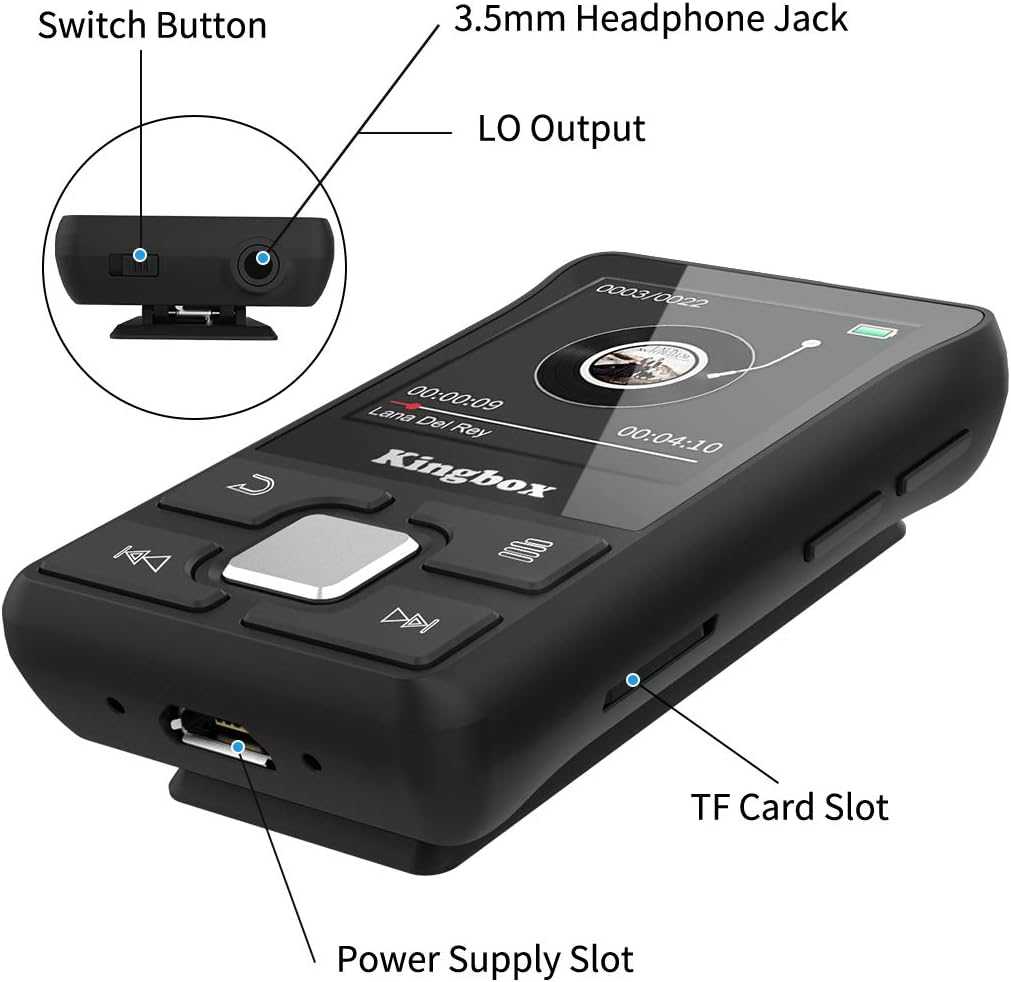
Imaxe: Unha detallada view of the Kingbox X55 MP3 Player, highlighting the Switch Button, 3.5mm Headphone Jack, LO Output, Power Supply Slot (USB port), and TF Card Slot.
- Botón de cambio: Encender/apagar o dispositivo.
- Conector para auriculares de 3.5 mm: Conecta uns auriculares con cable.
- Saída LO: Line Out for connecting to external audio systems.
- Power Supply Slot (USB): Para carga e transferencia de datos.
- Ranura para tarxetas TF: Insira unha tarxeta Micro SD para ampliar o almacenamento.
- Botóns de control: Navigation and playback controls on the front panel.
Configuración
1. Cargando o dispositivo
Before first use, fully charge the MP3 player. Connect the USB charging cable to the Power Supply Slot on the device and the other end to a USB power adapter (not included) or a computer's USB port. The battery indicator on the screen will show charging status.
2. Acendido/apagado
- Para acender: Press and hold the Switch Button until the screen lights up.
- Para apagar: Press and hold the Switch Button until the screen turns off.
3. Loading Music and Files
Connect the MP3 player to your computer using the provided USB cable. The device will appear as a removable disk. You can then drag and drop music files, videos, e-books, and photos into the appropriate folders on the player's internal storage.
4. Inserción dunha tarxeta Micro SD
The Kingbox X55 supports Micro SD cards up to 128GB for additional storage. Locate the TF Card Slot and gently insert the Micro SD card until it clicks into place. Ensure the card is inserted in the correct orientation.
Instrucións de funcionamento
1. Navegación básica
Use the control buttons on the front panel to navigate through menus and select options. The central button typically acts as 'Enter' or 'Confirm', while surrounding buttons are for directional movement or specific functions (e.g., back, menu).
2. Reprodución de música
From the main menu, select 'Music'. Browse your stored audio files and select a track to play. The player supports various audio formats including MP3, WMA, APE, FLAC, WAV, DRM, and ACELP.

Image: The Kingbox X55 MP3 Player screen displaying music playback, surrounded by icons representing supported audio formats like MP3, WMA, APE, WAV, and FLAC.
3. Conexión Bluetooth
The Kingbox X55 features Bluetooth 4.1 for wireless audio streaming. To connect to Bluetooth headphones or speakers:
- Go to the 'Bluetooth' menu on your MP3 player.
- Asegúrate de que o teu dispositivo Bluetooth estea no modo de emparellamento.
- Seleccionar 'Busca dispositivos no reprodutor de MP3.
- Choose your device from the list to pair.

Image: The Kingbox X55 MP3 Player with a Bluetooth 4.1 icon, showing various compatible Bluetooth devices such as earbuds, headphones, and a Bluetooth speaker.
4. Radio FM
To use the FM radio function, connect wired headphones to the 3.5mm jack, as they act as the antenna. Navigate to the 'FM Radio' menu. You can auto-scan for stations or manually tune to frequencies within the 87.8-108 MHz band.
5. Función de podómetro
The built-in pedometer tracks your steps, distance, and calories. Activate this function from the main menu. It can operate while music is playing, making it suitable for fitness activities.

Image: A woman running outdoors with the Kingbox X55 MP3 Player clipped to her clothing, displaying the pedometer function with step count, distance, calories, and time.
6. Outras funcións
The Kingbox X55 offers several additional features:
- Libro electrónico: Ler texto files.
- Gravación: Use the built-in microphone to record audio.
- Vídeo: Play supported video formats (AMV, AVI).
- Cronómetro: A basic timing function.
- Espertador: Establecer alarmas.
- Time Screensaver: Display time when idle.
- Resume Playback: Continues from where you left off.
- Lyrics Synchronization: Display lyrics for supported music files.

Image: The Kingbox X55 MP3 Player alongside icons representing its various functions: Music, Bluetooth, FM-Radio, E-Book, Video, Recording, Stopwatch, A-B Repeat, Alarm Clock, Time Screensaver, Resume Playback, and Lyrics Synchronization.
Mantemento
1. Limpeza
Limpe o dispositivo cun pano suave e seco. Evite usar produtos de limpeza líquidos ou materiais abrasivos, xa que poden danar a pantalla ou aasing.
2. Coidado da batería
To prolong battery life, avoid fully discharging the battery frequently. Charge the device regularly, even if not in use for extended periods. Store the device in a cool, dry place.
3. Almacenamento
When not in use, store the MP3 player in a protective case or pouch to prevent scratches and damage from dust or impacts.
Resolución de problemas
1. Poor FM Reception
If FM reception is weak or unclear, try the following:
- Adjust the direction and position of the player.
- Ensure the headphone cable is fully extended, as it functions as the antenna.
- Comprobe se hai dispositivos electrónicos próximos que poidan causar interferencias.
2. O dispositivo non responde
If the device becomes unresponsive, try performing a soft reset by pressing and holding the power button for approximately 10-15 seconds until it restarts.
3. Cannot Connect to PC
Ensure the USB cable is securely connected to both the player and the computer. Try a different USB port or cable. Verify that your computer's operating system recognizes new USB devices.
Especificacións
| Característica | Detalle |
|---|---|
| Marca | Kingbox |
| Nome do modelo | X55 |
| Almacenamento interno | 32 GB (memoria flash) |
| Almacenamento ampliable | Up to 128 GB (Micro SD/TF Card) |
| Versión Bluetooth | 4.1 |
| Tamaño da pantalla | 1.44 polgadas |
| Formatos de audio admitidos | MP3, WMA, APE, FLAC, WAV, DRM, ACELP |
| Formatos de vídeo admitidos | AMV, AVI |
| Frecuencia de radio FM | 87.8-108 MHz |
| Tipo de batería | Polímero de litio |
| Conectividade | Bluetooth, USB |
| Características especiais | FM Radio, Pedometer, E-book, Recording, Photo Viewer, Stopwatch, Alarm Clock |
| Dimensións do produto | 8.99 x 3.81 x 12.5 cm; 38 g |
Garantía e Soporte
Para obter información sobre a garantía e a atención ao cliente, consulte a documentación proporcionada no momento da compra ou póñase en contacto co seu vendedor. Garde o comprobante de compra para calquera reclamación de garantía.