
1. Introdución
Grazas pola compraasing the LUPO Digital Pocket Scale. This precision instrument is designed for accurate weighing of small items up to 200 grams with a 0.01 gram graduation. Its compact and portable design makes it ideal for various applications, including weighing jewelry, food ingredients, herbs, and other small objects. Please read this manual carefully to ensure proper operation and longevity of your scale.
Características principais:
- Capacidade máxima: 200 g
- Graduación: 0.01g
- Multiple Weighing Units: g, gn, oz, ozt, ct, tl, dwt
- Durable Stainless Steel Platform
- Pantalla LCD retroiluminada
- Función Tara
- Apagado automático
- Indicador de batería baixa
- Protección contra sobrecarga
2. Contido do paquete
- 1 x LUPO 200g Digital Pocket Scale
- 2 x pilas AAA
- 1 x Manual de usuario
3. Configuración
3.1 Instalación da batería
The scale requires 2 AAA batteries (included). To install or replace batteries:
- Abra a tapa do compartimento das baterías situada na parte inferior da báscula.
- Insira as 2 pilas AAA, asegurándose de manter a polaridade correcta (+/-).
- Pecha a tapa do compartimento da batería de forma segura.
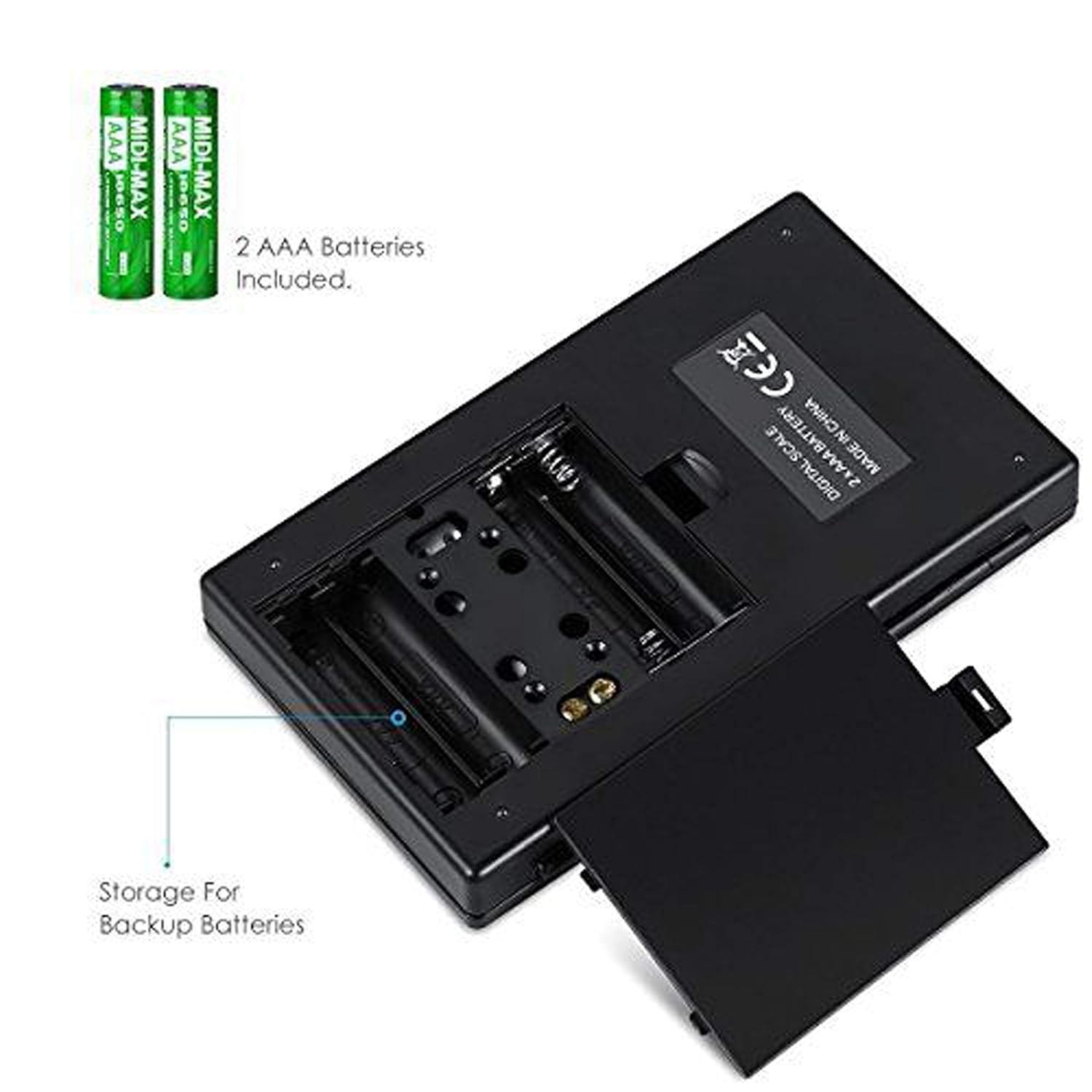
Figura 3.1: Compartimento de baterías con baterías AAA.
3.2 Colocación inicial
For accurate readings, place the scale on a hard, flat, and stable horizontal surface. Avoid placing it on soft or uneven surfaces, or near sources of vibration or electromagnetic interference.
4. Funcionamento
4.1 Pesaxe básica
- Preme o ON/OFF botón para encender a báscula.
- Wait for the display to show "0.00" (or "0") before placing any items on the weighing platform.
- Gently place the item(s) you wish to weigh onto the center of the stainless steel weighing platform.
- O peso mostrarase na pantalla LCD.

Figure 4.1: Quick start guide for basic weighing.
4.2 Conversión de unidades
The scale supports multiple weighing units. To change the unit:
- With the scale turned on and displaying "0.00", press the MODO botón repetidamente.
- The display will cycle through the available units: grams (g), grains (gn), ounces (oz), troy ounces (ozt), carats (ct), and pennyweights (dwt).
- Deixa de presionar MODO when your desired unit is displayed.
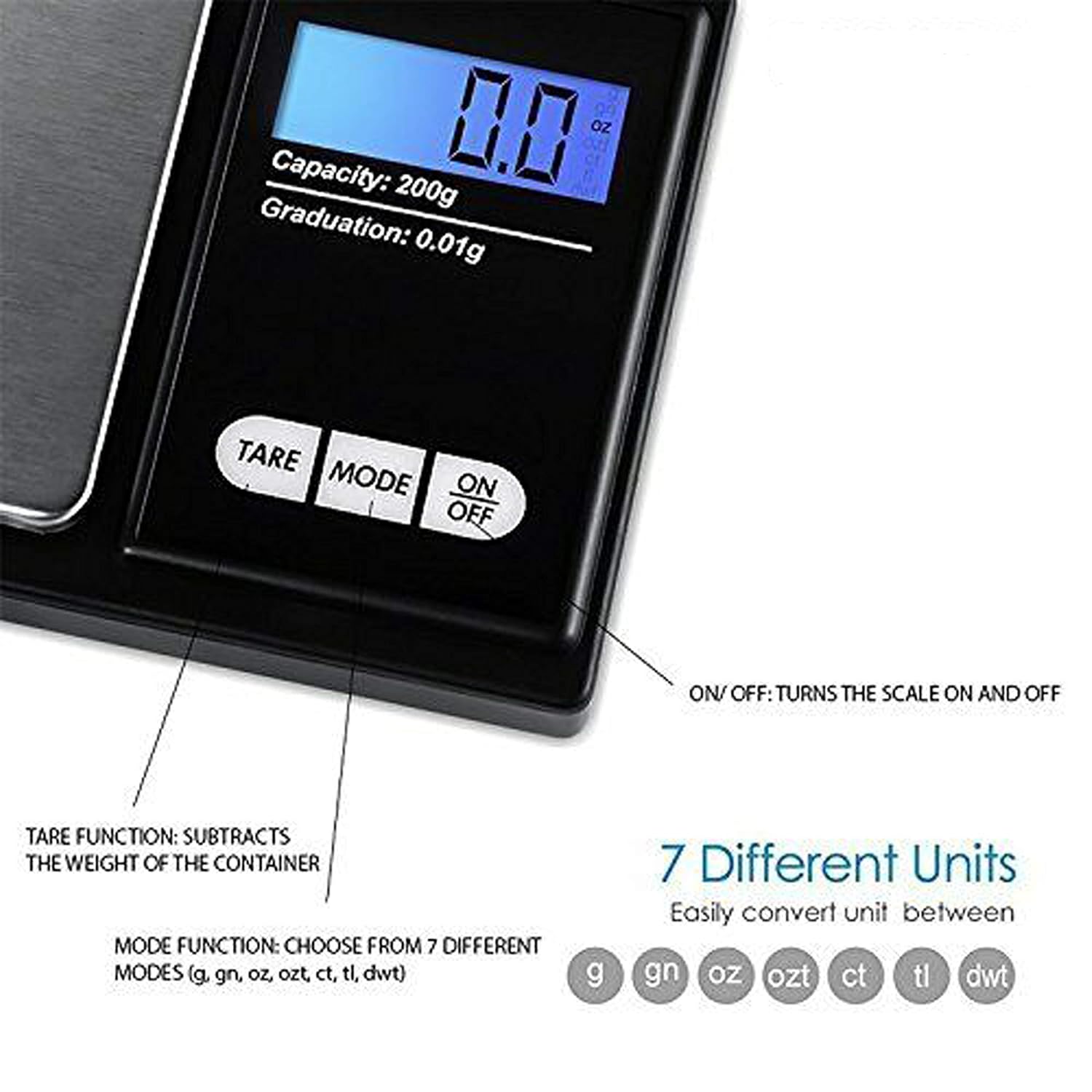
Figure 4.2: Available weighing units and button functions.
4.3 Función de tara
A función de tara permíteche restar o peso dun recipiente, de xeito que só medes o peso neto do seu contido.
- Coloque un recipiente baleiro na plataforma de pesaxe.
- Preme o TAREAR botón. A pantalla restablecerase a "0.00".
- Now, place the item(s) you wish to weigh into the container. The display will show only the weight of the item(s).
5. Calibración
Calibration ensures the accuracy of your scale. It is recommended to calibrate the scale periodically or if you notice inconsistent readings. A 200g calibration weight is required (not included).
- Encender a báscula premendo o ON/OFF botón.
- Wait for the display to show "0.00".
- Manteña premido o MODO button until the display shows "CAL", then release the button.
- Preme o MODO button again. The display will show "CAL" followed by the required calibration weight (e.g., "200.00g").
- Place the exact 200g calibration weight onto the center of the weighing platform.
- The display will show "PASS" and then return to normal weighing mode.
- Remove the calibration weight. Calibration is complete.
Note: If you do not have a 200g calibration weight, you may need to acquire one separately for accurate calibration.
6. Mantemento
6.1 Limpeza
Limpe a báscula cun lixeiro damp cloth. Do not immerse the scale in water or use abrasive cleaners. Keep the weighing platform clean and free of debris.
6.2 Almacenamento
Store the scale in a clean, dry environment. If the scale will not be used for an extended period, it is recommended to remove the batteries to prevent leakage.
7 Solución de problemas
If you encounter issues with your scale, consider the following:
- Lecturas inexactas:
- Asegúrese de que a báscula estea nunha superficie estable e nivelada.
- Avoid placing the scale near strong radio frequency interference.
- Keep the scale away from high humidity, air currents (e.g., fans, open windows), and extreme temperatures.
- Minimize vibration during weighing.
- Perform a calibration (refer to Section 5).
- "Lo" or "Low Battery" Display: Substitúe as baterías AAA.
- "O-Ld" or "Overload" Display: The item on the platform exceeds the maximum capacity of 200g. Remove the item immediately to prevent damage to the scale.
- A escala non se acende: Comprobe a instalación das baterías e asegúrese de que non estean esgotadas.

Figure 7.1: Overload and Low Battery indicators.
8. Especificacións
| Característica | Detalle |
|---|---|
| Marca | LUPO |
| Número de modelo | BHT2018376_200g_pock |
| Capacidade | 0.05 g a 200 g |
| Graduación | 0.01 g |
| Unidades de pesada | g, gn, oz, ozt, ct, tl, dwt |
| Tipo de visualización | LCD con retroiluminación |
| Fonte de enerxía | 2 pilas AAA (incluídas) |
| Material | Plastic, Stainless Steel Platform |
| Dimensións (aprox.) | 14.8 x 9 x 2.4 cm (Package); 5.0 x 3.0 x 0.8 inches (Scale) |
| Peso (aprox.) | 140 grams (Package) |
| Características especiais | Backlit display, Auto-off, Tare function, Lightweight, Portable |
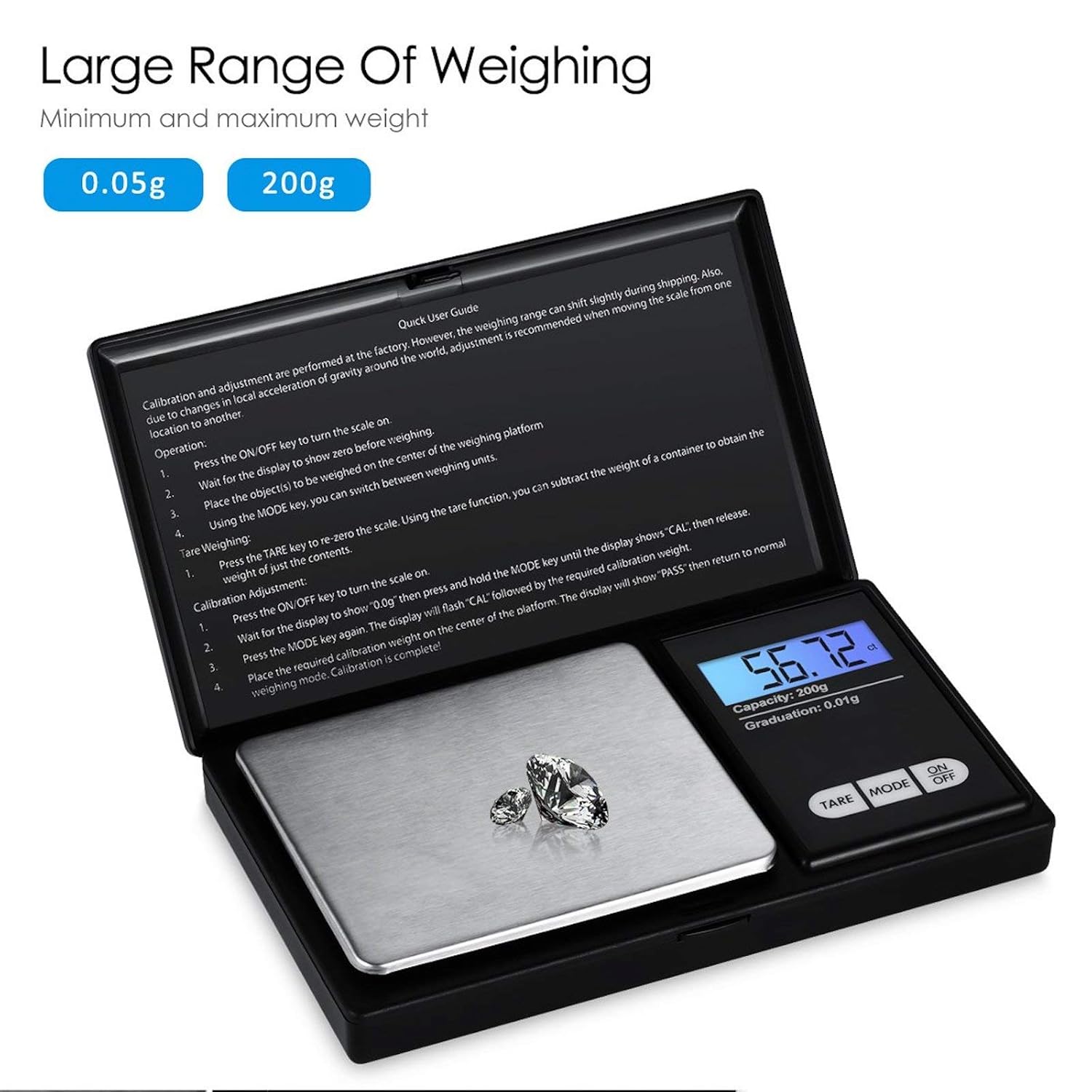
Figure 8.1: Weighing range of the scale.
9. Garantía e soporte
Warranty information for this product is not explicitly specified in the provided details. For any support inquiries or warranty claims, please contact the retailer or manufacturer directly.