
Xiaomi MSX201
Xiaomi Mijia Electric Shaver 2 Floating Head Razor User Manual
Modelo: MSX201
1. Información importante de seguridade
Please read all instructions carefully before using the Xiaomi Mijia Electric Shaver 2. Retain this manual for future reference.
- Avoid submerging the shaver completely in water. While it is waterproof for rinsing, prolonged submersion is not recommended.
- Exercise caution when using the floating head to prevent cuts or skin irritation.
- Limpa e seca sempre ben a afeitadora despois de cada uso para evitar o crecemento bacteriano e manter a hixiene.
- Manter fóra do alcance dos nenos.
- Non desmonte nin intente reparar a afeitadora vostede mesmo. Póñase en contacto co servizo técnico autorizado para obter axuda.
- Use only the provided charging cable or a compatible USB-C cable for charging.
2. Produto rematadoview
The Xiaomi Mijia Electric Shaver 2 is a compact, portable, and waterproof electric razor designed for men. It features two floating rotary heads for a smooth and comfortable shave, a durable stainless steel blade system, and a rechargeable battery for cordless operation.
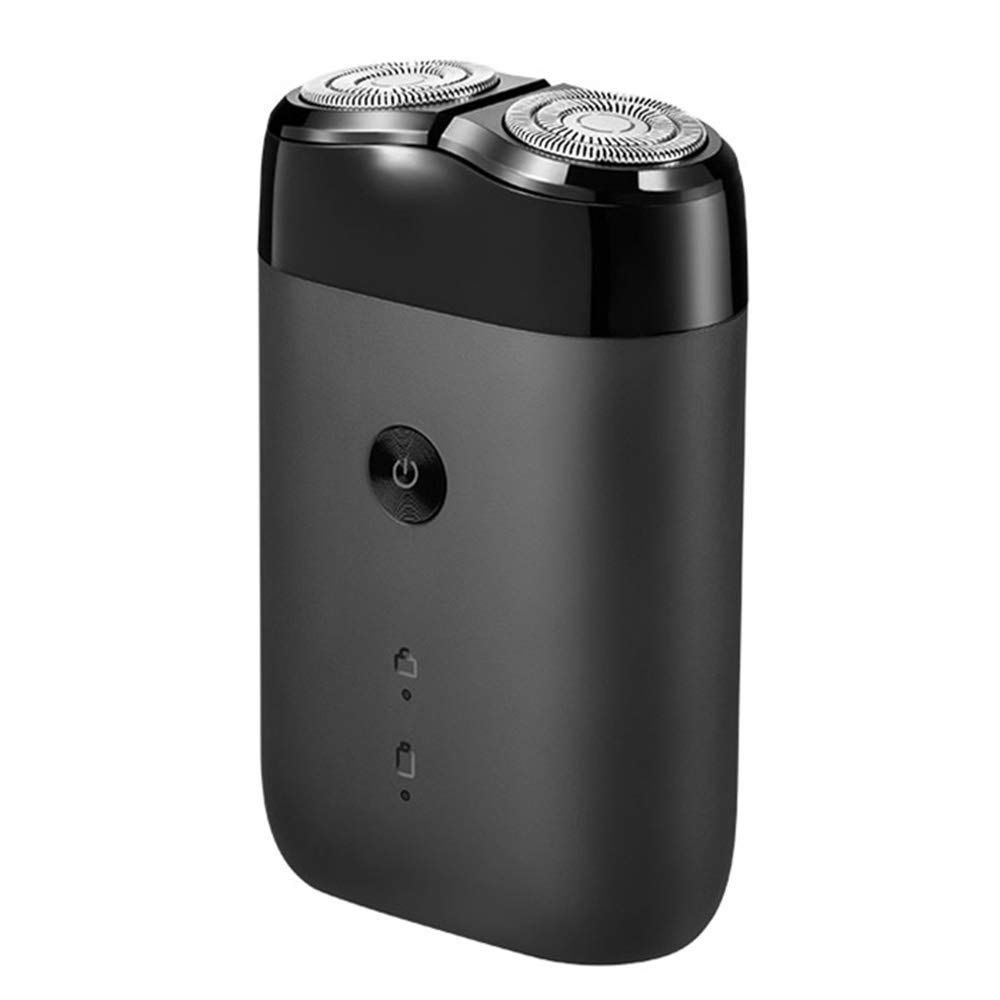
Figura 2.1: global view of the Xiaomi Mijia Electric Shaver 2, showcasing its compact, black design with two floating rotary heads and a power button on the front.
Características principais:
- Dual Floating Heads: Adapts to facial contours for a close shave.
- Deseño impermeable: Suitable for both wet and dry shaving, and easy to clean under running water.
- USB recargable: Convenient charging via USB-C.
- Compacto e portátil: Lightweight design (85 grams) ideal for travel.
- Bloqueo de viaxe: Evita a activación accidental durante o transporte.
3. Configuración e carga
Carga inicial:
Before first use, fully charge the shaver. A full charge typically takes approximately 2 hours and provides up to 90 minutes of shaving time.
- Locate the USB Type-C charging port at the bottom of the shaver.
- Connect the provided USB-C charging cable to the shaver and the other end to a compatible USB power adapter (not included) or a computer USB port.
- The battery indicator lights on the shaver will illuminate to show charging progress. They will typically turn off or change color when fully charged.

Figura 3.1: Un ángulo view of the Xiaomi Mijia Electric Shaver 2, highlighting the power button, battery indicators, and the USB-C charging port located at the bottom.

Figura 3.2: Primeiro plano view of the shaver's base, emphasizing the USB Type-C charging port and indicating long battery life with a 2-hour charge time for 90 minutes of use, alongside a diagram of the ECM Electrochemical Processing Technology for smooth blades.
4. Funcionamento da afeitadora
Activar/Desactivar:
- Para acender a máquina de afeitar, preme unha vez o botón de acendido.
- To turn off the shaver, press the power button once again.
Técnica de afeitado:
- For best results, hold the shaver at a right angle to your skin.
- Move a afeitadora con pequenos movementos circulares na dirección contraria ao crecemento do pelo.
- Apply gentle pressure. The floating heads are designed to adapt to your facial contours.
- The shaver can be used for both dry shaving and wet shaving with foam or gel.
Función de bloqueo de viaxe:
The shaver features a double security protection travel lock to prevent accidental activation.
- To activate the travel lock, press and hold the power button for approximately 3 seconds until the lock indicator light appears.
- To deactivate the travel lock, press and hold the power button again for approximately 3 seconds until the lock indicator light disappears.

Figure 4.1: A composite image illustrating key features: a hand holding the shaver, demonstrating its portability; icons for double security protection (travel lock); a storage bag; and the battery indicator lights.
5. Mantemento e Limpeza
Unha limpeza regular garante un rendemento e unha hixiene óptimos da túa afeitadora.
Limpeza diaria:
- Apague a máquina de afeitar.
- Gently twist and pull off the shaver head assembly.
- Rinse the shaver head and the main body (where the hair collects) under running water to remove hair clippings and residue.
- Shake off excess water and allow both parts to air dry completely before reattaching the head.
Limpeza profunda (periodicamente):
For a more thorough clean, you may use a small brush (if provided) to remove stubborn hair particles from the blades and inner components of the shaver head.
Coidado da batería:
- Evita descargar completamente a batería con frecuencia para prolongar a súa vida útil.
- If storing the shaver for an extended period, charge it to about 50% capacity.
- The battery indicator lights will show the remaining charge level. Recharge when the indicator shows low battery.
6 Solución de problemas
If you encounter issues with your Xiaomi Mijia Electric Shaver 2, refer to the following common problems and solutions:
- Shaver does not turn on:
- Ensure the shaver is charged. Connect it to a power source and check the charging indicator.
- Check if the travel lock is activated. Deactivate it by pressing and holding the power button for 3 seconds.
- Mal rendemento do afeitado:
- Clean the shaver head thoroughly to remove any accumulated hair or debris.
- Ensure the shaver is fully charged. Low battery can affect motor speed.
- For optimal performance, consider replacing the shaver heads if they are worn out (replacement parts sold separately, if available).
- Shaver makes unusual noise:
- Clean the shaver head. Hair or debris caught in the blades can cause unusual sounds.
- Ensure the shaver head is properly reattached after cleaning.
Se o problema persiste despois de probar estes pasos, ponte en contacto co servizo de atención ao cliente.
7. Especificacións
| Característica | Detalle |
|---|---|
| Nome do modelo | MSX201 |
| Marca | Xiaomi |
| Fonte de enerxía | Alimentado por batería (recargable por USB) |
| Característica especial | Rechargeable, Floating Head, Waterproof |
| Compoñentes incluídos | Shaver, Battery (internal) |
| Dimensións do paquete | 6.81 x 4.33 x 1.77 polgadas |
| Peso do elemento | 3 onzas (aprox. 85 gramos) |
| Fabricante | xiaomi |
8. Garantía e soporte
For information regarding product warranty, returns, or technical support, please refer to the warranty card included with your product packaging or visit the official Xiaomi websitio. Os termos e condicións específicos da garantía poden variar segundo a rexión.
For further assistance, you may also contact the seller or retailer from whom you purchased the product.
Ask a question about this manual
Ask about setup, troubleshooting, compatibility, parts, safety, or missing instructions. Manuals+ will review the question and use this page’s manual context to help answer it.